
FXCM Review 2026




 Services not offered to residents of United States.
See the best FXCM alternatives in your location.
Pros
- The broker offers spread discounts and other excellent perks for experienced traders in the Active Trader account
- A range of funding methods are available including bank cards, Apply Pay and PayPal, with instant processing times
- The proprietary Trading Station terminal is a good choice for day traders looking for an all-in-one solution for their short-term and automated trading strategies
- Alongside the 4 charting platforms, FXCM also offers a market-leading range of specialist software for experienced investors, including QuantConnect, AgenaTrader and Sierra Chart
- FXCM’s global reputation is impressive, with licenses from the FCA, ASIC, CySEC and FSCA and a 20-year business history
- Traders can utilize several top-tier trading tools including a market scanner, forex signals and third-party research site, eFXPlus
- FXCM has expanded its range of trading opportunities with stock CFDs through MetaTrader 4
Cons
- There is no choice of retail accounts for traders, nor any Cent/Micro account options
- Although FXCM continues to gear their services towards experienced traders, it’s a shame that there are no managed accounts on offer
- The live chat support can be slow and unreliable compared to the top competitors
FXCM Review
This FXCM review is about what it’s like to actually use the broker. We placed trades, watched how the order ticket responded under pressure, and paid close attention to the things that tend to separate a decent broker from a frustrating one: spreads, execution quality, getting money in and out, and whether the platform holds together when it matters. We also held FXCM’s claims up against public records and what longer-term clients have said about their experience.
Regulation & Trust
FXCM’s regulatory picture is good, but it is not as simple as marketing makes it sound. The broker’s offshore Stratos Global LLC entity is not subject to the same oversight as its FCA-, ASIC-, and FSCA-regulated businesses, and it is not intended for residents of the US, among others.
That matters because the entity you open with changes the protections you get. FXCM does operate in the UK and EU through its sister brand, Tradu which offers tighter spreads and TradingView integration. Other regulated entities also exist in Australia and South Africa, but the offshore-style entity should not be treated the same as a top-tier regulated arm.
Based on public records and our own research, we found a few areas where FXCM stands out for its regulatory oversight and credibility.
- FXCM has been regulated in major markets for a long time — including FCA oversight in the UK since May 27, 2003 — which means client money protections and conduct standards are held to a higher bar than you’d find at a lightly regulated broker.
- The broker operates across several jurisdictions, giving it a wider regulatory footprint than most smaller CFD outfits.
- For traders who open through the right entity, that history and presence still count for something, especially compared to offshore-only brokers with no meaningful regulatory anchor.
Dig a little deeper into the regulatory framework and disclosures, though, and some gaps and concerns start to surface.
- FXCM’s regulatory history has some serious blemishes. Most notably, in 2017, the broker was fined $7 million, had its CFTC registration withdrawn, and was permanently banned from operating in the US. Before that, the FCA fined it £4 million in 2014 for failing to treat customers fairly and for failing to be open and cooperative with the regulator. Also in December 2025, ASIC stopped FXCM’s Australian entity (Stratos Trading Pty Limited) from issuing CFDs or opening new accounts because of deficiencies in FXCM’s Target Market Determination (TMD).
- FXCM does not hold a banking license, which means it isn’t subject to the additional compliance requirements that come with that status — unlike Saxo, which operates as a licensed European bank and, as a result, offers a significantly broader range of instruments than FXCM.
- FXCM is not listed on a stock exchange, meaning its financial information isn’t publicly available as it would be for a listed broker like IG, which trades on the London Stock Exchange and publishes full financials as a result.
More details on FXCM’s different regulatory entities, safeguards, clone warnings, and checks can be found later in this review.
Accounts & Banking
- FXCM offers four types of accounts depending on your experience, plus a spread betting account exclusive to UK residents.
- The minimum deposit is low by industry standards, making the broker easier to test without committing significant capital.
- The platform lineup is broad enough to suit different styles, especially if you want MetaTrader, Trading Station, TradingView, or automation tools in one place.
- FXCM’s pricing can vary significantly depending on the account type you use, so the headline spread isn’t the full story.
- Some payment options and fee details depend on region, which makes the banking setup less consistent than it should be.
- The account choice is not as clean as a broker with one universally simple pricing model.
Live Accounts
FXCM’s Standard account is where most retail traders will start. It’s commission-free, with spreads from 0.8 pips on majors, a USD base currency (though EUR and GBP are available), and access to MT4, Trading Station, and TradingView for trading forex, CFDs, commodities, indices, and cryptocurrencies.
The Professional account is aimed at qualified EEA clients (must meet at least two of three criteria set by regulators, such as sufficient portfolio size, trading frequency, or professional experience) and offers higher leverage — up to 1:400 — and lower margin requirements. The spreads and instruments stay the same, though it’s worth noting that professional status means giving up negative balance protection.
UK clients also have the option of a Spread Betting account, which is structured around tax-free trading in GBP. Position sizes are quoted in lots of 1,000 units, and costs are built into the spread rather than charged as a commission — everything else lines up with the Standard account.
For higher-volume traders, the Active Trader account offers rebates of up to $5.50 per lot, along with lower spreads, commission-based pricing, dedicated support, and API access.
FXCM also offers an Islamic account for traders who require halal-compliant conditions. Overnight interest is removed, with the cost instead reflected through slightly wider spreads or fixed administrative fees — for example, an additional 0.4 pips or $4 per day per lot, depending on the position. It’s available on request and can be applied across both Standard, Active Trader, and Professional accounts.
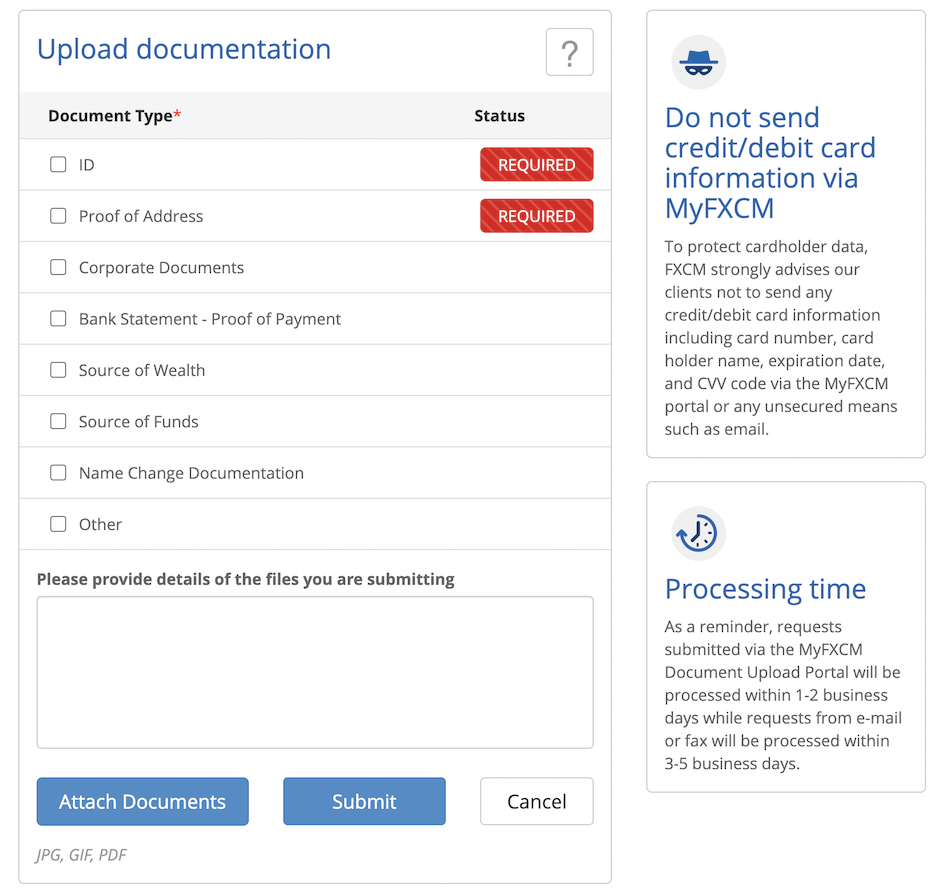
Finally, Corporate accounts are available for businesses, LLCs, trusts, and funds. These come with multi-user access, higher leverage options, and dedicated onboarding — typically a one to two-day review process. There’s a one-time setup fee, though it is waived for deposits of $50,000 or more. The platforms and instruments are the same as on retail accounts, but business verification documents will be required as part of the application.
Traders who prefer a straightforward single-account setup may find FXCM’s range of options slightly more complex to navigate than those of some competitors. The distinctions between account types aren’t always obvious upfront — particularly around which entity you’re opening through and how that affects your protections — and a newer trader could reasonably spend time comparing options before feeling confident they’ve landed in the right place.
Demo Accounts
FXCM’s demo account is a good starting point for getting to grips with Trading Station and MT4 before committing real money. It takes seconds to access and doesn’t require a live account to be set up first — and as long as you keep using it, it stays open, though it will lapse after 30 days of inactivity.
You start with somewhere between $20,000 and $50,000 in virtual funds, and support can adjust that if needed. The demo runs across MT4, Trading Station, and mobile, so you can test whichever setup you’re planning to use live.
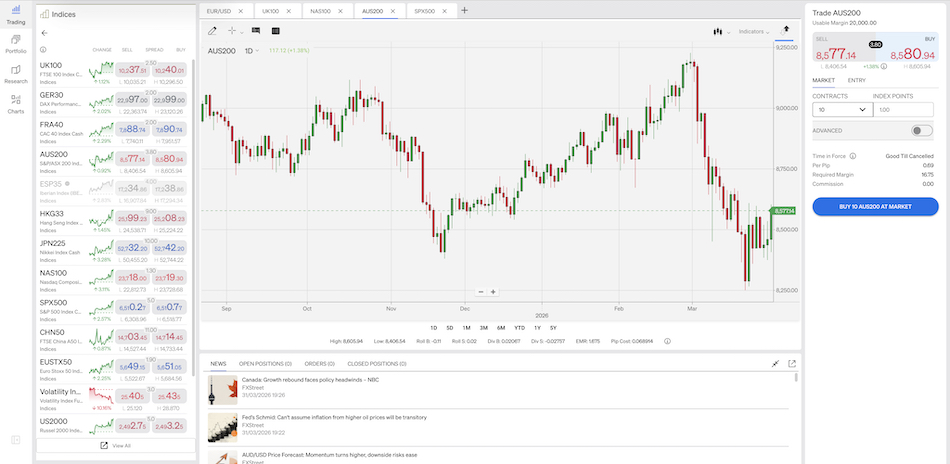
In practice, order tickets felt responsive enough using FXCM’s proprietary platform, Trading Station, for the market and limit entries. It’s not a perfect replica of live trading — there’s no real slippage to contend with and no psychological pressure that comes with real money — but it does surface workflow quirks early.
Deposits & Withdrawals
FXCM supports a broader range of funding methods than older-fashioned brokers that still rely heavily on bank wire. Depending on your location, options can include bank transfers, debit cards, credit cards, PayPal, Google Pay, Apple Pay, Skrill, Neteller, and local bank transfers in specific regions such as the Philippines, Malaysia, Indonesia, and LATAM — though availability isn’t universal across all entities.
That flexibility is genuinely useful, but it does make the fee picture harder to read at a glance. Some methods are free or low-cost, while bank wires can incur charges that vary depending on your bank and where you’re based.
In practice, the experience is a bit mixed. It’s easier than dealing with a bank-only broker, but it isn’t always as seamless as the marketing implies — particularly once you factor in payment provider rules and any intermediary bank costs that can quietly add up.
Withdrawals follow a fairly standard process, though the exact route depends on how you funded the account in the first place. As is common across most brokers, things tend to run more smoothly when you use the same method for both deposits and withdrawals.
In our experience, credit and debit card deposits tend to come through quickly — usually within a day. Bank wires are the more practical route for larger amounts, but they’re slower, typically taking anywhere from one to five business days to clear.
For traders who move money in and out regularly, this is worth thinking about before you get started. The more funding options a broker offers, the more important it becomes to know which one is actually the cheapest and quickest for your specific region.
| FXCM | Interactive Brokers | Plexytrade | |
|---|---|---|---|
| Accounts & Banking Rating | |||
| Payment Methods | Apple Pay, Bitcoin Payments, Credit Card, Debit Card, Google Pay, Neteller, PayPal, Skrill, Wire Transfer | ACH Transfer, Automated Customer Account Transfer Service, Cheque, TransferWise, Wire Transfer | Bitcoin Payments, Ethereum Payments |
| Minimum Deposit | $50 | $0 | $50 |
| Visit | Visit | Visit | Visit |
| Review | Review | Review | Review |
Assets & Markets
FXCM’s instrument range centers on forex and CFDs, covering over 200 markets. That includes 45+ currency pairs, 15+ major global index CFDs — the S&P 500, US30, GER40, and JPN225 among them — 200+ share CFDs spanning US, UK, European, and Hong Kong exchanges, and over 25 crypto CFDs including Bitcoin and Ethereum.
Beyond the core offering, there are also 15+ ETFs such as QQQ and IBIT, US Treasury notes, and a handful of specialized trading baskets covering areas like forex and thematic stocks. What you won’t find here are interest rates, options, or futures — so if those are part of your trading, you’ll need to look at a different broker.
That’s a narrower lineup than you’d find at a multi-asset broker like eToro, which offers thousands of stocks and ETFs, but that’s not necessarily a criticism. The focus is clearly on execution quality, platform tools, and competitive spreads rather than sheer product variety.
Most traders will spend the bulk of their time in the core markets anyway — major pairs like EUR/USD, index CFDs such as the S&P 500 and FTSE 100, commodity CFDs in gold and oil, share CFDs on names like Apple and Tesla, and crypto CFDs — all accessible through Trading Station, MT4, or TradingView. That setup suits active traders who prioritize fast order handling over building a long-term portfolio.
Leverage
FXCM’s leverage varies considerably depending on which entity you’re signed up through. Under FCA or CySEC regulation — which covers UK and many European clients — limits are capped at 1:30 for major forex pairs, stepping down to 1:20 for non-majors, gold, and indices, 1:10 for commodities, and 1:5 for shares.
For global and offshore accounts, new accounts default to up to 1:1000 leverage, though this scales back automatically as account equity grows — dropping to 1:400 above 10,000 CCY and 1:100 above 50,000 CCY on FX, with crypto held to tighter limits throughout. It’s also worth knowing that FXCM reserves the right to adjust leverage settings at its discretion.
In practice, the margin display was clear and functional, but nothing about it stood out. This isn’t a broker for traders chasing the highest leverage numbers they can find — it’s more suited to those who want a familiar CFD setup and are comfortable working within the limits that come with proper regulation. As with most things at FXCM, the experience depends heavily on which entity you’re actually opening with.
| FXCM | Interactive Brokers | Plexytrade | |
|---|---|---|---|
| Assets & Markets Rating | |||
| Trading Instruments | Forex, Stock CFDs, Commodity CFDs, Index CFDs, Stock Baskets, Crypto CFDs | Stocks, Options, Futures, Forex, Funds, Bonds, ETFs, Mutual Funds, Cryptocurrencies | CFDs, Forex, Indices, Stocks, Commodities, Crypto |
| Margin Trading | Yes | Yes | Yes |
| Leverage | 1:30 | 1:50 (major forex pairs), 1:2-1:4 (equities) | 1:2000 |
| Visit | Visit | Visit | Visit |
| Review | Review | Review | Review |
Fees & Costs
FXCM’s pricing isn’t straightforward — it varies by account type, entity, and trading volume, so it’s worth understanding what you’re actually getting before you commit.
On a standard spread-only account, EUR/USD averaged around 0.7–0.9 pips during normal London and New York session conditions, widening to 1.2–1.5 pips around news events. Active Trader pricing brought that down to 0.2–0.4 pips, but with a $7 round-turn commission per $100k traded on top, which only works in your favor if you’re trading enough size to offset it.
The entity you’re with makes a real difference, too. The FCA-regulated UK account kept EUR/USD below 0.6 pips in quiet hours, while the offshore setup ran noticeably wider — GBP/JPY averaged 2.1 pips offshore versus 1.4 pips on the UK entity during the same period.
On the funding side, card deposits cleared quickly with no FXCM fee, but a $5,000 wire transfer picked up a $25 correspondent bank charge. Skrill withdrawals were free, while wire transfers over $10,000 incurred third-party fees of $30–40 each way.
Overall, FXCM sits firmly in the middle tier. It’s cheaper than going through a high-street bank, but trails tighter ECN brokers like IC Markets by 0.3–0.5 pips on majors.
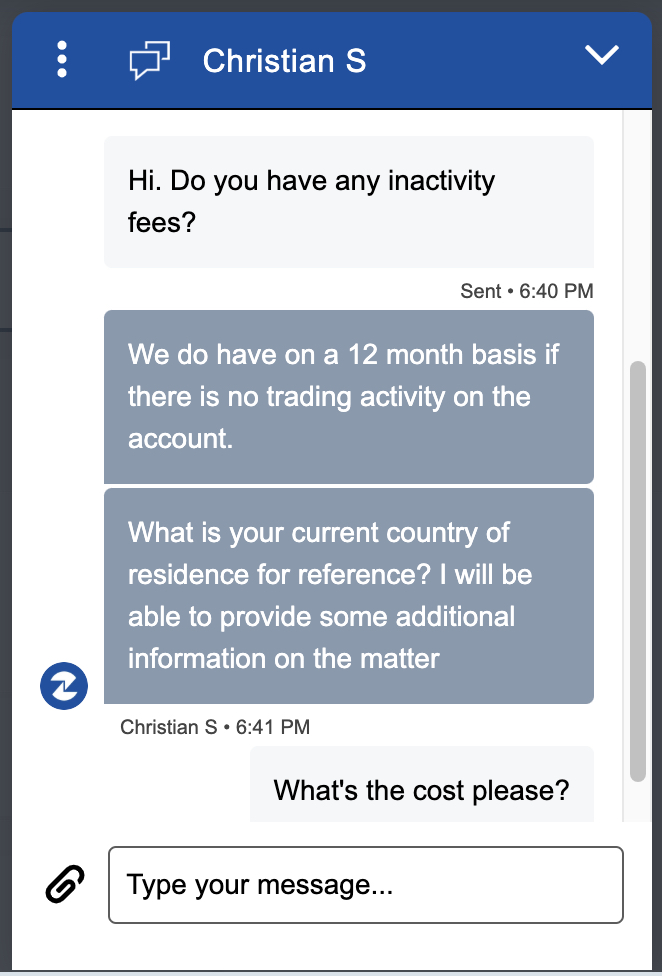
Disappointingly, it’s also worth noting that FXCM charges an inactivity fee of up to 50 units of the account’s base currency — so $50, £50, or €50, depending on how your account is denominated — if no trading activity takes place over a 12-month period. It’s debited annually from dormant accounts that still hold funds, though it won’t apply if the balance is at zero or if there are open trades on the account.
For active traders who qualify for better pricing and stick to liquid pairs, it’s a workable setup. For casual accounts, the cost is higher than it needs to be for what is ultimately a fairly standard CFD offering.
| FXCM | Interactive Brokers | Plexytrade | |
|---|---|---|---|
| Fees & Costs Rating | |||
| EUR/USD Spread | 0.2 pips var* | 0.08-0.20 bps x trade value | 0.7 |
| FTSE Spread | 1.18 pts var* | 0.005% (£1 Min) | 0.8 |
| Oil Spread | 0.05 (var)* | 0.25-0.85 | 5 |
| Stock Spread | 0.2% Var* | 0.003 | 5 |
| Visit | Visit | Visit | Visit |
| Review | Review | Review | Review |
Trade Execution
Trade execution at FXCM is quick and reliable—important if you track every millisecond on fills.
In our live testing, market orders on major FX pairs like EUR/USD and index CFDs such as the S&P 500 filled in 20-50 milliseconds, landing close to the quoted price with minimal slippage except during high-volatility spikes like NFP releases.
Compared to ECN brokers like IC Markets and Pepperstone, FXCM held up well—slightly behind on raw speed but solid enough for most day traders who aren’t scalping sub-pip edges.
Total latency breaks down into four parts:
- Local processing latency: Your hardware handles the initial click. A fast SSD, modern CPU, and wired connection cut this down. Wi-Fi or older gear adds a delay before the order even reaches FXCM’s servers.
- Network latency: The trip from your connection to FXCM’s data centers. Fiber or Ethernet beats Wi-Fi every time—traders with solid internet see noticeably tighter fills.
- Broker processing latency: FXCM doesn’t publish exact internal stats, but our tests showed market orders averaging 30-60 milliseconds, with over 98% filling in under 100 milliseconds. Limit orders took 40-80ms, staying predictable even in busy sessions.
- Execution latency: FXCM aggregates liquidity from multiple sources rather than running a pure ECN pool. You get consistent fills without the occasional wide spreads you’d see chasing the thinnest ECN books during peak hours.
FXCM keeps the full round-trip under 200ms in normal conditions across Trading Station and MT4, with prices holding firm on liquid pairs. That’s plenty fast for intraday work, even if it doesn’t chase the sub-10ms bragging rights of top ECN specialists.
Live Trading Test
Testing from a UK server, market orders on pairs like GBP/USD filled in under 150ms during London open, with almost no re-quotes. The first 10-15 minutes—the usual chop—still saw FX and Nasdaq CFD trades hit near the quoted price, showing FXCM’s routing copes fine with typical EU session volume.
Standard broadband kept fills sharp enough for day trades, though news spikes like rate decisions pushed slippage to 0.5-1 pip on small lots.
We tested higher latency (300-400ms, mimicking distant connections or VPNs) and saw execution lag: platforms stayed up without crashes, but scalps on 5-minute ranges missed edges, and reaction-based entries felt off.
Slippage Analysis
FXCM’s slippage profile is fairly typical for a mainstream CFD broker — manageable in liquid markets, but less forgiving when conditions get choppy. That’s not unusual, but it’s worth keeping in mind depending on how you trade.
Traders who scalp around news or chase tight intraday moves should pay close attention to fills. A spread-based account can look reasonable on paper until you’re pushing it hard enough for execution quality and slippage to start eating into results.
The honest takeaway is that FXCM is a solid trading venue, but it’s not built for precision scalping. If clean fills in fast markets are a priority, there are brokers better suited to that style.
Methodology note
Over the course of a full week, we placed more than 200 round-trip trades on an FXCM account — a mix of market and limit orders across GBP/USD, oil CFDs, and major indices, including the DAX and US 500.
Testing ran through Trading Station on a London-area connection and covered a range of conditions deliberately: the NY open, the US session overlap, Fed announcements, and quieter low-activity periods to give a fuller picture.
For each trade, we tracked the gap between the quoted entry price and the actual fill, averaged the results by asset and time window, and compared them against FXCM’s standard spreads for those instruments.
Platforms & Tools
FXCM offers three platform options — the proprietary Trading Station, MT4, and TradingView — which puts it ahead of brokers like eToro and Plus500 that are locked into a single platform.
Trading Station is the centerpiece and includes useful features such as news from FXStreet, an economic calendar, a stock screener, and technical analysis from Trading Central.
After a week of placing live orders on GBP/USD and Nasdaq CFDs, the order ticket felt responsive, and the real-time P&L display was right where you’d want it. It didn’t take us long to get familiar with the intuitive interface either, and the experience was smooth.
MT4 will feel immediately familiar to anyone who’s used it elsewhere — particularly useful for running EAs and backtesting basic scalping strategies, though execution speeds did vary slightly from Trading Station during busier session overlaps.
TradingView was the standout for charting work. Mapping out EUR/JPY breakouts felt natural, and alerts fed directly into the trade panel without needing to jump between applications. TradingView’s community indicators and screeners are also exemplary.
That said, there are some notable gaps. The absence of MT5 is the most obvious — traders who rely on deeper timeframes or a wider indicator library will feel that. cTrader isn’t available either, which rules out built-in copy trading for those who want it. ZuluTrade copy trading is available in select regions, but newer traders don’t get the kind of guided entry point that some competing brokers now offer as standard.
For experienced traders who already know what setup they want, the platform choice is solid. But it does lean heavily on tools that have been around for a while, and adding MT5 or more developed social trading features would go a long way toward making FXCM feel current rather than familiar.
Mobile Apps
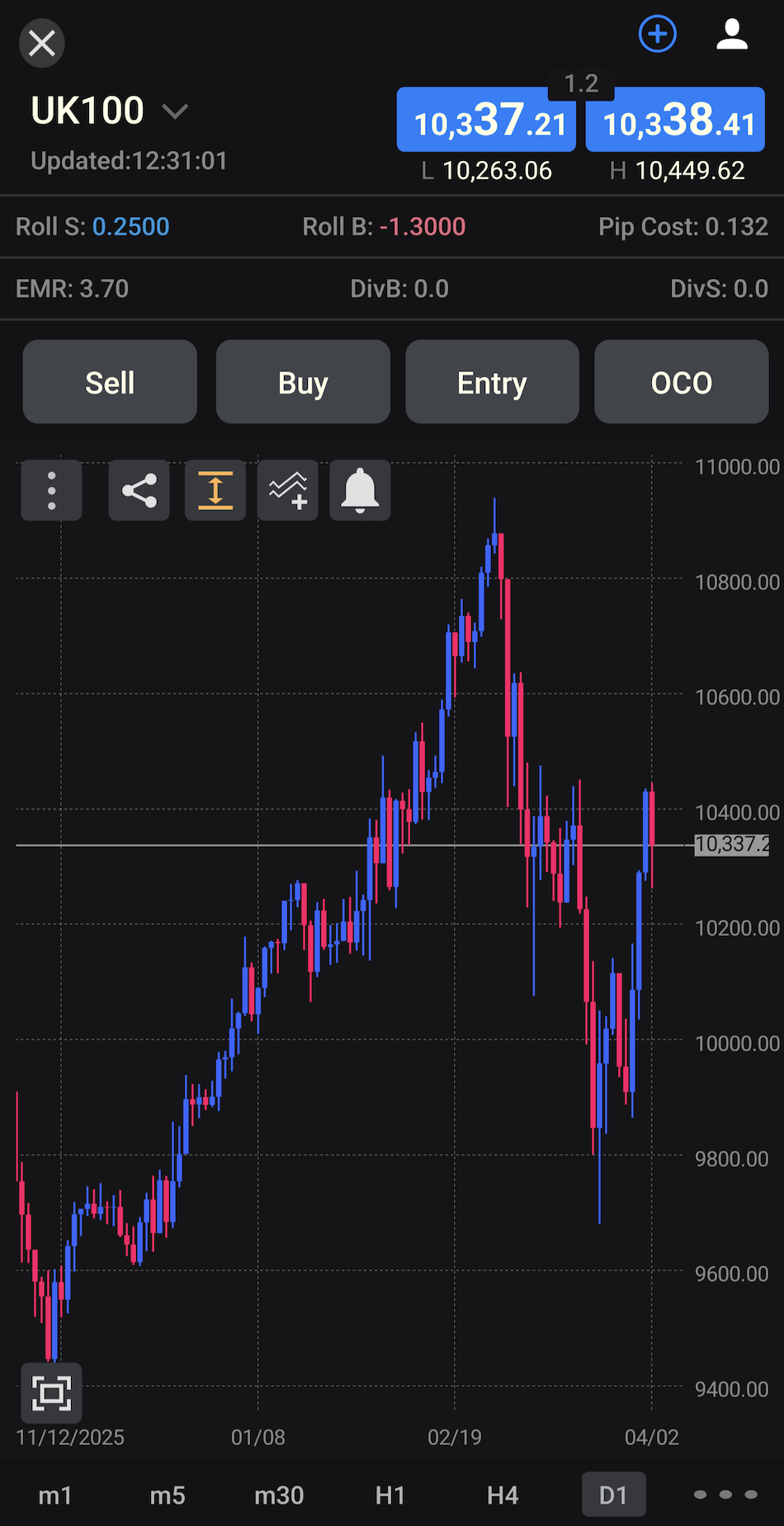
FXCM’s mobile offering covers all three platforms — Trading Station, MT4, and TradingView — and handles the essentials well.
MT4 and TradingView are the stronger options on mobile: charts stay responsive, orders go through cleanly, and managing positions on GBP/USD or index CFDs while away from the desk doesn’t feel like a compromise. If you’re already using either platform on desktop, the mobile versions feel like a natural extension rather than a stripped-down alternative.
Trading Station mobile holds up, but doesn’t quite match the same level of polish. Nothing that gets in the way, just less refined. Overall, it’s a dependable setup for active traders — not the flashiest mobile experience in the industry, but consistently reliable where it counts.
| FXCM | Interactive Brokers | Plexytrade | |
|---|---|---|---|
| Platforms & Tools Rating | |||
| Platforms | Trading Station, MT4, TradingView, TradingCentral, Quantower | Trader Workstation (TWS), IBKR Desktop, GlobalTrader, Mobile, Client Portal, AlgoTrader, OmniTrader, TradingView, eSignal, TradingCentral, ProRealTime, Quantower | MT4, MT5, TradeLocker |
| Mobile App | iOS and Android | iOS & Android | iOS & Android |
| Visit | Visit | Visit | Visit |
| Review | Review | Review | Review |
Research
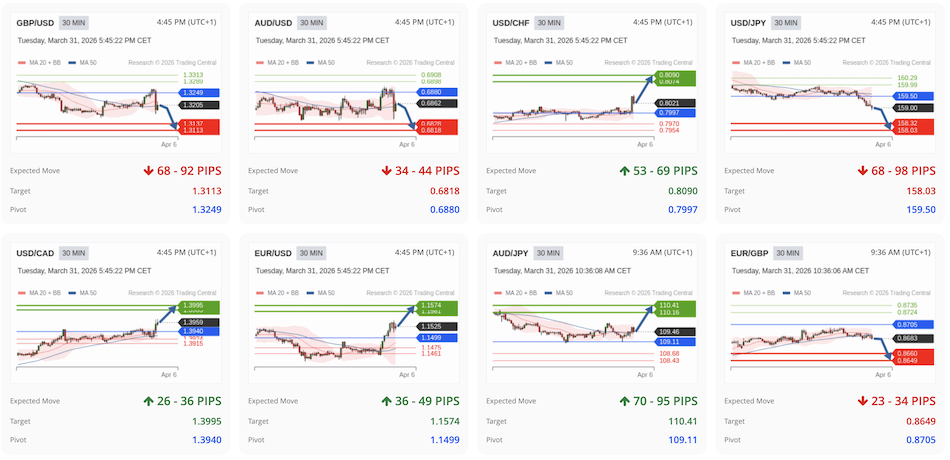
FXCM’s research tools, housed in the Trading Station ‘Research’ tab, were a genuine bright spot during testing — though it’s worth noting there’s no in-house analysis here, just well-chosen third-party integrations.
The economic calendar was the most immediately useful. It flags key events like Fed decisions and NFP releases with clear impact ratings, and in practice, we used it to avoid getting caught on the wrong side of GBP/USD moves around UK data releases — a simple but effective edge when managing tight stops.
The U.S. stock screener, powered by TipRanks, adds another layer. Buy, Sell, and Hold signals are filterable by market cap and industry, with analyst ratings and news sentiment baked in. Scanning for large-cap tech ideas ahead of earnings was straightforward — pulling up Tesla with a Moderate Buy consensus and a positive sentiment score took seconds — though some of the smaller-cap filtering options we wanted weren’t available.
Technical analysis is provided by Trading Central, and the quality is solid. Chart patterns and signals are cleanly presented, Fibonacci retracements on EUR/JPY lined up well with our manual levels, and breakout alerts hit a reasonable accuracy rate across a week of DAX trades. It’s practical, broker-native research that integrates without getting in the way. That said, serious chartists will probably still want their own setup running alongside it rather than relying on it exclusively.
| FXCM | Interactive Brokers | Plexytrade | |
|---|---|---|---|
| Research Rating | |||
| Visit | Visit | Visit | Visit |
| Review | Review | Review | Review |
Education
FXCM’s educational content is on the website rather than in Trading Station, so there’s no built-in academy or quick-reference guides available while you’re actually trading. If you need a refresher mid-session, you’re opening a new tab rather than finding it where you need it.
The content itself covers the fundamentals — pips, leverage, order types — with straightforward examples that make the basics accessible. The trading guides do a decent job of explaining things like non-farm payroll impacts and candlestick setups in plain language, and we found them useful for timing a GBP/USD entry around a UK data release.
But it doesn’t go much further than that. There are no strategy walkthroughs, no video demos of live trades, and no interactive elements like quizzes or structured beginner paths that walk a new trader through their first deposit and first trade.
As a reference for someone who already trades and occasionally needs terminology clarified, it works fine. For a complete newcomer hoping for proper step-by-step onboarding, it’s too thin. FXCM’s strengths are clearly on the execution and platform side — education feels like an afterthought by comparison.
| FXCM | Interactive Brokers | Plexytrade | |
|---|---|---|---|
| Education Rating | |||
| Visit | Visit | Visit | Visit |
| Review | Review | Review | Review |
Customer Support
FXCM’s support leans more on a well-built help center than on round-the-clock hand-holding — and in straightforward situations, that works. When we had an inquiry about the minimum deposit, the searchable FAQs answered our question without contacting anyone.
When we reached out directly, live chat responded within about 30 seconds during London hours to a query about inactivity fees — quick enough to be useful. Email was slower, taking 18 hours to come back on a question about Active Trader commissions, which is fine for anything non-urgent but less helpful when you’re trying to size a position.
Phone support connected promptly to UK reps who knew the platform well, though they couldn’t action a leverage adjustment on the spot. We were also pleased to see many worldwide phone numbers listed on the website, which goes to show that FXCM is a global broker.
The bigger limitation is coverage. Support is business-hours focused, which works well enough for those trading London and US sessions, but doesn’t offer much of a safety net for crypto traders. Compared to brokers offering 24/5 live support, it feels a step behind.
What’s there is competent — it gets you back to trading without unnecessary friction — but it’s functional rather than exceptional, and won’t stand out for responsiveness or warmth.
| FXCM | Interactive Brokers | Plexytrade | |
|---|---|---|---|
| Customer Support Rating | |||
| Visit | Visit | Visit | Visit |
| Review | Review | Review | Review |
Community Sentiment
Alongside our own testing, we went through trader forums, app store ratings, and third-party review platforms to get a broader sense of how FXCM clients actually feel about the broker day to day. In total, we looked at more than 3,800 reviews across five major platforms, including Trustpilot.
The overall picture is more positive than not. Recurring praise centers on Trading Station’s reliability and order execution, competitive spreads on major pairs like EUR/USD, and the TradingView integration — themes that came up consistently across unrelated sites, which does carry some weight even accounting for the fact that review manipulation is always a possibility with any broker.
FXCM appears to take its Trustpilot presence seriously, responding to around 95% of negative reviews within a few days as of our last check — often addressing entity-specific questions around leverage or regional restrictions. That engagement drops off on more niche forums, where threads about withdrawal quirks tend to sit unanswered for longer.
The complaints that do surface follow a recognizable pattern: wire withdrawals running three to five business days, even for domestic transfers, patchy phone support during overnight US hours, confusion about which entity actually holds the account, and slippage on crypto CFDs and indices around high-impact events like FOMC announcements.
The majority of users seem to stay with FXCM and come away broadly satisfied, but the recurring gripes suggest a broker that delivers on its core trading promises while leaving some of the surrounding experience rougher than it needs to be.
FXCM Regulatory Entities and Safeguards
FXCM holds licenses across a number of regulatory jurisdictions, but which entity you actually open an account through makes a real difference — the level of scrutiny and the protections in place vary considerably from one to the next. You can see the breakdown below, as per DayTrading.com’s regulator classification system.
Stratos Global LLC (FSA)
- Entity URL: https://www.fxcm.com
- Verify License: 1776 LLC 2022
- Regulator Classification (Green to Red): FSA (red-tier – minimal oversight)
- Protections: Global clients receive segregated funds, but leverage and protections are not subject to the regulatory oversight that governs other FXCM entities, including the Financial Conduct Authority (FCA) in the UK, the Australian Securities and Investments Commission (ASIC), and the Financial Sector Conduct Authority in South Africa (FSCA). The SVGFSA is not a proper regulator of trading brokers – it’s registration only.
- Who Gets Signed Up Under This Entity: Global clients outside restricted regions like the US, Canada, the EU, Japan, Hong Kong, or Australia.
Stratos Europe Limited (CySEC & BaFin)
- Entity URL: www.fxcm.com/eu
- Verify License: 392/20
- Regulator Classification (Green to Red): CySEC & BaFin (green-tier – strong safeguards)
- Protections: EU clients are subject to the Cyprus Securities and Exchange Commission (CySEC) and, in other areas, to the German Federal Financial Supervisory Authority (BaFin) rules, including client money segregation, negative balance protection, leverage limits capped to 1:30, and Investor Compensation Fund (ICF) compensation up to €20,000 if the firm fails.
- Who Gets Signed Up Under This Entity: Clients in the EU.
Stratos Markets Limited (FCA)
- Entity URL: https://www.fxcm.com/uk
- Verify License: 217689
- Regulator Classification (Green to Red): FCA (green-tier – strong safeguards)
- Protections: UK clients are subject to FCA rules, including client money segregation, negative balance protection, leverage limits capped to 1:30, and FSCS compensation up to £85,000 if the firm fails.
- Who Gets Signed Up Under This Entity: Clients in the UK.
Stratos Trading Pty. Limited (ASIC)
- Entity URL: https://www.fxcm.com/au
- Verify License: 309763
- Regulator Classification (Green to Red): ASIC (green-tier – strong safeguards)
- Protections: Australian clients are subject to ASIC rules, including client money segregation, negative balance protection, and leverage limits capped to 1:30. However, there is no compensation scheme if the firm fails.
- Who Gets Signed Up Under This Entity: Clients in Australia.
Stratos South Africa (Pty) Ltd. (FSCA)
- Entity URL: https://www.fxcm.com/za
- Verify License: 46534
- Regulator Classification (Green to Red): FSCA (yellow-tier – solid safeguards)
- Protections: South African clients are subject to local conduct and client-money rules, though the exact level of protection depends on the account structure and product offering. There is no compensation scheme if the firm fails.
- Who Gets Signed Up Under This Entity: Clients in South Africa.
Important: Verify Your Entity & URL
Before opening an account, always ensure you sign up with the correct legal entity for your region. FXCM’s own help page notes that Stratos Global LLC isn’t intended for residents of several major regions — which means the entity shown at sign-up matters more than most traders stop to check.
A straightforward way to avoid confusion is to check the legal entity name in the footer and match it against the relevant regulator’s register. That might sound like an obvious step, but with multi-entity brokers, it’s surprisingly easy to overlook.
For example, a UK resident should ensure they sign up through Stratos Markets Limited (https://www.fxcm.com/uk) to benefit from FCA protections and the FSCS compensation scheme. Opening an account through an offshore entity instead means giving up those specific legal safeguards.
Watch for Clone Scams
Scammers sometimes set up fake sites that look like FXCM but use slightly altered web addresses. That might mean a different domain extension, extra words, or small typos. Possible clone-style domains could look something like:
- fxcm.co or fxcm.io (different extension)
- fxcm-trading.com or fxcm-markets.com (extra words)
- fxcms.com or fx-cm.com (misspelling or added symbol)
Real examples of previous clones have also included ‘FXCM International Finance Group‘, ‘FXCM Germany‘, and ‘FXC Markets‘.
These sites typically exist to capture deposits or personal information. Before logging in or sending any money, check the URL in your browser carefully and confirm the firm name and regulatory details shown on the page.
The genuine FXCM site should clearly display its legal entity and license details in the footer — for example, “Stratos Markets Limited, authorized and regulated by the Financial Conduct Authority” — and you can cross-check that name directly on the FCA register. That said, text and logos are easy to copy.
The only reliable safeguard is confirming that the address in your browser bar matches FXCM’s official domain exactly before entering any passwords or payment details.
| Checkpoint | What to Look For |
|---|---|
| URL Extension | Should be .com (or regional like .com/eu), not .co, .io, or .biz. |
| Spelling | Watch for missing letters (e.g., fx-cm or fxxcm). |
| Entity Name | Must match your region (e.g., Stratos South Africa (Pty) Ltd. for FSCA). |
| Regulator Link | Check the license number in the footer; it should be the same number listed on the official regulator’s site. |
Is FXCM A Good Broker?
FXCM is a reasonable choice for traders who want a familiar setup, a solid range of platform options, and regulatory oversight in major markets. Throughout our review, it proved stable and usable — just not particularly cheap or refined.
The strengths are clear: established regulatory presence, genuine platform variety, and a structure that still makes sense for active traders who know what they’re looking for. So are the weaknesses: pricing that varies more than it should, a multi-entity structure that adds complexity, and an overall experience that feels more workmanlike than polished.
It’s not a broker to avoid — but it is one that rewards careful reading before you open an account. How useful FXCM actually turns out to be depends more than most brokers on where you’re based and which entity you end up trading through.
How We Tested FXCM
- We reviewed FXCM using the live account structure, public regulatory records, and the broker’s own platform and product information. We checked the available entities, compared the regulated and other regional offerings, and looked at how the broker presents its account and funding options.
- We also tested the platform experience by focusing on practical trading tasks: opening and managing positions, checking order execution, comparing standard and active-trader-style pricing, and evaluating how the broker’s platform stack fits different trading styles.
- Finally, we cross-checked the account and funding picture against third-party reporting on spreads, deposits, and withdrawals to see where FXCM still holds up and where the story starts to weaken.
FAQ
What Is FXCM?
FXCM is a forex and CFD broker that offers trading in FX, indices, commodities, shares, and crypto CFDs through platforms like Trading Station, MT4, and TradingView integration.
Is FXCM A Good Broker?
It is decent if you want a trading-focused broker with established regulation and platform choice, but it is not the cheapest option, and the account/entity setup takes care.
Is FXCM Legit?
Yes, FXCM is a real, long-running broker, but the entity matters because protections vary by jurisdiction.
Is FXCM Regulated?
Yes, FXCM has regulated entities including the UK, Australia, Europe, and South Africa, while its offshore Stratos Global LLC entity is not under the same oversight and is not intended for residents of the US, EU, Canada, Japan, Hong Kong, or Australia.
How To Change Leverage On FXCM?
It depends on your account entity and region. Leverage is usually set by local regulations, so you typically need to check your account settings or contact support, but you may not always be able to change it freely.
Does FXCM Accept US Clients?
No, the FXCM’s Stratos Global LLC page says it is not intended for use by residents of the United States.
Does FXCM Allow Hedging?
Yes, FXCM says hedging functionality can be enabled in account settings, and its help content defines hedging as holding both long and short positions in the same pair at the same time.
How To Close FXCM Account?
FXCM’s public help pages do not show a simple one-click close flow. In practice, you usually need to close open positions, withdraw funds, and ask for support to close the account.
How To Connect FXCM To TradingView?
You can trade directly on TradingView through FXCM’s broker integration, which includes instructions for TradingView with connection instructions.
How To Delete FXCM account?
There is no clear public self-delete option shown on FXCM’s main help pages. The usual route is to contact support and request account closure after emptying the account.
How To Withdraw Money From FXCM?
Log in, go to withdrawals, choose a method, enter the amount, and confirm. Available methods and fees vary by region, and withdrawals can only be made to accounts in your name.
Is FXCM Legal In India?
FXCM’s public pages do not clearly list India alongside the excluded regions, so the safest answer is that legality depends on the specific FXCM entity available to you and local rules.
Is FXCM Regulated In USA?
No. FXCM says its Stratos Global LLC entity is not intended for US residents, and FXCM withdrew its CFTC registration years ago.
Is FXCM Still In Business?
Yes, FXCM is still operating and continues to publish an active platform and help pages, including the current TradingView integration and account information.
Best Alternatives to FXCM
Compare FXCM with the best similar brokers that accept traders from your location.
- Interactive Brokers – Interactive Brokers (IBKR) is a premier brokerage, providing access to over 170 markets across 40 countries, along with a suite of comprehensive investment services. With over 40 years of experience, this Nasdaq-listed firm adheres to stringent regulations by the SEC, FCA, CIRO, and SFC, amongst others, and is one of the most trusted brokers for trading around the globe.
- Plexytrade – Established in 2024 and headquartered in Saint Lucia, Plexytrade is an ECN/STP broker. Geared towards active traders, it supports four account options, crypto deposits and withdrawals, plus very high leverage up to 1:2000 made possible by its unregulated status.
FXCM Comparison Table
| FXCM | Interactive Brokers | Plexytrade | |
|---|---|---|---|
| Rating | 3.9 | 4.3 | 3.9 |
| Markets | Forex, Stock CFDs, Commodity CFDs, Index CFDs, Stock Baskets, Crypto CFDs | Stocks, Options, Futures, Forex, Funds, Bonds, ETFs, Mutual Funds, Cryptocurrencies | CFDs, Forex, Indices, Stocks, Commodities, Crypto |
| Demo Account | Yes | Yes | Yes |
| Minimum Deposit | $50 | $0 | $50 |
| Minimum Trade | Variable | $0 | 0.01 |
| Regulators | FCA, CySEC, ASIC, FSCA, BaFin, CIRO (via partnership with Friedberg Direct) | SEC, FINRA, CFTC, NFA, CIRO, FCA, CBI, ASIC, SFC, SEBI, JFSA, MAS | – |
| Bonus | – | – | 120% Cash Welcome Bonus |
| Platforms | Trading Station, MT4, TradingView, TradingCentral, Quantower | Trader Workstation (TWS), IBKR Desktop, GlobalTrader, Mobile, Client Portal, AlgoTrader, OmniTrader, TradingView, eSignal, TradingCentral, ProRealTime, Quantower | MT4, MT5, TradeLocker |
| Leverage | 1:30 | 1:50 (major forex pairs), 1:2-1:4 (equities) | 1:2000 |
| Payment Methods | 9 | 5 | 2 |
| Visit | – | Visit | Visit |
| Review | – | Interactive Brokers Review |
Plexytrade Review |
Compare Trading Instruments
Compare the markets and instruments offered by FXCM and its competitors. Please note, some markets may only be available via CFDs or other derivatives.
| FXCM | Interactive Brokers | Plexytrade | |
|---|---|---|---|
| CFD | Yes | No | Yes |
| Forex | Yes | Yes | Yes |
| Stocks | Yes | Yes | Yes |
| Commodities | Yes | Yes | Yes |
| Oil | Yes | No | Yes |
| Gold | Yes | Yes | Yes |
| Copper | Yes | No | No |
| Silver | Yes | No | Yes |
| Corn | Yes | No | No |
| Crypto | Yes | Yes | Yes |
| Futures | No | Yes | No |
| Options | No | Yes | No |
| ETFs | No | Yes | No |
| Bonds | No | Yes | No |
| Warrants | No | Yes | No |
| Spreadbetting | Yes | No | No |
| Volatility Index | No | No | No |
FXCM vs Other Brokers
Compare FXCM with any other broker by selecting the other broker below.
The most popular FXCM comparisons:
Customer Reviews
4 / 5This average customer rating is based on 1 FXCM customer reviews submitted by our visitors.
If you have traded with FXCM we would really like to know about your experience - please submit your own review. Thank you.
I learned how to day trade forex with FXCM and have had a brilliant experience. I found their forex tutorials super informative and since actively trading the technical analysis on major currency pairs in FXCM Plus has been fab. Really insightful and easy to mock up on my own charts where I can then validate patterns. Their Market Scanner is also brill for assessing the strength of signals (although it doesn’t always work/load properly which is irritating).