




As active traders, industry experts, and experienced users of the software, we’ve tested and ranked the top brokers with TradingView from its growing network of 80+ partners – helping you find the best fit for your needs.
Top 4 TradingView Brokers For 2026
Our updated October 2026 rankings reveal these are the top 4 TradingView brokers :
-
- Demo account
- Min. deposit: $0
- Min. trade: $1
-
- Demo account
- Instruments: Stocks, ETFs, Options, Pink Sheets, Warrants
- Regulator: SEC, FINRA, CIRO, AFM, SCB
-
- Demo account
- Regulator: NFA, CFTC
- Platforms: WebTrader, Mobile, MT4, MT5, TradingView
-
- Regulator: CSSF, CBI, CySEC, BaFin, MAS, OSC, ASIC, BMA
- Min. deposit: $0
- Min. trade: $2




Learn how we test brokers and why you can trust our ratings.
Why Are These Brokers The Best Brokers With TradingView?
Here’s a quick rundown of why we believe these brokers are the best for TradingView integration:
- Interactive Brokers is the best TradingView broker in 2026 4.3/5 Interactive Brokers offers deep TradingView integration, enabling trading across global stocks, futures, forex, and options with competitive commissions from $0.005 per share. When we tested it, order execution was highly reliable and fast. Advanced analytics and algo tools empower professional traders with rich market insights.
- TradeZero 3.8/5 TradeZero is a stock and ETF broker established in the Bahamas in 2015. Though the global entity is regulated offshore, the US subsidiary is overseen by FINRA with SIPC registration. The powerful proprietary trading software makes it a popular choice for active day traders.
- FOREX.com 4.3/5 FOREX.com provides TradingView users with access to 80+ forex pairs amongst other assets, featuring tight spreads from 0.2 pips and commission-free standard accounts. During testing, execution speed was consistent and reliable for day traders. Advanced TradingView alerts and charting boost trade timing and strategy.
- Coinbase 3.5/5 Launched in 2012 as a platform enabling users to buy and sell Bitcoin via bank transfers, Coinbase has emerged as a crypto behemoth, expanding its services to include 240+ crypto assets, developing sophisticated trading platforms for retail investors, listing on the US Nasdaq, and securing licenses with multiple regulators. In May 2025, Coinbase also became the first crypto company to join the S&P 500, a milestone that enhances its reputation..
How Safe Are These Brokers That Support TradingView?
Explore the security measures at the top TradingView brokers:
| Broker | Trust Rating | Guaranteed Stop Loss | Negative Balance Protection | Segregated Accounts |
|---|---|---|---|---|
| Interactive Brokers | ✘No | ✘No | ✔Yes | |
| TradeZero | ✘No | ✘No | ✔Yes | |
| FOREX.com | ✘No | ✘No | ✔Yes | |
| Coinbase | ✘No | ✘No | ✔Yes |
Compare Mobile TradingView Access
See how good the mobile TradingView experience is at our top brokers:
| Broker | Mobile Apps | iOS Rating | Android Rating | Smart Watch App |
|---|---|---|---|---|
| Interactive Brokers | iOS & Android | ✔Yes | ||
| TradeZero | iOS & Android | ✘No | ||
| FOREX.com | iOS & Android | ✘No | ||
| Coinbase | iOS & Android | ✘No |
Are The Top TradingView Brokers Good For Beginners?
Beginners should test TradingView in a demo account and look for other features that new traders need:
| Broker | Demo Account | Minimum Deposit | Minimum Trade | Education Rating | Support Rating |
|---|---|---|---|---|---|
| Interactive Brokers | ✔Yes | $0 | $1 | ||
| TradeZero | ✔Yes | $2,500 (US), $500 (International), $250 (Europe) | $1 | ||
| FOREX.com | ✔Yes | $100 | 0.01 Lots | ||
| Coinbase | ✘No | $0 | $2 |
Are The Top TradingView Brokers Good For Advanced Traders?
Seasoned traders should look for value-add features to take the TradingView environment to the next level:
| Broker | Automated Trading | VPS | AI | Pro Account | Leverage | Low Latency | Extended Hours |
|---|---|---|---|---|---|---|---|
| Interactive Brokers | TWS API | ✘No | ✔Yes | ✘No | 1:50 (major forex pairs), 1:2-1:4 (equities) | ✔Yes | ✔Yes |
| TradeZero | TradeZero Developer | ✘No | ✘No | ✘No | 1:2 (U.S), 1:6 intraday/1:2 overnight (International), 1:3 (Europe) | ✔Yes | ✔Yes |
| FOREX.com | Expert Advisors (EAs) on MetaTrader | ✔Yes | ✔Yes | ✘No | 1:50 | ✔Yes | ✘No |
| Coinbase | Algo trading via Coinbase Advanced API | ✘No | ✔Yes | ✘No | - | ✔Yes | ✘No |
Compare The Ratings Of Top Brokers Supporting TradingView
Uncover how the top TradingView brokerages scored in core areas in our hands-on tests:
| Broker | Trust | Platforms | Assets | Mobile | Fees | Accounts | Research | Education | Support |
|---|---|---|---|---|---|---|---|---|---|
| Interactive Brokers | |||||||||
| TradeZero | |||||||||
| FOREX.com | |||||||||
| Coinbase |
Compare Trading Fees
The cost of trading on TradingView adds up over time - here's how the top providers stack up on costs:
| Broker | Cost Rating | Fixed Spreads | Inactivity Fee |
|---|---|---|---|
| Interactive Brokers | ✘No | $0 | |
| TradeZero | ✘No | $0 | |
| FOREX.com | ✘No | $15 | |
| Coinbase | ✘No | $0 |
Community Sentiment
See how users rate these brokers based on the average customer ratings submitted on DayTrading.com, plus ratings from Trustpilot, the Apple App Store and Google Play.
| Broker | Our Users' Rating | Trustpilot Score | Trustpilot Reviews | iOS App Rating | Android App Rating |
|---|---|---|---|---|---|
| Interactive Brokers | 5526 | ||||
| TradeZero | - | 3092 | |||
| FOREX.com | 2529 | ||||
| Coinbase | 23248 |
How Popular Are These Brokers With TradingView?
As the popularity of TradingView grows, traders look for established brokers, i.e. those with the most clients:
Why Use TradingView With Interactive Brokers?
Interactive Brokers is one of the best brokers for advanced day traders, providing powerful charting platforms, real-time data, and customizable layouts, notably through the new IBKR Desktop application. Its superb pricing and advanced order options also make it highly attractive for day traders, while its diverse range of equities is still among the best in the industry.
 Christian Harris, Reviewer
Interactive Brokers quick facts
- Demo Account
- ✔Yes
- Instruments
- Stocks, Options, Futures, Forex, Funds, Bonds, ETFs, Mutual Funds, Cryptocurrencies
- Regulator
- SEC, FINRA, CFTC, NFA, CIRO, FCA, CBI, ASIC, SFC, SEBI, JFSA, MAS
- Platforms
- Trader Workstation (TWS), IBKR Desktop, GlobalTrader, Mobile, Client Portal, AlgoTrader, OmniTrader, TradingView, eSignal, TradingCentral, ProRealTime, Quantower
- Minimum Deposit
- $0
- Minimum Trade
- $1
- Account Currencies
- USD, EUR, GBP, CAD, AUD, INR, JPY, SEK, NOK, DKK, CHF, AED, HUF
Pros
- With low commissions, tight spreads and a transparent fee structure, IBKR delivers a cost-effective environment for short-term traders.
- There's a vast library of free or paid third-party research subscriptions catering to all types of traders, plus you can enjoy commission reimbursements from IBKR if you subscribe to Toggle AI.
- The TWS platform has clearly been built for intermediate and advanced traders and comes with over 100 order types and a reliable real-time market data feed that rarely goes offline.
Cons
- IBKR was fined $11.8m by the US OFAC in 2025 for providing services in sanctioned jurisdictions. It was also fined $125k by FINRA in 2025 for municipal bond disclosure failures.
- TWS’s learning curve is steep, and beginners may find it challenging to navigate the platform and understand all the features.
- You can only have one active session per account, so you can’t have your desktop program and mobile app running simultaneously, making for a sometimes frustrating trading experience.
Why Use TradingView With TradeZero?
TradeZero is best for experienced stock day traders, especially those trading momentum in small-caps or those chasing opportunities in pre- and after-hours sessions. It also suits short sellers needing hard-to-borrow locates and active options traders thanks to its direct routing tools and Level 2 data, though these typically require a paid platform subscription (ZeroPro or ZeroWeb).
 James Barra, Reviewer
TradeZero quick facts
- Demo Account
- ✔Yes
- Instruments
- Stocks, ETFs, Options, Pink Sheets, Warrants
- Regulator
- SEC, FINRA, CIRO, AFM, SCB
- Platforms
- TZ1, ZeroPro, ZeroFree, ZeroMobile, TradingView
- Minimum Deposit
- $2,500 (US), $500 (International), $250 (Europe)
- Minimum Trade
- $1
- Account Currencies
- USD
Pros
- In our latest support tests, comprising 7 queries on different topics, 70% of responses arrived in under 5 minutes and 90% resolved the issue without follow-up.
- TradeZero brought out Developer 2026, giving experienced algo traders an API to automate stock and options trades and short locate workflows.
- TradeZero Europe is bolstering its regional footprint and local trading services by now accepting clients in Belgium, Luxembourg, Norway, and Denmark.
Cons
- The TradingView integration disappointed during our tests and is supported by wider user feedback, with access issues, freezes and occasional order-processing problems that make it harder to trust for frequent live execution.
- TradeZero was charged by the US SEC in 2022 over misleading statements concerning its meme-stock purchase halts, plus it had a $250k fine from FINRA in 2024 over compliance failures, and a $175k fine from CIRO in 2025 for inadequate supervision of client trading.
- TradeZero is not suitable for traders seeking to build multi-asset portfolios, with no forex, no futures, no funds, no copy trading, and no modern funding options.
Why Use TradingView With FOREX.com?
FOREX.com remains a best-in-class brokerage for active forex traders of all experience levels, with over 80 currency pairs, tight spreads from 0.0 pips and low commissions. The powerful charting platforms collectively offer over 100 technical indicators, as well as extensive research tools.
Christian Harris, Reviewer
FOREX.com quick facts
- Demo Account
- ✔Yes
- Instruments
- Forex, Futures and Options on Metals, Energies, Commodities, Indices, Bonds
- Regulator
- NFA, CFTC
- Platforms
- WebTrader, Mobile, MT4, MT5, TradingView
- Minimum Deposit
- $100
- Minimum Trade
- 0.01 Lots
- Account Currencies
- USD, EUR, GBP, CAD, AUD, JPY, CHF, PLN
Pros
- There’s a wealth of educational resources including tutorials, webinars, and a stacked YouTube channel to help you get educated in the financial markets.
- The in-house Web Trader continues to stand out as one of the best-designed platforms for aspiring day traders with a slick design and over 80 technical indicators for market analysis.
- FOREX.com offers industry-leading forex pricing starting from 0.0 pips, alongside competitive cashback rebates of up to 15% for serious day traders.
Cons
- The group being FOREX.com, GAIN Capital Group LLC, had to pay a $700k fine to NFA for improperly handling some client accounts.
- There’s no negative balance protection for US clients, so you may find yourself owing more money than your initial deposit into your account.
- FOREX.com's MT4 platform offers approximately 600 instruments, significantly fewer than the over 5,500 available on its non-MetaTrader platforms.
Why Use TradingView With Coinbase?
Coinbase is ideal for beginners looking for an intuitive platform to buy and sell a wide variety of cryptocurrencies, with robust security and regulatory compliance. However, its fees are higher compared to competitors in our tests, and it’s not as tailored for short-term traders.
Christian Harris, Reviewer
Coinbase quick facts
- Demo Account
- ✘No
- Instruments
- Crypto, Stocks, ETFs (US only), Pre-IPO Perpetual Futures (non-US)
- Regulator
- CSSF, CBI, CySEC, BaFin, MAS, OSC, ASIC, BMA
- Platforms
- Coinbase, Advanced Trade, Wallet, NFT, TradingView
- Minimum Deposit
- $0
- Minimum Trade
- $2
- Account Currencies
- USD, EUR
Pros
- Some users can secure a credit card by using their stablecoins (USDC) as collateral, with up to 4% paid back in Bitcoin.
- There are platforms for all levels: beginners can use the simple Coinbase app, while Advanced Trade provides lower fees and pro-level tools.
- Coinbase Advanced bolstered its leveraged trading offering with a suite of new futures products in 2025, including Ripple (XRP), Natural Gas (NGS), and Cardano (ADA), providing accessible ways to trade, hedge, or diversify.
Cons
- Received regulatory enforcement actions, including the CBI fining Coinbase Europe Limited €21.46M in November 2025 for AML and CFT failures relating to 30M+ transactions being unmonitored.
- High crypto fees based on tests, especially compared to competitors like Kraken and BitMEX, and notably on the standard dealing platform.
- There are woeful research tools; Advanced Trade has TradingView charts but lacks features like news feeds, economic calendars, and AI market insights.
How DayTrading.com Chose The Best Brokers For TradingView
To compile a list of the best brokers that support TradingView, we:
- Took our evolving database that currently stands at 143 online brokers;
- Pinpointed those that support trading through the TradingView platform;
- Sorted those providers by their overall rating, combining 200+ data points with our first-hand findings.
We also routinely update our findings and run fresh tests when brokers add or improve their TradingView offerings. For example, Deriv enhanced its TradingView offering in 2026 by enabling direct trading on its Derived Indices, providing around-the-clock opportunities for active traders.
How To Connect TradingView To A Broker
By connecting your broker, you can seamlessly execute trades, manage your portfolio, and monitor performance, all in one place.
Here’s how to link the TradingView software with a broker:
- Open the Trading Panel (click the arrow at the bottom of the platform).
- Choose your brokerage from the list of supported providers.
- Log in using your broker’s credentials.
- Follow any additional verification steps your broker requires.
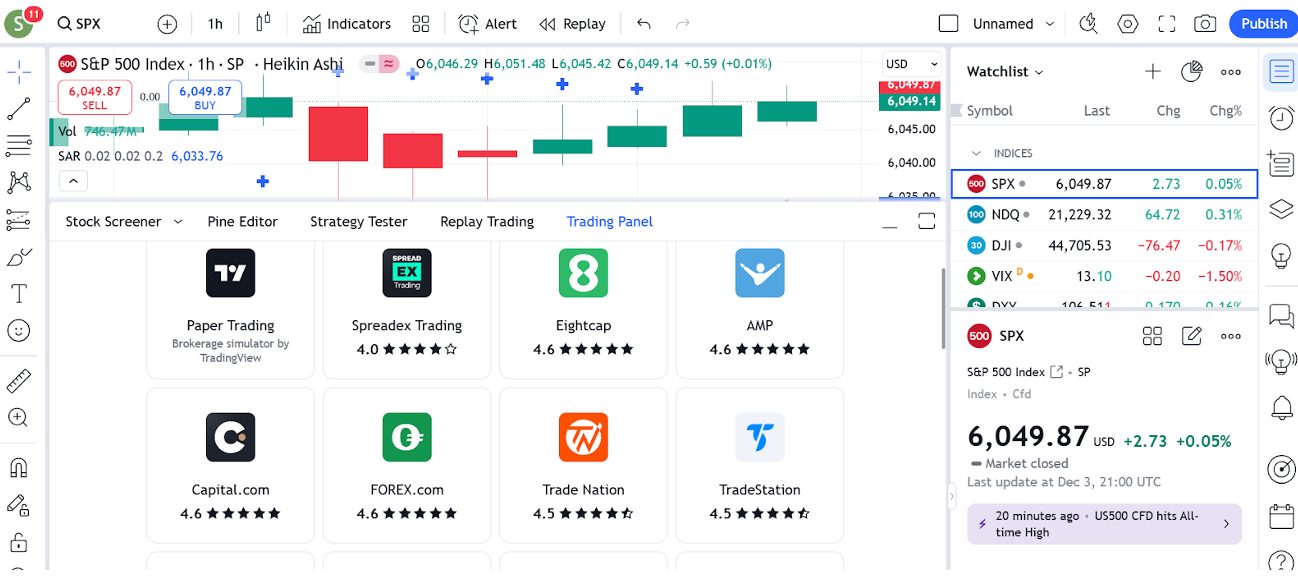
I’ve watched brokers rush to integrate TradingView over the years, with big names like IG and Fusion Markets, joining in 2024.
Established partners like Eightcap have also expanded their offerings, now including a TradingView Plus subscription for UK users.
I expect the majority of forex and CFD brokers will integrate the TradingView software in the coming years.
James BarraHead of Content and Media LeadBottom Line
TradingView isn’t just another charting platform – it’s a dynamic ecosystem designed to empower active traders of all levels, which is why we’re seeing brokers increasingly support this modern software.
Whether you’re analyzing markets, collaborating with others, or executing trades, TradingView provides everything you need in one place. That’s why some of our team have subscriptions with TradingView for their personal investments.
To get started, find the right TradingView broker for your needs.
Article Sources
The writing and editorial team at DayTrading.com use credible sources to support their work. These include government agencies, white papers, research institutes, and engagement with industry professionals. Content is written free from bias and is fact-checked where appropriate. Learn more about why you can trust DayTrading.com