




Launched in 2010, MetaTrader 5 (MT5) is an all-in-one toolkit that’s proven a hit with active traders, and has been integrated by hundreds of online brokers.
But which of these providers offers the best MetaTrader 5 experience? We’ve done the legwork for you – discover DayTrading.com’s pick of the top MT5 brokers following our hands-on tests.
As a veteran MT5 user, I’ll also share my pro tips for getting the most out of the latest software from MetaQuotes.
6 Top MetaTrader 5 Brokers
We’ve put 143 brokers through their paces as of October 2026, and these are the 6 best brokers with MetaTrader 5 integration in Iran:
-
- Demo account
- Regulator: ASIC, CySEC, FSCA, BVI FSC
- Platforms: Web Platform, MT4, MT5, TradingCentral
-
- Demo account
- Regulator: FMA, FSA
- Min. deposit: $0
-
- Demo account
- Regulator: CySEC, MISA
- Platforms: MT4, MT5
-
- Demo account
- Regulator: FCA, ASIC, FSCA, VFSC, CIMA
- Min. deposit: $50
-
- Demo account
- Regulator: ASIC, CySEC, FSA, FSCA, FSC, SCB, CMA-Kenya
- Min. deposit: $0
-
- Demo account
- Regulator: FSA
- Platforms: MT5






Learn how we test brokers and why you can trust our ratings.
This is why we think these brokers are the best in this category in 2026:
- Markets.com 4.4/5 Established in 2008, Markets.com is a long-standing, multi-regulated broker with oversight from the CySEC and FSCA. It offers unique features to track hedge fund moves and insider trades, while providing stock signals to alert traders to market opportunities. Its choice of accounts (Classic to Professional) caters to all levels of active trader. 72.3% of retail accounts lose money.
- BlackBull 4.5/5 In our tests, BlackBull’s MT5 delivered a top-tier environment for day traders with tight spreads from 0.1 pips on major pairs with $3 per side commissions. Execution was fast and reliable, even in choppy markets. Asset coverage on MT5 is also amongst the best we've seen with thousands of instruments across forex, stocks, indices, metals, and commodities, with a smooth, professional trading interface.
- FXCC 4.6/5 During our evaluations, FXCC’s MT5 platform offered decent execution and spreads from 0.0 pips with zero commission on its all-in-one ECN XL account. The range includes forex, indices, and metals, but asset variety and platform features felt more basic compared to some other top-tier MT5 brokers we tried.
- Vantage 4.7/5 When we tested Vantage’s MT5, execution was extremely fast, ideal for day traders, complete with raw spreads from 0.0 pips and $3 per side commissions. The software also performed well under volatility, with stable pricing and reliable order execution - making Vantage an obvious pick for serious MT5 traders.
- FP Markets 4.2/5 Established in 2005 in Australia, FP Markets is an ASIC- and CySEC-regulated broker boasting an extensive suite of tradable assets. Its Standard and Raw accounts cater to day traders at every level, while it packs a punch in the tooling department, from the MetaTrader suite and intuitive TradingView to actionable trading ideas from Trading Central and AutoChartist.
- Bullwaves 3.9/5 In testing, Bullwaves’ MT5 offered competitive spreads from 0.5 pips on major pairs with no added commissions on standard accounts. Execution was steady, though slightly slower than other brokers listed during peak volatility. Asset coverage focuses on forex and popular CFDs, providing a straightforward trading experience for beginners and mid-level traders.
Best MetaTrader 5 (MT5) Brokers In 2026 Comparison
| Broker | MT5 Integration | MT5 Demo | Automated Trading | Instruments | Regulators | Minimum Deposit |
|---|---|---|---|---|---|---|
| Markets.com | ✔Yes | ✔Yes | Expert Advisors (EAs) on MetaTrader | CFDs, Forex, Stocks, Commodities, Indices, Crypto, ETFs, Bonds | ASIC, CySEC, FSCA, BVI FSC | $200 |
| BlackBull | ✔Yes | ✔Yes | Expert Advisors (EAs) on MetaTrader, cBots on cTrader | CFDs, Stocks, Indices, Commodities, Futures, Crypto | FMA, FSA | $0 |
| FXCC | ✔Yes | ✔Yes | Expert Advisors (EAs) on MetaTrader | CFDs, Forex, Stocks, Indices, Metals, Energies, Crypto | CySEC, MISA | $0 |
| Vantage | ✔Yes | ✔Yes | Myfxbook AutoTrade, Expert Advisors (EAs) on MetaTrader | CFDs, Forex, Stocks, Indices, Commodities, ETFs, Bonds | FCA, ASIC, FSCA, VFSC, CIMA | $50 |
| FP Markets | ✔Yes | ✔Yes | Expert Advisors (EAs) on MetaTrader, cBots on cTrader | CFDs, Forex, Stocks, Indices, Commodities, Bonds, ETFs, Crypto | ASIC, CySEC, FSA, FSCA, FSC, SCB, CMA-Kenya | $0 |
| Bullwaves | ✔Yes | ✔Yes | Expert Advisors (EAs) on MetaTrader | CFDs, Forex, Commodities, Stocks, Indices, ETFs, Crypto | FSA | $100 |
Community Sentiment
See how users rate these brokers based on the average customer ratings submitted on DayTrading.com, plus ratings from Trustpilot, the Apple App Store and Google Play.
| Broker | Our Users' Rating | Trustpilot Score | Trustpilot Reviews | iOS App Rating | Android App Rating |
|---|---|---|---|---|---|
| Markets.com | 1258 | ||||
| BlackBull | 3519 | ||||
| FXCC | 223 | ||||
| Vantage | 15787 | ||||
| FP Markets | 10366 | ||||
| Bullwaves | 675 |
Markets.com
Markets.com is best suited to retail investors who trade frequently but don’t want to calculate commissions, thanks to its spread-only pricing (EUR/USD around 1.3 pips). It especially appeals to short-term traders who value fast execution, flexible asset choice spanning 2,200+ instruments and proprietary tools like hedge fund confidence indices and insider trade alerts.
 Christian Harris, Reviewer
Markets.com quick facts
- Demo Account
- ✔Yes
- Instruments
- CFDs, Forex, Stocks, Commodities, Indices, Crypto, ETFs, Bonds
- Regulator
- ASIC, CySEC, FSCA, BVI FSC
- Platforms
- Web Platform, MT4, MT5, TradingCentral
- Minimum Deposit
- $200
- Minimum Trade
- 0.01 Lots
- Account Currencies
- USD, EUR, GBP, AUD, ZAR, SEK, NOK, DKK, CHF, PLN, CZK
Pros
- Switching between the proprietary web platform (great for alerts and quick analysis) and MT5 (strong for algorithmic EAs) was smooth in our tests; positions synced across desktop, web, and mobile without gaps or re-quotes.
- Markets.com provides commission-free trading on most assets with spreads starting from around 0.6 pips on major forex pairs, making it cost-effective for casual traders.
- Markets.com’s Hedge Fund Confidence and Insider Trading tools pulls SEC filings into the dashboard within 24 hours of disclosure, helping to spot fund moves and C-suite buys before most retail newsfeeds updated.
Cons
- While CySEC and FSCA oversight is solid, the SVGFSA and BVIFSC entities offers 1:500 leverage under a light-touch framework, meaning protections like compensation schemes and strict conduct rules lag behind the strictest regulatory standards.
- Inactivity charges kick in after just 3 months, while variable spreads are wider than top ECN brokers during testing, which may deter day traders and high-frequency traders.
- The proprietary web platform felt a bit basic once we pushed into advanced charting with fewer drawing/indicator options than full TradingView or MetaTrader.
BlackBull
After improving its trading infrastructure with Equinix servers in London, reducing latency for traders, BlackBull is an obvious choice if you want to day trade stock CFDs with ECN pricing. With competitive spreads and no commission on a growing roster of digital tokens paired with USD, BlackBull also works for active crypto traders.
Christian Harris, Reviewer
BlackBull quick facts
- Demo Account
- ✔Yes
- Instruments
- CFDs, Stocks, Indices, Commodities, Futures, Crypto
- Regulator
- FMA, FSA
- Platforms
- BlackBull Invest, BlackBull CopyTrader, MT4, MT5, cTrader, TradingView, AutoChartist
- Minimum Deposit
- $0
- Minimum Trade
- 0.01 Lots
- Account Currencies
- USD, EUR, GBP, CAD, AUD, NZD, JPY, ZAR, SGD
Pros
- BlackBull is a much greater fit for aspiring traders following the overhaul of its ECN Prime account, now featuring improved spreads averaging 0.16 on EUR/USD and a more accessible minimum deposit of $0 compared to the old $2,000.
- BlackBulls’s research is superb, especially the daily ‘Trading Opportunities’ articles that break down complex market movements into easy-to-understand insights, making it simpler to capitalize on emerging trends.
- BlackBull offers every ingredient for day traders; fast execution speeds of <100ms and tight spreads from 0.0 pips.
Cons
- Although the Education Hub now features improvements like webinars and tutorials, the courses we’ve explored need more focus on explaining the wider economic factors influencing prices.
- Unlike most top brokers, BlackBull charges an irritating $5 withdrawal fee, which can detract from the overall cost-effectiveness, especially for active traders who frequently move funds.
- Despite a growing selection of 2,180+ assets, including additions to its Asia Pacific indices, they are mainly stocks with an average selection of currency pairs and indices.
FXCC
FXCC continues to prove itself an excellent option for day traders with a particularly strong selection of 70+ currency pairs, ultra-tight spreads from 0.0 pips during testing, and a free VPS for qualifying traders.
 Jemma Grist, Reviewer
FXCC quick facts
- Demo Account
- ✔Yes
- Instruments
- CFDs, Forex, Stocks, Indices, Metals, Energies, Crypto
- Regulator
- CySEC, MISA
- Platforms
- MT4, MT5
- Minimum Deposit
- $0
- Minimum Trade
- 0.01 Lots
- Account Currencies
- USD, EUR, GBP, CAD
Pros
- The free VPS for qualifying traders and the ability to build or buy EAs on MetaTrader make FXCC a strong option for algo traders.
- FXCC’s ECN XL account has been built with active traders in mind, featuring spreads from 0.0 with no commission, while also passing our execution speed benchmark for day traders.
- FXCC has stepped up its offering over the years, adding MT5 to its suite of platforms, hundreds of stocks and more cryptos to its product line-up, plus a copy trading feature and greater margin trading opportunities.
Cons
- FXCC charges steep withdrawal fees on many of its payment methods, including $45 for bank transfers and 2% crypto transfers, which may cut into the returns of traders making regular withdrawals.
- Although regulated by the CySEC, FXCC’s offshore entity operates with weak regulatory oversight from MISA and may not provide safeguards like investor compensation in the event of broker insolvency.
- Although the economic calendar has benefited from a facelift, FXCC still offers very little in terms of market research beyond basic daily technical analysis and aggregated market news, with no tools like Autochartist or social sentiment data.
Vantage
Vantage remains an excellent option for CFD traders seeking a tightly-regulated broker with access to the reliable MetaTrader platforms. The fast sign-up process and $50 minimum deposit make it very straightforward to start day trading quickly.
Jemma Grist, Reviewer
Vantage quick facts
- Demo Account
- ✔Yes
- Instruments
- CFDs, Forex, Stocks, Indices, Commodities, ETFs, Bonds
- Regulator
- FCA, ASIC, FSCA, VFSC, CIMA
- Platforms
- ProTrader, MT4, MT5, TradingView, TradingCentral, DupliTrade
- Minimum Deposit
- $50
- Minimum Trade
- 0.01 Lots
- Account Currencies
- USD, EUR, GBP, CAD, AUD, NZD, JPY, HKD, SGD, PLN
Pros
- The app was upgraded in 2026 with wider asset visibility bringing together balances across Contract, Copy, and Funding accounts on one screen
- Vantage has bolstered its algorithmic trading tools for advanced traders with AutoFibo EA identifying reversal opportunities
- There’s an excellent suite of day trading software, including the award-winning platforms MT4 and MT5
Cons
- A steep $10,000 deposit is needed for the best trading conditions, which include the $1.50 commission per side
- It's a shame that some clients will need to register with the offshore entity, which offers less regulatory protection
- The average execution speeds of 100ms to 250ms are slower than alternatives based on tests
FP Markets
FP Markets strikes an ideal balance between affordability and quality for active traders. They’ve managed to keep trading costs low while expanding their investment offering, charting tools, and research features, all while providing excellent support you can rely on for urgent trading queries.
Christian Harris, Reviewer
FP Markets quick facts
- Demo Account
- ✔Yes
- Instruments
- CFDs, Forex, Stocks, Indices, Commodities, Bonds, ETFs, Crypto
- Regulator
- ASIC, CySEC, FSA, FSCA, FSC, SCB, CMA-Kenya
- Platforms
- Iress, MT4, MT5, cTrader, TradingView, AutoChartist, TradingCentral
- Minimum Deposit
- $0
- Minimum Trade
- 0.01 Lots
- Account Currencies
- USD, EUR, GBP, CAD, AUD, NZD, JPY, CHF, HKD, SGD
Pros
- FP Markets delivers fast and dependable support, available 24/5 with average response times of less than 1 minute during testing.
- FP Markets has a seamless onboarding experience, standing out with crypto deposits and over 10 base currencies, catering to global traders.
- FP Markets offers a superb selection of tradable assets, especially since expanding its suite of commodities and supporting over 10,000 stocks.
Cons
- FP Markets’ Iress platform is only available to clients in Australia. It also primarily emphasizes stock trading over forex trading, and data fees can accumulate rapidly unless you're an active trader or maintain a high-balance account.
- Although Traders Hub provides rich research, notably the Daily Report, Technical Report, Market Insights, and Fundamental Analysis, it needs to widen its daily content variety and keep its forex news updated to match category leaders like IG.
- While pricing in the Raw account is excellent, spreads in the Standard account trail the cheapest brokers with a 1.1-pip average spread on the EUR/USD compared to the 0.8-pip average at IC Markets.
Bullwaves
Bullwaves may appeal to aspiring day traders looking for the MetaTrader charting platforms with a growing suite of research tools, including AI-powered market analysis. However, the limited track record and weak regulatory credentials raise questions about its reliability.
Christian Harris, Reviewer
Bullwaves quick facts
- Demo Account
- ✔Yes
- Instruments
- CFDs, Forex, Commodities, Stocks, Indices, ETFs, Crypto
- Regulator
- FSA
- Platforms
- MT5
- Minimum Deposit
- $100
- Minimum Trade
- 0.01 Lots
- Account Currencies
- USD, EUR, GBP
Pros
- Registering on the Bullwaves website and setting up an account is super smooth, only taking a few minutes based on tests.
- MT5 is supported (MT4 has been discontinued), giving day traders a leading charting platform with excellent backtesting capabilities.
- USDT deposits and withdrawals are facilitated, in addition to regular bank cards, bank wire transfers, and an e-wallet.
Cons
- Day traders and scalpers will likely prefer the VIP or ECN accounts, but these require significantly higher starting deposits ($3,000 and $5,000) compared to many brokers offering similar trading conditions with lower entry barriers.
- Bullwaves operates without strong regulation in major jurisdictions, holding a license with one lower tier regulator, the Seychelles FSA, meaning it lacks oversight from reputable authorities to ensure compliance with strict financial standards.
- Customer support performed poorly during our initial tests with no 24/7 chat support as advertised, and no response to our email queries, though it performed much better in our latest round of tests with most queries getting answers same-day.
How We Chose The Best MT5 Brokers
To compile a list of the best brokers that support MT5, we:
- Took our evolving directory that today stands at 143 online brokers,
- Pinpointed the approximately 70+ firms that have MT5 on desktop, web or mobile,
- Sorted those providers by their overall rating, combining 200+ data points with the personal views of our testers to find the very best.
How To Choose A MetaTrader 5 Broker
When selecting an MT5 broker, here are six key factors to consider:
1. Device Compatibility
Virtually every MT5 broker we’ve evaluated provides access to the software on desktop, mobile and web:
- The desktop terminal is best for advanced traders needing custom features and fast execution.
- The web solution is more beginner-friendly but can be slower and sometimes lack certain tools.
- The mobile app is perfect for on-the-go trading and is highly rated (above 4.5/5) on both iOS and Android, with iOS slightly ahead.
- Pepperstone has impressed us for years, providing a first-class trading environment on MT5’s desktop, web and mobile platforms. It’s also scooped our annual ‘Best Forex Broker’ award twice, plus our ‘Best Overall Broker’ and ‘Best Trading App’.
2. Available Trading Instruments
Unlike its predecessor MT4, which was built for forex trading, MT5 offers multi-asset trading opportunities on popular global markets spanning stocks, commodities, indices, cryptocurrencies, and CFDs.
- BlackBull continues to offer the most extensive range of instruments for trading on MT5 that we’ve seen, with over 26,000 markets covering forex, stocks, indices, commodities and more.
3. Trading Costs
Look for brokers with low spreads and minimal commissions, especially if you’re a day trader making frequent transactions.
Advanced traders may even prefer an ECN broker, which often offer spreads from 0.0 pips, low commissions, and even rebates to high-volume traders.
- IC Markets tops our rankings for pricing, with its raw spread account featuring terrific spreads averaging 0.1 pips on EUR/USD. IC Markets has also scooped our ‘Best MetaTrader Broker’ annual award in recent years.
4. Demo Account Availability
Over 95% of brokers we’ve tested offer MT5 demo accounts, allowing you to practice with virtual funds.
Great for beginners, these accounts typically last between 14 to 30 days, but some providers even offer unlimited demo access for ongoing practice of day trading strategies.
- XM impresses with its MT5 demo account that we customized with a whopping $5,000,000 in account equity. You can also keep the demo mode open alongside your live account – ideal for beginners.
5. Trustworthiness
Choose an MT5 provider with a clean track record and most importantly, authorization from a respected regulator to ensure your funds are protected.
We’ve built a proprietary Regulation & Trust Rating, putting regulators into four tiers – green, yellow, orange and red – to help you understand which regulatory licenses indicate a trustworthy brokerage.
- FOREX.com continues to earn our trust, sporting over 20 years in our industry and authorization from 9 ‘green tier’ regulators, ensuring it’s held to the highest regulatory standards in multiple jurisdictions worldwide.
6. MT5 Add-Ons
Some brokers provide advanced tools for technical analysis and risk management features through MetaTrader add-ons, taking the trading experience up a notch for serious investors.
What Is MetaTrader 5?
MetaTrader 5 is an online trading platform that connects retail investors, primarily active traders, to the financial markets.
Think of MT5 as the bigger, more advanced sibling of MetaTrader 4 (MT4). While MT4 focuses on forex trading, MT5 goes further, opening doors to other markets like stocks, commodities, and even futures.
It’s ideal for those who want to explore diverse trading opportunities without switching platforms.
Whether you’re just starting out or already an experienced pro, MT5 packs a punch with its modern features, user-friendly design, and powerful tools.
Here are the highlights:
- Multi-Asset Trading: Access to a wide range of markets beyond forex.
- Advanced Charting: Over 80 built-in technical indicators and 21 timeframes to analyze trends.
- Algorithmic Trading: Automate strategies using Expert Advisors (EAs).
- Economic Calendar: Stay updated on market-moving events directly in the platform.
- Fast Execution: Designed for speed, MT5 ensures trades are executed quickly, ideal for day trading.
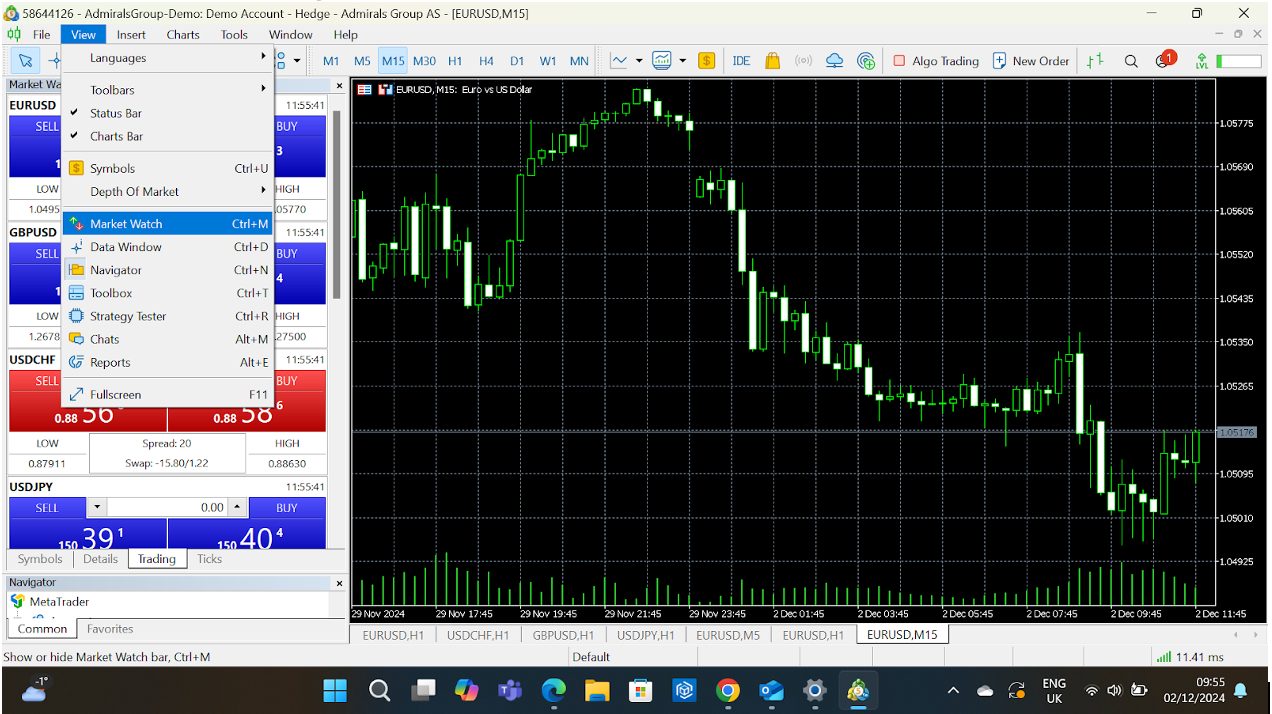
- Market Watch: This is your dashboard for monitoring various instruments and their prices.
- Chart Window: Where the magic happens; analyze price movements, add indicators, or apply templates here.
- Toolbox: Your command centre for monitoring trades, account history, alerts, and more.
Getting Started With MT5
Step 1: Download & Install
- Where to Get It: Download MT5 from your broker’s website or the official MetaQuotes MT5 download.
- Compatibility: It’s available for Windows, Mac, web browsers, and mobile devices (iOS/Android).
Step 2: Set Up Your Account
- Create a demo account to practice risk-free or log in with your broker-provided credentials for live trading.
Step 3: Navigate Like A Pro
- Market Watch: Right-click to add/remove instruments.
- Navigator: Access accounts, indicators, EAs, and scripts here.
- Toolbox: Track trades, account history, alerts, and news.
Step 4: Usability Tips
- Learn the Interface: Spend time clicking around in a demo account. MT5 is intuitive, but I know from firsthand experience that familiarity makes a huge difference.
- Test Features: Whether it’s using one-click trading or adding indicators, don’t be shy to experiment.
Key Features
Let’s unpack three essential parts of the MetaTrader 5 (MT5) platform: Market Watch, Navigator, and Toolbox.
Each one plays a critical role in helping you monitor markets, manage tools, and keep track of your short-term trades.
Market Watch
What Is It?
Market Watch is the command centre for all the instruments you can trade (forex pairs, stocks, indices, commodities, etc). It gives you real-time price quotes and quick access to charts and order windows.
How Does It Work?
- Price Quotes: See Bid and Ask prices for selected instruments at a glance.
- Tick Charts: Double-click an instrument to open a real-time price movement tick chart.
- Add/Remove Instruments: Customize the list to focus on the assets you actually trade.
- Depth Of Market (DOM): Right-click an instrument and select Depth of Market for a detailed view of liquidity and order book.
How To Navigate Market Watch
- Open Market Watch: If it’s not visible, press Ctrl+M or go to View > Market Watch.
- Add Instruments: Right-click anywhere in the Market Watch panel > Symbols. From here, browse categories (eg forex, indices) and double-click to add/remove assets.
- Customize Columns: Right-click > Columns. Choose what you want to display, like Spread, High/Low, or Volume.
My pro tip is to use Sets to save different groups of instruments. I find it great for switching between trading forex pairs and stocks.
 Paul HolmesAuthor
Navigator
What Is It?
The Navigator is where you manage all your trading accounts, indicators, scripts, and Expert Advisors (EAs). Think of it as your control panel for everything customizable on MT5.
How Does It Work?
- Accounts Management: Easily switch between demo and live accounts or log into a new account.
- Indicators: Access built-in technical indicators like Moving Averages, Relative Strength Index (RSI), and Bollinger Bands.
- EAs and Scripts: Manage your automated trading tools and run quick tasks using scripts.
How To Navigate Navigator
- Open Navigator: Press Ctrl+N or go to View > Navigator.
- Log In to Accounts: Double-click Accounts, then select your account or log into a new one using credentials.
- Apply Indicators: Drag an indicator from the list and drop it onto a chart. Adjust settings to match your strategy.
- Run EAs: Drag an EA onto the chart to activate it. Be sure to enable automated trading via the toolbar or Ctrl+E.
When I have a lot of custom indicators and scripts, I organize them into folders for quick access.
Paul HolmesAuthor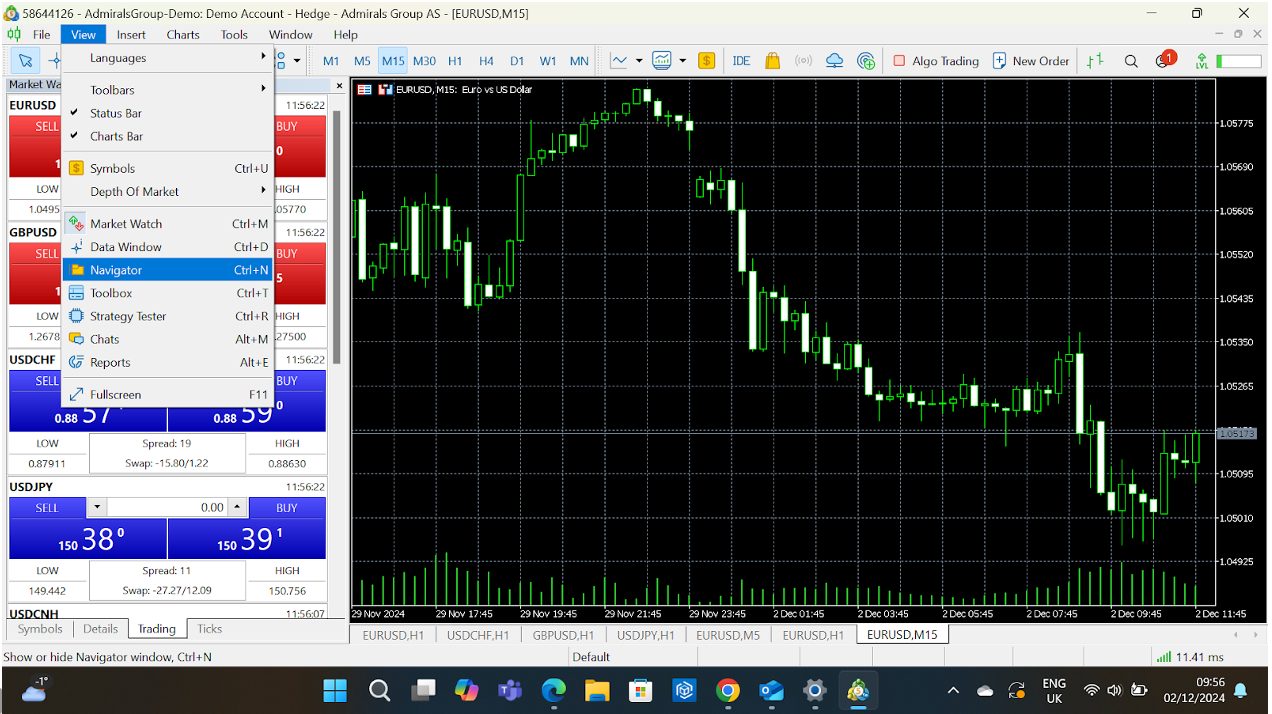
Toolbox
What Is It?
The Toolbox is your all-in-one tracker for open trades, account history, news, alerts, and more. It’s where you monitor the status of your trading activities and manage notifications.
How Does It Work?
- Trade Tab: Shows your current open positions, pending orders, and overall account balance.
- History Tab: A detailed log of all your closed trades – great for reviewing your performance.
- News Tab: Keeps you updated with market news from your broker.
- Alerts Tab: Manage alerts you’ve set for price levels or economic events.
- Mailbox Tab: Receive essential messages from your broker.
- Journal Tab: Tracks all platform activities, such as login history or order executions.
How To Navigate Toolbox
- Open Toolbox: Press Ctrl+T or go to View > Toolbox.
- Switch Tabs: Click the tabs at the bottom of the Toolbox window (eg Trade, History).
- Set Alerts: Go to the Alerts tab, right-click, and choose Create. Set conditions like when EUR/USD hits 1.1000.
- View Performance: Use the History tab to filter trades by day, week, or month to analyze your results.
Monitor your real-time profit/loss and margin usage on the Trade tab. I find it crucial for managing my risk.
Paul HolmesAuthor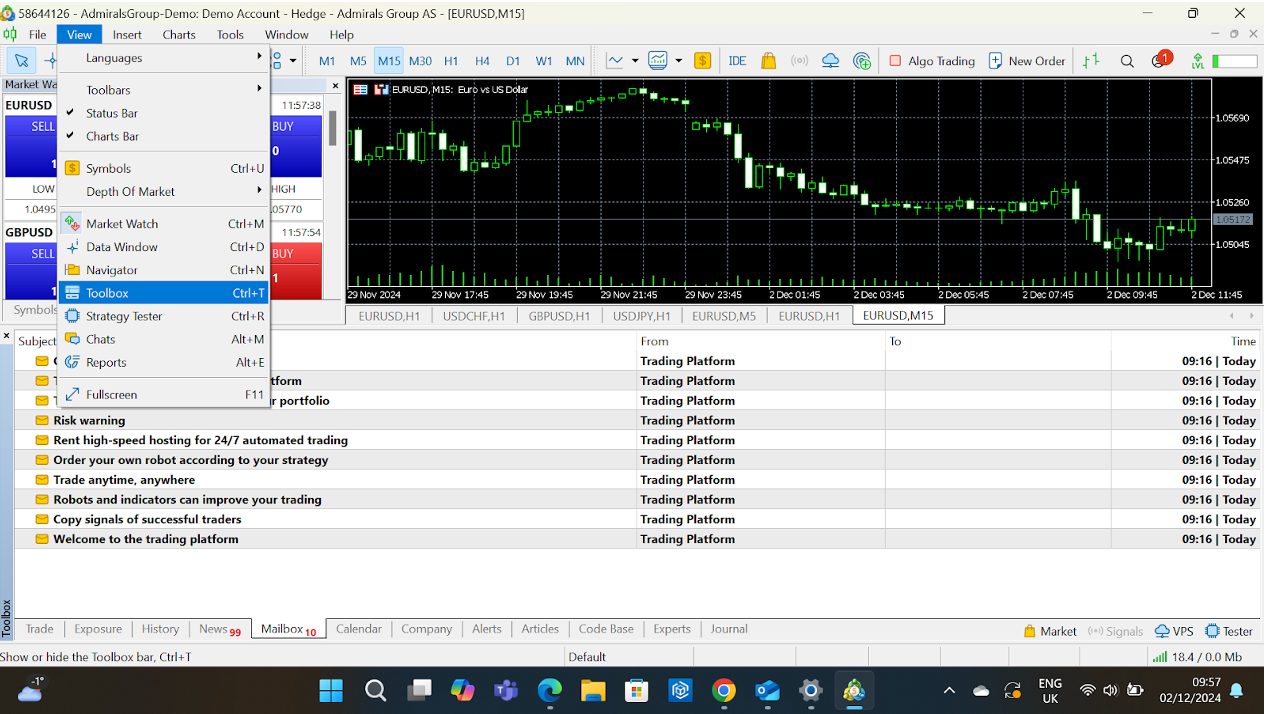
Besides these three core features, there are several notable tools that will also appeal to active traders:
Multi-Asset Trading
Many day traders love variety, and MT5 delivers big time. You can trade forex, stocks, indices, commodities, and futures from one platform.
Real-life perk: Suppose you’re trading EUR/USD in the morning and eyeing US tech stocks in the afternoon. With MT5, there’s no need to switch platforms.
I use the Market Watch panel to monitor multiple markets simultaneously and create groups to keep things tidy.
Paul HolmesAuthorAdvanced Charting
MT5 takes charting to the next level with 21 timeframes (from 1 minute to 1 month) and over 80 built-in indicators.
- Chart settings: Save your favorite chart settings as templates to apply them across instruments instantly.
I once spent hours perfecting a Fibonacci retracement setup on MT5’s chart, and the precise tools made it so much easier to spot critical levels.
Paul HolmesAuthor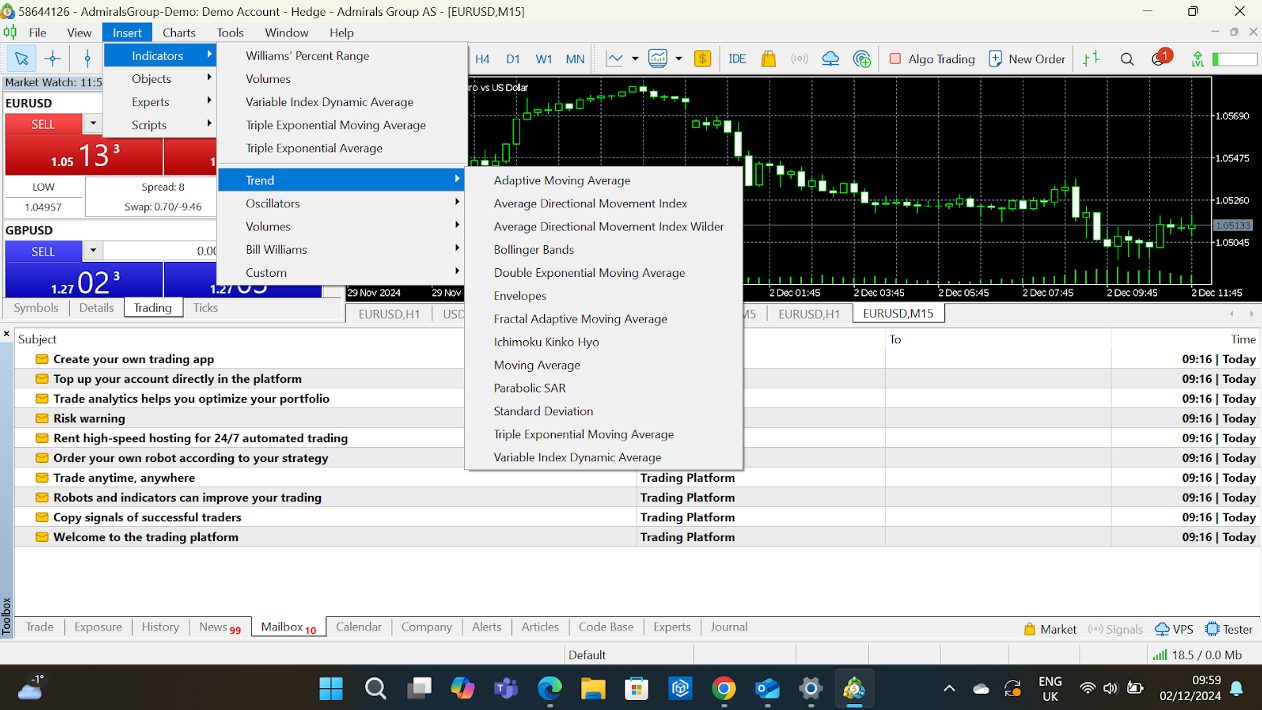
Algorithmic Trading With Expert Advisors (EAs)
MT5’s support for automated trading strategies makes it a dream come true for tech-savvy traders.
You can write your programmes in MQL5 or download pre-built EAs.
- Switching to MT5 for EA testing can be a game-changer. The backtesting speed alone saves hours.
- Use MT5’s strategy tester to backtest your EA on historical data before deploying it live.
I use EAs for heavy lifting by automating repetitive trading tasks.
Paul HolmesAuthor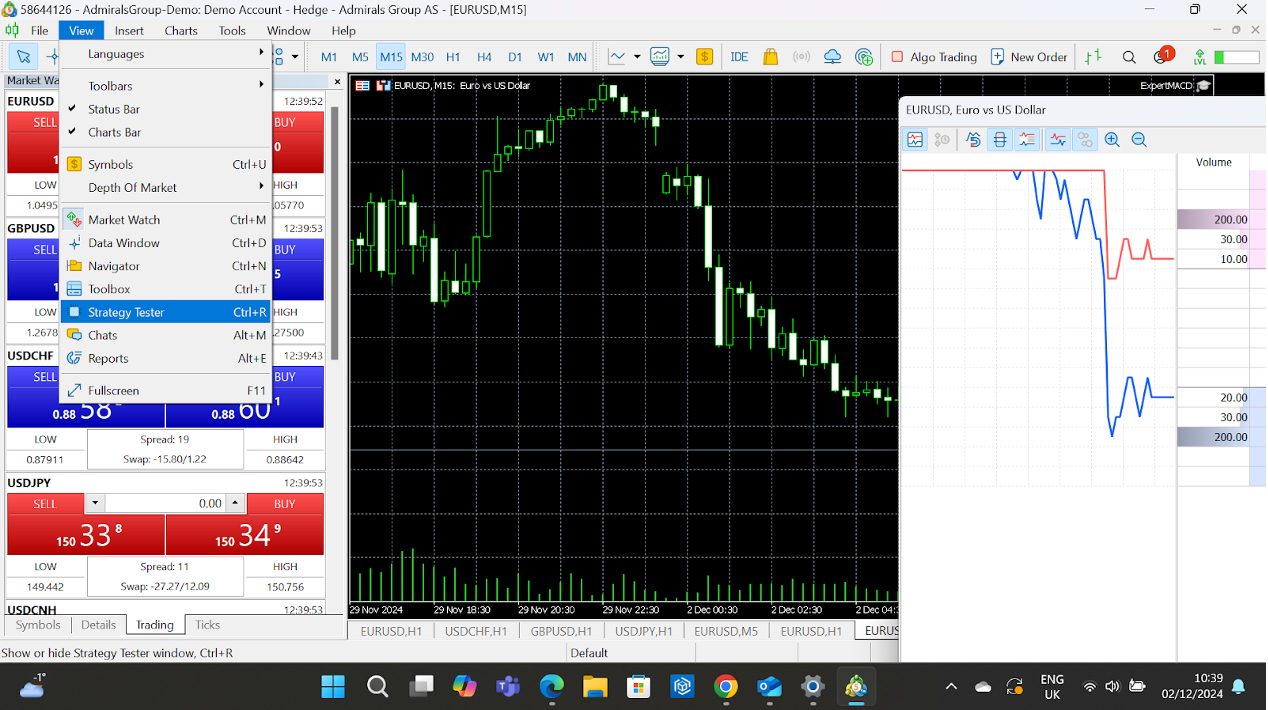
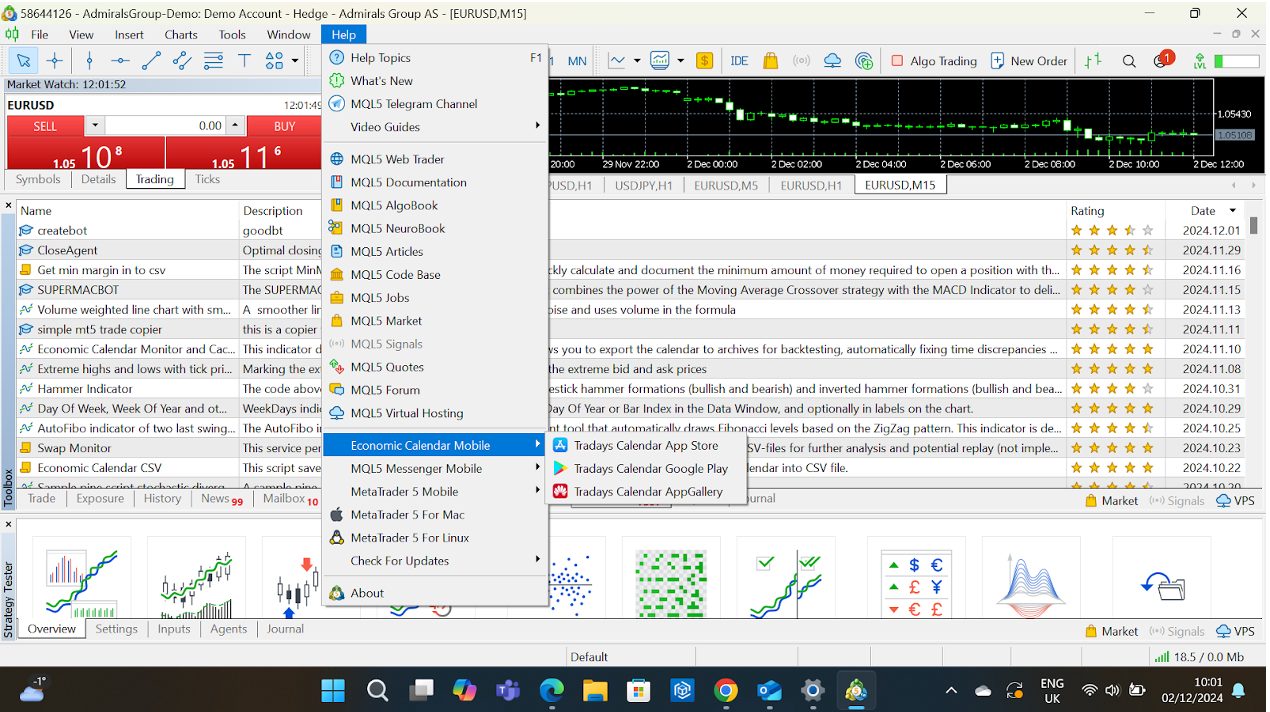
Built-In Economic Calendar
Stay ahead of market-moving events without leaving the platform. The economic calendar, which you won’t find in MT4, highlights key reports and forecasts.
- MT5 links the calendar to charts to see how past events affected price movements.
- Combine the calendar with alerts to get notified about upcoming events that matter to your trades.
Fast Execution & Depth Of Market (DOM)
For scalpers and day traders, speed and pricing transparency are crucial. MT5’s DOM shows the real-time order book.
Seeing the depth of market helps me gauge liquidity before placing big orders – it’s an absolute lifesaver for my trading strategy.
Paul HolmesAuthor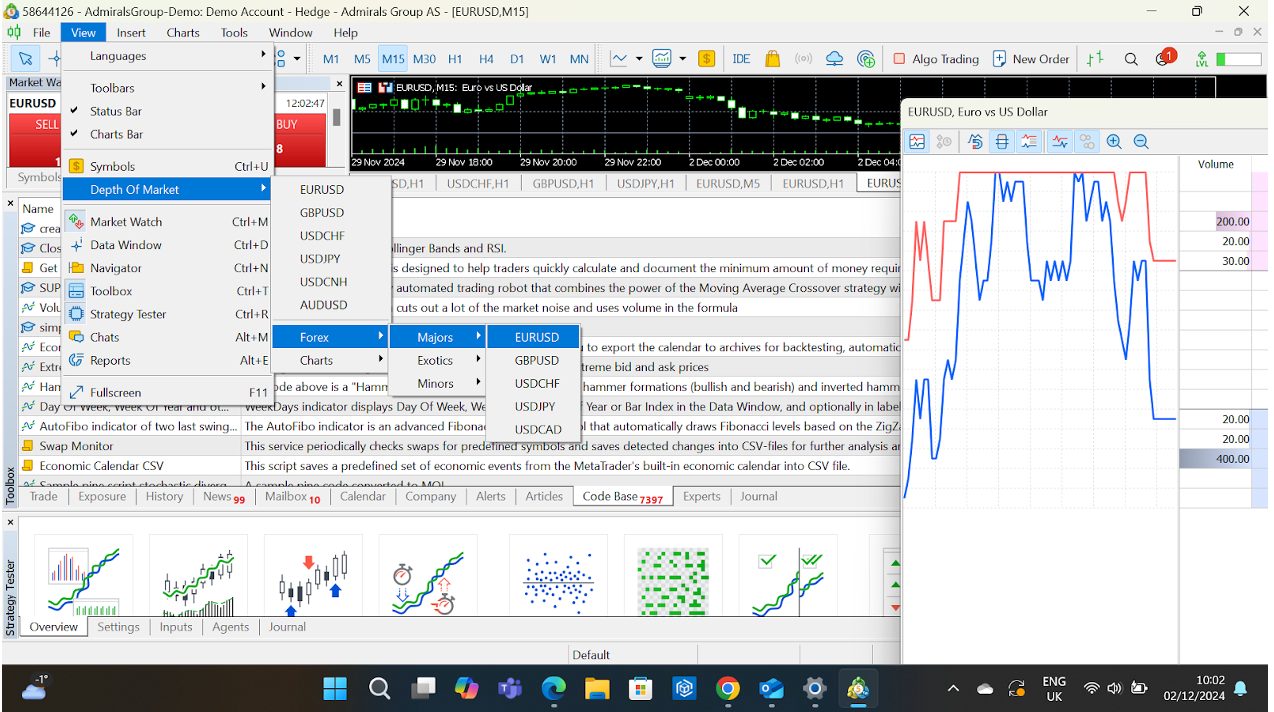
How To Customize MT5
MT5 gives you total control over how your workspace looks and functions:
- Dockable Panels: Rearrange panels like Market Watch, Navigator, and Toolbox to create your perfect setup.
- Custom Indicators: Beyond the built-ins, you can add custom indicators downloaded from the MQL5 marketplace.
- Shortcuts: Set hotkeys for frequent actions; this is a massive time-saver for active traders.
Create different profiles for different trading strategies. For example, I can have one for scalping with smaller timeframes and another for swing trading with higher ones.
Paul HolmesAuthorLet’s break it all down:
Chart Customization
Charts are the heart of any platform for day traders, and MT5 offers a ton of ways to tweak them to your liking.
Change Chart Styles
- Options: Choose from three chart types: Line, Bar, or Candlestick.
- How-To: Right-click on the chart > Properties > Choose your style under Common.
Add Indicators
- Options: MT5 comes preloaded with 80+ indicators (eg Moving Averages, RSI, Bollinger Bands), and you can add custom indicators too.
- How-To: Drag indicators from the Navigator to your chart or download custom ones from the MQL5 marketplace.
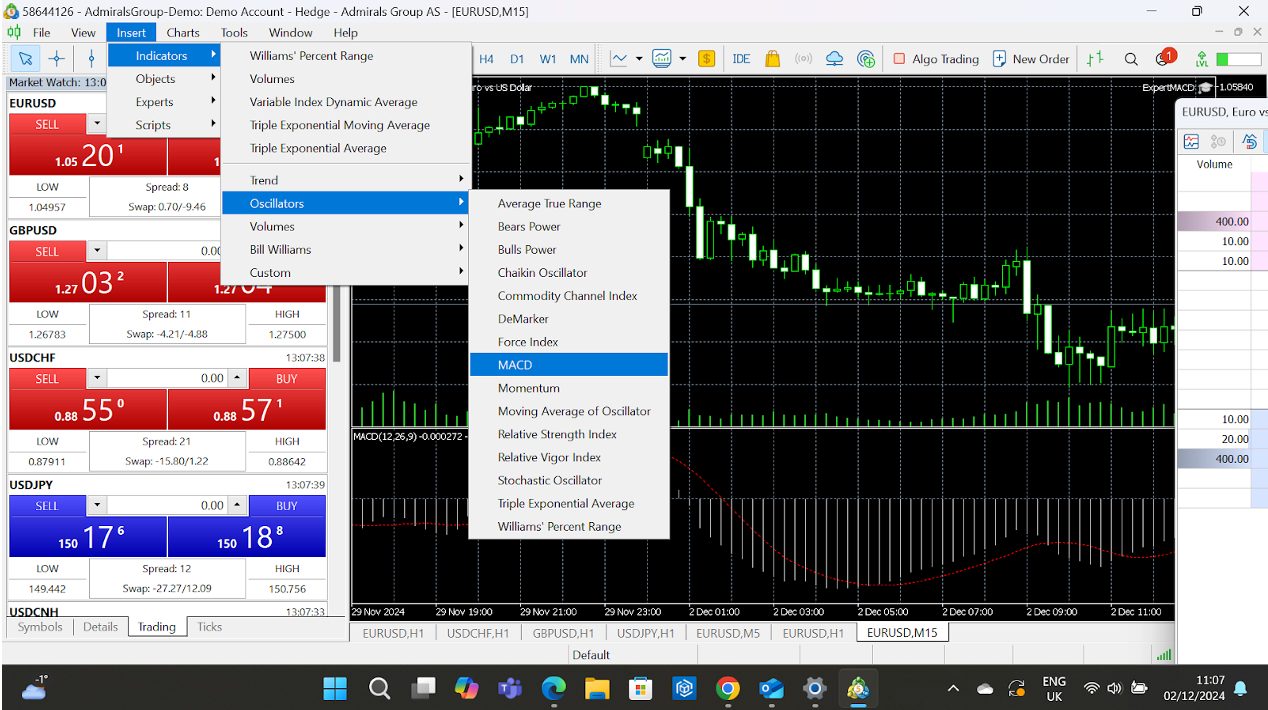
I often stack multiple indicators in the same sub-window (e.g., RSI and MACD) to save space and get a combined view.
Paul HolmesAuthorCustomize Chart Appearance
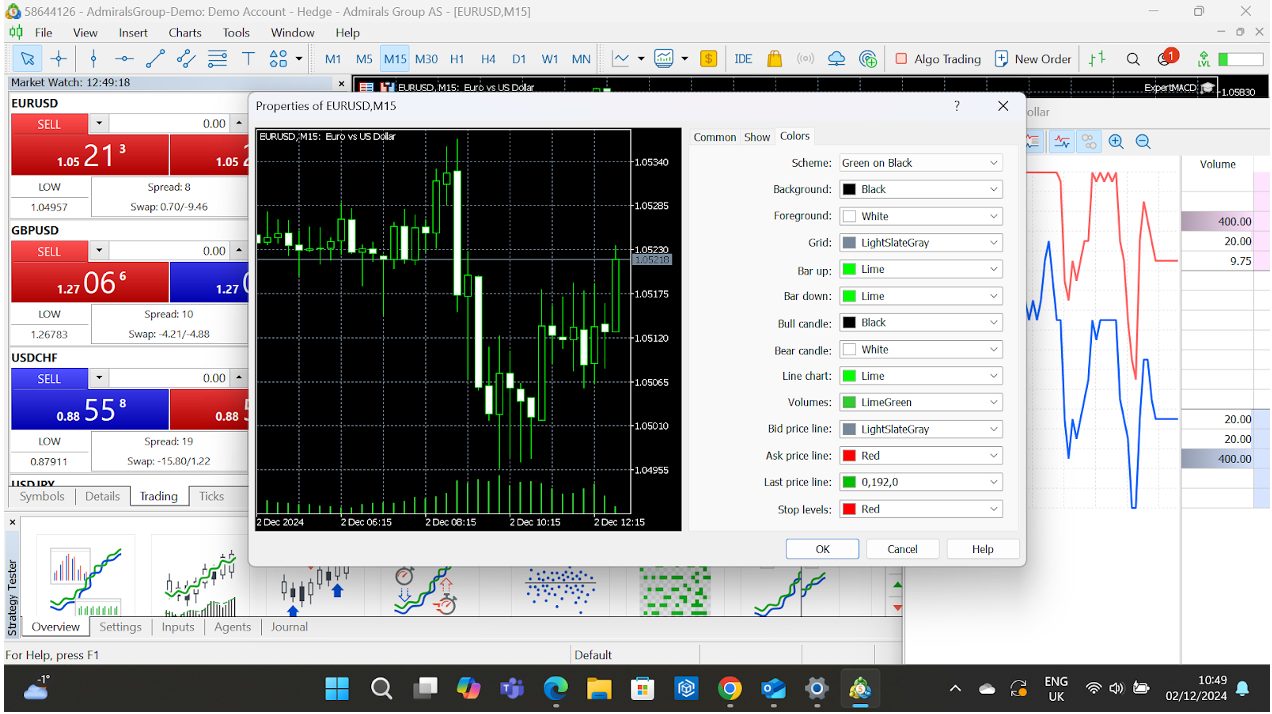
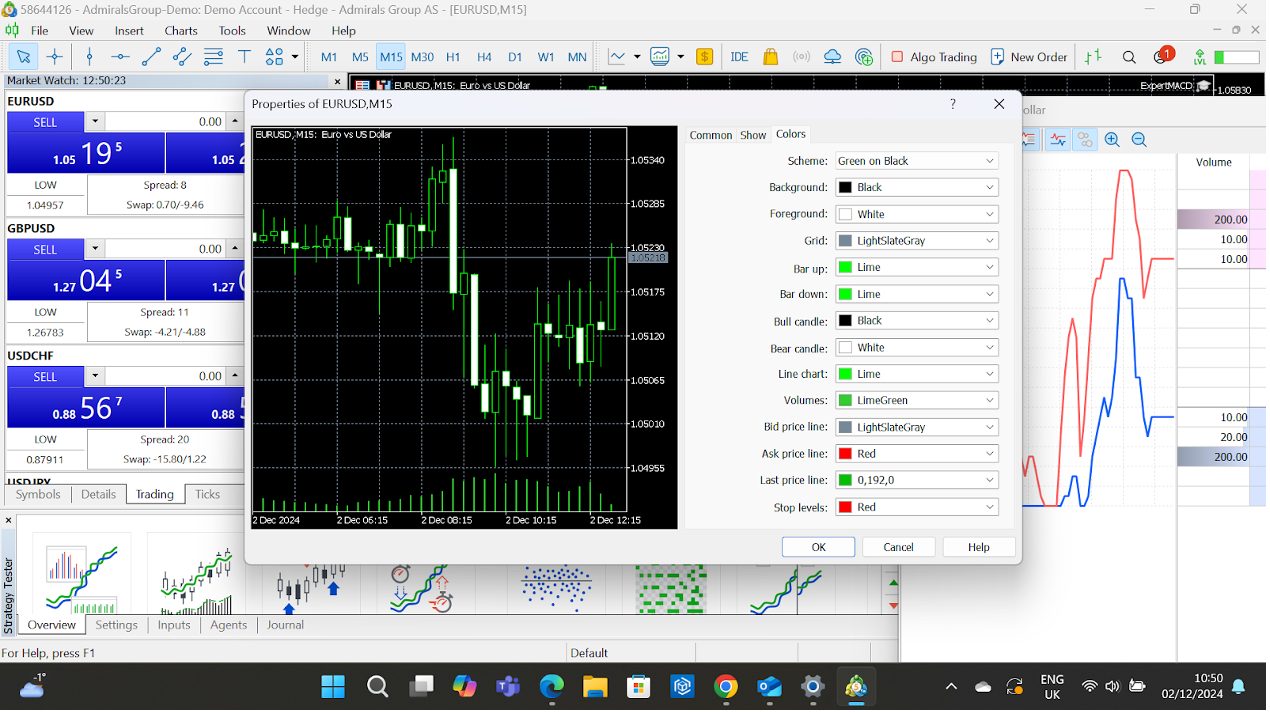
- Colours: Adjust the colour of candles, gridlines, backgrounds, and more.
- How-To: Right-click > Properties > Colors tab.
- Templates: Save your preferred chart style (timeframe, indicators, colours) as a template.
- How-To: Right-click > Template > Save Template.
Use Multiple Timeframes
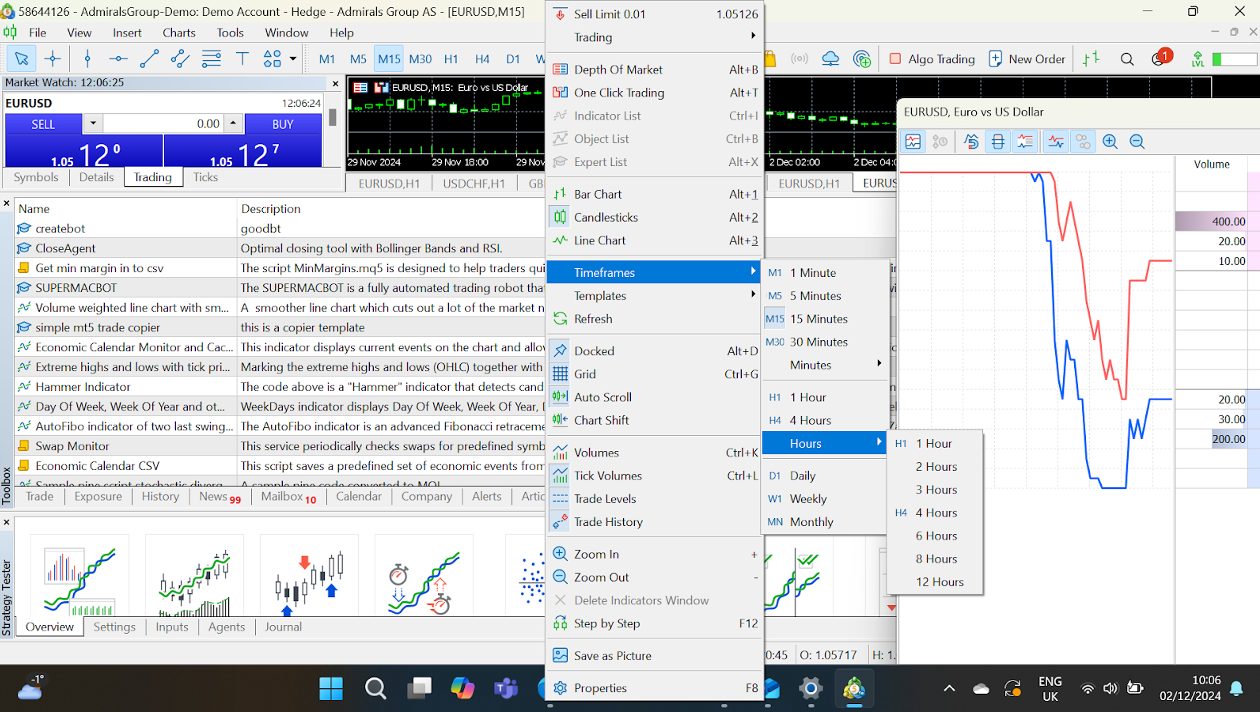
- Why It’s Beneficial: Analyze trends across timeframes with just a click; great for strategy building.
- How-To: Right-click on the chart > Timeframes > Select from 1-minute to 1-month views.
Workspace Customization
Dockable Panels
MT5 lets you rearrange panels like Market Watch, Navigator, and Toolbox to suit your style.
- How-To: Drag and drop any panel to dock it in a new position or leave it floating.
Multiple Monitors
If you’re juggling multiple markets, spread your charts across several monitors.
- How-To: Right-click on the chart tab > Detach Window.
Custom Profiles
Set up different profiles for various trading strategies or markets. For example:
- A forex profile with charts for EUR/USD, GBP/USD, and USD/JPY.
- A stocks profile with S&P 500 and Nasdaq charts.
- How-To: Go to File > Profiles > Save Profile As.
Keyboard Shortcuts & Hotkeys
MT5 is a hotkey lover’s dream. You can assign shortcuts for nearly every action.
- Default Shortcuts:
- Ctrl+T: Show/Hide Toolbox.
- Ctrl+M: Show/Hide Market Watch.
- F9: Open the trading order window.
- Alt+T: Activate one-click trading.
- Custom Hotkeys:
- Go to Tools > Options > Hotkeys tab.
Use shortcuts for actions like switching timeframes or closing charts; this helps me save precious seconds during fast markets.
Paul HolmesAuthorMarket Watch Customization
This is where you monitor all the instruments you can trade.
- Add/Remove Symbols: Right-click in the Market Watch window > Symbols > Search and select/deselect instruments.
- Create Custom Groups: Organize instruments into categories like forex pairs, commodities, and indices.
- Tick Chart Display: Double-click any instrument to see its tick chart – ideal for scalpers.
Depth Of Market (DOM) Settings
Active traders using DOM can customize their views.
- Options: Switch between Standard, Market Depth, and Price Ladder styles.
- How-To: Right-click in the DOM window > Settings.
I use the DOM for precise entry/exit planning, especially in highly liquid markets.
Paul HolmesAuthorAlerts & Notifications
Stay on top of price changes without constantly watching the screen.
- Set Alerts:
- Right-click on the Price Line or in Toolbox > Alerts tab > Create.
- Example: Alert when EUR/USD hits 1.1000.
- Get Push Notifications: Sync MT5 with the mobile app to receive alerts on your phone.
- How-To: In Tools > Options > Notifications, enter your MetaQuotes ID.
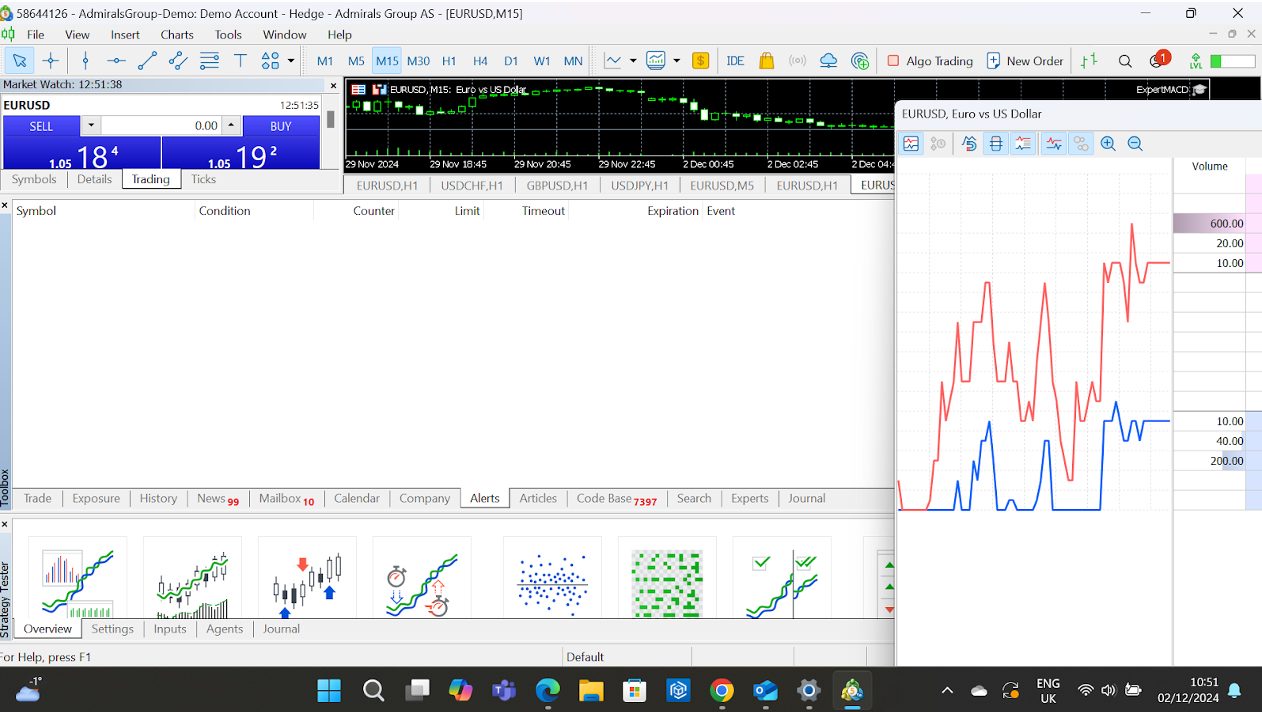
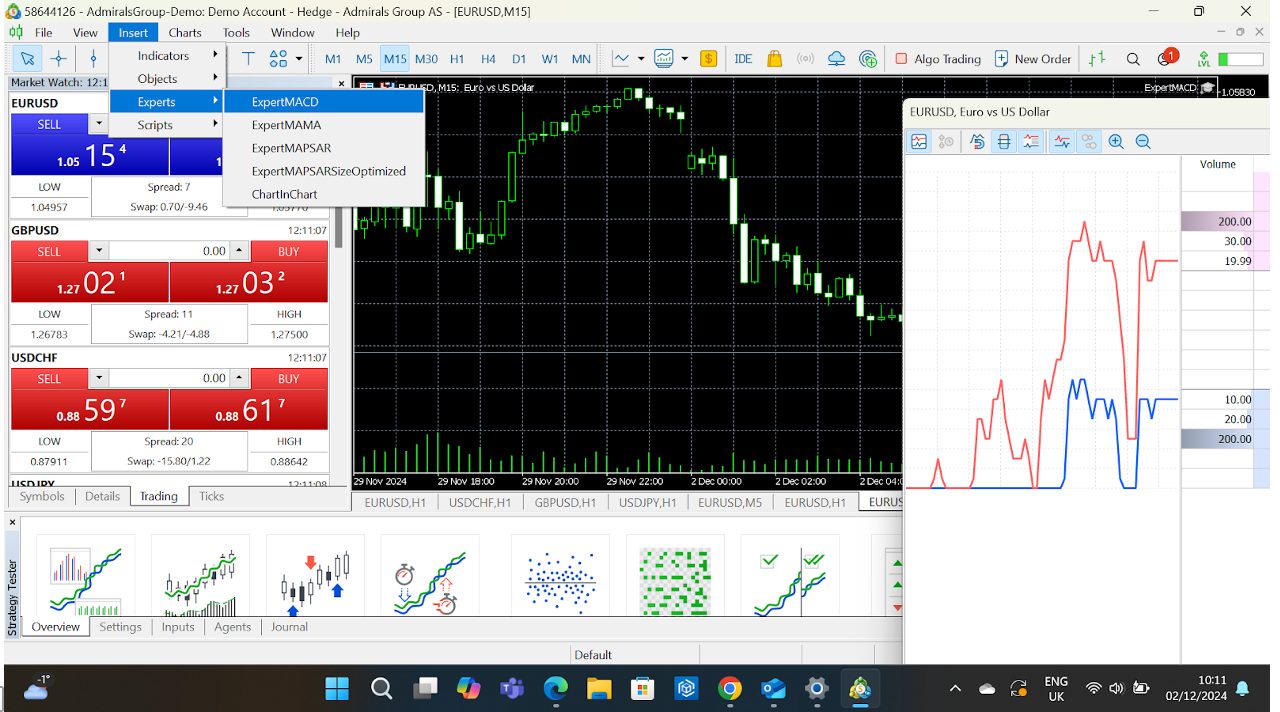
Expert Advisors (EAs) & Scripts
Automation is king on MT5, and the platform makes it easy to implement your trading bots.
- Install EAs: Drag and drop your EA file into the Experts folder (accessible via File > Open Data Folder).
- Customize EA Parameters: Adjust inputs to fine-tune the bot to your needs once added to the chart.
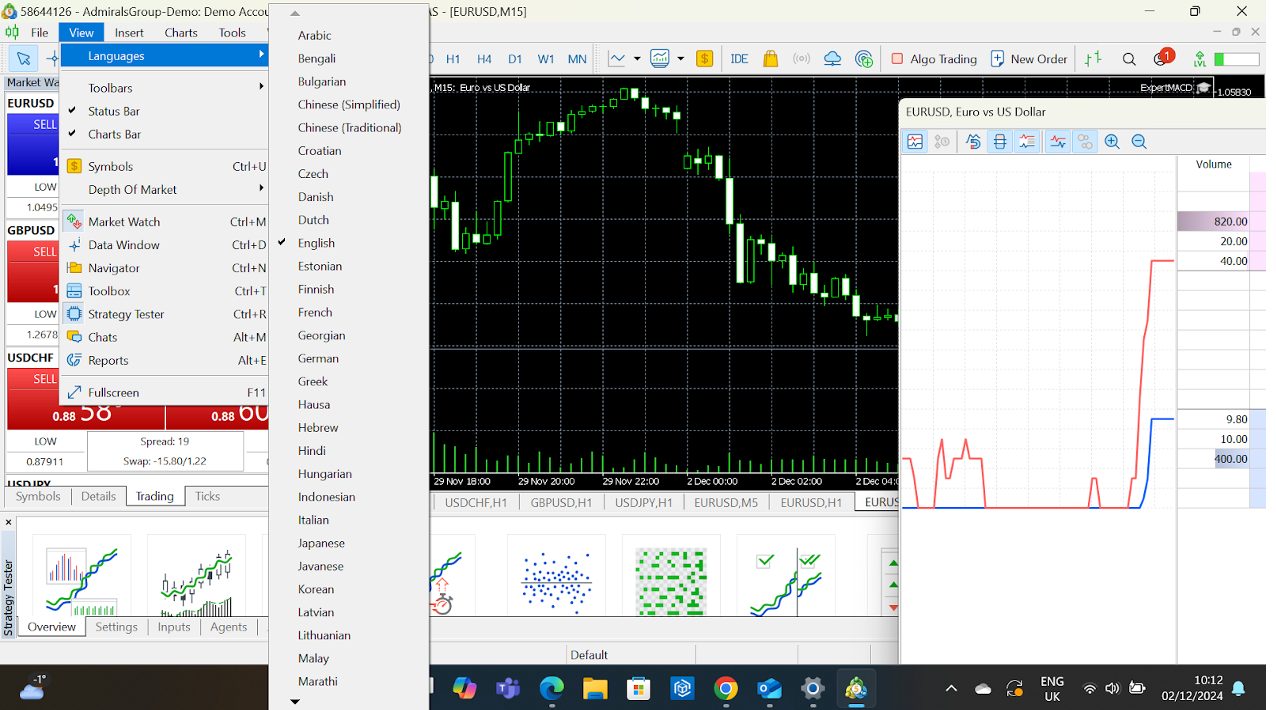
Language & Regional Settings
If English isn’t your preferred language, switch the platform’s language.
- How-To: Go to View > Languages, select your choice, and restart MT5.
The beauty of MT5 is its adaptability. It can be as straightforward or as complex as you want. Spend time playing around with these options and quickly discover what works best for you.
Start small, explore its features step by step, and watch your trading experience evolve.
Paul HolmesAuthorBottom Line
MetaTrader 5 (MT5) isn’t just a trading platform; it’s a powerhouse that caters to active traders of all levels.
Whether you’re a beginner looking for a user-friendly way to start trading or an experienced trader ready to dive into multi-asset strategies, MT5 has the tools to make it happen.
That’s partly why it’s the second most widely offered third-party platform offered by online brokers based on our analysis, trailing just its predecessor, MT4.
That said, since its app was briefly removed from the Apple App Store in September 2022, it’s facing increasing competition from other third-party platforms, notably TradingView and cTrader, which are now more widely supported at brokerages.
To get started, find the right provider for your needs from our selection of the best MetaTrader 5 brokers.
Article Sources
The writing and editorial team at DayTrading.com use credible sources to support their work. These include government agencies, white papers, research institutes, and engagement with industry professionals. Content is written free from bias and is fact-checked where appropriate. Learn more about why you can trust DayTrading.com