




Launched in 2010, MetaTrader 5 (MT5) is an all-in-one toolkit that’s proven a hit with active traders, and has been integrated by hundreds of online brokers.
But which of these providers offers the best MetaTrader 5 experience? We’ve done the legwork for you – discover DayTrading.com’s pick of the top MT5 brokers following our hands-on tests.
As a veteran MT5 user, I’ll also share my pro tips for getting the most out of the latest software from MetaQuotes.
6 Top MetaTrader 5 Brokers
We’ve put 143 brokers through their paces as of October 2026, and these are the 6 best brokers with MetaTrader 5 integration in Jersey:
-
- Demo account
- Platforms: MT4, MT5, TradingCentral
- Min. deposit: $5
-
- Demo account
- Min. deposit: $100
- Min. trade: 0.01 Lots
-
- Demo account
- Regulator: FSC
- Platforms: R StocksTrader, MT4, MT5, TradingView
-
- Demo account
- Min. deposit: $0
- Min. trade: 0.01 Lots
73-89% of retail investor accounts lose money when trading CFDs -
- Demo account
- Regulator: ASIC, CySEC, FSA, SCB, CMA-Kenya
- Min. deposit: $200
-
- Demo account
- Regulator: FCA, ASIC, CySEC, FSC, SCB, FSA
- Platforms: MT4, MT5, TradingView, TradeLocker
71.28% of retail traders lose money when trading CFDs






Learn how we test brokers and why you can trust our ratings.
This is why we think these brokers are the best in this category in 2026:
- XM 4.8/5 When we traded on XM’s MT5, execution was fast and spreads averaged 0.6–1.0 pips on majors, depending on account type - Ultra Low accounts offer tighter pricing. No commissions on most trades, low deposit minimums, and no inactivity fee in early use. Strong asset diversity and reliable platform performance across forex, indices, and stocks.
- AvaTrade 4.9/5 When we tested AvaTrade’s MT5 platform, it stood out for its zero-commission model and fixed spreads—around 0.9 pips on majors. Asset variety is solid across forex, crypto, indices, and commodities, though execution speed and slippage control lagged behind some other top MT5 brokers in our rankings.
- RoboForex 4.5/5 When we tested RoboForex’s MT5, execution was fast and spreads started from 0.0 pips on Pro accounts with $3 per side commissions. The platform supports a wide range of assets - forex, indices, commodities, and cryptocurrencies - with advanced charting and risk management tools for active traders.
- Pepperstone 4.8/5 When we tested Pepperstone’s MT5 setup, execution was lightning-fast, even on volatile assets. Spreads averaged 0.1–0.3 pips on EUR/USD via Razor accounts, with $3.50 per side commissions. No minimum deposit, no inactivity fee, and a huge CFD range. Advanced order tools and smart risk features were available.
- IC 4.8/5 When we tested IC’s MT5, execution was among the fastest we've seen, ideal for scalping and high-frequency trading. Raw spreads hit 0.0 pips on majors, with $3.00 per side commissions. No inactivity fee, no deposit minimum, and a vast CFD lineup - forex, crypto, indices, and commodities all covered.
- Eightcap 4.6/5 When we used Eightcap’s MT5, execution was sharp with spreads from 0.0 pips and $3.50 per side commissions on Raw accounts. It offers a deep CFD range, including crypto and indices. What stood out was FlashTrader - its advanced custom tool for rapid order placement and automation.
Best MetaTrader 5 (MT5) Brokers In 2026 Comparison
| Broker | MT5 Integration | MT5 Demo | Automated Trading | Instruments | Regulators | Minimum Deposit |
|---|---|---|---|---|---|---|
| XM | ✔Yes | ✔Yes | Expert Advisors (EAs) on MetaTrader | CFDs, Forex, Stocks, Commodities, Indices, Thematic Indices, Precious Metals, Energies | CySEC, DFSA, FSCA, SCA, FSA, FSC-Belize, FSC-Mauritius, CMA-Kenya, CMA-UAE | $5 |
| AvaTrade | ✔Yes | ✔Yes | Expert Advisors (EAs) on MetaTrader | CFDs, Forex, Stocks, Indices, Commodities, ETFs, Bonds, Crypto, Spread Betting, Futures | ASIC, CySEC, FSCA, ISA, CBI, JFSA, BVI, FSRA/ADGM, AFM, CMA-Kenya, CIRO (via Friedberg Direct) | $100 |
| RoboForex | ✔Yes | ✔Yes | Expert Advisors (EAs) on MetaTrader, Strategy Builder in R StocksTrader | CFDs, Forex, Stocks, Indices, Commodities, ETFs, Futures, Crypto | FSC | $10 |
| Pepperstone | ✔Yes | ✔Yes | Expert Advisors (EAs) on MetaTrader, cBots on cTrader | CFDs, Forex, Currency Indices, Stocks, Indices, Commodities, ETFs, Crypto CFDs, Spread Betting | FCA, ASIC, CySEC, BaFin, DFSA, SCA, SCB, CMA-Kenya | $0 |
| IC | ✔Yes | ✔Yes | Expert Advisors (EAs) on MetaTrader, cBots on cTrader, Myfxbook AutoTrade | CFDs, Forex, Stocks, Indices, Commodities, Bonds, Futures, Crypto | ASIC, CySEC, FSA, SCB, CMA-Kenya | $200 |
| Eightcap | ✔Yes | ✔Yes | Expert Advisors (EAs) on MetaTrader | CFDs in Forex, Stocks, Indices, Commodities, Crypto | FCA, ASIC, CySEC, FSC, SCB, FSA | $100 |
Community Sentiment
See how users rate these brokers based on the average customer ratings submitted on DayTrading.com, plus ratings from Trustpilot, the Apple App Store and Google Play.
| Broker | Our Users' Rating | Trustpilot Score | Trustpilot Reviews | iOS App Rating | Android App Rating |
|---|---|---|---|---|---|
| XM | 3078 | ||||
| AvaTrade | 13616 | ||||
| RoboForex | 775 | ||||
| Pepperstone | 3712 | ||||
| IC | 2 | ||||
| Eightcap | 3908 |
XM
With a low $5 minimum deposit, advanced charting platforms in MT4 and MT5, expanding range of markets, and a Zero account offering spreads from 0.0, XM provides all the essentials for active traders.
 Christian Harris, Reviewer
XM quick facts
- Demo Account
- ✔Yes
- Instruments
- CFDs, Forex, Stocks, Commodities, Indices, Thematic Indices, Precious Metals, Energies
- Regulator
- CySEC, DFSA, FSCA, SCA, FSA, FSC-Belize, FSC-Mauritius, CMA-Kenya, CMA-UAE
- Platforms
- MT4, MT5, TradingCentral
- Minimum Deposit
- $5
- Minimum Trade
- 0.01 Lots
- Account Currencies
- USD, EUR, GBP, JPY, ZAR
Pros
- XM stands out for its commitment to trader education, with a wealth of well-presented resources, including webinars, tutorials, and even real-time trading sessions through XM Live.
- XM secured a category 5 license from the Securities and Commodities Authority (SCA) of the United Arab Emirates in late 2025, strengthening its regulatory credentials and making it a strong option for traders in the Middle East.
- XM’s customer support has delivered over years of testing, with 24/7 assistance in 30 languages, response times of under 2 minutes and a growing Telegram channel.
Cons
- While the XM app stands out for its usability and exclusive copy trading products, the selection of technical analysis tools needs to be improved to meet the needs of advanced traders.
- XM is falling behind the curve by not offering cTrader, which is favored over MetaTrader by some serious traders for its smoother user experience and superior charting package.
- Although trusted and generally well-regulated in some regions, XM also has global entities registered with the weak regulators like FSC (Belize) and FSA (Seychelles), whilst UK clients are no longer accepted, reducing its market reach.
AvaTrade
AvaTrade offers active traders everything they need: an intuitive WebTrader, powerful AvaProtect risk management, a smooth 5-minute sign-up process, and dependable support you can rely on in fast-moving markets.
 Jemma Grist, Reviewer
AvaTrade quick facts
- Demo Account
- ✔Yes
- Instruments
- CFDs, Forex, Stocks, Indices, Commodities, ETFs, Bonds, Crypto, Spread Betting, Futures
- Regulator
- ASIC, CySEC, FSCA, ISA, CBI, JFSA, BVI, FSRA/ADGM, AFM, CMA-Kenya, CIRO (via Friedberg Direct)
- Platforms
- WebTrader, AvaTradeGO, AvaOptions, AvaFutures, MT4, MT5, AlgoTrader, TradingView, TradingCentral, DupliTrade
- Minimum Deposit
- $100
- Minimum Trade
- 0.01 Lots
- Account Currencies
- USD, EUR, GBP, CAD, AUD, ZAR
Pros
- Support at AvaTrade performed excellently during testing, with response times of 3 minutes and localized support in major trading jurisdictions, including the UK, Europe and the Middle East.
- The WebTrader excelled in our hands-on tests, sporting a user-friendly interface for beginners, complete with robust charting tools like 6 chart layouts and 60+ technical indicators.
- Years on, AvaTrade remains one of the few brokers offering a bespoke risk management tool, AvaProtect, that insures losses up to $1M for a fee and is easy to activate on the platform.
Cons
- The AvaSocial app is good but not great – the look and feel, plus the navigation between finding strategy providers and account management needs upgrading to rival category leaders like eToro.
- While signing up is a breeze, AvaTrade lacks an ECN account like Pepperstone or IC Markets, which provides the raw spreads and ultra-fast execution many day traders are looking for.
- AvaTrade’s WebTrader has improved, but work is still needed in terms of customizability – frustratingly widgets like market watch and watchlists can’t be hidden, moved, or resized.
RoboForex
RoboForex is great if you want a vast range of 12,000+ day trading markets with ECN accounts, powerful charting and loyalty promotions. It also stands out for stock traders with its user-friendly R StocksTrader platform, featuring 3,000+ shares, fees from $0.01 and sophisticated watchlists.
Christian Harris, Reviewer
RoboForex quick facts
- Demo Account
- ✔Yes
- Instruments
- CFDs, Forex, Stocks, Indices, Commodities, ETFs, Futures, Crypto
- Regulator
- FSC
- Platforms
- R StocksTrader, MT4, MT5, TradingView
- Minimum Deposit
- $10
- Minimum Trade
- 0.01 Lots
- Account Currencies
- USD, EUR
Pros
- The broker offers two commission-free withdrawals each month in the Free Funds Withdrawal program, helping day traders to minimize transaction costs.
- RoboForex offers over 12,000 instruments, providing more short-term trading opportunities than the vast majority of online brokers, with forex, stocks, indices, ETFs, commodities, and futures.
- RoboForex is known for its tight spreads starting from 0 pips and low minimum deposits from $10, making it accessible to those on a budget. The ability to trade with micro lots further lowers the barrier to entry for new traders.
Cons
- Despite offering a range of platforms, RoboForex still doesn't support the increasingly popular cTrader. This might deter traders who prefer this specific platform for their day trading activities and is available at firms like Fusion Markets.
- Despite 15+ years in the industry and registering with the Financial Commission, RoboForex is authorized by one ‘Red-Tier’ regulator – the FSC in Belize, lowering the level of regulatory protections for traders.
- RoboForex now restricts base currency options to USD and EUR. This limitation may inconvenience day traders preferring to manage their accounts in other currencies, while potentially leading to conversion fees.
Pepperstone
Pepperstone stands out as a top choice for day trading, offering razor-sharp spreads, ultra-fast execution, and advanced charting platforms for experienced traders. New traders are also welcomed with no minimum deposit, extensive educational resources, and exceptional 24/5 support (18h a day on weekends).
Christian Harris, Reviewer
Pepperstone quick facts
- Demo Account
- ✔Yes
- Instruments
- CFDs, Forex, Currency Indices, Stocks, Indices, Commodities, ETFs, Crypto CFDs, Spread Betting
- Regulator
- FCA, ASIC, CySEC, BaFin, DFSA, SCA, SCB, CMA-Kenya
- Platforms
- Pepperstone Trading Platform, MT4, MT5, cTrader, TradingView
- Minimum Deposit
- $0
- Minimum Trade
- 0.01 Lots
- Account Currencies
- USD, EUR, GBP, CAD, AUD, NZD, JPY, CHF, HKD, SGD
Pros
- Award-winning customer support is available via telephone, email or live chat with response times of <5 minutes during testing and friendly agents knowledgeable about its products and trading tools.
- Pepperstone has greatly improved the deposit and withdrawal experience in recent years, adding Apple Pay and Google Pay in 2025, as well as PIX and SPEI for clients in Brazil and Mexico in 2024.
- There’s support for a range of industry-leading charting platforms including MT4, MT5, TradingView, and cTrader, catering to various short-term trading styles, including algo trading.
Cons
- Execution may not feel as reliable in fast markets as headline speeds suggest. In our own testing, execution was fast at desired prices, but some community complaints focus on slippage, stop-loss fills and spread-sensitive order triggers during volatile conditions.
- Overnight holding fees are higher than that found with some Market Maker brokers (usually Benchmark + 2.5%). This makes pepperstone an ideal broker for day traders and forex scalpers but less suitable for swing traders who often keep position open overnight.
- Despite improvements to its range of markets, crypto CFD offerings are still fairly limited compared to other brokers who focus on this area, such as Eightcap, and there's no option to invest in real coins.
IC
IC (formerly IC Markets) offers superior pricing, exceptionally fast execution and seamless deposits. The introduction of advanced charting platforms, notably TradingView, and the Raw Trader Plus account, ensures it remains a top choice for intermediate to advanced day traders.
Christian Harris, Reviewer
IC quick facts
- Demo Account
- ✔Yes
- Instruments
- CFDs, Forex, Stocks, Indices, Commodities, Bonds, Futures, Crypto
- Regulator
- ASIC, CySEC, FSA, SCB, CMA-Kenya
- Platforms
- MT4, MT5, cTrader, TradingView, TradingCentral, DupliTrade, Quantower
- Minimum Deposit
- $200
- Minimum Trade
- 0.01 Lots
- Account Currencies
- USD, EUR, GBP, CAD, AUD, NZD, JPY, CHF, HKD, SGD
Pros
- IC secured DayTrading.com's 'Best MT4/MT5 Broker' in 2025 for its seamless, industry-leading MetaTrader integration, refined over years to maximize the platform experience.
- IC offers fast and dependable 24/7 support based on firsthand experience, particularly when it comes to accounts and funding issues.
- As a tightly regulated and widely respected broker, IC prioritizes client security and transparency, helping to ensure a reliable trading experience globally.
Cons
- Despite four industry-leading third-party platforms, there is no proprietary software or trading app built with new traders in mind.
- Interest isn't paid on unused cash, an increasingly popular feature found at alternatives like Interactive Brokers.
- There are fees for certain withdrawal methods, including a $20 wire charge, which can eat into profits, especially for frequent withdrawals.
Eightcap
Eightcap delivers in every area for day traders with a growing selection of charting platforms, education via Labs, and AI-powered tools. Now sporting 120+ crypto CFDs, it's also become a stand-out choice for crypto trading, winning our 'Best Crypto Broker' award two years in a row.
Christian Harris, Reviewer
Eightcap quick facts
- Demo Account
- ✔Yes
- Instruments
- CFDs in Forex, Stocks, Indices, Commodities, Crypto
- Regulator
- FCA, ASIC, CySEC, FSC, SCB, FSA
- Platforms
- MT4, MT5, TradingView, TradeLocker
- Minimum Deposit
- $100
- Minimum Trade
- 0.01 Lots
- Account Currencies
- USD, EUR, GBP, CAD, AUD, NZD, SGD
Pros
- Eightcap has brought in GOLD247 for 24/7 trading opportunities on a gold/USD CFD with leverage up to 1:20, minimum trade size of 0.01 lots, and no commission, appealing to weekend traders interested in the precious metal.
- Eightcap Challenges, the broker's prop trading firm, is multi-regulated, removing the third-party risks we commonly see with white-label prop firms, and its tailoring its funded accounts to crypto traders with around 150 crypto pairs, plus it's integrated into the TradingView interface.
- After bolstering its roster in 2021, Eightcap offers one of the most extensive selections of cryptocurrency CFDs in the market, with crypto/fiat pairs, crypto/crypto pairs, plus crypto indices for broader exposure to the market.
Cons
- The demo account expires after 30 days and can only be extended upon request - a notable inconvenience compared to the likes of XM with its unlimited demo mode.
- Despite a useful library of educational guides and e-books in Labs, Eightcap still trails IG’s comprehensive toolkit for aspiring traders with its dedicated IG Academy app and 18 course categories.
- In spite of an increasing variety of tools, Eightcap doesn't offer industry favorites like Autochartist or Trading Central, which offer cutting-edge charting analytics, live news, and market insights for short-term traders.
How We Chose The Best MT5 Brokers
To compile a list of the best brokers that support MT5, we:
- Took our evolving directory that today stands at 143 online brokers,
- Pinpointed the approximately 70+ firms that have MT5 on desktop, web or mobile,
- Sorted those providers by their overall rating, combining 200+ data points with the personal views of our testers to find the very best.
How To Choose A MetaTrader 5 Broker
When selecting an MT5 broker, here are six key factors to consider:
1. Device Compatibility
Virtually every MT5 broker we’ve evaluated provides access to the software on desktop, mobile and web:
- The desktop terminal is best for advanced traders needing custom features and fast execution.
- The web solution is more beginner-friendly but can be slower and sometimes lack certain tools.
- The mobile app is perfect for on-the-go trading and is highly rated (above 4.5/5) on both iOS and Android, with iOS slightly ahead.
- Pepperstone has impressed us for years, providing a first-class trading environment on MT5’s desktop, web and mobile platforms. It’s also scooped our annual ‘Best Forex Broker’ award twice, plus our ‘Best Overall Broker’ and ‘Best Trading App’.
2. Available Trading Instruments
Unlike its predecessor MT4, which was built for forex trading, MT5 offers multi-asset trading opportunities on popular global markets spanning stocks, commodities, indices, cryptocurrencies, and CFDs.
- BlackBull continues to offer the most extensive range of instruments for trading on MT5 that we’ve seen, with over 26,000 markets covering forex, stocks, indices, commodities and more.
3. Trading Costs
Look for brokers with low spreads and minimal commissions, especially if you’re a day trader making frequent transactions.
Advanced traders may even prefer an ECN broker, which often offer spreads from 0.0 pips, low commissions, and even rebates to high-volume traders.
- IC Markets tops our rankings for pricing, with its raw spread account featuring terrific spreads averaging 0.1 pips on EUR/USD. IC Markets has also scooped our ‘Best MetaTrader Broker’ annual award in recent years.
4. Demo Account Availability
Over 95% of brokers we’ve tested offer MT5 demo accounts, allowing you to practice with virtual funds.
Great for beginners, these accounts typically last between 14 to 30 days, but some providers even offer unlimited demo access for ongoing practice of day trading strategies.
- XM impresses with its MT5 demo account that we customized with a whopping $5,000,000 in account equity. You can also keep the demo mode open alongside your live account – ideal for beginners.
5. Trustworthiness
Choose an MT5 provider with a clean track record and most importantly, authorization from a respected regulator to ensure your funds are protected.
We’ve built a proprietary Regulation & Trust Rating, putting regulators into four tiers – green, yellow, orange and red – to help you understand which regulatory licenses indicate a trustworthy brokerage.
- FOREX.com continues to earn our trust, sporting over 20 years in our industry and authorization from 9 ‘green tier’ regulators, ensuring it’s held to the highest regulatory standards in multiple jurisdictions worldwide.
6. MT5 Add-Ons
Some brokers provide advanced tools for technical analysis and risk management features through MetaTrader add-ons, taking the trading experience up a notch for serious investors.
What Is MetaTrader 5?
MetaTrader 5 is an online trading platform that connects retail investors, primarily active traders, to the financial markets.
Think of MT5 as the bigger, more advanced sibling of MetaTrader 4 (MT4). While MT4 focuses on forex trading, MT5 goes further, opening doors to other markets like stocks, commodities, and even futures.
It’s ideal for those who want to explore diverse trading opportunities without switching platforms.
Whether you’re just starting out or already an experienced pro, MT5 packs a punch with its modern features, user-friendly design, and powerful tools.
Here are the highlights:
- Multi-Asset Trading: Access to a wide range of markets beyond forex.
- Advanced Charting: Over 80 built-in technical indicators and 21 timeframes to analyze trends.
- Algorithmic Trading: Automate strategies using Expert Advisors (EAs).
- Economic Calendar: Stay updated on market-moving events directly in the platform.
- Fast Execution: Designed for speed, MT5 ensures trades are executed quickly, ideal for day trading.
- Market Watch: This is your dashboard for monitoring various instruments and their prices.
- Chart Window: Where the magic happens; analyze price movements, add indicators, or apply templates here.
- Toolbox: Your command centre for monitoring trades, account history, alerts, and more.
Getting Started With MT5
Step 1: Download & Install
- Where to Get It: Download MT5 from your broker’s website or the official MetaQuotes MT5 download.
- Compatibility: It’s available for Windows, Mac, web browsers, and mobile devices (iOS/Android).
Step 2: Set Up Your Account
- Create a demo account to practice risk-free or log in with your broker-provided credentials for live trading.
Step 3: Navigate Like A Pro
- Market Watch: Right-click to add/remove instruments.
- Navigator: Access accounts, indicators, EAs, and scripts here.
- Toolbox: Track trades, account history, alerts, and news.
Step 4: Usability Tips
- Learn the Interface: Spend time clicking around in a demo account. MT5 is intuitive, but I know from firsthand experience that familiarity makes a huge difference.
- Test Features: Whether it’s using one-click trading or adding indicators, don’t be shy to experiment.
Key Features
Let’s unpack three essential parts of the MetaTrader 5 (MT5) platform: Market Watch, Navigator, and Toolbox.
Each one plays a critical role in helping you monitor markets, manage tools, and keep track of your short-term trades.
Market Watch
What Is It?
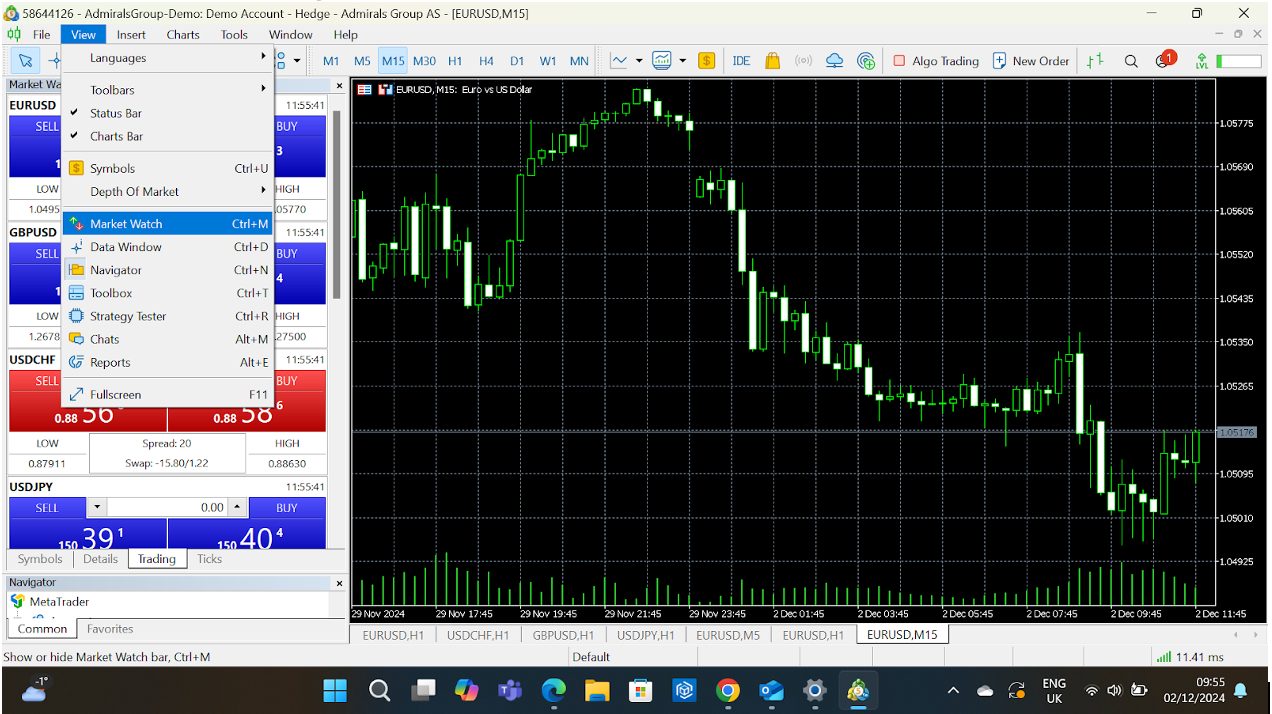
Market Watch is the command centre for all the instruments you can trade (forex pairs, stocks, indices, commodities, etc). It gives you real-time price quotes and quick access to charts and order windows.
How Does It Work?
- Price Quotes: See Bid and Ask prices for selected instruments at a glance.
- Tick Charts: Double-click an instrument to open a real-time price movement tick chart.
- Add/Remove Instruments: Customize the list to focus on the assets you actually trade.
- Depth Of Market (DOM): Right-click an instrument and select Depth of Market for a detailed view of liquidity and order book.
How To Navigate Market Watch
- Open Market Watch: If it’s not visible, press Ctrl+M or go to View > Market Watch.
- Add Instruments: Right-click anywhere in the Market Watch panel > Symbols. From here, browse categories (eg forex, indices) and double-click to add/remove assets.
- Customize Columns: Right-click > Columns. Choose what you want to display, like Spread, High/Low, or Volume.
My pro tip is to use Sets to save different groups of instruments. I find it great for switching between trading forex pairs and stocks.
 Paul HolmesAuthor
Navigator
What Is It?
The Navigator is where you manage all your trading accounts, indicators, scripts, and Expert Advisors (EAs). Think of it as your control panel for everything customizable on MT5.
How Does It Work?
- Accounts Management: Easily switch between demo and live accounts or log into a new account.
- Indicators: Access built-in technical indicators like Moving Averages, Relative Strength Index (RSI), and Bollinger Bands.
- EAs and Scripts: Manage your automated trading tools and run quick tasks using scripts.
How To Navigate Navigator
- Open Navigator: Press Ctrl+N or go to View > Navigator.
- Log In to Accounts: Double-click Accounts, then select your account or log into a new one using credentials.
- Apply Indicators: Drag an indicator from the list and drop it onto a chart. Adjust settings to match your strategy.
- Run EAs: Drag an EA onto the chart to activate it. Be sure to enable automated trading via the toolbar or Ctrl+E.
When I have a lot of custom indicators and scripts, I organize them into folders for quick access.
Paul HolmesAuthor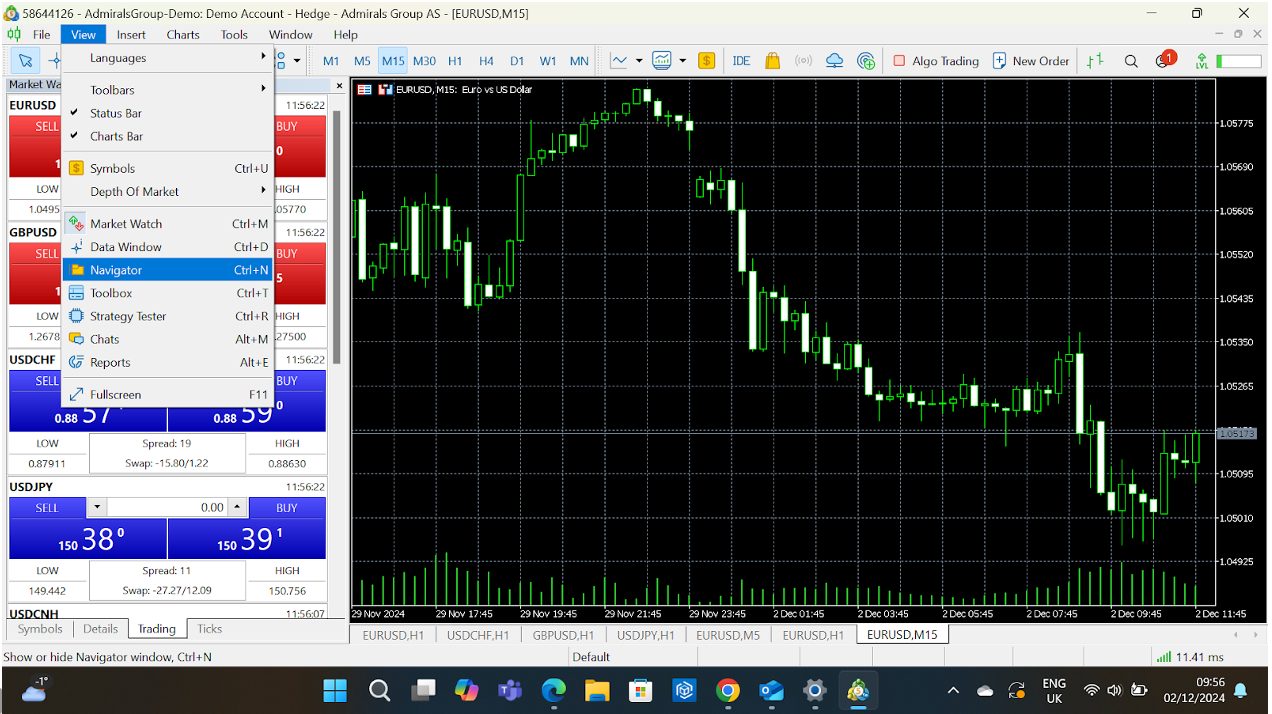
Toolbox
What Is It?
The Toolbox is your all-in-one tracker for open trades, account history, news, alerts, and more. It’s where you monitor the status of your trading activities and manage notifications.
How Does It Work?
- Trade Tab: Shows your current open positions, pending orders, and overall account balance.
- History Tab: A detailed log of all your closed trades – great for reviewing your performance.
- News Tab: Keeps you updated with market news from your broker.
- Alerts Tab: Manage alerts you’ve set for price levels or economic events.
- Mailbox Tab: Receive essential messages from your broker.
- Journal Tab: Tracks all platform activities, such as login history or order executions.
How To Navigate Toolbox
- Open Toolbox: Press Ctrl+T or go to View > Toolbox.
- Switch Tabs: Click the tabs at the bottom of the Toolbox window (eg Trade, History).
- Set Alerts: Go to the Alerts tab, right-click, and choose Create. Set conditions like when EUR/USD hits 1.1000.
- View Performance: Use the History tab to filter trades by day, week, or month to analyze your results.
Monitor your real-time profit/loss and margin usage on the Trade tab. I find it crucial for managing my risk.
Paul HolmesAuthor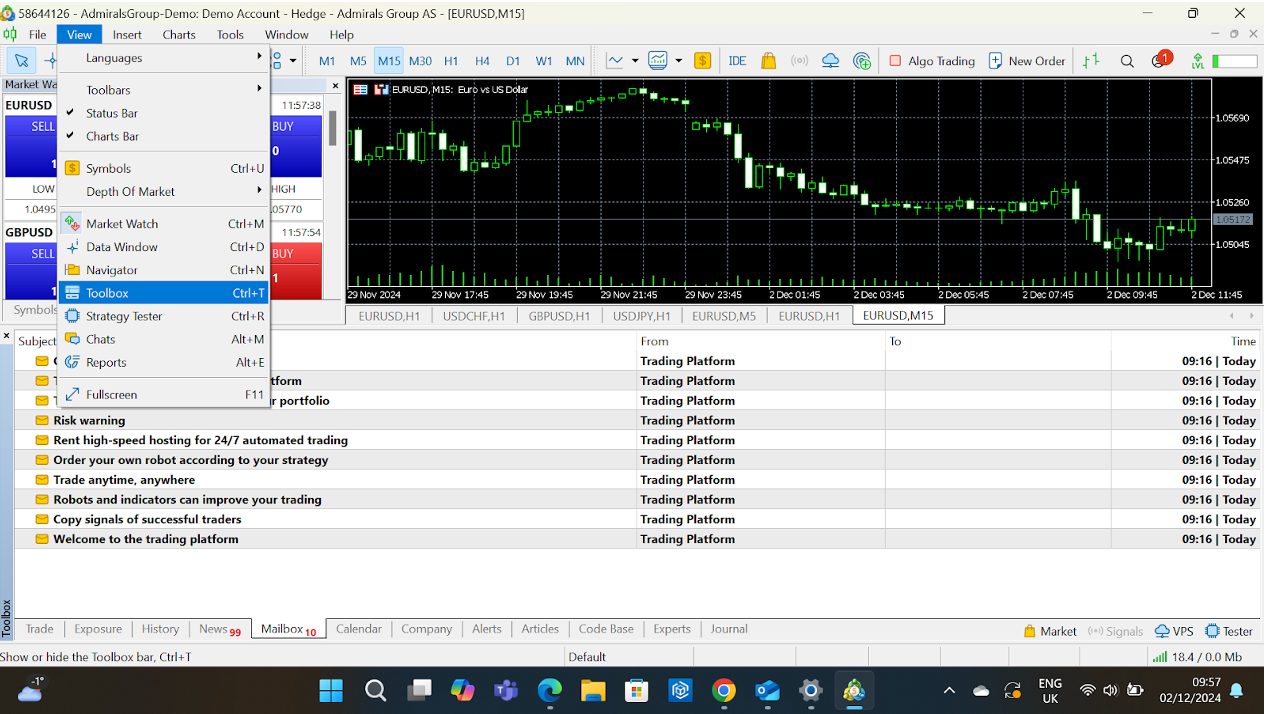
Besides these three core features, there are several notable tools that will also appeal to active traders:
Multi-Asset Trading
Many day traders love variety, and MT5 delivers big time. You can trade forex, stocks, indices, commodities, and futures from one platform.
Real-life perk: Suppose you’re trading EUR/USD in the morning and eyeing US tech stocks in the afternoon. With MT5, there’s no need to switch platforms.
I use the Market Watch panel to monitor multiple markets simultaneously and create groups to keep things tidy.
Paul HolmesAuthorAdvanced Charting
MT5 takes charting to the next level with 21 timeframes (from 1 minute to 1 month) and over 80 built-in indicators.
- Chart settings: Save your favorite chart settings as templates to apply them across instruments instantly.
I once spent hours perfecting a Fibonacci retracement setup on MT5’s chart, and the precise tools made it so much easier to spot critical levels.
Paul HolmesAuthor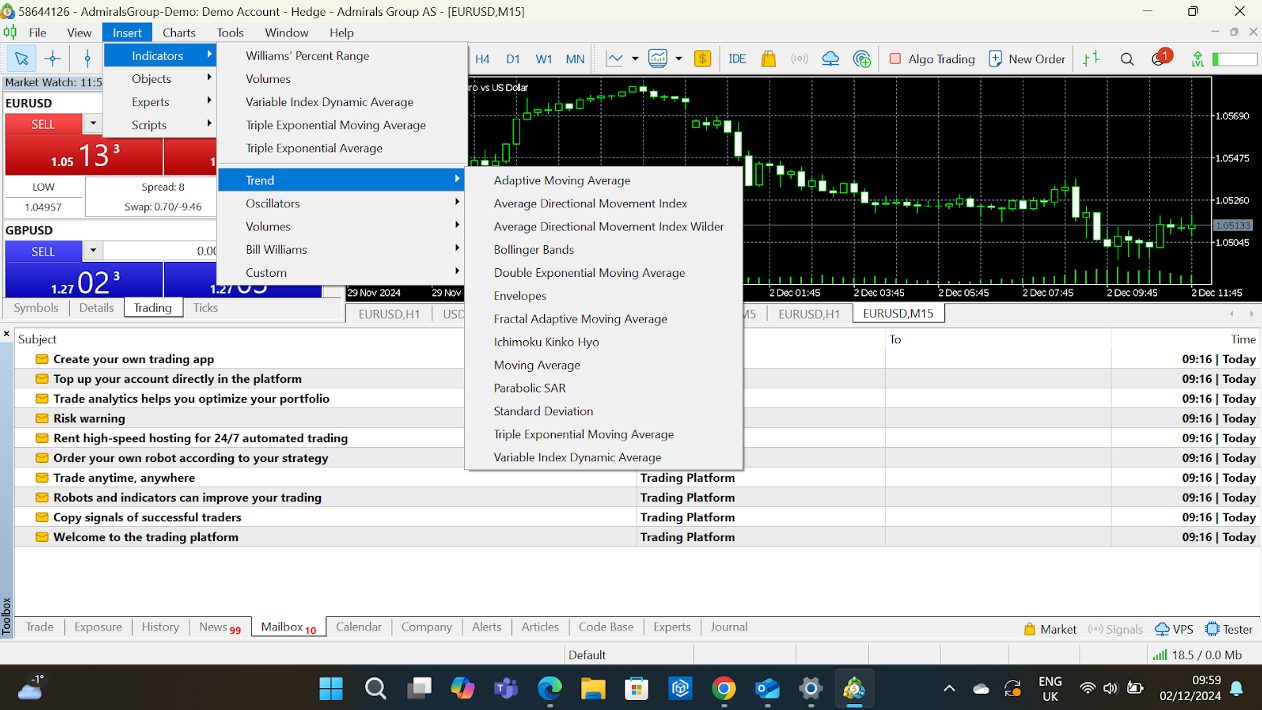
Algorithmic Trading With Expert Advisors (EAs)
MT5’s support for automated trading strategies makes it a dream come true for tech-savvy traders.
You can write your programmes in MQL5 or download pre-built EAs.
- Switching to MT5 for EA testing can be a game-changer. The backtesting speed alone saves hours.
- Use MT5’s strategy tester to backtest your EA on historical data before deploying it live.
I use EAs for heavy lifting by automating repetitive trading tasks.
Paul HolmesAuthor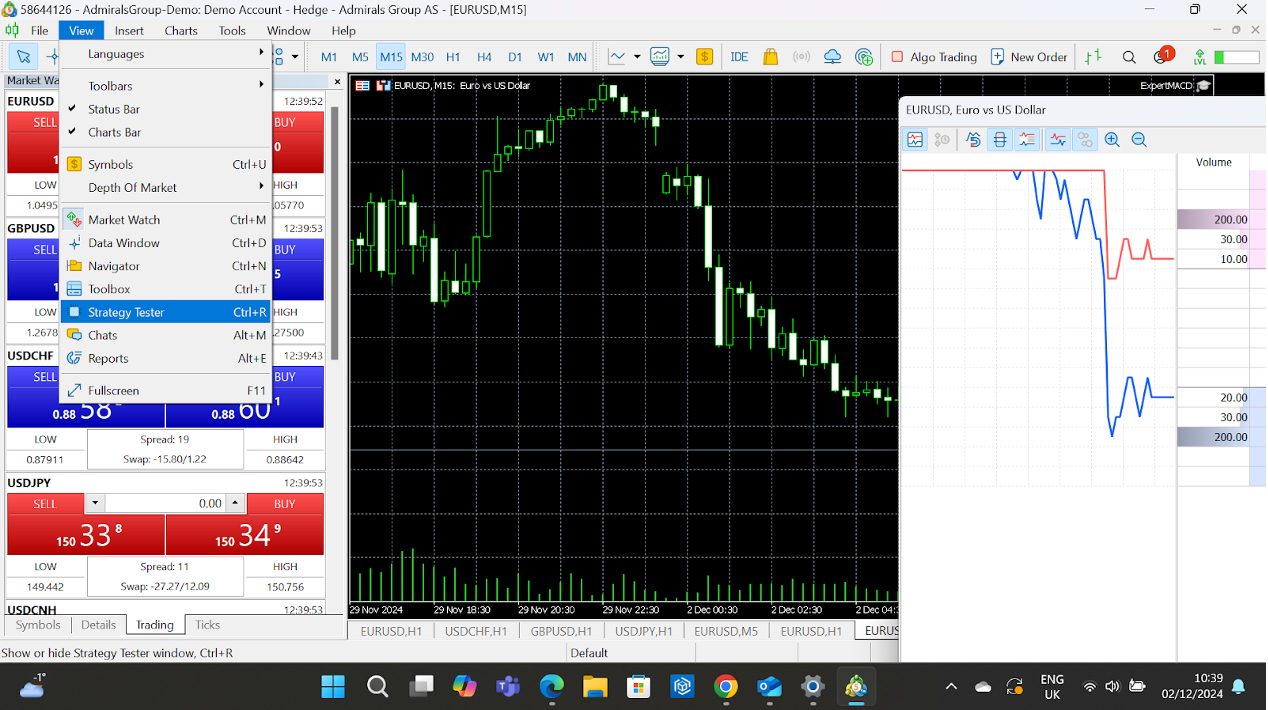
Built-In Economic Calendar
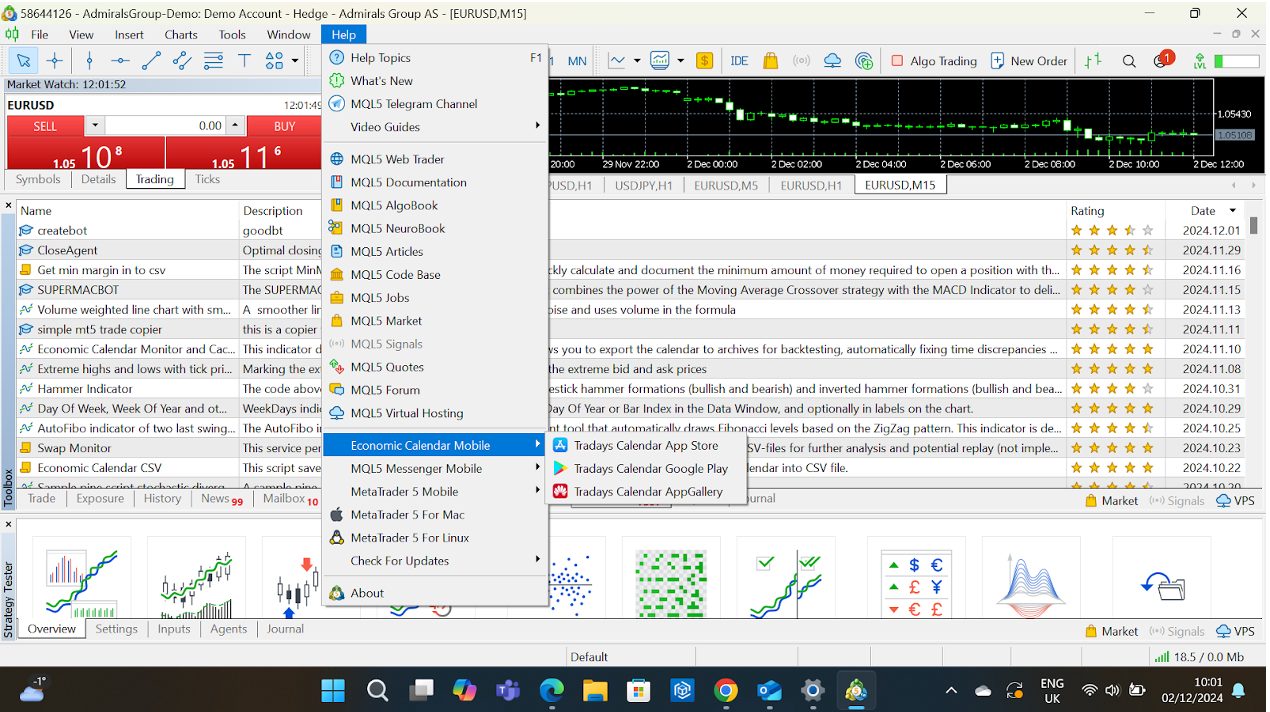
Stay ahead of market-moving events without leaving the platform. The economic calendar, which you won’t find in MT4, highlights key reports and forecasts.
- MT5 links the calendar to charts to see how past events affected price movements.
- Combine the calendar with alerts to get notified about upcoming events that matter to your trades.
Fast Execution & Depth Of Market (DOM)
For scalpers and day traders, speed and pricing transparency are crucial. MT5’s DOM shows the real-time order book.
Seeing the depth of market helps me gauge liquidity before placing big orders – it’s an absolute lifesaver for my trading strategy.
Paul HolmesAuthor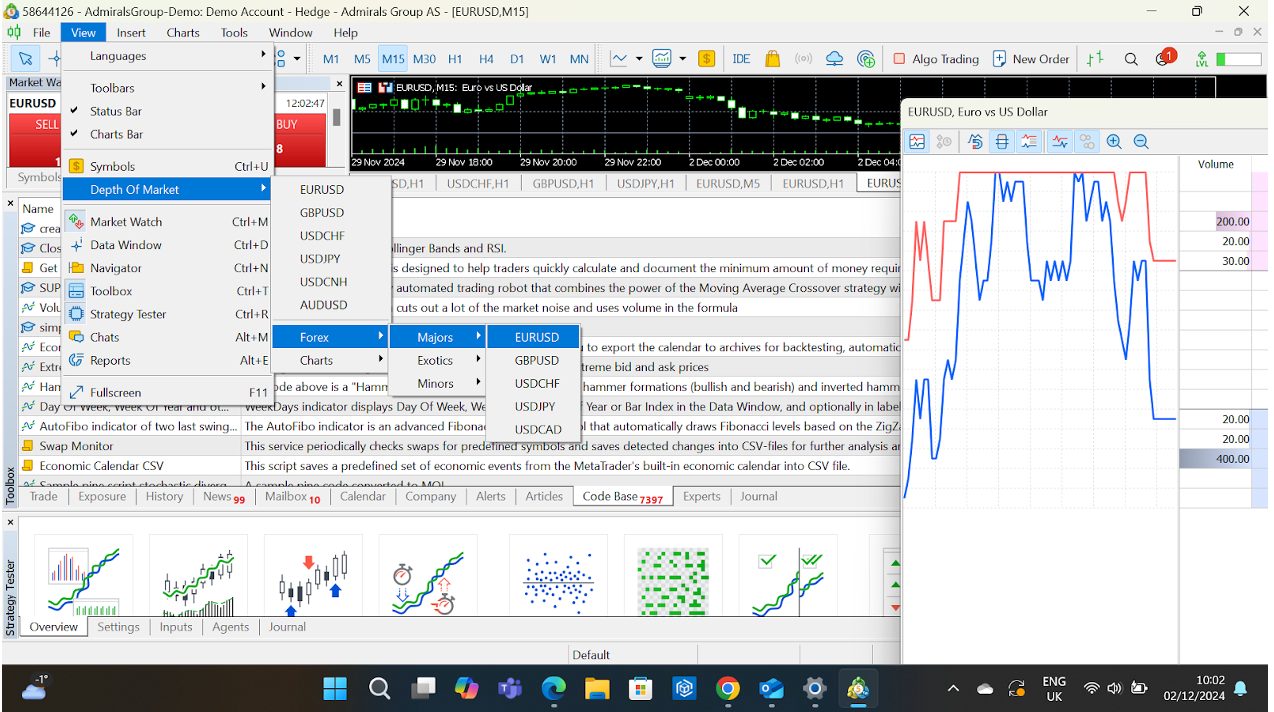
How To Customize MT5
MT5 gives you total control over how your workspace looks and functions:
- Dockable Panels: Rearrange panels like Market Watch, Navigator, and Toolbox to create your perfect setup.
- Custom Indicators: Beyond the built-ins, you can add custom indicators downloaded from the MQL5 marketplace.
- Shortcuts: Set hotkeys for frequent actions; this is a massive time-saver for active traders.
Create different profiles for different trading strategies. For example, I can have one for scalping with smaller timeframes and another for swing trading with higher ones.
Paul HolmesAuthorLet’s break it all down:
Chart Customization
Charts are the heart of any platform for day traders, and MT5 offers a ton of ways to tweak them to your liking.
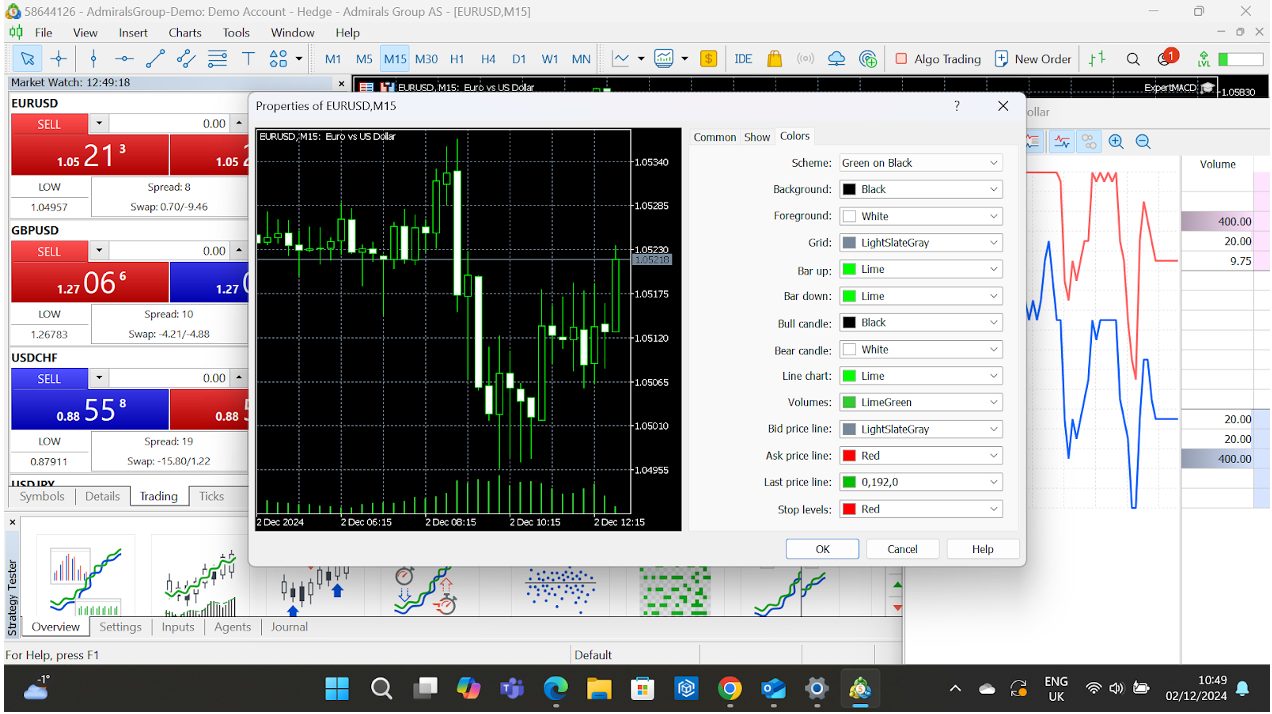
Change Chart Styles
- Options: Choose from three chart types: Line, Bar, or Candlestick.
- How-To: Right-click on the chart > Properties > Choose your style under Common.
Add Indicators
- Options: MT5 comes preloaded with 80+ indicators (eg Moving Averages, RSI, Bollinger Bands), and you can add custom indicators too.
- How-To: Drag indicators from the Navigator to your chart or download custom ones from the MQL5 marketplace.
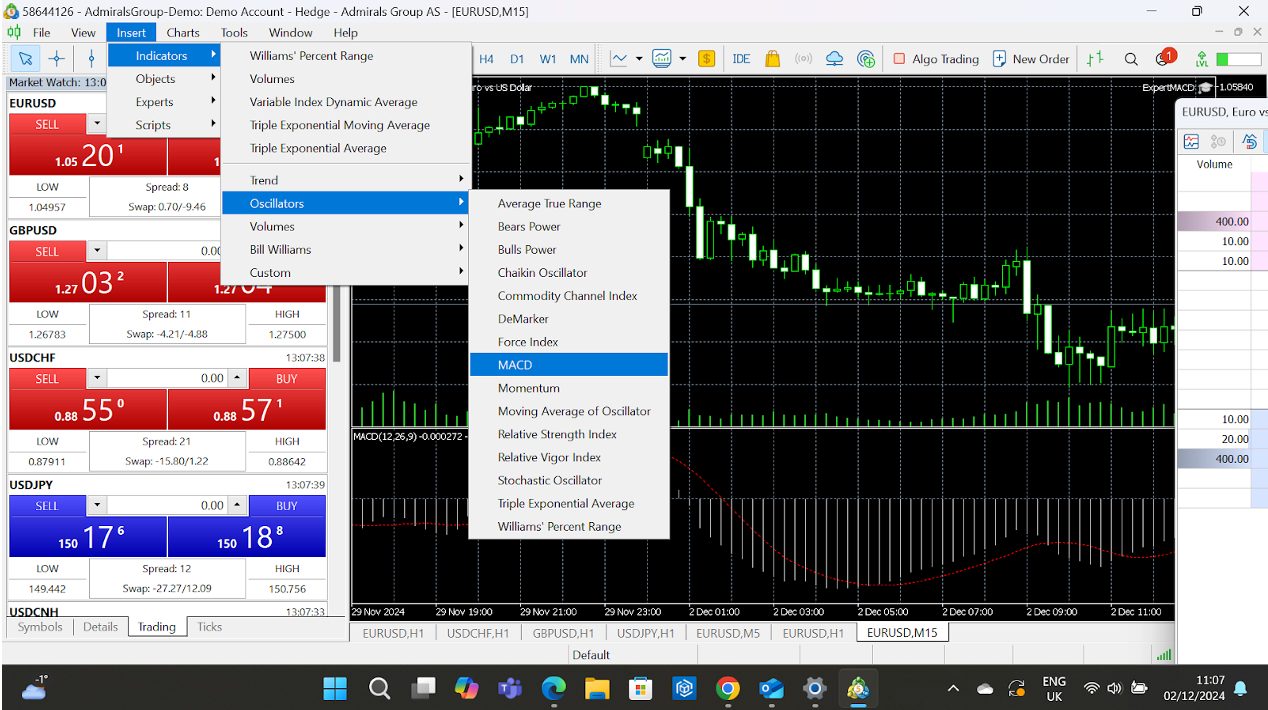
I often stack multiple indicators in the same sub-window (e.g., RSI and MACD) to save space and get a combined view.
Paul HolmesAuthorCustomize Chart Appearance
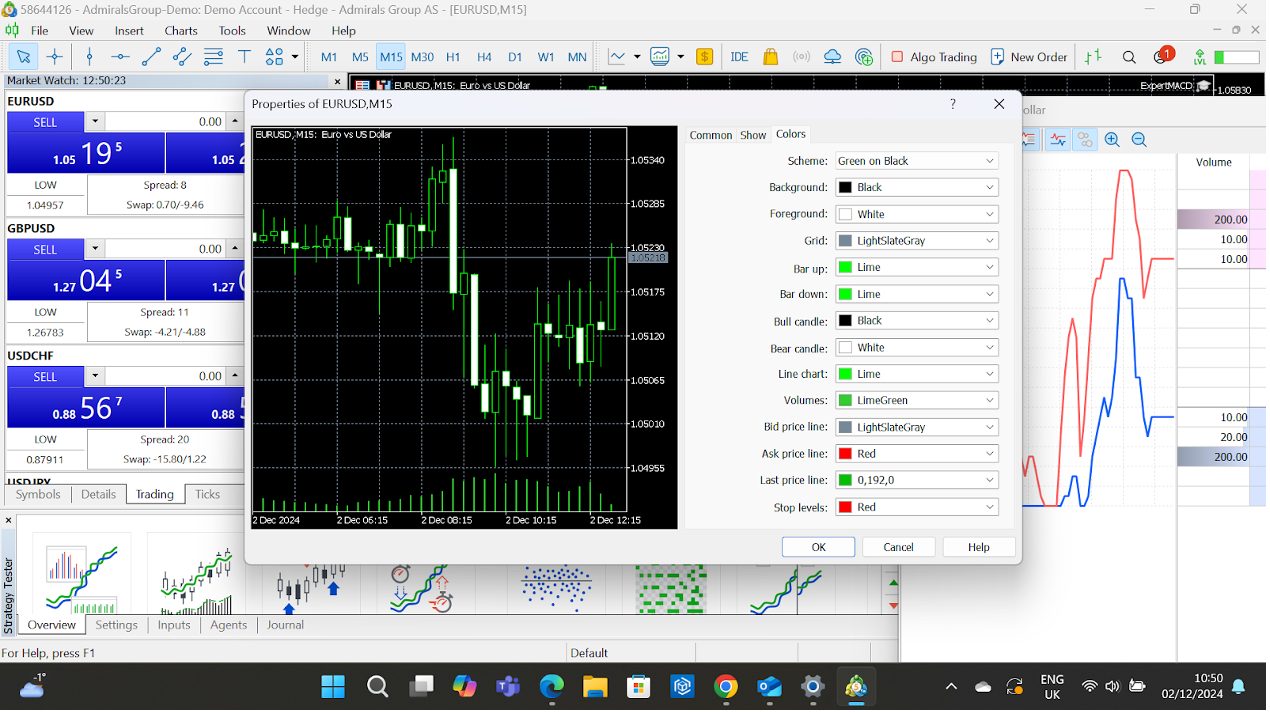
- Colours: Adjust the colour of candles, gridlines, backgrounds, and more.
- How-To: Right-click > Properties > Colors tab.
- Templates: Save your preferred chart style (timeframe, indicators, colours) as a template.
- How-To: Right-click > Template > Save Template.
Use Multiple Timeframes
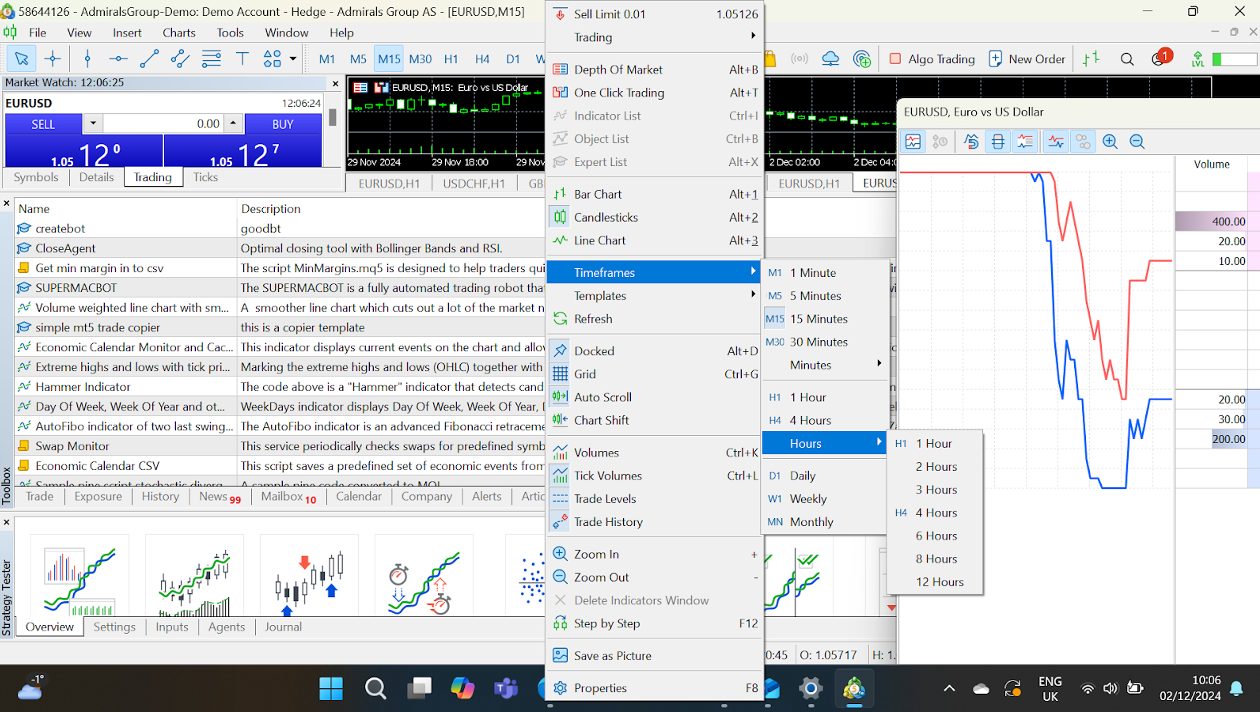
- Why It’s Beneficial: Analyze trends across timeframes with just a click; great for strategy building.
- How-To: Right-click on the chart > Timeframes > Select from 1-minute to 1-month views.
Workspace Customization
Dockable Panels
MT5 lets you rearrange panels like Market Watch, Navigator, and Toolbox to suit your style.
- How-To: Drag and drop any panel to dock it in a new position or leave it floating.
Multiple Monitors
If you’re juggling multiple markets, spread your charts across several monitors.
- How-To: Right-click on the chart tab > Detach Window.
Custom Profiles
Set up different profiles for various trading strategies or markets. For example:
- A forex profile with charts for EUR/USD, GBP/USD, and USD/JPY.
- A stocks profile with S&P 500 and Nasdaq charts.
- How-To: Go to File > Profiles > Save Profile As.
Keyboard Shortcuts & Hotkeys
MT5 is a hotkey lover’s dream. You can assign shortcuts for nearly every action.
- Default Shortcuts:
- Ctrl+T: Show/Hide Toolbox.
- Ctrl+M: Show/Hide Market Watch.
- F9: Open the trading order window.
- Alt+T: Activate one-click trading.
- Custom Hotkeys:
- Go to Tools > Options > Hotkeys tab.
Use shortcuts for actions like switching timeframes or closing charts; this helps me save precious seconds during fast markets.
Paul HolmesAuthorMarket Watch Customization
This is where you monitor all the instruments you can trade.
- Add/Remove Symbols: Right-click in the Market Watch window > Symbols > Search and select/deselect instruments.
- Create Custom Groups: Organize instruments into categories like forex pairs, commodities, and indices.
- Tick Chart Display: Double-click any instrument to see its tick chart – ideal for scalpers.
Depth Of Market (DOM) Settings
Active traders using DOM can customize their views.
- Options: Switch between Standard, Market Depth, and Price Ladder styles.
- How-To: Right-click in the DOM window > Settings.
I use the DOM for precise entry/exit planning, especially in highly liquid markets.
Paul HolmesAuthorAlerts & Notifications
Stay on top of price changes without constantly watching the screen.
- Set Alerts:
- Right-click on the Price Line or in Toolbox > Alerts tab > Create.
- Example: Alert when EUR/USD hits 1.1000.
- Get Push Notifications: Sync MT5 with the mobile app to receive alerts on your phone.
- How-To: In Tools > Options > Notifications, enter your MetaQuotes ID.
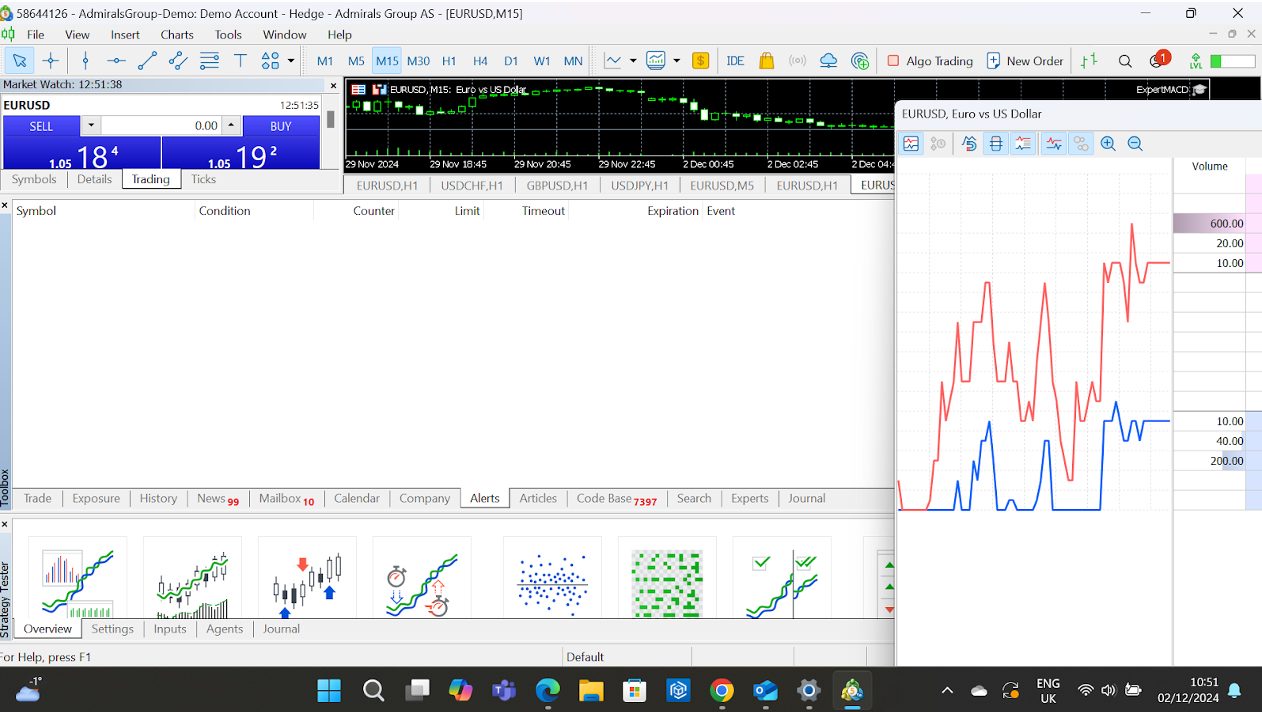
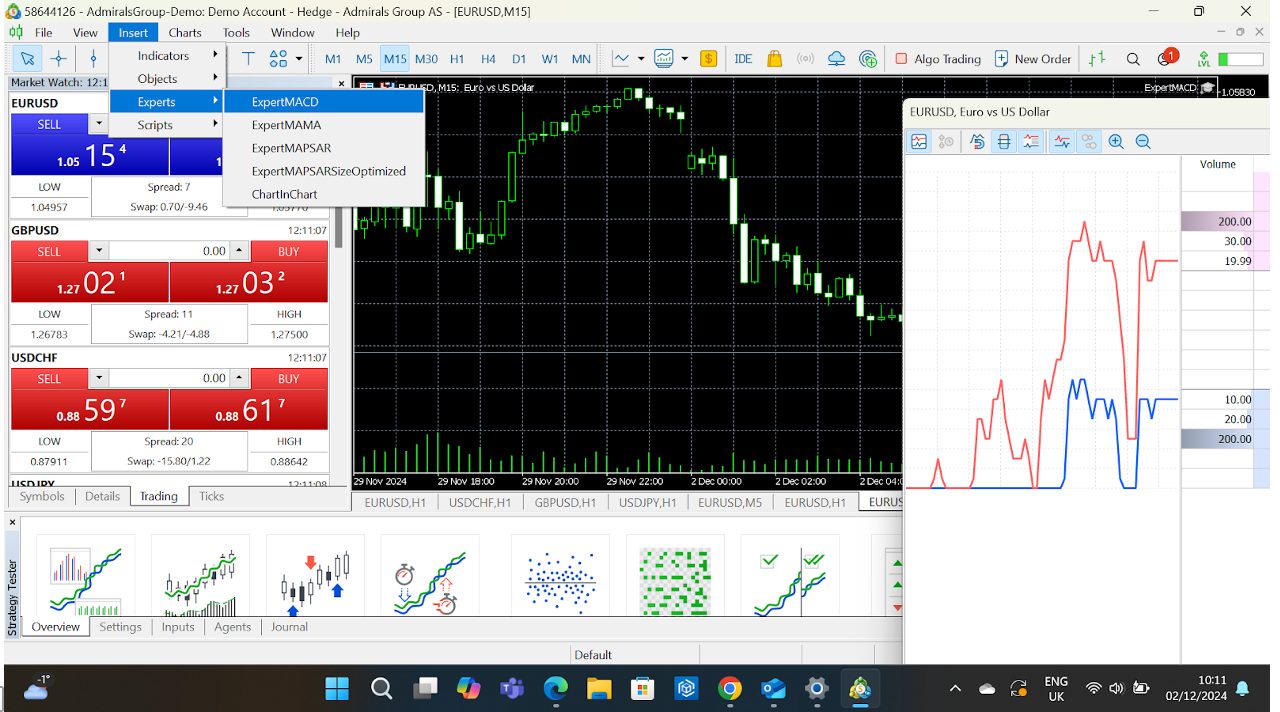
Expert Advisors (EAs) & Scripts
Automation is king on MT5, and the platform makes it easy to implement your trading bots.
- Install EAs: Drag and drop your EA file into the Experts folder (accessible via File > Open Data Folder).
- Customize EA Parameters: Adjust inputs to fine-tune the bot to your needs once added to the chart.
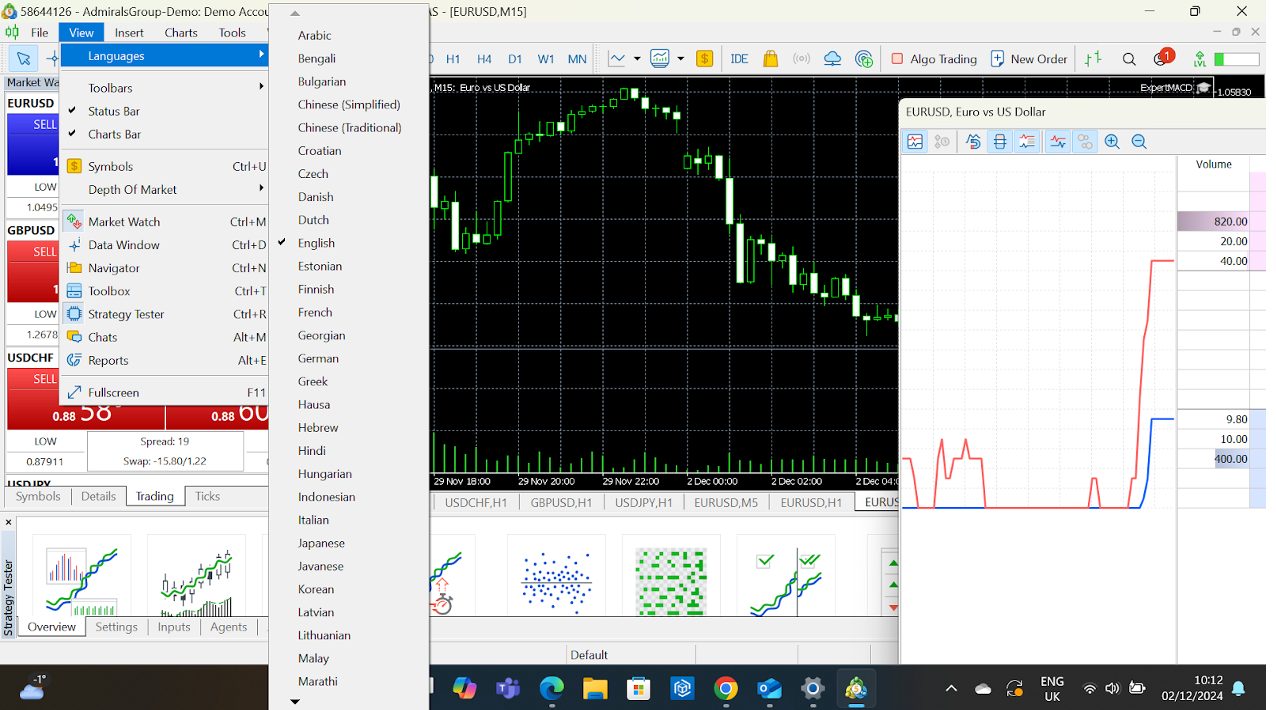
Language & Regional Settings
If English isn’t your preferred language, switch the platform’s language.
- How-To: Go to View > Languages, select your choice, and restart MT5.
The beauty of MT5 is its adaptability. It can be as straightforward or as complex as you want. Spend time playing around with these options and quickly discover what works best for you.
Start small, explore its features step by step, and watch your trading experience evolve.
Paul HolmesAuthorBottom Line
MetaTrader 5 (MT5) isn’t just a trading platform; it’s a powerhouse that caters to active traders of all levels.
Whether you’re a beginner looking for a user-friendly way to start trading or an experienced trader ready to dive into multi-asset strategies, MT5 has the tools to make it happen.
That’s partly why it’s the second most widely offered third-party platform offered by online brokers based on our analysis, trailing just its predecessor, MT4.
That said, since its app was briefly removed from the Apple App Store in September 2022, it’s facing increasing competition from other third-party platforms, notably TradingView and cTrader, which are now more widely supported at brokerages.
To get started, find the right provider for your needs from our selection of the best MetaTrader 5 brokers.
Article Sources
The writing and editorial team at DayTrading.com use credible sources to support their work. These include government agencies, white papers, research institutes, and engagement with industry professionals. Content is written free from bias and is fact-checked where appropriate. Learn more about why you can trust DayTrading.com