




Since launching in 2005, MetaTrader 4 (MT4) has become a favorite with active traders thanks to its excellent charting, customization, automated trading through Expert Advisors (EAs), and widespread support from brokers.
Delve into DayTrading.com’s pick of the best MT4 brokers. Every provider has been tested by our expert team, which includes experienced traders who have spent countless hours developing their own MetaTrader algorithms.
6 Top-Rated MetaTrader 4 Brokers
As of our latest tests in October 2026, we've evaluated 143 brokers and found these 6 best for trading on MT4:
-
- Demo account
- Platforms: MT4, MT5, TradingCentral
- Min. deposit: $5
-
- Demo account
- Min. deposit: $100
- Min. trade: 0.01 Lots
-
- Demo account
- Regulator: FCA, ASIC, CMVM , FSCA, SCB, FSA
- Platforms: TN Trader, MT4, TradingView
-
- Demo account
- Regulator: FSC
- Platforms: R StocksTrader, MT4, MT5, TradingView
-
- Demo account
- Regulator: ASIC, CySEC, FSA, SCB, CMA-Kenya
- Min. deposit: $200
-
- Demo account
- Min. deposit: $0
- Min. trade: 0.01 Lots
73-89% of retail investor accounts lose money when trading CFDs






Learn how we test brokers and why you can trust our ratings.
Why Are These The Brokers With The Best MT4 Integration?
Here is why we think these are the top MT4 brokers:
- XM is the top-rated MT4 broker in Uzbekistan in 2026 4.8/5 Throughout our tests, XM’s MT4 delivered reliable execution with spreads from 0.6 pips on majors and no commission on standard accounts. The platform supports micro lots, extensive custom indicators, and seamless EA automation. The mobile version is stable, while XM’s proprietary add-ons enhance trade management and market analysis beyond vanilla MT4 features.
- AvaTrade 4.9/5 When we tested AvaTrade’s MT4, execution was really stable but slightly slower than average, with spreads from 0.9 pips and no commission. The platform supports micro accounts and offers solid EA automation. Mobile MT4 was responsive, and AvaTrade includes proprietary tools like AvaProtect for risk management, enhancing the standard MT4 toolkit.
- Trade Nation 4.4/5 When we used Trade Nation’s MT4, it delivered the full charting package, indicators and drawing tools that we're used to seeing. Full EA automation worked well; mobile MT4 was stable. While MT4 excludes some instruments compared to their TN-Trader platform, copy-trading can be enabled via the “TradeCopier” add-on.
- RoboForex 4.5/5 In our use, RoboForex’s MT4 delivered 50+ built-in indicators, full EA support, nano/micro lot sizes and mobile/web parity. What's also great is the extensive range of assets on the broker's MT4 software, catering to various short-term trading strategies, plus ECN/Prime accounts offering raw spreads from 0.0 pips with ~$2-$4 round-turn commission and standard Pro accounts running at ~1.3 pips spread with no commission.
- IC 4.8/5 When we tested IC’s MT4, execution was consistently among the fastest we've seen - ideal for high-frequency strategies. Spreads averaged 0.1 pips on EUR/USD with a $7 per lot commission. EA automation, VPS integration, and advanced tools like Depth of Market made the platform a standout for serious algo traders.
- Pepperstone 4.8/5 When we tested Pepperstone’s MT4, execution was ultra-fast with spreads from 0.1 pips plus $7 per lot commission on Razor accounts. The Smart Trader Tools plugin suite added real value - offering sentiment, mini-terminal, and trade management tools. EA automation ran flawlessly, and the mobile version mirrored desktop performance during live trades.
Compare The Top-Rated MT4 Brokers On Key Attributes
Find the right MT4 broker for you with our comparison of key features:
| Broker | MT4 Integration | Instruments | Regulators |
|---|---|---|---|
| XM | ✔Yes | CFDs, Forex, Stocks, Commodities, Indices, Thematic Indices, Precious Metals, Energies | CySEC, DFSA, FSCA, SCA, FSA, FSC-Belize, FSC-Mauritius, CMA-Kenya, CMA-UAE |
| AvaTrade | ✔Yes | CFDs, Forex, Stocks, Indices, Commodities, ETFs, Bonds, Crypto, Spread Betting, Futures | ASIC, CySEC, FSCA, ISA, CBI, JFSA, BVI, FSRA/ADGM, AFM, CMA-Kenya, CIRO (via Friedberg Direct) |
| Trade Nation | ✔Yes | CFDs, Forex, Indices, Shares, Commodities, Futures, Bonds, Spread Betting (UK and Ireland only), Cryptos (Bahamas entity only) | FCA, ASIC, CMVM , FSCA, SCB, FSA |
| RoboForex | ✔Yes | CFDs, Forex, Stocks, Indices, Commodities, ETFs, Futures, Crypto | FSC |
| IC | ✔Yes | CFDs, Forex, Stocks, Indices, Commodities, Bonds, Futures, Crypto | ASIC, CySEC, FSA, SCB, CMA-Kenya |
| Pepperstone | ✔Yes | CFDs, Forex, Currency Indices, Stocks, Indices, Commodities, ETFs, Crypto CFDs, Spread Betting | FCA, ASIC, CySEC, BaFin, DFSA, SCA, SCB, CMA-Kenya |
How Safe Are These MT4 Brokers?
How reliable are the top MT4 brokers and do they have features that help protect your funds?
| Broker | Trust Rating | Guaranteed Stop Loss | Negative Balance Protection | Segregated Accounts |
|---|---|---|---|---|
| XM | ✘No | ✔Yes | ✔Yes | |
| AvaTrade | ✘No | ✔Yes | ✔Yes | |
| Trade Nation | ✘No | ✔Yes | ✔Yes | |
| RoboForex | ✘No | ✔Yes | ✔Yes | |
| IC | ✘No | ✔Yes | ✔Yes | |
| Pepperstone | ✘No | ✔Yes | ✔Yes |
Mobile MT4 Trading Comparison
Are these brokers good for trading on MT4 from mobile?
| Broker | Mobile Apps | iOS Rating | Android Rating | Smart Watch App |
|---|---|---|---|---|
| XM | iOS, Android & Windows | ✘No | ||
| AvaTrade | iOS & Android | ✘No | ||
| Trade Nation | iOS & Android | ✘No | ||
| RoboForex | iOS & Android, R StocksTrader, Telegram Mini App | ✘No | ||
| IC | iOS & Android | ✘No | ||
| Pepperstone | iOS & Android | ✘No |
Are The Top MT4 Brokers Suitable For Beginners?
Traders new to MT4 should use brokers that allow trading with virtual money (a demo account) alongside other features that beginners will benefit from.
| Broker | Demo Account | Minimum Deposit | Minimum Trade | Education Rating | Support Rating |
|---|---|---|---|---|---|
| XM | ✔Yes | $5 | 0.01 Lots | ||
| AvaTrade | ✔Yes | $100 | 0.01 Lots | ||
| Trade Nation | ✔Yes | $0 | 0.1 Lots | ||
| RoboForex | ✔Yes | $10 | 0.01 Lots | ||
| IC | ✔Yes | $200 | 0.01 Lots | ||
| Pepperstone | ✔Yes | $0 | 0.01 Lots |
Compare Advanced Trader Features
Are these brokers with MT4 integration suitable for advanced traders?
| Broker | Automated Trading | VPS | AI | Pro Account | Leverage | Low Latency | Extended Hours |
|---|---|---|---|---|---|---|---|
| XM | Expert Advisors (EAs) on MetaTrader | ✔Yes | ✔Yes | ✘No | 1:1000 | ✔Yes | ✘No |
| AvaTrade | Expert Advisors (EAs) on MetaTrader | ✘No | ✔Yes | ✔Yes | 1:30 (Retail) 1:400 (Pro) | ✔Yes | ✘No |
| Trade Nation | Expert Advisors (EAs) on MetaTrader | ✘No | ✘No | ✘No | 1:30 (FCA, CMVM, ASIC), 1:200 (FSCA, SCB), 1:500 (FSA) | ✘No | ✘No |
| RoboForex | Expert Advisors (EAs) on MetaTrader, Strategy Builder in R StocksTrader | ✔Yes | ✘No | ✘No | 1:2000 | ✘No | ✘No |
| IC | Expert Advisors (EAs) on MetaTrader, cBots on cTrader, Myfxbook AutoTrade | ✔Yes | ✘No | ✘No | 1:5000 | ✔Yes | ✘No |
| Pepperstone | Expert Advisors (EAs) on MetaTrader, cBots on cTrader | ✘No | ✘No | ✔Yes | 1:30 (Retail - UK, EU, Australia), 1:500 (Pro), 1:200 (Offshore), 1:400 (Kenya) | ✔Yes | ✘No |
Compare The Ratings Of Top MT4 Brokers
Discover how the top MT4 brokers stack up in key areas from our hands-on tests.
| Broker | Trust | Platforms | Assets | Mobile | Fees | Accounts | Research | Education | Support |
|---|---|---|---|---|---|---|---|---|---|
| XM | |||||||||
| AvaTrade | |||||||||
| Trade Nation | |||||||||
| RoboForex | |||||||||
| IC | |||||||||
| Pepperstone |
Compare Fees For Trading On MT4
The cost of trading on MT4 with a broker will add up over time.
| Broker | Cost Rating | Fixed Spreads | Inactivity Fee |
|---|---|---|---|
| XM | ✘No | $5 | |
| AvaTrade | ✔Yes | $50 | |
| Trade Nation | ✔Yes | $0 | |
| RoboForex | ✘No | $0 | |
| IC | ✘No | $0 | |
| Pepperstone | ✔Yes | $0 |
Community Sentiment
See how users rate these brokers based on the average customer ratings submitted on DayTrading.com, plus ratings from Trustpilot, the Apple App Store and Google Play.
| Broker | Our Users' Rating | Trustpilot Score | Trustpilot Reviews | iOS App Rating | Android App Rating |
|---|---|---|---|---|---|
| XM | 3132 | ||||
| AvaTrade | 13597 | ||||
| Trade Nation | 2166 | ||||
| RoboForex | 777 | ||||
| IC | 2 | ||||
| Pepperstone | 3700 |
How Popular Are These MT4 Brokers?
Some traders prefer the most popular MT4 brokers, i.e those with the most clients.
Why Trade On MT4 With XM?
With a low $5 minimum deposit, advanced charting platforms in MT4 and MT5, expanding range of markets, and a Zero account offering spreads from 0.0, XM provides all the essentials for active traders, even earning our ‘Best MT4/MT5 Broker’ award in recent years.
 Christian Harris, Reviewer
XM quick facts
- Demo Account
- ✔Yes
- Instruments
- CFDs, Forex, Stocks, Commodities, Indices, Thematic Indices, Precious Metals, Energies
- Regulator
- CySEC, DFSA, FSCA, SCA, FSA, FSC-Belize, FSC-Mauritius, CMA-Kenya, CMA-UAE
- Platforms
- MT4, MT5, TradingCentral
- Minimum Deposit
- $5
- Minimum Trade
- 0.01 Lots
- Account Currencies
- USD, EUR, GBP, JPY, ZAR
Pros
- XM has rolled out platform upgrades with integrated TradingView charts and an XM AI assistant, delivering faster execution, smarter analysis, and a sleeker, more intuitive trading experience.
- XM’s customer support has delivered over years of testing, with 24/7 assistance in 30 languages, response times of under 2 minutes and a growing Telegram channel.
- XM’s growing roster of 1,400+ instruments provides diverse short-term trading opportunities, with unique turbo stocks, fractional shares, and more recently thematic indices.
Cons
- XM relies solely on the MetaTrader platforms for desktop trading, so there’s no in-house downloadable solution for a more beginner-friendly user experience with unique features.
- Although trusted and generally well-regulated in some regions, XM also has global entities registered with the weak regulators like FSC (Belize) and FSA (Seychelles), whilst UK clients are no longer accepted, reducing its market reach.
- XM is falling behind the curve by not offering cTrader, which is favored over MetaTrader by some serious traders for its smoother user experience and superior charting package.
Why Trade On MT4 With AvaTrade?
AvaTrade offers active traders everything they need: an intuitive WebTrader, powerful AvaProtect risk management, a smooth 5-minute sign-up process, and dependable support you can rely on in fast-moving markets.
 Jemma Grist, Reviewer
AvaTrade quick facts
- Demo Account
- ✔Yes
- Instruments
- CFDs, Forex, Stocks, Indices, Commodities, ETFs, Bonds, Crypto, Spread Betting, Futures
- Regulator
- ASIC, CySEC, FSCA, ISA, CBI, JFSA, BVI, FSRA/ADGM, AFM, CMA-Kenya, CIRO (via Friedberg Direct)
- Platforms
- WebTrader, AvaTradeGO, AvaOptions, AvaFutures, MT4, MT5, AlgoTrader, TradingView, TradingCentral, DupliTrade
- Minimum Deposit
- $100
- Minimum Trade
- 0.01 Lots
- Account Currencies
- USD, EUR, GBP, CAD, AUD, ZAR
Pros
- Years on, AvaTrade remains one of the few brokers offering a bespoke risk management tool, AvaProtect, that insures losses up to $1M for a fee and is easy to activate on the platform.
- AvaTrade launched AvaFutures to offer low-margin access to global markets, then expanded in 2025 as one of the first brokers to add CME’s Micro Grain Futures, and then later in the year went further by integrating with TradingView.
- Support at AvaTrade performed excellently during testing, with response times of 3 minutes and localized support in major trading jurisdictions, including the UK, Europe and the Middle East.
Cons
- The AvaSocial app is good but not great – the look and feel, plus the navigation between finding strategy providers and account management needs upgrading to rival category leaders like eToro.
- AvaTrade’s WebTrader has improved, but work is still needed in terms of customizability – frustratingly widgets like market watch and watchlists can’t be hidden, moved, or resized.
- While signing up is a breeze, AvaTrade lacks an ECN account like Pepperstone or IC Markets, which provides the raw spreads and ultra-fast execution many day traders are looking for.
Why Trade On MT4 With Trade Nation?
Trade Nation suits discretionary traders who want to speculate on major indices like the US 500 or liquid FX pairs, and want the predictable all-in costs of fixed spreads. In tests, we found the fixed-spread TN Trader environment particularly useful for trading around scheduled economic releases owing to its reliable charting environment and because published spreads stayed capped.
Christian Harris, Reviewer
Trade Nation quick facts
- Demo Account
- ✔Yes
- Instruments
- CFDs, Forex, Indices, Shares, Commodities, Futures, Bonds, Spread Betting (UK and Ireland only), Cryptos (Bahamas entity only)
- Regulator
- FCA, ASIC, CMVM , FSCA, SCB, FSA
- Platforms
- TN Trader, MT4, TradingView
- Minimum Deposit
- $0
- Minimum Trade
- 0.1 Lots
- Account Currencies
- USD, EUR, GBP, AUD, ZAR, SEK, NOK, DKK
Pros
- The demo comes with a $5,000 practice account and you can request a one-on-one platform walkthrough by callback - this level of personal help is rare.
- Trade Nation accounts can now be linked with TradingView, providing advanced multi-charts and the ability to execute trades directly.
- In testing of the TN Trader account under normal market conditions, fixed spreads held while fills were prompt on major forex pairs, with a slight drift in the entry level as price ticked between click and fill.
Cons
- Withdrawals can take up to five business days, which is around the industry average but slower than the 1-3 days we’re increasingly seeing brokers offer in an attempt to quash withdrawal complaints from retail investors.
- Offshore SCB and FSA entities allow retail clients up to 1:200 and 1:500 leverage compared to 1:30 in regions like the UK, Europe and Australia, so an FSA client can have 16 times the exposure of a UK retail client on the same trade, but with less oversight and no compensation scheme.
- The 2–20% rebate scheme is closed to FCA, CMVM, and ASIC clients, meaning active day traders in these regions who would benefit from transaction rebates cannot claim them.
Why Trade On MT4 With RoboForex?
RoboForex is great if you want a vast range of 12,000+ day trading markets with ECN accounts, powerful charting and loyalty promotions. It also stands out for stock traders with its user-friendly R StocksTrader platform, featuring 3,000+ shares, fees from $0.01 and sophisticated watchlists.
Christian Harris, Reviewer
RoboForex quick facts
- Demo Account
- ✔Yes
- Instruments
- CFDs, Forex, Stocks, Indices, Commodities, ETFs, Futures, Crypto
- Regulator
- FSC
- Platforms
- R StocksTrader, MT4, MT5, TradingView
- Minimum Deposit
- $10
- Minimum Trade
- 0.01 Lots
- Account Currencies
- USD, EUR
Pros
- RoboForex offers over 12,000 instruments, providing more short-term trading opportunities than the vast majority of online brokers, with forex, stocks, indices, ETFs, commodities, and futures.
- The broker offers two commission-free withdrawals each month in the Free Funds Withdrawal program, helping day traders to minimize transaction costs.
- RoboForex is known for its tight spreads starting from 0 pips and low minimum deposits from $10, making it accessible to those on a budget. The ability to trade with micro lots further lowers the barrier to entry for new traders.
Cons
- RoboForex provides a variety of account types, which, while offering flexibility, can be overwhelming for newer traders trying to choose the most suitable option for their trading style. Alternatives, notably eToro, provide a smoother entry into online trading with one retail account.
- Despite offering a range of platforms, RoboForex still doesn't support the increasingly popular cTrader. This might deter traders who prefer this specific platform for their day trading activities and is available at firms like Fusion Markets.
- While RoboForex offers competitive spreads, some of its account types come with high trading commissions up to $20 per lot, trailing the cheapest brokers, such as IC Markets.
Why Trade On MT4 With IC?
IC (formerly IC Markets) offers superior pricing, exceptionally fast execution and seamless deposits. The introduction of advanced charting platforms, notably TradingView, and the Raw Trader Plus account, ensures it remains a top choice for intermediate to advanced day traders.
Christian Harris, Reviewer
IC quick facts
- Demo Account
- ✔Yes
- Instruments
- CFDs, Forex, Stocks, Indices, Commodities, Bonds, Futures, Crypto
- Regulator
- ASIC, CySEC, FSA, SCB, CMA-Kenya
- Platforms
- MT4, MT5, cTrader, TradingView, TradingCentral, DupliTrade, Quantower
- Minimum Deposit
- $200
- Minimum Trade
- 0.01 Lots
- Account Currencies
- USD, EUR, GBP, CAD, AUD, NZD, JPY, CHF, HKD, SGD
Pros
- IC secured DayTrading.com's 'Best MT4/MT5 Broker' in 2025 for its seamless, industry-leading MetaTrader integration, refined over years to maximize the platform experience.
- As a tightly regulated and widely respected broker, IC prioritizes client security and transparency, helping to ensure a reliable trading experience globally.
- IC offers fast and dependable 24/7 support based on firsthand experience, particularly when it comes to accounts and funding issues.
Cons
- Despite four industry-leading third-party platforms, there is no proprietary software or trading app built with new traders in mind.
- The breadth and depth of tutorials, webinars and educational resources still need work, trailing alternatives like CMC Markets and reducing its suitability for beginners.
- While IC offers a selection of metals and cryptos for trading via CFDs, the range is not as extensive as brokers like eToro, limiting opportunities for traders interested in these asset classes.
Why Trade On MT4 With Pepperstone?
Pepperstone stands out as a top choice for day trading, offering razor-sharp spreads, ultra-fast execution, and advanced charting platforms for experienced traders. New traders are also welcomed with no minimum deposit, extensive educational resources, and exceptional 24/5 support (18h a day on weekends).
Christian Harris, Reviewer
Pepperstone quick facts
- Demo Account
- ✔Yes
- Instruments
- CFDs, Forex, Currency Indices, Stocks, Indices, Commodities, ETFs, Crypto CFDs, Spread Betting
- Regulator
- FCA, ASIC, CySEC, BaFin, DFSA, SCA, SCB, CMA-Kenya
- Platforms
- Pepperstone Trading Platform, MT4, MT5, cTrader, TradingView
- Minimum Deposit
- $0
- Minimum Trade
- 0.01 Lots
- Account Currencies
- USD, EUR, GBP, CAD, AUD, NZD, JPY, CHF, HKD, SGD
Pros
- Award-winning customer support is available via telephone, email or live chat with response times of <5 minutes during testing and friendly agents knowledgeable about its products and trading tools.
- There’s support for a range of industry-leading charting platforms including MT4, MT5, TradingView, and cTrader, catering to various short-term trading styles, including algo trading.
- After adding spread betting through TradingView, Pepperstone provides a seamless, tax-efficient trading experience with advanced analysis tools for financial spread bettors in supported countries.
Cons
- Despite improvements to its range of markets, crypto CFD offerings are still fairly limited compared to other brokers who focus on this area, such as Eightcap, and there's no option to invest in real coins.
- Pepperstone has removed support for several tools that elevated the trading experience for active retail traders, notably Autochartist, Capitalise.ai and a free VPS for qualifying traders (now only pro traders in some countries).
- Overnight holding fees are higher than that found with some Market Maker brokers (usually Benchmark + 2.5%). This makes pepperstone an ideal broker for day traders and forex scalpers but less suitable for swing traders who often keep position open overnight.
How Did We Pick The Top-Rated MT4 Brokers?
To compile a list of the top-rated brokers that support MT4, we:
- Leveraged our evolving database that currently stands at 143 online brokers;
- Identified the approximately 75+, or around 30%, that support MT4 on desktop, web or mobile;
- Ranked those firms by their rating, blending 200+ data points with the hands-on observations of our testers to identify the 10 absolute best.
How To Choose A MetaTrader 4 Broker
There are six key questions to ask yourself when choosing a broker with access to MetaTrader 4:
1. Does the broker support MT4 on your preferred device?
Almost every brokerage we’ve assessed supports the downloadable desktop client, web-accessible terminal, or iOS and Android-friendly mobile app. However, consider your needs:
- Desktop: Ideal for advanced traders needing full features, customization and offline access to historical data. It also has superior speeds because it directly connects to the broker’s servers.
- Web: Suitable for beginners, but lacks custom indicators and automated trading. It may also have slower speeds that could impact fast-paced strategies like day trading.
- Mobile: Great for the growing class of on-the-go traders. The app has been downloaded over 10 million times, although the Android version gets slightly higher user ratings than its Apple counterpart.
2. Does the broker support your desired instruments on MT4?
While all MT4 brokers offer forex trading, some increasingly provide additional asset classes like stocks, indices, commodities, and crypto.
Check available instruments before funding an account, as some brokers (eg AvaTrade) may not offer specific products like options trading on MT4.
3. Does the broker offer low trading fees?
Look for brokers with tight spreads and low or zero commissions, especially if you’re a day trader dealing in high volumes. However, be aware that some brokers may offer wider spreads on MT4 than on their proprietary platforms.
ECN MT4 brokers like Pepperstone are great for low fees, with spreads starting at 0.0 and 25%+ rebate programs for active traders.
4. Does the broker provide an MT4 demo account?
Most brokers offer MT4 demo accounts, letting you test strategies risk-free. These typically last 14-30 days and come with $10,000-$100,000 in virtual funds.
If you need ongoing access to MT4 demo mode, brokers like IC Markets offer unlimited paper trading as long as you’re active.
5. Is the broker trustworthy?
Not all MT4 brokers are regulated by reputable authorities, which increases the risk of you falling victim to trading scams and can limit access to safeguards like negative balance protection.
6. Does the broker offer unique MT4 add-ons?
Some brokers provide a superior MT4 trading experience with extra features to inform trading decisions.
For example, Pepperstone offers 28 indicators and EAs through its MT4 Smart Trader Tools.
Getting Started With MT4
Download our free MetaTrader 4 Tutorial PDF.
I’ve spent a lot of time over the years trading on MT4. My verdict? MT4 is a solid platform for traders at all levels. Its balance of power and simplicity is one reason it’s stood the test of time. From advanced charting and analysis to automated trading, it offers everything you need to be successful in today’s fast-paced markets.
Drawing on my direct experience with MT4, I’ll walk you through its key features, how you can customize it to fit your style, and share tips to help you get up and running smoothly.
Downloading And Installing
Getting MT4 up and running is pretty straightforward:
- Go to the official MetaTrader 4 website or your broker’s site to download the platform.
- Run the installer and follow the instructions.
- Once installed, open MT4 and log in with your trading account details.
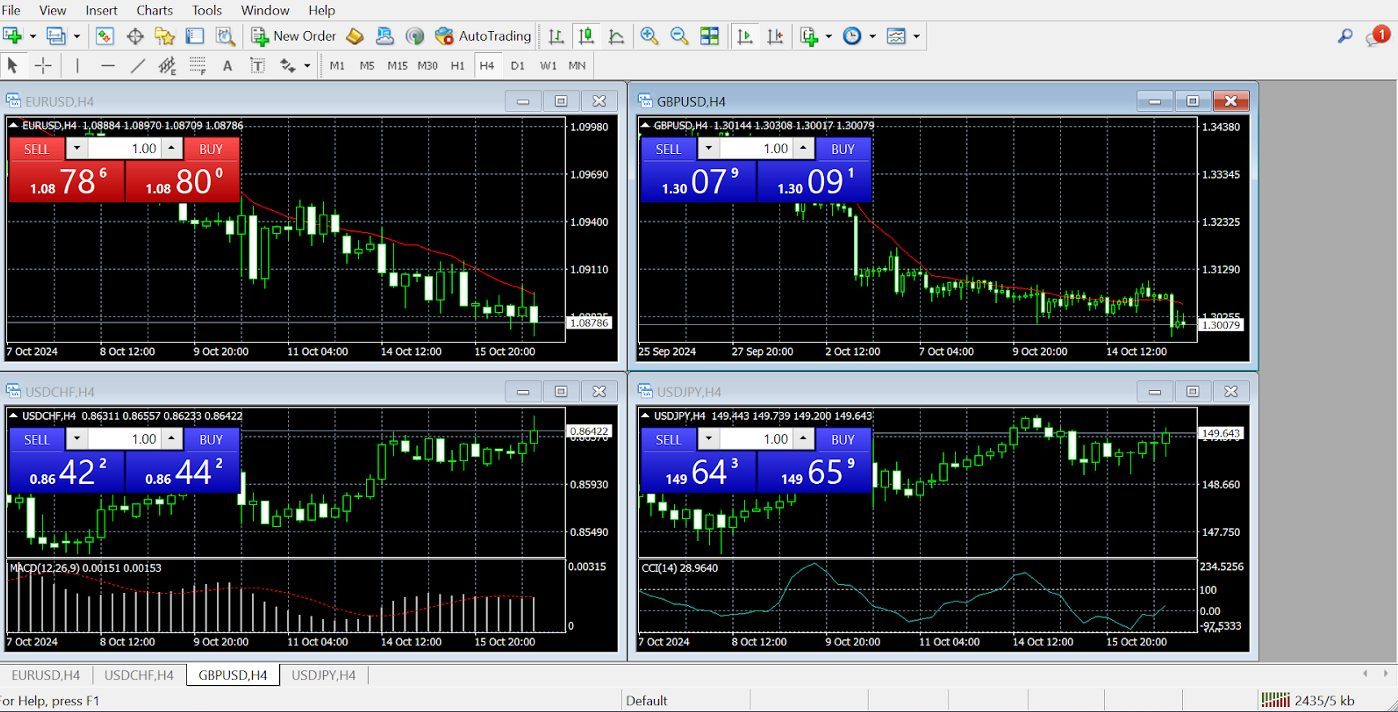
You’ll then be presented with your platform in default form, which will look something like the one below. The standard settings can vary slightly depending on the broker you use to open your MT4 account.
Navigating The Platform
- Market Watch: This is where you’ll see live prices for all the instruments you can trade – right-click on an asset to open a chart or place an order.
- Navigator: This window gives you quick access to your accounts, indicators, Expert Advisors, and scripts.
- Terminal: This is your command centre for monitoring trades, account history, and alerts.
The Terminal option below is your go-to place to start when your account is opened and when you log in to your MT4 platform. Here, you can pick up mail, see messages from your broker, check out relevant articles, read news, click on strategy ideas, and see all your trading activity.
Get familiar with the icons at the top of the platform navigation. They serve as shortcuts to many features and options.
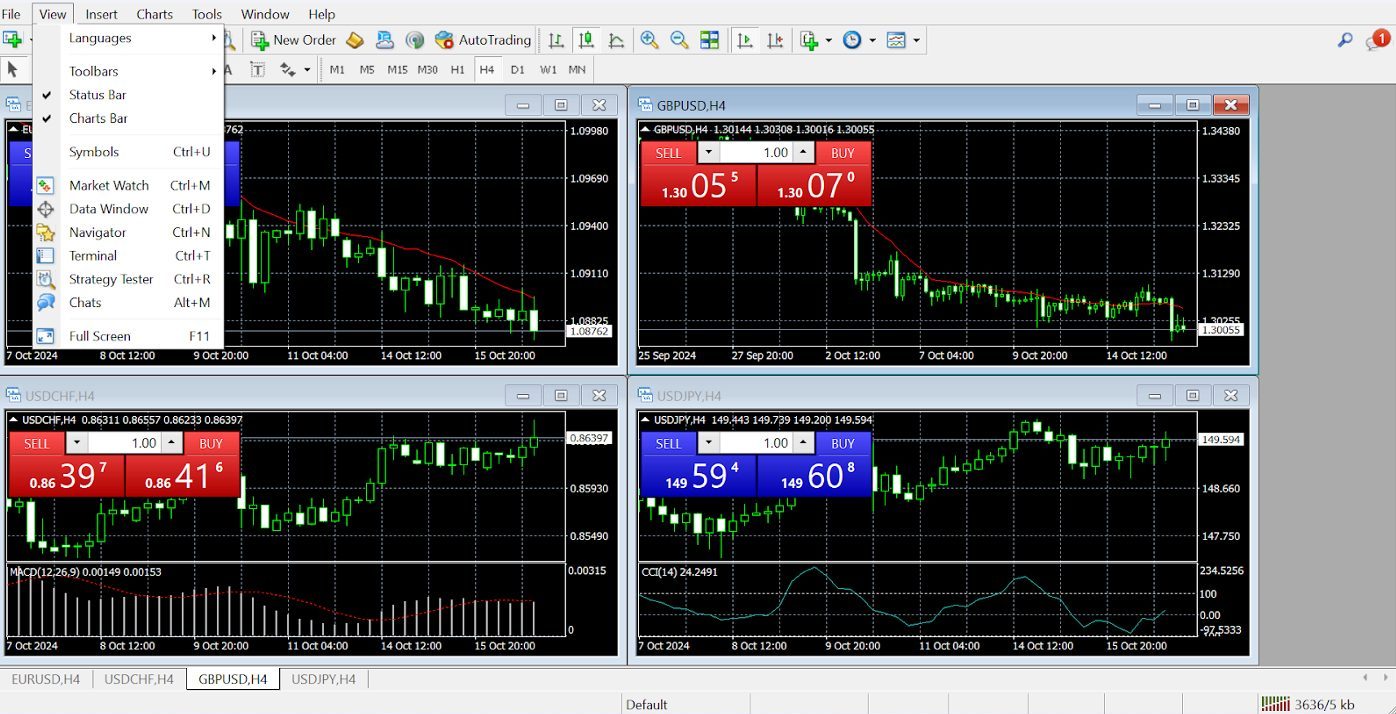
At first, MT4’s layout can feel a little overwhelming, but after exploring each section, it all starts to make sense. Soon, it becomes second nature.
 Paul HolmesAuthor
Placing Your First Trade
Ready to make a day trade? Here’s how you do it:
- Open a chart by right-clicking on an instrument in the Market Watch window.
- Press F9 or click “New Order” to bring up the trading window.
- Set your order type, stop loss, take profit and lot size, then hit “Buy” or “Sell.”
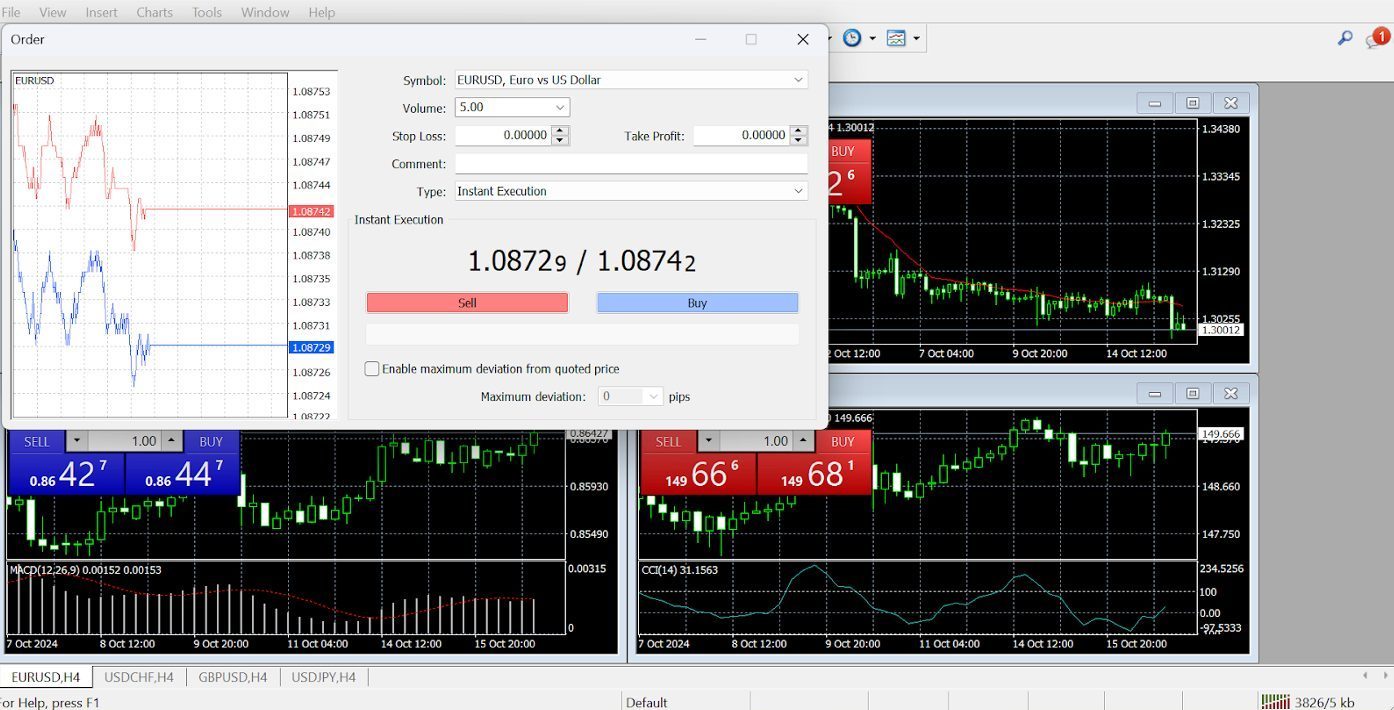
Once you get more confident with your trading plan, strategies, and platform, you can use one-click trading after you’ve set up your trading parameters. Just right-click a chart, and the menu below appears.
Customizing The Platform
Once you familiarize yourself with the basics, you can dive deeper into customization. Set up hotkeys, adjust chart settings, or add indicators that match your trading style.
MT4 gives you the freedom to make the platform truly yours.
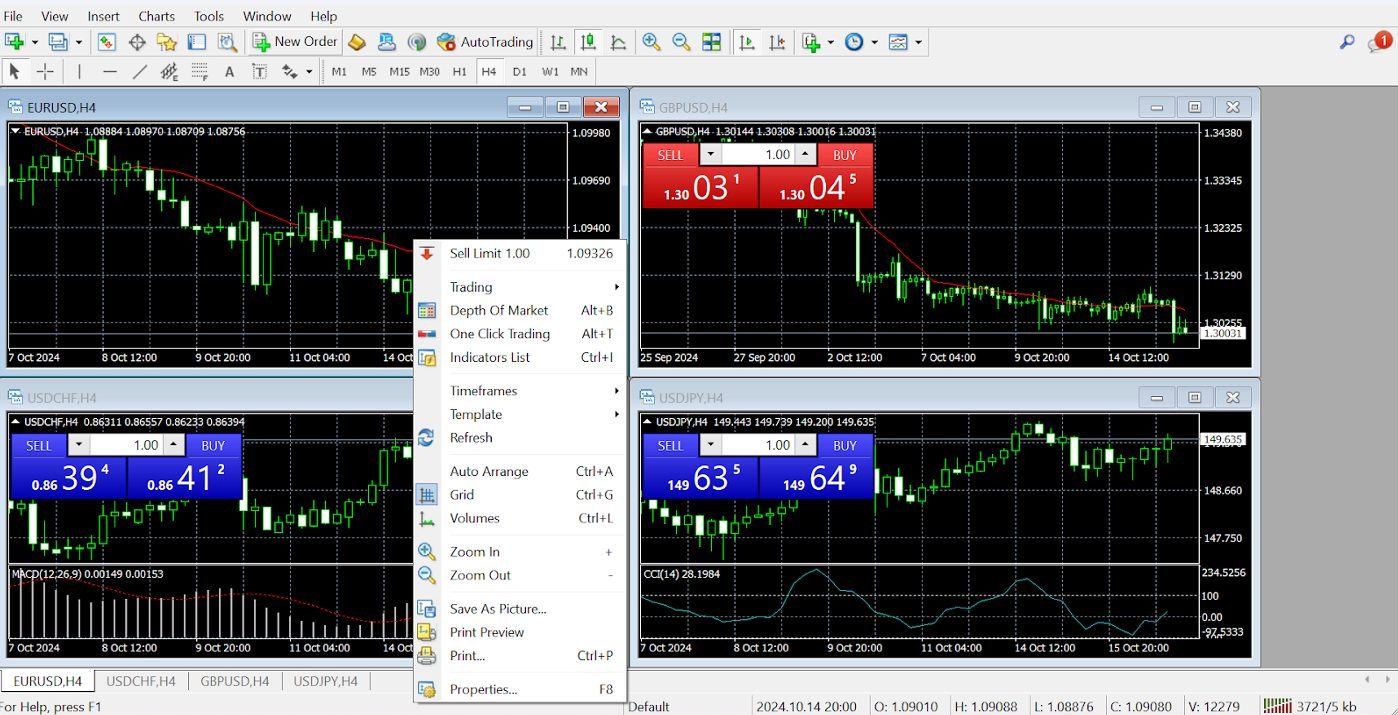
Spend time learning the platform, setting up your workspace, and testing strategies. Once you’ve got a handle on MT4, it becomes a powerful tool that can significantly improve your trading experience.
Trust me, after a few sessions you’ll be navigating MT4 like a pro.
Paul HolmesAuthorKey Features For Active Traders
Market Watch And Charting
When you first open MT4, you’ll notice the “Market Watch” window on the left side.
This is where you can keep track of live prices for various instruments, whether you’re into forex, commodities, or CFDs. But that’s just a start on how personalized you can make it happen with the charts.
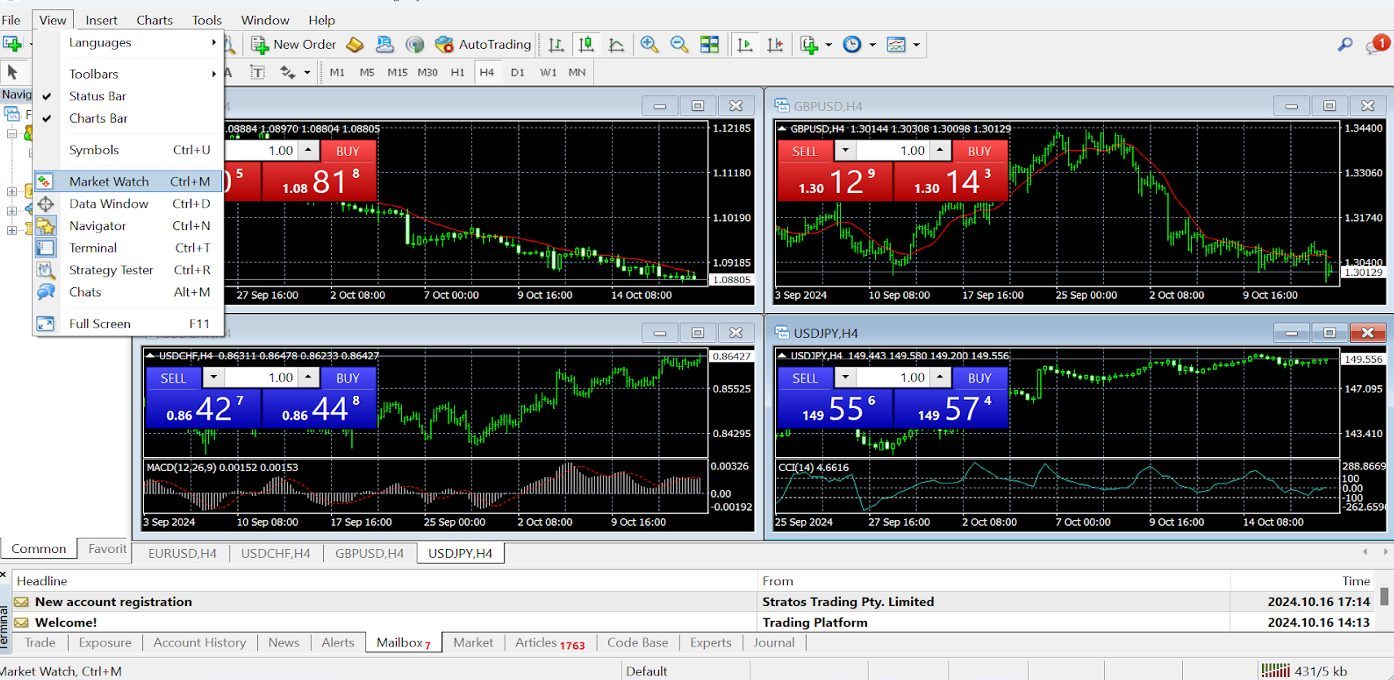
MT4 gives you several chart types, including candlesticks, bars, and lines, so you can visualize price movements however you prefer.
You can also break down the charts by timeframes, ranging from one minute to one month, which helps you spot trends whether you’re scalping or holding for longer.
When I first started using MT4, I set up multiple charts for different timeframes and strategies. Having all those visual insights open at once gave me a better feel for where the market was headed.
Paul HolmesAuthorTechnical Indicators And Analysis Tools
MT4 comes loaded with 30 built-in indicators, such as Moving Averages, RSI, MACD, and Bollinger Bands.
If you want to get deep into the technicals, you can add custom indicators; thousands are free, or you can even code your own if you know MQL4.
These tools help with analyzing the market and making decisions. For example, combining the RSI with a Moving Average can help you spot potential reversal points or confirm trends.
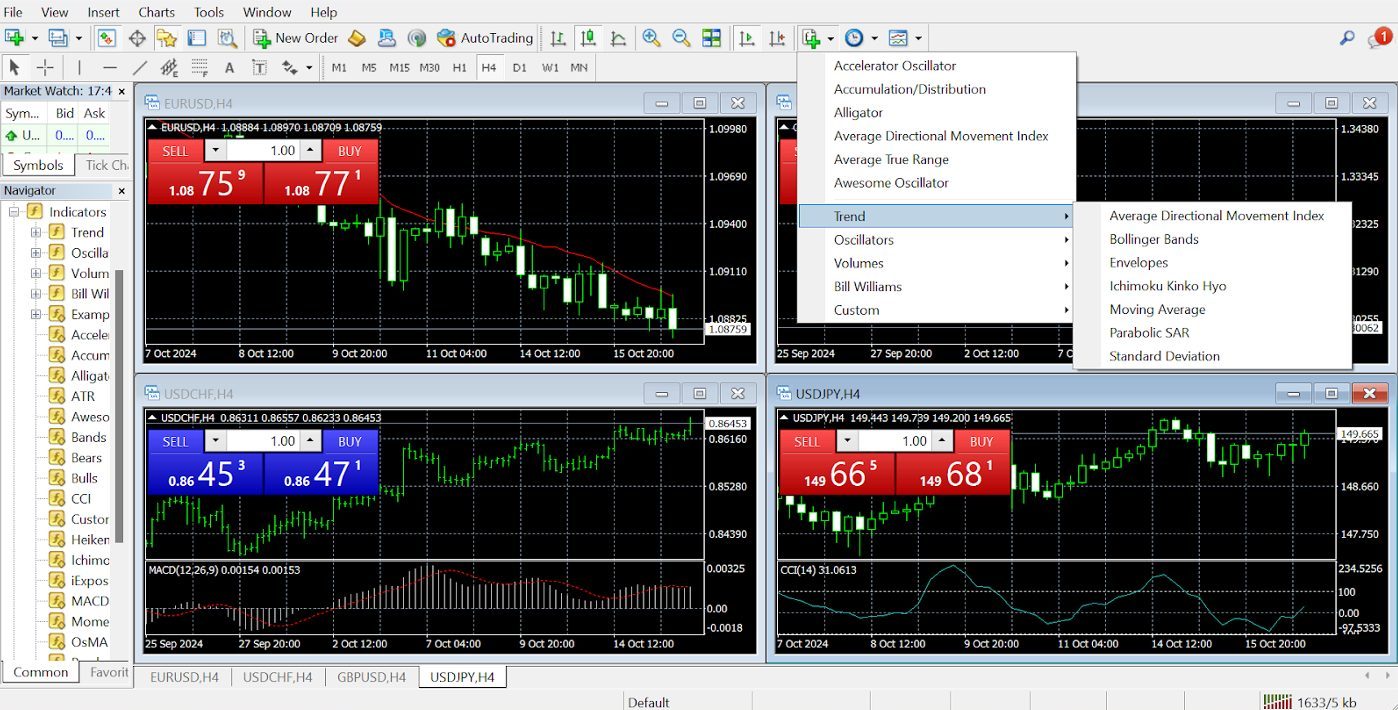
The indicators are listed on the right-hand side of the platform under an icon with a green plus sign. Click it, and the various indicator groupings, such as trend indicators, will appear in a drop-down menu.
I usually stick with a few key indicators like the MACD for momentum and Fibonacci retracements for potential support and resistance levels.
But be careful not to overload your MT4 chart with too many indicators – it can get messy and confusing.
Paul HolmesAuthorAutomated Trading With Expert Advisors (EAs)
One of MT4’s standout features is automated trading using Expert Advisors (EAs). These are essentially bots that can execute trades based on your strategy without needing you to monitor the market 24/7.
You can either write your own EAs, download free ones, or purchase more advanced options from the MT4 marketplace. This is a huge benefit for traders who want to diversify their strategies or run multiple systems simultaneously.
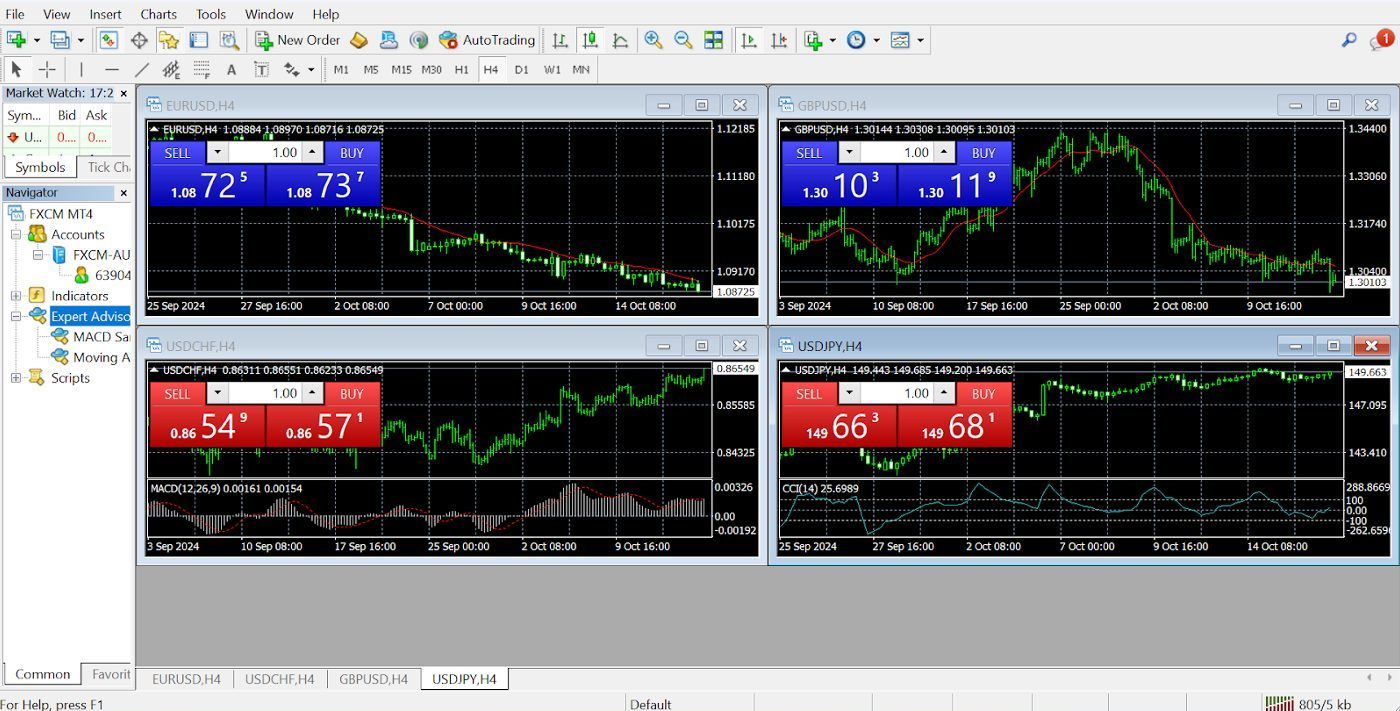
To find examples of scripts (EAs) you can experiment with, simply roll over the view button, select navigator and the menu will appear.
Before using any EA on your live account, make sure you backtest it thoroughly. I’ve seen strategies that looked great on paper but didn’t hold up in real market conditions. Backtesting is your safety net.
Paul HolmesAuthorOrder Types And Execution
MT4 offers different order types, making it flexible for all kinds of traders. Whether you want to jump into a trade right now or set up an order for later, you have options:
- Market Orders let you trade instantly at the current price.
- Pending Orders let you set up future trades at your desired price (like buy limits or sell stops).
- Stop Orders automatically close your position if it hits a certain level.
- Trailing Stops move your stop loss as the price moves in your favour, helping lock in profits without manual adjustments.
Click the new order icon at the top of the navigation to place an order. You’ll then be able to select from a list of all the currency pairs your broker offers.
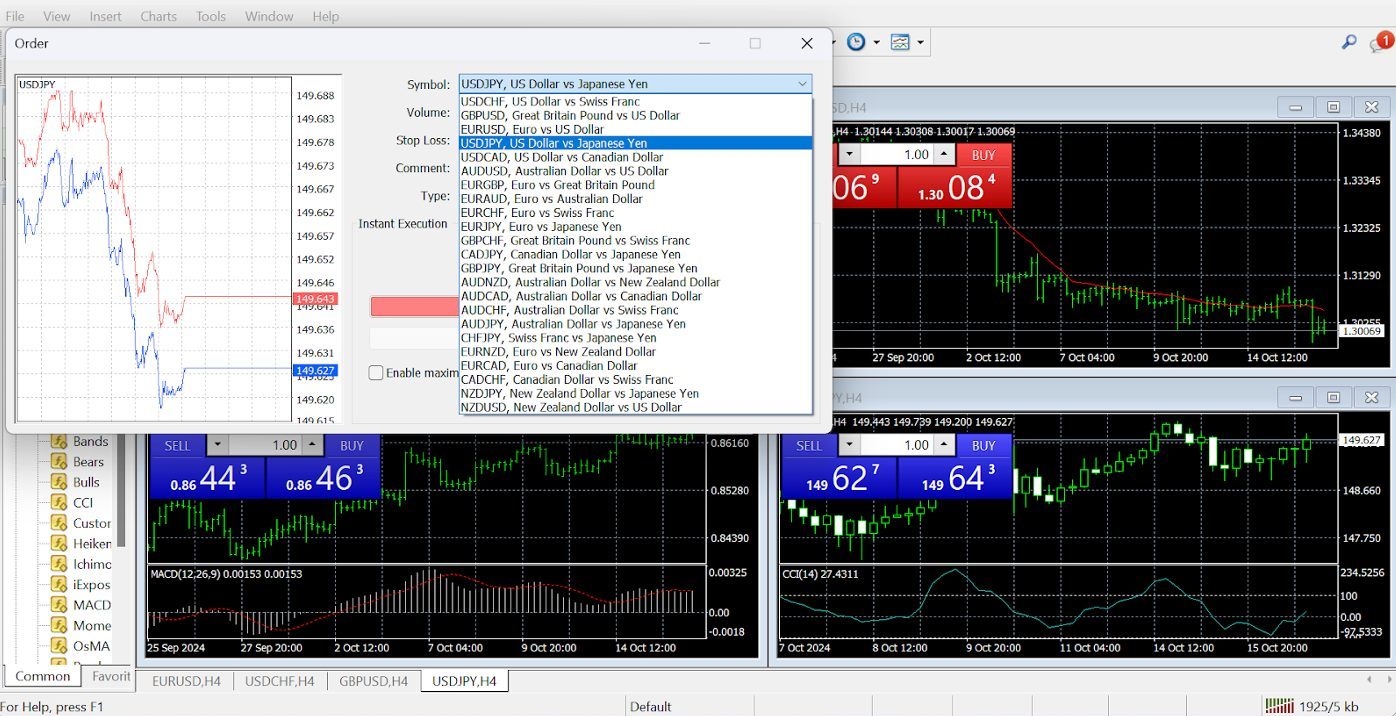
I love using trailing stops when I’m trading momentum. It helps secure profits while the market is still moving in my favour, without me having to keep a constant eye on it.
Paul HolmesAuthorTrading Signals And Copy Trading
MT4 also has a built-in “Trading Signals” feature that allows you to follow and copy trades from experienced traders. This feature is super helpful if you’re just starting out or don’t have the time to stay glued to your screen.
You can access this service by clicking the help button in the nav. You then see a drop-down menu that lists several MQL5 topics. Market and signals are listed there.
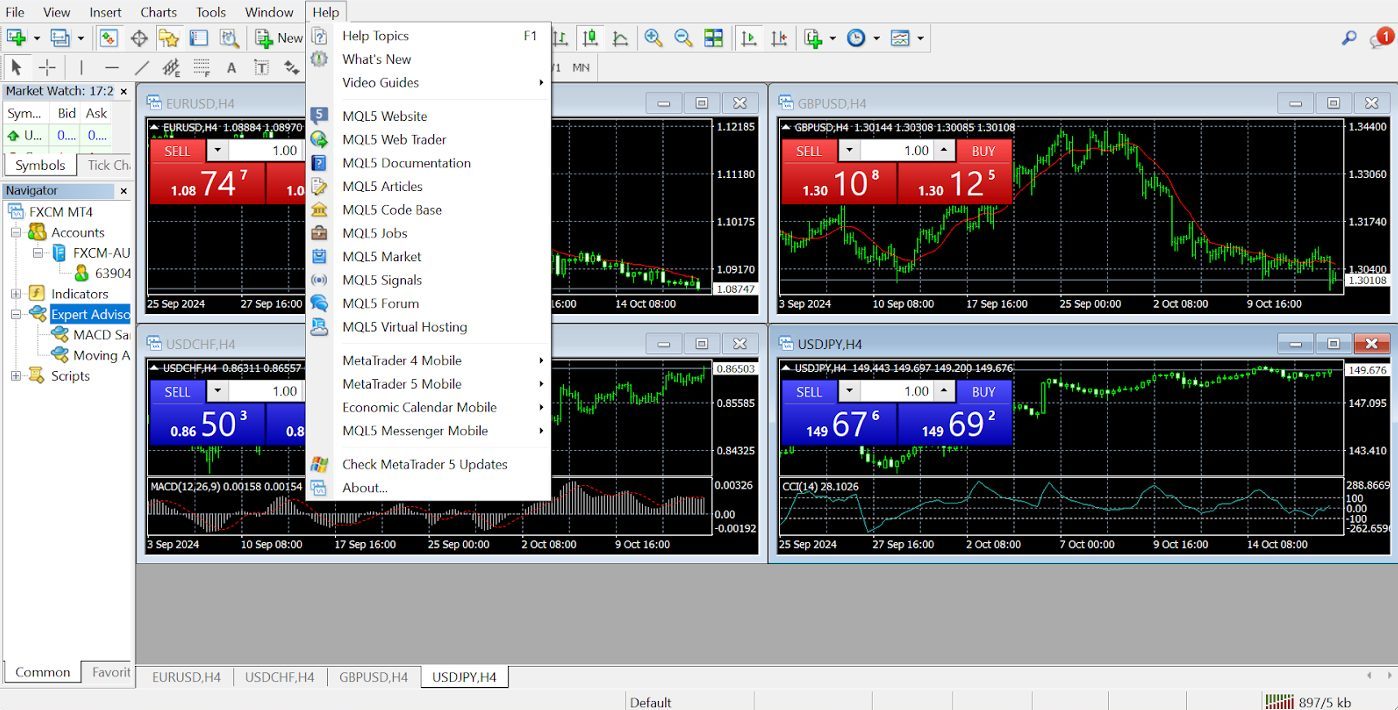
You can choose from thousands of signals, and expert advisors in a marketplace in which experienced traders will share their code; some charge, and some don’t.
In my early days using MT4, I followed a couple of top traders and learned a lot just by watching their moves. It’s a good way to get a feel for how pros trade, but choose wisely – you don’t want to follow anyone blindly.
Paul HolmesAuthorCustomization Options
Custom Indicators And Scripts
One of the coolest things about MT4 is how customizable it is. You can add custom indicators and scripts to fit your specific trading style.
Once I felt comfortable with the basics, I started adding custom indicators that aligned more with my strategies. It’s easy to find tons of them online, but make sure you’re downloading from trusted sources.
Paul HolmesAuthorWorkspace Layouts
MT4 allows you to create and save different workspace layouts. You can set up multiple chart layouts for various strategies and easily switch between them.
If you want the four most traded currency pairs horizontally on your chart, you can save your layouts; simply click file and click profiles. Or click the chart icon at the end of the top nav bar and choose save template.
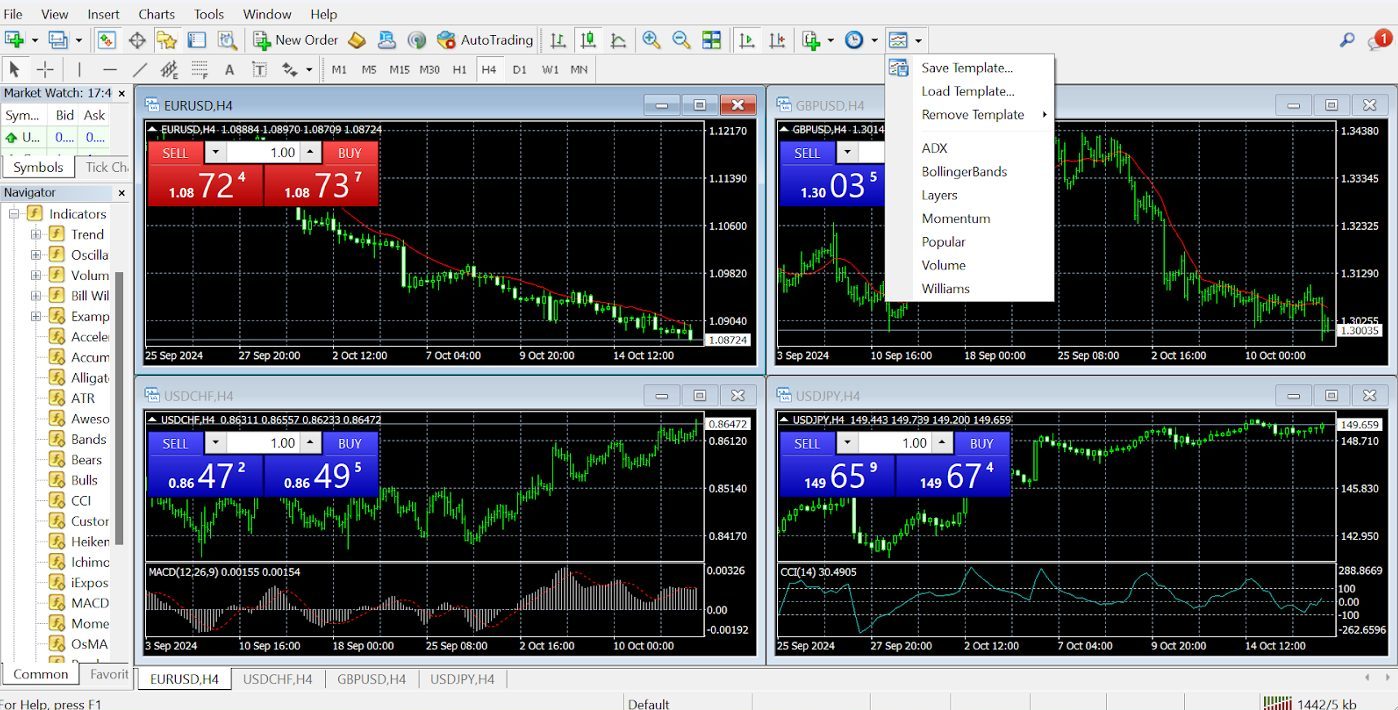
I have a simple, clutter-free workspace on MT4 for my everyday trading and a more detailed setup when I want to dive deep into analysis. Being able to switch between them quickly makes life much easier.
Paul HolmesAuthorCustom Timeframes
While MT4 has nine default timeframes, you can add custom ones if you need even more precision. There are ways to tweak the settings or use custom scripts to achieve this.
Chart Themes And Templates
MT4’s charts are fully customizable. You can change colours and themes and even save templates for future use.
I keep my charts clean and easy on the eyes. Choose colours that don’t strain your vision, especially for those long trading sessions that many day traders will be familiar with.
Paul HolmesAuthorShould I Use MT4 Or MT5?
For beginners or those primarily interested in forex trading, MetaTrader 4 is the obvious choice. If you’re an advanced trader wanting additional, sophisticated tools, you may prefer MetaTrader 5 (MT5).
Here’s a side-by-side comparison of MT4 and MT5 so you can see where they differ:
| Order Types | Technical Indicators | Chart Types | Chart Timeframes | Automated Trading | Economic Calendar | Mobile Compatible | Web Terminal | Desktop Download | Demo Mode | |
|---|---|---|---|---|---|---|---|---|---|---|
| MT4 | 4 | 30 | 3 | 9 | MQL4 | N | Y | Y | Y | Y |
| MT5 | 6 | 38 | 3 | 21 | MQL5 | Y | Y | Y | Y | Y |
Bottom Line
MetaTrader 4’s enduring popularity comes from its blend of power, flexibility, and ease of use. Whether you’re a beginner or an experienced trader, MT4 offers advanced charting tools, technical indicators, and automated trading via Expert Advisors (EAs) and copy trading, making it versatile for different strategies.
One of the biggest reasons MT4 remains a top choice is its approachability. It offers a comprehensive range of features without overwhelming users, and its clean, user-friendly interface means that traders can start placing trades right out of the gate.
Plus, the platform’s customizability ensures that as active traders grow and refine their strategies, MT4 can grow with them.
Add in the large, active community that continuously develops custom indicators, scripts, and strategies, and you’ve got a platform that stays relevant year after year.
So despite increasing competition from the newer and more advanced MetaTrader 5, plus competitors like cTrader and TradingView, MT4’s ability to offer professional-grade tools while remaining accessible to active traders of all levels makes it a front-runner in the day trading world.
To find the right provider for your needs, turn to our rankings of the highest-rated MT4 brokers for day trading.
FAQ
Is MetaTrader 4 A Broker?
MetaTrader 4 is not a broker. It is an electronic trading platform licensed to online brokers. The brokerages then offer the platform to their traders.
How Does MetaTrader 4 Work?
MetaTrader 4 facilitates access to financial markets through its online trading platform. The platform is split between a client and a server module. The server component is licensed to MT4 brokers while the client portal is used by the broker’s clients.
Is MetaTrader 4 Free At Online Brokers?
MetaTrader 4 is free to download and use. However, you’ll pay the usual fees when you place trades, such as spreads, commissions and overnight fees (you can avoid these if you day trade).
We’ve observed some brokers offering wider spreads on MT4 than on their proprietary platforms, so investigate the cost structure before signing up.
Is MetaTrader 4 Safe To Use?
MetaTrader 4 is a relatively secure platform that uses 128-bit encryption, two-factor authentication (2FA) and data segregation. However, online trading itself is risky.
Only risk what you can afford to lose and pick an MT4 broker regulated by a trusted body according to DayTrading.com’s Regulation & Trust Rating.
Is MetaTrader 4 Available For Prop Trading?
The availability of MT4 at proprietary trading firms has been greatly reduced following a crackdown by MetaQuotes in 2024. MetaQuotes forced many forex brokers to terminate “grey-labeling” agreements with prop firms. The crackdown primarily hit firms onboarding US clients due to strict regulatory limits on retail CFDs, which are banned in the US.
Article Sources
The writing and editorial team at DayTrading.com use credible sources to support their work. These include government agencies, white papers, research institutes, and engagement with industry professionals. Content is written free from bias and is fact-checked where appropriate. Learn more about why you can trust DayTrading.com