
NinjaTrader Review 2026




Pros
- Nano contracts — one-hundredth the size of standard contracts — allow traders to size positions with precision and manage risk at a much smaller scale, a meaningful advantage for those building positions gradually
- NinjaTrader's ecosystem gives traders access to thousands of add-ons and applications from developers across more than 150 countries, covering indicators, strategies, and custom tools that go well beyond what the platform ships with natively
- NinjaTrader launched CME Group Single Stock futures in July 2026, allowing traders to express directional views in top U.S. companies like Nvidia, and Amazon without needing options
- The market replay function is a standout feature — you can download tick-by-tick historical data, rewind to any specific date, and interact with it as if trading live, making it genuinely useful for both strategy testing and real-world practice
Cons
- Intraday margin requirements can spike by as much as four times in the 15 minutes leading up to major economic news releases, and may stay elevated for several minutes after volatility subsides — a detail that can catch underprepared traders off guard at exactly the wrong moment.
- NinjaTrader was fined $250k in 2025 for failing to implement an adequate anti-money laundering (AML) program and for supervisory failures.
- NinjaTrader was acquired by Kraken in May 2025, and while it continues to operate independently for now, traders who value long-term stability may have reservations about how the platform's direction and pricing could shift under new ownership.
NinjaTrader Review
We tested NinjaTrader the same way any serious trader would — by actually using it. We opened trades, tracked executions in fast markets, and watched how the platform handled pressure when spreads shifted and orders piled up. We looked beyond surface features and checked how it performed in real conditions: order speed, stability, chart responsiveness, and the smoothness of deposits and withdrawals. We also compared NinjaTrader’s public claims with data from user reports, trade logs, and what long-time clients have said over the years.
Regulation & Trust
NinjaTrader’s regulatory setup is more layered than it appears at first. NinjaTrader, LLC develops and supports the trading platform, while brokerage services for its integrated US futures offering are provided by NinjaTrader Clearing, LLC, which does business as NinjaTrader, Kraken Derivatives US and Tradovate.
NinjaTrader Clearing, LLC is registered with the Commodity Futures Trading Commission as a futures commission merchant and is an approved National Futures Association member under NFA ID 0309379. Its NFA profile also carries a “Pending Withdrawal” and “Firm On Withdrawal Hold” flag, although it continues to be shown as an approved NFA member and registered FCM.
The separate entity NinjaTrader Brokerage LLC, NFA ID 0339976, is no longer an NFA member and also carries a pending-withdrawal flag. This entity merged into NinjaTrader Clearing, LLC in November 2024, so is not the entity that holds brokerage accounts.
Clients using NinjaTrader Clearing receive the protections applicable to a US-regulated futures commission merchant, including rules concerning customer-fund segregation, financial reporting, risk disclosures and business conduct. These safeguards do not protect customers from trading losses, and futures customers may lose all or more than their initial investment.
Where a trader connects NinjaTrader’s software to another supported broker, the applicable protections instead depend on that broker, its legal entity and its regulator. Traders should therefore verify the name of the firm opening and carrying the account rather than relying solely on the NinjaTrader brand.
- NinjaTrader’s integrated US brokerage offering is provided through NinjaTrader Clearing, LLC, a CFTC-registered futures commission merchant and approved NFA member.
- US futures customers benefit from regulatory requirements covering customer-fund segregation, financial reporting, disclosures and business conduct.
- NinjaTrader publishes the relevant legal entity and NFA identification details, making its current regulatory status independently verifiable.
- NinjaTrader Clearing’s current NFA profile carries a “Pending Withdrawal” and “Firm On Withdrawal Hold” flag. It remains listed as an approved NFA member and registered FCM, but we’ll be monitoring the register for any further changes to its status.
- Unlike large multi‑asset brokers, NinjaTrader has faced some scrutiny around its structure. In September 2024, the CFTC ordered the payment of over $980,000 for failing to diligently supervise employees, specifically failing to properly restrict accounts during emergencies. In May 2025, NinjaTrader was fined $250,000 by the NFA for failing to implement an adequate anti-money laundering program.
- NinjaTrader lacks a banking license, so it is not subject to strict capital and reporting standards like regulated banks, some of which are also brokerages, limiting its product range and fund management practices.
- NinjaTrader isn’t publicly listed and doesn’t disclose detailed financials, making it harder for traders to evaluate its financial strength compared to brokers that release audited financial statements.
The main concern with NinjaTrader is not that it looks like a fake broker, but that traders can easily focus on the platform brand and overlook the legal entity actually holding their funds. The most important recent official issues were supervisory and AML failings at NinjaTrader Clearing, LLC, rather than clone-scam alerts tied to the brand itself.
More details on NinjaTrader’s different global entities, safeguards, and any warnings can be found later in this review.
Accounts & Banking
- NinjaTrader offers genuine flexibility on the account side, with Free, Monthly, and Lifetime license options, as well as a sim-only mode that lets you test the platform without risking real capital.
- The barrier to entry is lower than most — there’s no hard minimum deposit to open an account, and $400 is enough to cover micro futures margins, which compares favorably to brokers that want $2,000 or more upfront.
- Funding options are practical and varied, with ACH for regular deposits, instant debit for quicker top-ups, and wire transfers for moving larger sums — all accessible within a single platform.
- Costs swing wildly by license tier — Free users pay $1.29/side commissions while Lifetime drops to $0.59, so the “low entry” hides premium pricing for casual traders.
- Banking varies by broker connection. NinjaTrader Brokerage ACH is free but slow, while third-party links add their own fees and rules.
- No single simple account like uniform brokers — pick the wrong license or partner, and you’re stuck with higher fees or mismatched margins.
Live Accounts
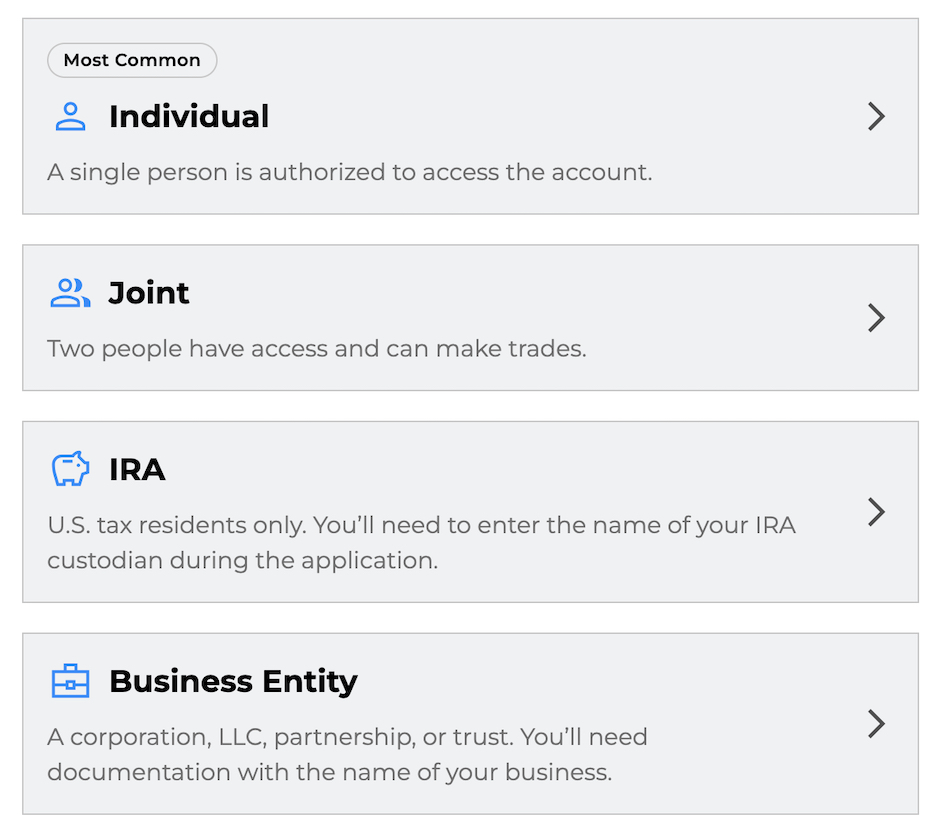
NinjaTrader’s account structure looks accessible on paper, but dig into the details, and it becomes clear this is a platform built for futures traders with real capital behind them, not casual retail accounts.
The official pricing page lists no minimum deposit — technically $0 — but that’s more of a technicality than an invitation. In practice, you’ll need at least $400 to fund your account and activate live trading, which covers micro contracts like the MES with day-trade margins typically running between $50 and $120.
Step up to full E-mini ES contracts, and the picture changes quickly: margin requirements range from $500 to $12,000 per contract, depending on whether you’re day trading or holding overnight. Anything beyond micros will eat through a small balance fast, and minimum trade sizes follow exchange rules — one micro contract, nothing fractional.
On the platform licensing side, you have three options: a Free tier, a $99 Monthly subscription, or a $1,499 Lifetime license. The free version is workable if you’re comfortable with higher commissions — up to $1.29 per side on futures — whereas the lifetime license brings that down to $0.59 per side, which adds up meaningfully for active traders.
But there’s no negative balance protection beyond standard exchange rules, no interest earned on cash holdings, and leverage is capped at exchange limits.
The prop trading route through NinjaTrader Prop adds another layer of complexity, with evaluation fees starting around $150, drawdown limits, and simulated funded tiers up to $200k that only convert to real capital once you’ve cleared their hurdles. Funded trading accounts are provided through ‘NinjaTrader Prop’ and ‘Tradovate Prop’.
The low entry point sells an accessible image, but the reality is a platform that rewards traders coming in with $5,000 to $10,000 or more, enough to trade multiple contracts without hitting margin calls at the first sign of movement. Underfund it, and you’ll spend more time watching than trading.
Demo Accounts
NinjaTrader’s demo account is a reasonable way to get familiar with the platform, but it has enough limitations that serious traders shouldn’t rely on it as a true rehearsal for live conditions.
The first thing to know is that the real-time CME data is only available for 14 days after signing up. Once that window closes, the demo switches to delayed feeds unless you pay for live access — which quietly turns your “free” practice environment into a lagged simulation that no longer reflects how markets actually move.
There are also daily usage limits tied to CME and CQG capacity, meaning you can find yourself locked out mid-week with no clean solution beyond restarting or upgrading.
The fills don’t help either. Demo executions are unrealistically clean compared to what you’ll encounter live — no slippage, no partial fills, none of the latency that real ES or NQ orders regularly throw at you. Mistakes that would cost money in a live account get quietly forgiven in sim mode.
Default starting balances tend to be set high too, often $50,000 or more, which encourages position sizing that has nothing to do with what’s actually possible on a $400 micro account.
For basic platform exploration or testing how an indicator behaves, it does the job. But as a tool for practicing execution or validating a strategy under anything resembling live pressure, it falls short.
The gap between demo conditions and the real thing — delayed data, usage caps, idealized fills — can leave you feeling more prepared than you actually are. It’s a decent introduction, but don’t mistake it for genuine preparation.
Deposits & Withdrawals
NinjaTrader’s funding setup is functional, but there are enough hurdles baked into the process to catch you off guard if you haven’t read the fine print.
On the deposit side, ACH transfers are free and typically clear within one to two days for amounts up to $5,000. Debit card and digital wallet options (Google Pay & Apple Pay) offer something closer to instant access within similar limits, while wire transfers carry no cap but come with bank fees and can take anywhere from a few hours to a full business day.
There’s no formal minimum to open an account, but you’ll need at least $400 to trade micro futures in any meaningful way — anything below that just sits there. Third-party transfers are blocked outright, and wires must come directly from an account in your name; otherwise, they’ll be returned with compliance complications attached.
Withdrawals come with their own set of constraints. The minimum is $30 to $50, depending on the method. ACH is free if you submit before the 11am CT cutoff, and wire withdrawals carry a $30 fee with a 2-day or more wait. Freshly deposited funds are subject to a seven-day hold before they can be withdrawn, so anyone expecting to move money in and out quickly will hit a wall.
Crypto isn’t an option, and daily caps on certain methods limit how quickly larger sums can move.
For patients, US-based futures traders operating on a steady rhythm get the job done. But the holds, the fees attached to faster options, and the rigid verification process feel designed around risk management rather than trader convenience.
If quick access to your money matters — or you’re working with a smaller account — it’s worth knowing that other brokers handle this side of things with considerably less friction.
| NinjaTrader | Interactive Brokers | FOREX.com | |
|---|---|---|---|
| Accounts & Banking Rating | |||
| Payment Methods | ACH Transfer, Cheque, Debit Card, Wire Transfer | ACH Transfer, Automated Customer Account Transfer Service, Cheque, TransferWise, Wire Transfer | ACH Transfer, Credit Card, Debit Card, Mastercard, Neteller, PayNow, PayPal, Skrill, Visa, Wire Transfer |
| Minimum Deposit | $0 (live trades must meet intraday margin minimums, e.g., $50 to trade micro contracts) | $0 | $100 |
| Visit | Visit | Visit | Visit |
| Review | Review | Review | Review |
Assets & Markets
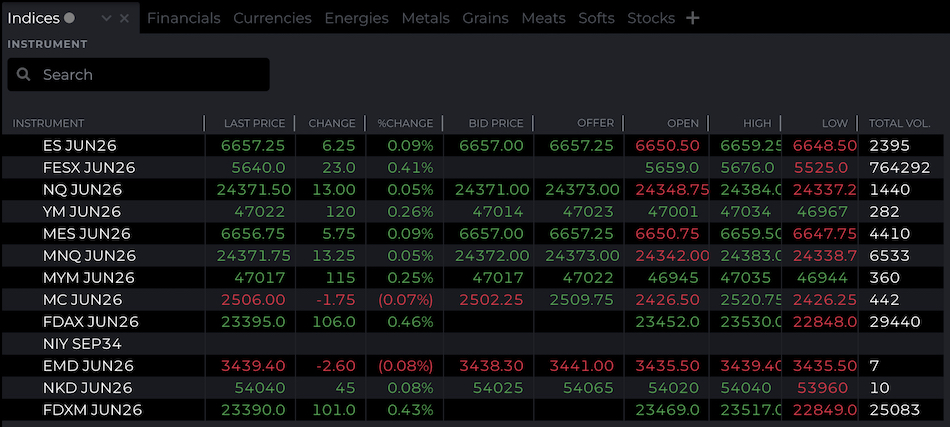
NinjaTrader’s asset coverage is deep in one direction and deliberately narrow in most others. The platform gives you access to over 100 futures contracts across CME, COMEX, and NYMEX, covering the instruments most active futures traders actually care about — ES, NQ, the micro E-minis, crude oil, gold, silver, and a range of agricultural and energy contracts.
But outside of futures, the native offering essentially stops there. No stocks, no spot forex, no options, no CFDs, no ETFs, no crypto. If futures aren’t your primary market, NinjaTrader on its own won’t cut it.
NinjaTrader expanded into retail futures in Europe in 2026, kicking operations off in the Netherlands and Germany. This is via CySEC-regulated Payward Europe Digital Solutions (CY) Limited.
Within futures, the lineup covers the essentials well. The E-mini S&P 500 and E-mini Nasdaq are front and center, with the micro versions — MES and MNQ — at a tenth of the full contract size, making them accessible to traders with smaller accounts.
Energy covers crude oil and natural gas, metals include gold and silver, and the agricultural side includes corn, soybeans, and wheat, though liquidity in those contracts thins considerably outside seasonal periods.
Treasury exposure is limited largely to ZN, and currency futures are narrow, with the euro contract being the most traded. Exotic metals, refined energy products, and anything beyond the mainstream are largely absent.
One practical reality worth understanding is how overnight margins work. Holding positions past the close typically triggers margin requirements two to five times higher than intraday levels, which can sideline smaller accounts quickly if they’re not prepared for it. Contract expirations and monthly rolls are also part of the rhythm — something traders new to futures need to get comfortable with.
The picture expands when you connect third-party brokers. Link NinjaTrader to Interactive Brokers or a similar provider, and stocks, options, and spot forex become available within the platform interface. It’s a meaningful addition, but it’s not seamless — different data feeds, margin rules, and order routing per broker create a patchwork experience rather than a unified one.
NinjaTrader is a futures-first platform with bolt-on access to other markets, not a genuine multi-asset trading house. For traders whose world revolves around ES, NQ, or the commodities complex, that’s not a problem. For anyone wanting deep, integrated access across asset classes in a single login, it’ll feel like a compromise.
Leverage
Leverage at NinjaTrader works differently from the simple ratios you’ll see advertised by forex brokers. Everything here is governed by exchange-set margin requirements, which determine how much market exposure you can carry per dollar in your account — and the gap between intraday and overnight rules is where a lot of traders get caught out.
Intraday margins look attractive on paper. A single ES contract requires just $500 during the day session, with micro contracts like MES coming in at around $50, meaning a $5,000 account can theoretically control 10 contracts, with a single point move translating to $500 in either direction.
Overnight, that picture changes dramatically — margins can balloon to $12,000 or more per ES contract, quickly exposing daytime access for what it really is: a short window that closes sharply when the regular session ends.
For scalpers and active day traders, the low intraday thresholds are genuinely useful. But they can also be a trap for anyone who’s undercapitalized or unclear on how the mechanics work.
The effective leverage embedded in futures contracts is substantial — an ES contract carries a notional value of around $220,000 against a $500 margin, implying leverage in the region of 1:440 — yet that exposure can shift suddenly when exchanges raise requirements during periods of elevated volatility.
Some third-party brokers connected to the platform offer slightly lower day margins, but the inconsistency between providers means you can’t always count on it.
The bigger risk is that the accessibility of low intraday margins can encourage you to load up on contracts relative to your actual account size, leaving little buffer when maintenance margins kick in, or markets move against you.
There’s no negative balance protection beyond standard exchange rules in some regions, and no leverage cap to act as a safety net. In the right hands — typically traders with meaningful capital buffers and a clear risk framework — the leverage available through NinjaTrader is a genuine edge. For undercapitalized accounts chasing outsized positions, it’s a fast route to a blown account.
| NinjaTrader | Interactive Brokers | FOREX.com | |
|---|---|---|---|
| Assets & Markets Rating | |||
| Trading Instruments | Futures, Forex, Stocks, Options, Commodities, Futures, Crypto (non-futures depend on provider) | Stocks, Options, Futures, Forex, Funds, Bonds, ETFs, Mutual Funds, Cryptocurrencies | Forex, Futures and Options on Metals, Energies, Commodities, Indices, Bonds |
| Margin Trading | Yes | Yes | Yes |
| Leverage | $50 intraday margins for Micro contracts and $500 for popular E-mini contracts | 1:50 (major forex pairs), 1:2-1:4 (equities) | 1:50 |
| Visit | Visit | Visit | Visit |
| Review | Review | Review | Review |
Fees & Costs
NinjaTrader’s fee structure appears trader-friendly on the surface, but dig into the details, and it reveals a tiered system that can quietly work against lower-volume or less active users.
Trading costs are tied directly to your platform license. The Free tier offers commissions of $1.29 per side on standard futures and $0.39 per side on micros. The Monthly plan at $99 brings those down to $0.99 and $0.29 respectively, and the Lifetime license — a one-time $1,499 — gets you to $0.59 and $0.09.
On top of whichever rate applies to you, there are exchange fees of around $0.19 per contract, NFA clearing charges, and routing fees through Rithmic or CQG. Run 10 round-trip ES trades in a day, and you’re looking at over $25 on the Free plan, or closer to $15 on the Lifetime license. For traders scalping micros at volume, the difference between plans compounds quickly.
The non-trading fees are where things get more frustrating. An inactivity charge of $25 to $35 per month kicks in if you’re logged in but not placing live trades for 30 days — essentially a nudge to either stay active or leave.
Market data is a separate bill: CME Level I costs around $12 per month for non-professional users, while Level II data, which is genuinely necessary for order flow analysis, jumps to $48. Wire withdrawals carry a $30-plus fee, and while ACH is free, it’s capped and takes two to three days.
The underlying issue is that the pricing model is built around volume. Traders churning through a hundred or more contracts a month will find the Lifetime license pays for itself relatively quickly, and the overall cost structure starts to make sense at that level of activity.
For beginners or anyone still finding their feet, the free plan’s higher commissions, stacked on top of data fees, create a cost base that leaves very little margin for error. It’s a structure that rewards commitment and punishes hesitation — which is fine if you know what you’re signing up for, but less so if you’re still deciding whether futures trading is right for you.
| NinjaTrader | Interactive Brokers | FOREX.com | |
|---|---|---|---|
| Fees & Costs Rating | |||
| Inactivity Fee | $35 | $0 | $15 |
| Visit | Visit | Visit | Visit |
| Review | Review | Review | Review |
Trade Execution
Trade execution on NinjaTrader runs fast and steady—key if you’re chasing tight fills on futures like ES or NQ.
In live tests, market orders hit in 20-40ms during NY open, landing right at quoted levels with little slippage outside FOMC or NFP spikes.
Against ECN-style futures brokers like Interactive Brokers, NinjaTrader keeps pace—raw speed trails a touch, but reliable enough for day traders not scalping single ticks.
Total latency splits into four stages:
- Local processing latency: Your rig handles the click. Modern CPU, SSD, and Ethernet shave this. Wi-Fi or older hardware can delay the order before it reaches NinjaTrader’s servers.
- Network latency: Path from your line to their data centers. Fiber crushes Wi-Fi—traders on strong net see crisper fills.
- Broker processing latency: NinjaTrader doesn’t post internals, but tests clocked market orders at 25-50ms, over 98% under 80ms. Limits ran 35-70ms, steady even in heavy volume.
- Execution latency: NinjaTrader pulls from exchange pools, not pure DMA. Fills stay consistent without the gaps you’d hit in thin books during opens.
Round-trip stays under 150ms are normal on desktop; prices firm on liquid contracts. Fast enough for intraday, even if it skips the sub-10ms flex of top DMA brokers.
Live Trading Test
Testing from a London-area computer, market orders on ES and NQ futures filled under 120ms during the NY open. Almost no re-quotes. The first 10 minutes of chop still landed trades close to quoted prices, showing NinjaTrader’s routing holds up under typical session volume.
Standard broadband kept executions tight for day trades. FOMC spikes pushed slippage to 1-2 ticks on small contracts.
We dialed latency up to 300ms—think VPN or distant connections—and execution slowed. The platform stayed stable, no crashes. But scalps on tight ranges lost edge, and reaction entries lagged.
Slippage Analysis
NinjaTrader’s slippage stays tight on liquid futures like ES and NQ during normal hours. But it widens fast around open, news drops, or thin overnight sessions. That’s standard for futures platforms, yet it hits scalpers harder than swing traders.
Active traders need to watch fills closely. The desktop SuperDOM helps spot depth, but exchange fees and variable latency can still nick edges on quick entries. A demo looks clean until live volume tests it.
Overall, NinjaTrader handles volume fine for most day trades. But if zero-slippage scalping in chop is your game, look at brokers with deeper liquidity pools or tighter DMA routing.
Methodology note
Over seven straight days, we ran over 200 round-trip trades on a NinjaTrader futures account—mostly market and limit orders on ES, NQ, and crude oil contracts.
Tests were run on the desktop platform from a London-area connection. We hit NY open, session overlaps, economic releases, and slow overnight hours to catch execution under real pressure.
For every trade, we measured the entry quote against the actual fill, averaged slippage by contract and time frame, and checked it against NinjaTrader’s listed commissions and exchange fees.
Platforms & Tools
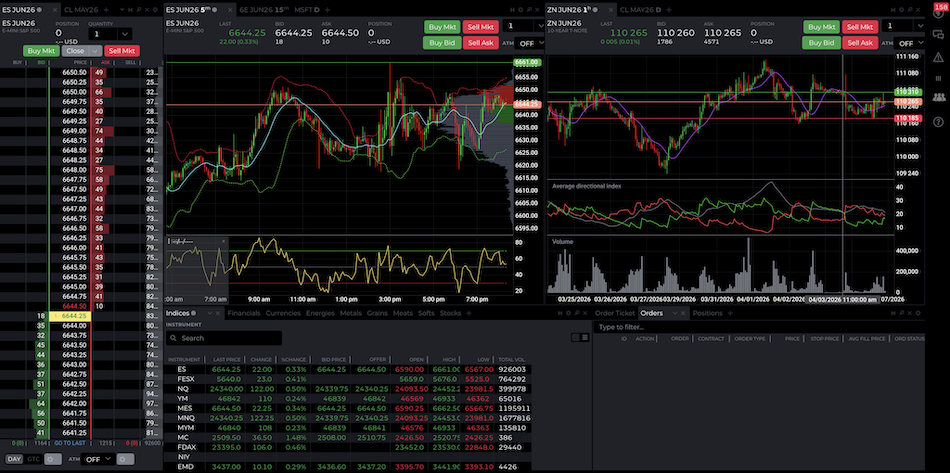
NinjaTrader’s trading platforms are strong, but they don’t go out of their way to make life easy for newcomers. The desktop version is where the real power sits. You get detailed charting, order flow tools, and the SuperDOM — essentially a live depth-of-market ladder that shows bid and ask liquidity, lets you place orders directly from the ladder, and gives you a fast way to adjust stops and targets without wading through menus. For active traders, that kind of immediacy matters. It strips out the nuisances that costs you time in fast-moving markets.
The catch is that the platform assumes you already know what you’re doing. SuperDOM is powerful, but it’s unforgiving — click the wrong price level or misread the ladder, and the software won’t bail you out. The same applies to trade management more broadly.
ATM (Advanced Trade Management) strategies, OCO orders, and quick order modification are all there, but they come with a steeper learning curve and an interface that expects precision from the trader rather than protecting them from their own mistakes.
Add in custom indicators, automation, and extensive layout control, and you have something genuinely well-suited to serious futures traders — but only if they’re prepared to put the time in. The interface is busy, and at times it can feel like you’re managing the software as much as you’re managing your trades.
The web version offers a lighter, more accessible entry point, but it gives up a lot in the trade-off. Workspace control, customization, and analytical depth are all reduced compared to the desktop build. The split is fairly clear: the desktop app is for serious, Windows-based traders (no native macOS support) who want full control, while the web version functions more as a convenience layer.
That makes NinjaTrader a powerful platform in the right hands, but also an unfinished one in practical terms — it hands you the tools and largely leaves you to figure out the rest.
Measured against MetaTrader, cTrader, and TradingView, NinjaTrader is the most specialized of the group. MetaTrader remains the default for retail forex and CFD traders, cTrader offers a cleaner, more approachable experience for many (with native copy trading), and TradingView leads in charting and community-driven idea sharing.
NinjaTrader goes further than any of them on futures execution and order flow analysis, but it doesn’t play well with others — you can’t simply plug in a MetaTrader or TradingView workflow and expect it to carry over. That makes it a deep and capable platform, but also a closed one. To get the most out of it, you have to commit to working within its own ecosystem.
Mobile Apps
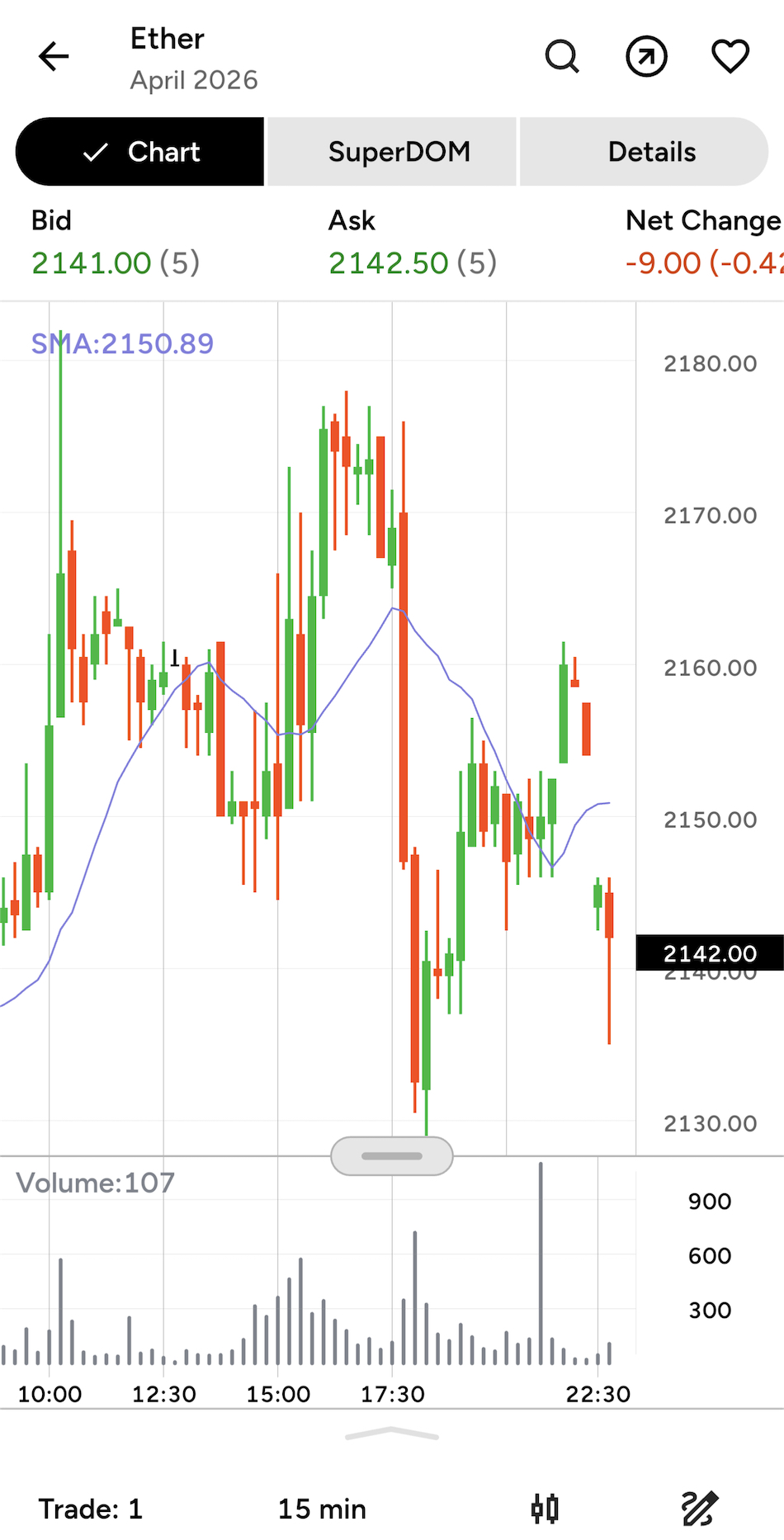
NinjaTrader’s mobile app is a solid companion tool for iOS and Android devices, but it’s not trying to replace the desktop platform — and it shows. What it does well is give you a way to monitor positions, manage orders, and keep an eye on the futures market from your phone.
The app has improved over time, too, with charting and SuperDOM views now included, along with a cleaner layout and automatic Y-axis scaling that makes quick risk checks or minor adjustments away from the desk genuinely workable.
The gaps are harder to overlook if you’re expecting more. The depth just isn’t there compared to the desktop version, particularly for anything involving heavier analysis, advanced drawing tools, or full order flow workflows.
The app does what it’s designed to do reasonably well. It keeps you connected, lets you stay across your positions, and handles light trade management without much friction. But it’s clearly built as a trimmed-down companion rather than a full trading workstation, and traders who rely on NinjaTrader’s deeper analytical capabilities will still need to be at their desk to do their best work.
| NinjaTrader | Interactive Brokers | FOREX.com | |
|---|---|---|---|
| Platforms & Tools Rating | |||
| Platforms | NinjaTrader Desktop, Web & Mobile, eSignal | Trader Workstation (TWS), IBKR Desktop, GlobalTrader, Mobile, Client Portal, AlgoTrader, OmniTrader, TradingView, eSignal, TradingCentral, ProRealTime, Quantower | WebTrader, Mobile, MT4, MT5, TradingView |
| Mobile App | iOS & Android | iOS & Android | iOS & Android |
| Visit | Visit | Visit | Visit |
| Review | Review | Review | Review |
Research
NinjaTrader does offer some research-oriented tools, though they lean more toward market observation than independent analysis. The core of it is built around the Market Analyzer, hot lists, technical indicators, charting tools, and the Strategy Analyzer for backtesting. Throw in live market data and third-party add-ons, and you can piece together a reasonably capable research workspace — provided you already have a clear idea of what you’re building.
News is also available on the platform through third-party feeds like Investing.com and RTTNews, which give you a simple way to stay up to date on headlines without leaving the workspace.
Where it falls short is in anything resembling deeper, original research. There’s no in-house analysis desk, and nothing comparable to Trading Central or Autochartist — so don’t expect built-in technical signals, sentiment overlays, or analyst commentary. What NinjaTrader labels as research is really a collection of technical screens and workflow tools, useful in their own right but a long way from what a full-service broker would offer.
For active futures traders, that’s often fine. The Market Analyzer, chart indicators, news feeds, and backtesting suite cover a lot of ground if your goal is to test setups quickly and move decisively. But for beginners or anyone coming in with expectations of broker-grade research, curated signals, and market commentary, the offering will feel thin.
| NinjaTrader | Interactive Brokers | FOREX.com | |
|---|---|---|---|
| Research Rating | |||
| Visit | Visit | Visit | Visit |
| Review | Review | Review | Review |
Education
NinjaTrader’s learning resources cover a wide range — webinars, video tutorials, strategy guides, and video-based courses that range from futures basics to order flow analysis. The problem is that much of the more useful material, such as learning courses, is behind a login wall. There are free teasers available, but you’ll need a registered account before the real depth opens up.
That creates an early sticking point for beginners. The public-facing videos cover topics like opening charts and placing basic orders, but they assume a working knowledge of futures concepts—ticks, margins, and the like. Without an account, you’re largely stuck with surface-level content, and most newcomers end up filling the gaps on YouTube rather than through NinjaTrader’s own resources.
On the plus side, the YouTube-hosted webinars go into genuine depth, with tested setups — VWAP for scalping, for example — that are more actionable than the generic advice you find elsewhere. The library holds up well for intermediates who know what they’re looking for.
Taken as a whole, it’s a strong reason to sign up, but it asks for a level of commitment upfront that competitors with fully open resources don’t. Intermediates with an account will get solid value from it, complete beginners will likely feel underserved, and seasoned traders will probably work through most of it fairly quickly.
| NinjaTrader | Interactive Brokers | FOREX.com | |
|---|---|---|---|
| Education Rating | |||
| Visit | Visit | Visit | Visit |
| Review | Review | Review | Review |
Customer Support
NinjaTrader leans on its help center and community forums as the first line of support, and for straightforward questions, it works well enough. A query about minimum funding was answered quickly through the FAQs without needing to speak to anyone. The video guides are also worth flagging — they cover a solid range of platform topics and are genuinely useful for getting up to speed on features without having to dig through written documentation.
What’s presented as live chat is actually a bot, and while it handles common questions competently enough, it’s a noticeable step down from real-time human support — and for a trading broker, that’s a genuine disappointment. Email is an option too, but there’s a catch: you need to have an account before you can submit an inquiry, which shuts out prospective clients who have questions before they’re ready to sign up. For anyone still weighing up whether NinjaTrader is the right fit, that’s a frustrating wall to hit.
There’s no phone support to fall back on either, which narrows the options considerably when something urgent comes up. That’s a meaningful gap for an active trading platform, and it becomes most obvious outside standard US hours — traders in Asian time zones, in particular, will find support options thin on the ground.
Overall, the self-serve resources are better than average, and the video guides in particular do a lot of heavy lifting. But when you need a real answer quickly, the absence of live chat and phone support leaves the experience feeling underpowered for what is, ultimately, a platform handling people’s money.
| NinjaTrader | Interactive Brokers | FOREX.com | |
|---|---|---|---|
| Customer Support Rating | |||
| Visit | Visit | Visit | Visit |
| Review | Review | Review | Review |
Community Sentiment
To get a rounded picture of NinjaTrader, we went beyond our own testing and dug into what actual traders are saying. That meant trawling through forums, app stores, and review platforms like Trustpilot — covering more than 2,500 comments from active users across all of them.
The overall sentiment leans positive. Chart reliability during volatile sessions, fast order fills on contracts like ES and NQ, and order flow tools that hold up under pressure — these came up repeatedly and across enough different sources to feel genuine, not just the usual chorus of paid-up fans.
On the support side, NinjaTrader handles Trustpilot complaints reasonably well, responding to around 90% of them within 48 hours, typically to clarify data-feed issues or broker connection questions. The picture is less consistent on smaller forums, where threads about withdrawal delays occasionally go unanswered.
The recurring complaints follow a fairly predictable pattern: support response times slowing outside US hours, some confusion among newer users about which broker actually holds their account, and the odd chart redraw on tick data when major news hits.
None of that overshadows the core experience for most users, who seem genuinely satisfied with what the platform delivers day to day. But the gaps in support availability and off-hours access are noticeable enough to warrant flagging.
NinjaTrader Entities, Safeguards & Warnings
List Of NinjaTrader Entities
NinjaTrader’s setup is more nuanced than a typical broker because the software brand and the account-holding firm are not always the same thing. That makes it especially important to confirm which legal entity is providing execution and custody, since the regulator and the investor protections depend on that specific firm. You can check this below.
NinjaTrader Clearing, LLC (NFA & CFTC)
- Entity URL: https://ninjatrader.com
- Verify Registration: NFA ID 0309379
- Trading Names: NinjaTrader, Kraken Derivatives US and Tradovate
- Regulatory Status: CFTC-registered futures commission merchant and NFA member. The NFA profile shows “NFA Member Approved” together with “Pending Withdrawal” and “Firm On Withdrawal Hold” flags. NFA & CFTC (green-tier – strong safeguards)
- Protections: Clients using NinjaTrader brokerage are regulated by the NFA and CFTC, which enforce some of the toughest standards in retail trading. Client funds must be held in segregated accounts, leverage on major forex pairs is capped at 1:50. The US law prohibits bonus schemes that encourage over‑trading, but there is no investor compensation fund like those offered by FCA– or CySEC-regulated brokers if the firm fails.
- Who Uses This Entity: Eligible customers using NinjaTrader’s integrated US futures brokerage offering and the associated NinjaTrader, Tradovate or Kraken Derivatives US services, depending on the product and onboarding route.
Payward Europe Digital Solutions (CY) Limited (CySEC)
- Entity URL: https://ninjatrader.com/eu/
- Verify License: 342/17
- Regulator Classification (Green to Red): CySEC / MiFID (green-tier – strong EEA safeguards)
- Protections: NinjaTrader’s European offering is provided via Payward Europe Digital Solutions (CY) Limited, a CySEC-authorised MiFID investment firm trading as NinjaTrader. Retail clients onboarded through this entity receive the usual MiFID-style protections, including client-asset and conduct rules, appropriateness requirements, and the standard EU retail derivatives framework where applicable. As a Cyprus investment firm, eligible clients may also have access to the Cyprus Investor Compensation Fund up to €20,000 if the firm cannot return money or financial instruments. That said, this is not protection against trading losses.
- Who Gets Signed Up Under This Entity: European clients using NinjaTrader’s EU offering. NinjaTrader announced this launch in January 2026, starting with the Netherlands and Germany, with wider EU expansion planned.
Important: Verify Your Entity & URL
Before opening your NinjaTrader account, remember that NinjaTrader provides only the trading platform. Your funds and trading activity are managed by the specific broker linked to your NinjaTrader software. In most cases, for US clients, this is NinjaTrader’s own brokerage, but it can also be a third-party, potentially offshore broker. This detail is critical to understand.
To confirm oversight, check the broker’s name and regulators (NFA, CFTC, FCA, CySEC, etc.) in the website footer before signing up.
US customers using NinjaTrader’s integrated futures brokerage should confirm that their account is provided by NinjaTrader Clearing, LLC, NFA ID 0309379. NinjaTrader Brokerage LLC is no longer an NFA member following its merger into NinjaTrader Clearing. Using non-US or unregulated brokers forfeits these safeguards.
Watch for Clone Scams
Scammers sometimes create fake websites that look almost identical to the real one but use slightly different web addresses. The changes can be small — a different domain ending, an extra word, or a subtle typo. Examples of clone-style domains could look like:
- ninjatrader.co or ninjatrader.io (different extension)
- ninjatrader-platform.com or ninjatrader-brokerage.net (extra words)
- ninja-trader.com or ninjatraders.com (added symbol or plural)
These copy sites exist to steal deposits or personal data. Before logging in or transferring money, always check the URL in your browser carefully. Make sure you’re on ninjatrader.com, and that the page clearly shows for instance “NinjaTrader Brokerage LLC, Member NFA, and registered with the CFTC.”
Even official-looking text or logos can be faked.
The only reliable safeguard is to confirm that your browser address bar shows https://ninjatrader.com exactly — no extra words, no slight misspelling — before you enter your credentials or payment details.
| Checkpoint | What to Look For |
|---|---|
| URL Extension | Should be .com (or regional like .com), not .co, .io, or .biz. |
| Spelling | Watch for missing letters (e.g., ninjatrada or ninjatrador). |
| Entity Name | Must match your region (e.g., NinjaTrader Clearing, LLC for NFA & CFTC). |
| Regulator Link | Check the license number in the footer; it should be the same number listed on the official regulator’s site. |
Regulatory Alerts
NinjaTrader’s public risk profile is driven more by official enforcement actions than by a large archive of clone warnings. We checked IOSCO’s Investor Alert Portal and major regulator databases, and the recent items are more related to enforcement and disciplinary matters than published clone alerts.
Is NinjaTrader A Good Broker?
NinjaTrader is a legitimate US futures broker, but that alone doesn’t make it the right choice for everyone. Where it really earns its reputation is with active futures traders who prioritize charting depth, order flow analysis, and execution quality over a broad product range or a more rounded brokerage experience.
The platform is the main event. For traders who want serious tools — detailed analysis, automation capabilities, and hands-on order management — NinjaTrader delivers. But it’s built around futures, and that focus shows. Anyone looking to trade ETFs, options, or a wider mix of stocks will quickly run into its limits.
The weaker areas are fairly predictable for a specialist broker. Support can be inconsistent, the platform takes time to get comfortable with, and it doesn’t do much to ease beginners in gently.
So the honest answer is that yes, NinjaTrader can be an excellent choice — but largely for experienced futures traders who already know what they want from a platform and are ready to hit the ground running.
How We Tested NinjaTrader
- We tested NinjaTrader on a live futures account through its brokerage, using public NFA/CFTC records and the platform’s own specs. We checked how it routes through partner brokers versus direct brokerage, and dug into the account types and funding paths it lists.
- We also ran hands-on checks on core functions. We placed orders on ES and NQ contracts — among others — tracked execution speeds during market open, compared sim versus live data feeds, and observed how the charting and order flow tools handle scalping and longer swings.
- We cross-checked funding and withdrawal claims against trader reports on forums and review sites. We found where the platform delivers steady performance, and where data lags, or broker handoffs create friction.
FAQ
How To Use NinjaTrader?
Head to Ninjatrader.com, download the installer, and connect your broker account. From there, you can pull up charts, use the SuperDOM for order management, layer in indicators, and trade manually or let an automated strategy do the work.
How To Connect NinjaTrader To TradingView?
Log in to TradingView and link your NinjaTrader credentials through the broker connection settings. Once linked, you can fire off orders directly from TradingView charts via NinjaTrader’s web connection.
Is NinjaTrader Free?
The core platform is free — charts, sim trading, and backtesting are all included at no cost. You’ll only start paying when you go live, through broker commissions and data fees.
Is NinjaTrader Legit?
Yes, the NinjaTrader brokerage is regulated by both the NFA and CFTC in the US. It’s authorized in the EU via Payward Europe Digital Solutions (CY) Limited.
What Is NinjaTrader?
NinjaTrader is a desktop and web-based trading platform built for futures, forex, and stocks. It’s particularly known for its order flow analysis tools, customizable NinjaScript indicators, and support for fully automated trading strategies. The company also provides a brokerage service.
Does NinjaTrader Work On Mac?
Not natively. Your best option is running it through Parallels or VMware, which lets you set up a Windows environment on your Mac and run NinjaTrader from there.
Is NinjaTrader A Broker?
Yes. NinjaTrader operates as both a trading platform and a licensed brokerage. Through Ninjatrader.com, you can open an account and trade directly without needing a third-party broker, though the platform also supports connections to other compatible brokers if you prefer.
How To Download NinjaTrader On Mac?
Install a virtualization tool like Parallels or VMware, spin up a Windows virtual machine, then download and run the NinjaTrader installer from within that environment.
Is NinjaTrader Good?
For futures traders focused on order flow and automation, it’s one of the best options out there that we’ve used. The learning curve is steep, so beginners may struggle early on — but for experienced traders, it’s hard to beat.
Is NinjaTrader Safe?
For US-based accounts in particular, yes. Client funds are segregated, and traders benefit from negative balance protection under CFTC and NFA rules. Protections for global clients vary depending on the individual brokers used.
Also, no broker can ever be fully safe – you could ultimately lose any money you invest.
How To Backtest On NinjaTrader?
Open the Strategy Analyzer, load your historical data, select the strategy you want to test, dial in your slippage and commission settings, and run the backtest. The results return a solid breakdown of performance metrics.
Is NinjaTrader A Prop Firm?
Not exactly, though it does run the NinjaTrader Prop program, which offers funded futures trading challenges for traders seeking access to external capital.
Does NinjaTrader Have A Mobile App?
Yes, there are apps for both iOS and Android that cover charts, order entry, and position management on the go.
Does NinjaTrader Have Footprint Charts?
Yes. Its volumetric bars display bid and ask volume, delta, and order imbalances, giving you a detailed look at what’s happening beneath the surface of price action.
Does NinjaTrader Offer Funded Accounts?
Yes, through its NinjaTrader Prop evaluation program, with simulated capital allocations going up to $200k.
How Do I Fund My NinjaTrader Account?
Go to Control Center, head to Accounts, and select Fund Account. From there, you can choose ACH transfer (free, takes one to three days), debit card (instant), or wire transfer.
Is NinjaTrader Really Free?
The core platform is genuinely free to use. Costs apply only when you start trading live or access real-time data through your broker.
Is NinjaTrader Worth It?
For serious futures traders, yes — it’s a genuinely powerful platform. If you’re mainly trading stocks casually, though, it’s probably more than you need.
Which Prop Firms Use NinjaTrader?
Several well-known prop firms support NinjaTrader, including Apex Trader Funding, Topstep, Take Profit Trader, and Earn2Trade.
Best Alternatives to NinjaTrader
Compare NinjaTrader with the best similar brokers that accept traders from your location.
- Interactive Brokers – Interactive Brokers (IBKR) is a premier brokerage, providing access to over 170 markets across 40 countries, along with a suite of comprehensive investment services. With over 40 years of experience, this Nasdaq-listed firm adheres to stringent regulations by the SEC, FCA, CIRO, and SFC, amongst others, and is one of the most trusted brokers for trading around the globe.
- FOREX.com – Founded in 2001, FOREX.com is now part of StoneX, a financial services organization serving over one million customers worldwide. Regulated in the US, UK, EU, Australia and beyond, the broker offers thousands of markets, not just forex, and provides excellent pricing on cutting-edge platforms.
NinjaTrader Comparison Table
| NinjaTrader | Interactive Brokers | FOREX.com | |
|---|---|---|---|
| Rating | 4.5 | 4.3 | 4.3 |
| Markets | Futures, Forex, Stocks, Options, Commodities, Futures, Crypto (non-futures depend on provider) | Stocks, Options, Futures, Forex, Funds, Bonds, ETFs, Mutual Funds, Cryptocurrencies | Forex, Futures and Options on Metals, Energies, Commodities, Indices, Bonds |
| Demo Account | Yes | Yes | Yes |
| Minimum Deposit | $0 (live trades must meet intraday margin minimums, e.g., $50 to trade micro contracts) | $0 | $100 |
| Minimum Trade | 1 contract | $1 | 0.01 Lots |
| Regulators | NFA, CFTC, CySEC | SEC, FINRA, CFTC, NFA, CIRO, FCA, CBI, ASIC, SFC, SEBI, JFSA, MAS | NFA, CFTC |
| Bonus | – | – | VIP status with up to 10k+ in rebates – T&Cs apply. |
| Platforms | NinjaTrader Desktop, Web & Mobile, eSignal | Trader Workstation (TWS), IBKR Desktop, GlobalTrader, Mobile, Client Portal, AlgoTrader, OmniTrader, TradingView, eSignal, TradingCentral, ProRealTime, Quantower | WebTrader, Mobile, MT4, MT5, TradingView |
| Leverage | $50 intraday margins for Micro contracts and $500 for popular E-mini contracts | 1:50 (major forex pairs), 1:2-1:4 (equities) | 1:50 |
| Payment Methods | 4 | 5 | 10 |
| Visit | Visit | Visit | Visit |
| Review | – | Interactive Brokers Review |
FOREX.com Review |
Compare Trading Instruments
Compare the markets and instruments offered by NinjaTrader and its competitors. Note some markets may only be available via derivatives, and availability may vary based on region and entity.
| NinjaTrader | Interactive Brokers | FOREX.com | |
|---|---|---|---|
| CFD | No | No | No |
| Forex | Yes | Yes | Yes |
| Stocks | Yes | Yes | Yes |
| Commodities | Yes | Yes | Yes |
| Oil | Yes | No | Yes |
| Gold | Yes | Yes | Yes |
| Copper | Yes | No | Yes |
| Silver | Yes | No | Yes |
| Corn | No | No | Yes |
| Crypto | Yes | Yes | No |
| Futures | Yes | Yes | Yes |
| Options | Yes | Yes | Yes |
| ETFs | No | Yes | No |
| Bonds | No | Yes | No |
| Warrants | No | Yes | No |
| Spreadbetting | No | No | No |
| Volatility Index | No | No | No |
NinjaTrader vs Other Brokers
Compare NinjaTrader with any other broker by selecting the other broker below.
The most popular NinjaTrader comparisons:
- NinjaTrader vs Kraken
- NinjaTrader vs Moomoo
- Plus500 vs NinjaTrader
- NinjaTrader vs Forex.com
- IC Markets vs NinjaTrader
- Exness vs NinjaTrader
- NinjaTrader vs Webull
- NinjaTrader vs Interactive Brokers
- Optimus Futures vs NinjaTrader
Customer Reviews
4 / 5This average customer rating is based on 1 NinjaTrader customer reviews submitted by our visitors.
If you have traded with NinjaTrader we would really like to know about your experience - please submit your own review. Thank you.
I switched to NinjaTrader because they offer micro bitcoin futures from the CME (centralized and regulated). Intraday margins are low at $50 and commissions are better than other platforms I’ve seen at $0.009 contract. Do I LOVE the NinjaTrader software? No, it’s a little heavy and overwhelming but I’m sure some big boy day traders will love the masses of indicators and drawing tools. I do rate the NinjaTrader simulator though – she;’s a beauty for backtesting setups.