



Searching for the perfect cTrader broker? Explore DayTrading.com’s selection of the best brokers with cTrader, personally tested and rated by our experts which includes longtime users of the platform.
Top 6 Brokers With cTrader
As of our latest hands-on tests in October 2026, these are the 6 top brokers that support cTrader:
-
- Demo account
- Min. deposit: $0
- Min. trade: 0.01 Lots
73-89% of retail investor accounts lose money when trading CFDs -
- Demo account
- Regulator: ASIC, VFSC, FSA
- Platforms: MT4, MT5, cTrader, TradingView, DupliTrade
-
- Demo account
- Regulator: FMA, FSA
- Min. deposit: $0
-
- Demo account
- Regulator: ASIC, CySEC, FSA, FSCA, FSC, SCB, CMA-Kenya
- Min. deposit: $0
-
- Demo account
- Regulator: FSC
- Platforms: Web, MT4, MT5, cTrader
-
- Demo account
- Regulator: CySEC
- Min. deposit: $100
65% of retail investor accounts lose money when trading CFDs with this provider.






Learn how we test brokers and why you can trust our ratings.
Here is a short summary of why we think each broker belongs in this top list:
- Pepperstone 4.8/5 Pepperstone’s cTrader delivers ultra-fast execution and tight spreads - often around 0.0-0.2 pips on majors - with low commissions from $7 per round turn. When we used it, order routing was seamless, no minimum deposit restrictions applied, and advanced charting plus algorithmic trading tools enhanced usability for active traders.
- Fusion Markets 4.6/5 Fusion Markets’ cTrader impressed us with ultra-low spreads from 0.0 pips and a $7 commission per round turn. During our hands-on testing, execution was quick and stable. Advanced features like customizable indicators and smart order types enhance trading for all skill levels.
- BlackBull 4.5/5 BlackBull Markets’ cTrader delivers tight spreads from 0.0 pips with competitive commissions around $6–$7 per lot. When we tested it, execution speed was consistently fast, supported by deep liquidity. Features like automated trading and customizable interface make it a strong choice for active and professional traders.
- FP Markets 4.2/5 FP Markets’ cTrader delivers ultra-tight spreads from 0.0 pips with low commissions near $7 per lot. When we tested its cTrader solution, execution was consistently fast and stable. Advanced features like algorithmic trading, custom indicators, and one-click order execution cater well to active traders.
- LiteFinance 4.0/5 LiteFinance is an offshore-regulated broker with 55 forex pairs and a range of international stocks as well as a smaller list of indices, commodities and cryptocurrencies. With support for the MetaTrader 4 and MetaTrader 5 platforms as well as a proprietary mobile app, there is a good selection of tools available. The broker offers a Classic commission-free account as well as an ECN account with spreads starting from zero and a commission per lot.
- Skilling 3.4/5 Skilling’s cTrader offers competitive spreads starting around 0.0 pips with low commissions tailored for active traders. During our tests of it, execution speed was solid and reliable for day traders. The platform’s advanced charting tools and automated trading capabilities enhance efficiency for both beginners and experienced traders.
Best cTrader Brokers In 2026 Comparison
| Broker | cTrader Integration | Demo Account | Trading Instruments | Broker Regulators | Minimum Deposit |
|---|---|---|---|---|---|
| Pepperstone | ✔Yes | ✔Yes | CFDs, Forex, Currency Indices, Stocks, Indices, Commodities, ETFs, Crypto CFDs, Spread Betting | FCA, ASIC, CySEC, BaFin, DFSA, SCA, SCB, CMA-Kenya | $0 |
| Fusion Markets | ✔Yes | ✔Yes | CFDs, Forex, Stocks, Indices, Commodities, Crypto | ASIC, VFSC, FSA | $0 |
| BlackBull | ✔Yes | ✔Yes | CFDs, Stocks, Indices, Commodities, Futures, Crypto | FMA, FSA | $0 |
| FP Markets | ✔Yes | ✔Yes | CFDs, Forex, Stocks, Indices, Commodities, Bonds, ETFs, Crypto | ASIC, CySEC, FSA, FSCA, FSC, SCB, CMA-Kenya | $0 |
| LiteFinance | ✔Yes | ✔Yes | Forex, CFDs, indices, shares, commodities, cryptocurrencies | FSC | $10 |
| Skilling | ✔Yes | ✔Yes | Forex, CFDs, Stocks, Indices, Commodities and Cryptos | CySEC | $100 |
Community Sentiment
See how users rate these brokers based on the average customer ratings submitted on DayTrading.com, plus ratings from Trustpilot, the Apple App Store and Google Play.
| Broker | Our Users' Rating | Trustpilot Score | Trustpilot Reviews | iOS App Rating | Android App Rating |
|---|---|---|---|---|---|
| Pepperstone | 3703 | ||||
| Fusion Markets | 10181 | ||||
| BlackBull | 3517 | ||||
| FP Markets | 10359 | ||||
| LiteFinance | 686 | ||||
| Skilling | 446 |
Pepperstone
Pepperstone stands out as a top choice for day trading, offering razor-sharp spreads, ultra-fast execution, and advanced charting platforms for experienced traders. New traders are also welcomed with no minimum deposit, extensive educational resources, and exceptional 24/5 support (18h a day on weekends).
 Christian Harris, Reviewer
Pepperstone quick facts
- Demo Account
- ✔Yes
- Instruments
- CFDs, Forex, Currency Indices, Stocks, Indices, Commodities, ETFs, Crypto CFDs, Spread Betting
- Regulator
- FCA, ASIC, CySEC, BaFin, DFSA, SCA, SCB, CMA-Kenya
- Platforms
- Pepperstone Trading Platform, MT4, MT5, cTrader, TradingView
- Minimum Deposit
- $0
- Minimum Trade
- 0.01 Lots
- Account Currencies
- USD, EUR, GBP, CAD, AUD, NZD, JPY, CHF, HKD, SGD
Pros
- Award-winning customer support is available via telephone, email or live chat with response times of <5 minutes during testing and friendly agents knowledgeable about its products and trading tools.
- Pepperstone has greatly improved the deposit and withdrawal experience in recent years, adding Apple Pay and Google Pay in 2025, as well as PIX and SPEI for clients in Brazil and Mexico in 2024.
- After adding spread betting through TradingView, Pepperstone provides a seamless, tax-efficient trading experience with advanced analysis tools for financial spread bettors in supported countries.
Cons
- Overnight holding fees are higher than that found with some Market Maker brokers (usually Benchmark + 2.5%). This makes pepperstone an ideal broker for day traders and forex scalpers but less suitable for swing traders who often keep position open overnight.
- Execution may not feel as reliable in fast markets as headline speeds suggest. In our own testing, execution was fast at desired prices, but some community complaints focus on slippage, stop-loss fills and spread-sensitive order triggers during volatile conditions.
- Pepperstone has removed support for several tools that elevated the trading experience for active retail traders, notably Autochartist, Capitalise.ai and a free VPS for qualifying traders (now only pro traders in some countries).
Fusion Markets
Fusion Markets is a standout option for forex traders looking for excellent pricing with spreads near zero, industry-low commissions and recently TradingView integration. It’s a particularly good broker for Australian traders where the company is headquartered and regulated by the ASIC.
 Jemma Grist, Reviewer
Fusion Markets quick facts
- Demo Account
- ✔Yes
- Instruments
- CFDs, Forex, Stocks, Indices, Commodities, Crypto
- Regulator
- ASIC, VFSC, FSA
- Platforms
- MT4, MT5, cTrader, TradingView, DupliTrade
- Minimum Deposit
- $0
- Minimum Trade
- 0.01 Lots
- Account Currencies
- USD, EUR, GBP, CAD, AUD, NZD, JPY, CHF, HKD, SGD
Pros
- The market analysis features, Market Buzz and Analyst Views, are great tools for discovering opportunities and conveniently integrated into the client dashboard.
- Fusion Markets is set up to support algo traders with a sponsored VPS solution and a 25% discount if you opt for the NYC Servers VPS for MT4 or cTrader.
- Fusion Markets offers best-in-class support with very fast, friendly and helpful responses during tests and no frustrating automated chatbot to navigate.
Cons
- While the selection of currency pairs trumps most rivals, the broker's alternative investment offering is average with no stock CFDs beyond the US.
- The demo account expires after 30 days, limiting its potential as a useful trading tool alongside a real-money account.
- Traders outside of Australia must sign up with weakly regulated global entities with limited safeguards, though in August 2026 they made negative balance protection available to all eligible accounts.
BlackBull
After improving its trading infrastructure with Equinix servers in London, reducing latency for traders, BlackBull is an obvious choice if you want to day trade stock CFDs with ECN pricing. With competitive spreads and no commission on a growing roster of digital tokens paired with USD, BlackBull also works for active crypto traders.
Christian Harris, Reviewer
BlackBull quick facts
- Demo Account
- ✔Yes
- Instruments
- CFDs, Stocks, Indices, Commodities, Futures, Crypto
- Regulator
- FMA, FSA
- Platforms
- BlackBull Invest, BlackBull CopyTrader, MT4, MT5, cTrader, TradingView, AutoChartist
- Minimum Deposit
- $0
- Minimum Trade
- 0.01 Lots
- Account Currencies
- USD, EUR, GBP, CAD, AUD, NZD, JPY, ZAR, SGD
Pros
- BlackBulls’s research is superb, especially the daily ‘Trading Opportunities’ articles that break down complex market movements into easy-to-understand insights, making it simpler to capitalize on emerging trends.
- BlackBull is a much greater fit for aspiring traders following the overhaul of its ECN Prime account, now featuring improved spreads averaging 0.16 on EUR/USD and a more accessible minimum deposit of $0 compared to the old $2,000.
- With two ECN-powered accounts (Standard and Prime), plus Prime+ - an active trader rewards program offering trading rebates - BlackBull accommodates beginners through to high-volume active traders.
Cons
- Although the Education Hub now features improvements like webinars and tutorials, the courses we’ve explored need more focus on explaining the wider economic factors influencing prices.
- Unlike most top brokers, BlackBull charges an irritating $5 withdrawal fee, which can detract from the overall cost-effectiveness, especially for active traders who frequently move funds.
- Despite a growing selection of 2,180+ assets, including additions to its Asia Pacific indices, they are mainly stocks with an average selection of currency pairs and indices.
FP Markets
FP Markets strikes an ideal balance between affordability and quality for active traders. They’ve managed to keep trading costs low while expanding their investment offering, charting tools, and research features, all while providing excellent support you can rely on for urgent trading queries.
Christian Harris, Reviewer
FP Markets quick facts
- Demo Account
- ✔Yes
- Instruments
- CFDs, Forex, Stocks, Indices, Commodities, Bonds, ETFs, Crypto
- Regulator
- ASIC, CySEC, FSA, FSCA, FSC, SCB, CMA-Kenya
- Platforms
- Iress, MT4, MT5, cTrader, TradingView, AutoChartist, TradingCentral
- Minimum Deposit
- $0
- Minimum Trade
- 0.01 Lots
- Account Currencies
- USD, EUR, GBP, CAD, AUD, NZD, JPY, CHF, HKD, SGD
Pros
- With MetaTrader, cTrader, Iress and more recently TradingView, FP Markets is one of the most accommodating brokers in terms of platform choice.
- AI-powered sentiment analysis, trading signals and real-time NewsIQ research, integrated with MT4 and MT5, has been added via FP Markets Intelligence.
- FP Markets offers a superb selection of tradable assets, especially since expanding its suite of commodities and supporting over 10,000 stocks.
Cons
- FP Markets’ Iress platform is only available to clients in Australia. It also primarily emphasizes stock trading over forex trading, and data fees can accumulate rapidly unless you're an active trader or maintain a high-balance account.
- While pricing in the Raw account is excellent, spreads in the Standard account trail the cheapest brokers with a 1.1-pip average spread on the EUR/USD compared to the 0.8-pip average at IC Markets.
- Although Traders Hub provides rich research, notably the Daily Report, Technical Report, Market Insights, and Fundamental Analysis, it needs to widen its daily content variety and keep its forex news updated to match category leaders like IG.
LiteFinance
LiteFinance will suit traders seeking a long-standing broker to trade forex, stocks, commodities, indices, cryptocurrencies, and newer assets like equity perpetuals. The social trading system will also suit investors looking to learn from seasoned traders, though careful risk controls are required when copy trading.
 Tobias Robinson, Reviewer
LiteFinance quick facts
- Demo Account
- ✔Yes
- Instruments
- Forex, CFDs, indices, shares, commodities, cryptocurrencies
- Regulator
- FSC
- Platforms
- Web, MT4, MT5, cTrader
- Minimum Deposit
- $10
- Minimum Trade
- 0.01 Lots
- Account Currencies
- USD, EUR
Pros
- Great trading platform support with MT4, MT5 and a proprietary app
- Fast and reliable customer support based on testing
- Social trading service
Cons
- Some complaints online about difficulties withdrawing funds
- Not overseen by any top-tier regulator
- Wide spreads on the Classic account
Skilling
Skilling maintains its position as a top pick for budding traders looking for a competitive zero commission account with direct access to a copy trading feature. It will also serve experienced strategy providers looking to earn commissions, or active traders looking to deal forex.
Christian Harris, Reviewer
Skilling quick facts
- Demo Account
- ✔Yes
- Instruments
- Forex, CFDs, Stocks, Indices, Commodities and Cryptos
- Regulator
- CySEC
- Platforms
- Skilling Trader, MT4, MT5, cTrader, TradingView
- Minimum Deposit
- $100
- Minimum Trade
- 0.01 Lots
- Account Currencies
- USD, EUR, GBP, SEK, NOK
Pros
- The Skilling Trader platform maintains a focused design, offering charts, order placement, and risk controls without unnecessary features or promotional content. For systematic traders or those who prefer a streamlined execution environment, this simplicity is an advantage
- Skilling offers five trading platforms: Skilling Trader, cTrader, MT4, MT5, and TradingView, each with distinct strengths. MT4 and MT5 supports EA-based strategies, cTrader excels in order management, Skilling Trader offers straightforward web execution, and TradingView specializes in advanced charting. This range provides valuable flexibility for traders
- Beyond major forex pairs, Skilling’s spreads are often lower than those of larger, more prominent brokers. While not always the lowest, traders focused on raw pricing can find competitive value without needing a full ECN setup
Cons
- Skilling depends on TradingView for advanced analytics and does not provide its own platform for Trading Central, Autochartist, or instrument-specific news feeds. This may be sufficient for traders with independent research tools, but it is less comprehensive than brokers offering integrated in-platform content
- Skilling’s educational and research resources are limited to a basic economic calendar, brief market commentary, some lessons, and occasional news headlines, plus the newer AI-powered Skilling Trade Assistant. There aren't comprehensive and structured learning paths
How Did We Choose The Top cTrader Brokers?
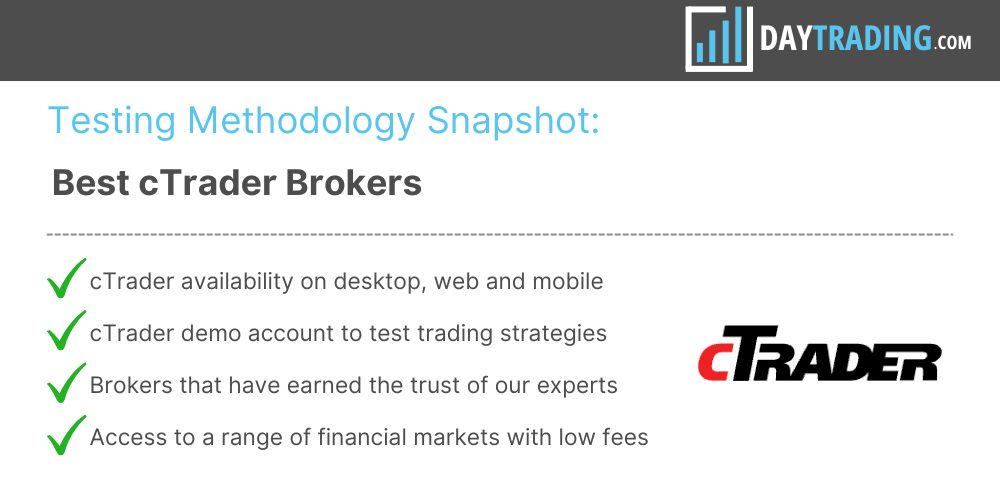
To curate our list of the best brokers that support cTrader, we:
- Took our dynamic directory that currently stands at 143 online brokers;
- Pinpointed the growing number that provide cTrader on desktop, web or mobile devices;
- Sorted those firms by their rating, combining 200+ data points with the direct findings of our testers to pinpoint the absolute best.
2026 Update: The UK’s FCA issued a warning that cTrader / Spotware Systems is not authorized and we’ve since noticed brokers revoking access to cTrader Copy for British residents.
What Is cTrader?
cTrader is an online platform for forex trading and CFD trading which was developed by the Spotware Systems Group.
Since its 2011 debut with FxPro, cTrader has soared in popularity with active traders, now integrating with dozens of brokers worldwide.
In particular, we saw interest spike after MetaTrader 4 (MT4) and MetaTrader 5 (MT5) were pulled from app stores in September 2022, with Blackbull Markets, FP Markets and Fusion Markets all adding the platform in the months that followed.
Its popularity is largely due to its impressive charting power and straight through processing (STP) and electronic communication network (ECN) capabilities which help ensure fast execution with minimal slippage – crucial for short-term trading strategies.
What Devices Can I Use cTrader on?
Today, cTrader is offered as a downloadable application for Windows, Mac OS or Linux operating systems, plus as a convenient web trader version.
Reflecting the rising number of mobile traders, there’s also a cTrader app, which can be downloaded to all major devices, including Apple and Android.
What Markets Can I Trade On cTrader?
You can trade various assets on cTrader, depending on the instruments available at your chosen brokerages.
From our investigations, this typically includes currency pairs, stocks, indices, commodities, high-risk cryptos and even spread betting at some partner brokers, such as Pepperstone.
Spotware has made notable improvements to its platform over the years. The result is a powerful, user-friendly platform that caters to active traders at every level.
Recent upgrades include the addition of overlay indicators in cTrader desktop and the Market Replay feature in 2023, plus optimization upgrades to cBots and enhanced backtesting performance in 2024.
 James BarraAuthor
Key Features
Interface
cTrader offers a clean, modern and visually appealing layout, especially compared to alternatives like MetaTrader.
There are different layouts you can choose and you can also detach charts and customize them as needed. Additionally, there’s the option to switch between dark and light themes, which is a nice touch.
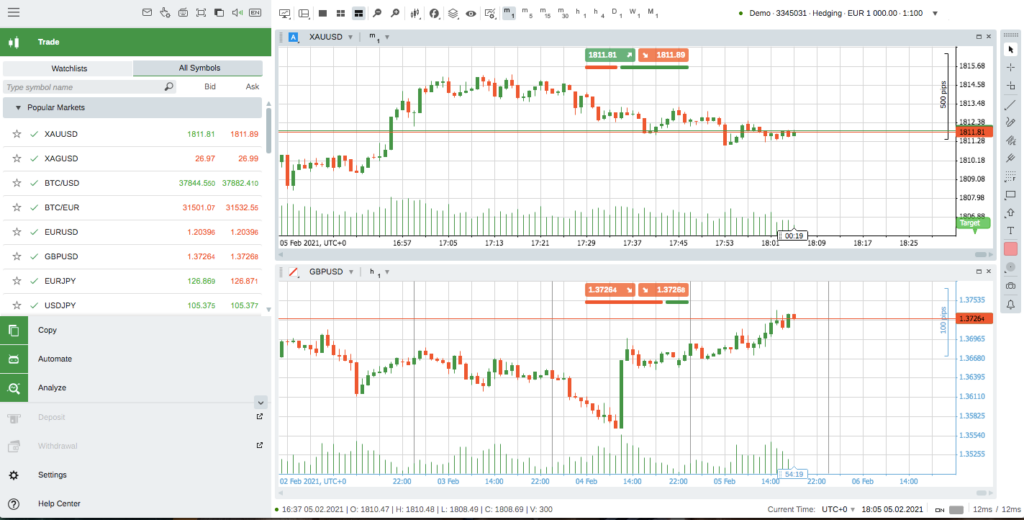
I appreciate the user interface on cTrader. It’s clean and intuitive, and it makes navigating through charts, order types, and account settings straightforward. Everything feels well-organized, which makes my trading sessions smoother.
Christian HarrisBroker Analyst and EditorMarket Depth Functionality
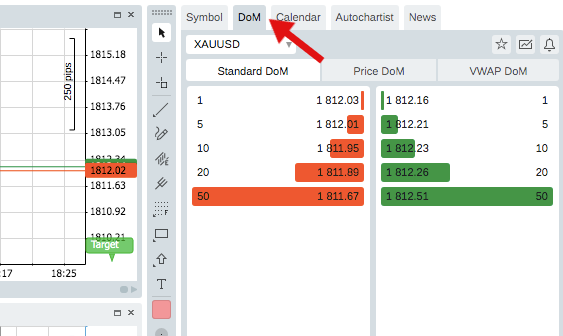
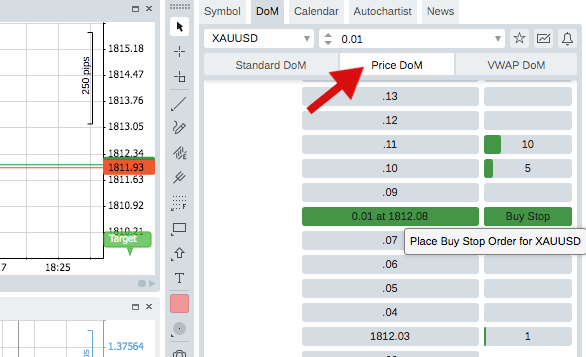
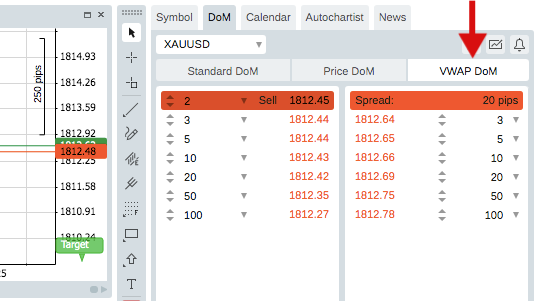
Contrary to only one kind of market depth offered by MetaTrader 5, cTrader displays three types of market depth and level 2 pricing:
- Standard Depth of Market – Displays the price and amount of liquidity available at that price. Note that standard DoM allows viewing but not trading.
- Price Depth of Market – Allows for precise trading with more details available, including selling and buying volumes. Price DoM is ideal for scalping trading.
- VWAP Depth of Market – Volume-Weighted Average Price allows you to view expected VWAP prices against adjustable volumes. Orders are therefore filled against the full order book. VWAP DoM is ideal for trading large volumes.
Charting
cTrader’s charting features are both intuitive and user-friendly, with excellent customization options to suit different preferences.
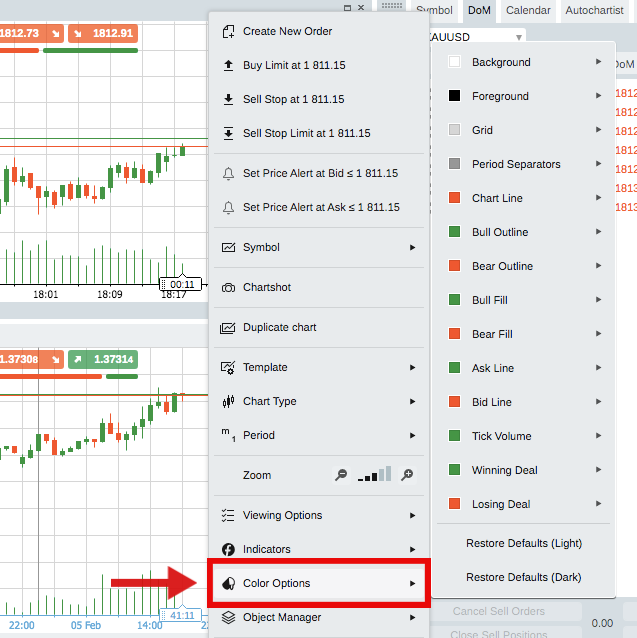
- Chart Modes & Colour Schemes – You can choose between single-chart, multi-chart, or free-chart mode, plus resizing options. You can also customize any colours, from the chart background to the colour of your candles: simply right click on the chart window and click ‘Colour Options’, or click on the ‘Colour’ button in the chart toolbar.
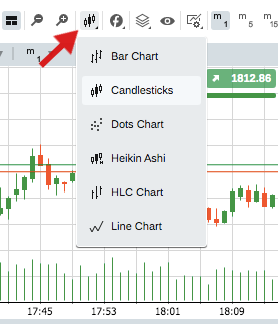
- Timeframes & Chart Views – cTrader offers 54 timeframes across 6 different chart types, including Candlesticks, Heiken Ashi, Renko and Bar charts. You can also adjust the zoom level from the main toolbar at the top.
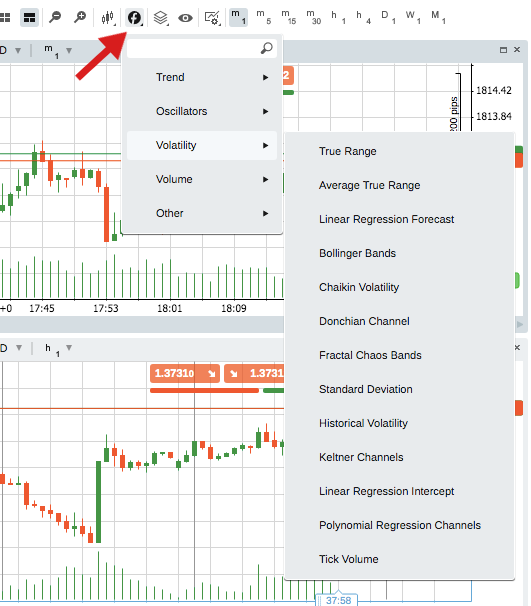
- Technical Analysis – You can use over 70 pre-installed technical indicators, objects and drawing tools directly from the chart. Popular tools include Exponential Moving Average (EMA), Fibonacci Retracements, Bollinger Bands, Pivot Points, support and resistance and volume profile indicators.
Order Types
You can execute four order types: market, limit, stop and stop limit.
For each one, a window will appear where you can adjust your parameters, set price alerts, choose the market range and expiry dates. You will then need to utilize the risk management parameters and set the stop loss and take profit levels.
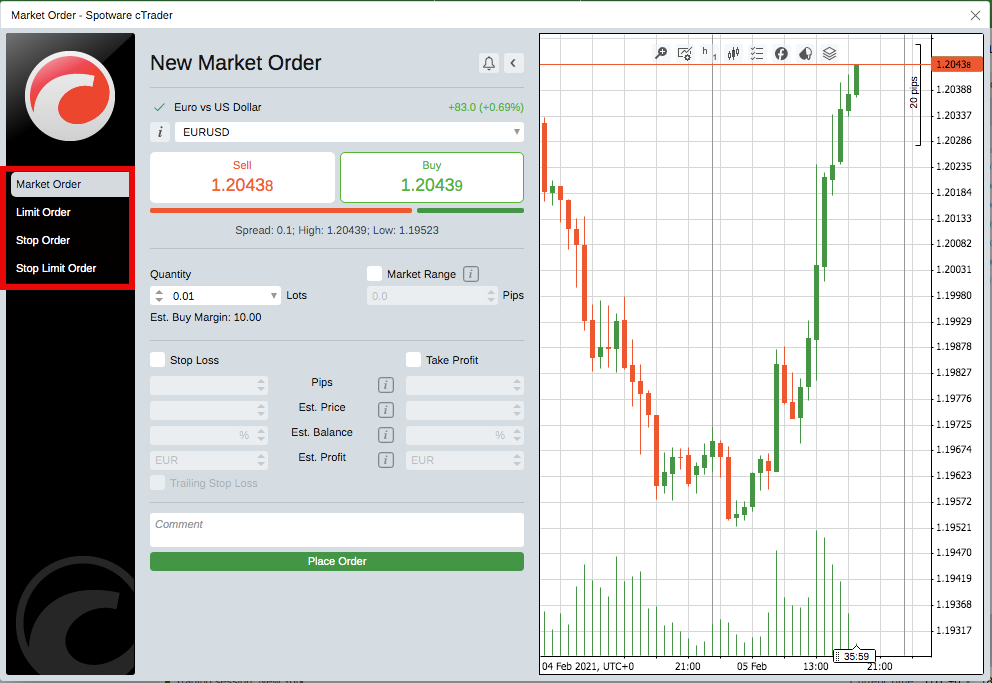
You can edit or cancel a open pending order by clicking on the ‘Modify’ button next to the instrument in your TradeWatch panel. Here you can edit the entry price, expiry date, stop loss and take profit, as well as trailing stop.
TradeWatch
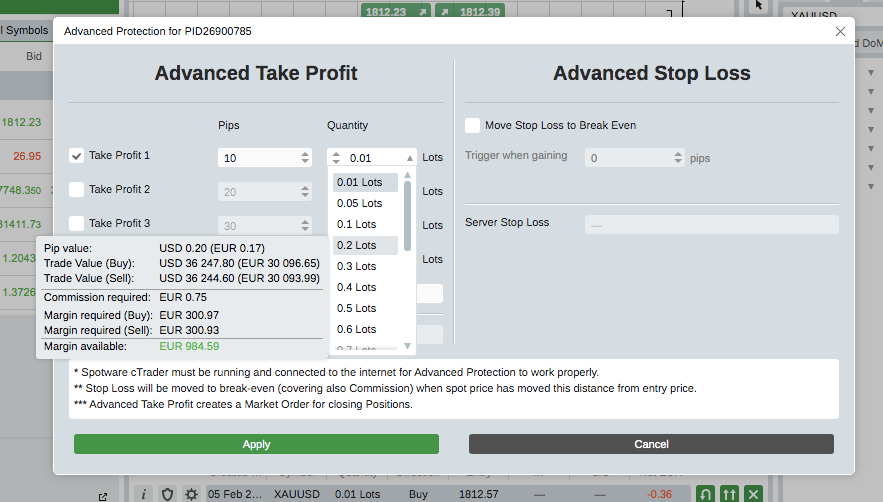
Located at the bottom of your screen, the TradeWatch panel allows you to enter or leave trades, view and modify positions, and manage transactions. You can also set advanced take profit and stop loss levels for a position, by clicking on the ‘Advanced Protection’ settings.
Advanced take profit will automatically initiate a partial close on a position when it reaches the desired profit level. The advanced stop-loss allows for more precise control over pip movements at the stop loss point.
cTrader Automate
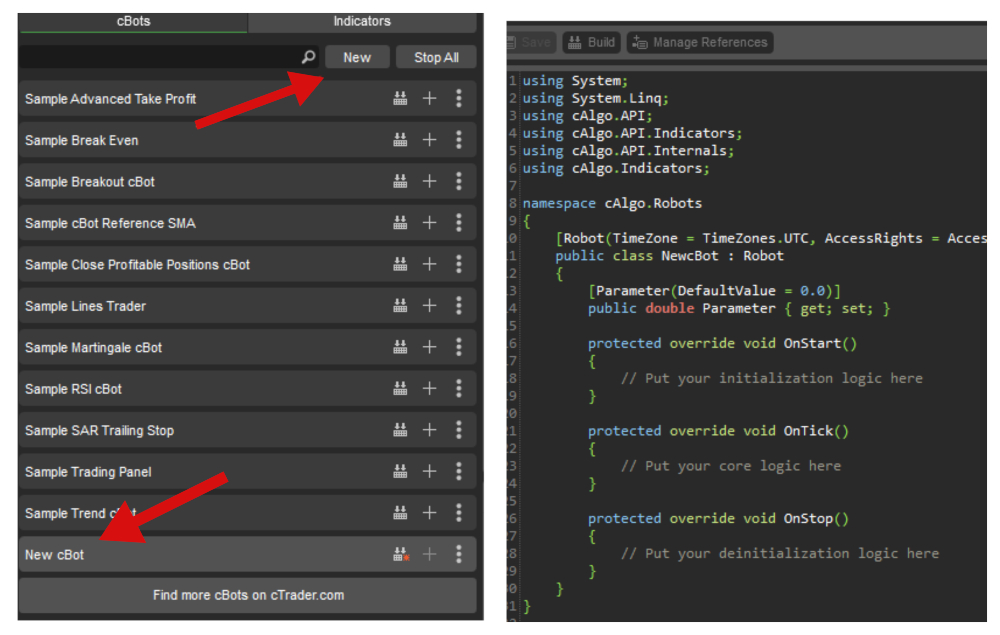
cTrader Automate (formerly known as cAlgo) allows traders to build their own automated trading robots (cBots) and custom indicators using the C# programming language on the cTrader open API.
The integrated solution supports manual backtesting in replay mode against historical data, an in-built code editor and a deal map.
The main advantage of cBots is that trades can be entered more precisely and quickly than a human can process manually. Indicators can be used for manual trading but can also be integrated into cBots to indicate trends and provide signals. Some popular cBots include the scalping or moving average bot, as well as the TradingView charting package bot.
To create and run a cBot or indicator, click on ‘New’ from inside the ‘cBots’ or ‘Indicator’ tab where a new template will be created with a default code. The user guide online contains instructions on how to optimise the codes, as well as other sample codes.
Copy Trading
cTrader Copy is fully integrated within the platform and allows for a variety of copy trading strategies.
You can access the feature by clicking on the ‘Copy’ tab in the main left-hand window. This allows you to check available strategies, compare history and fees, and start copying in just a few clicks.
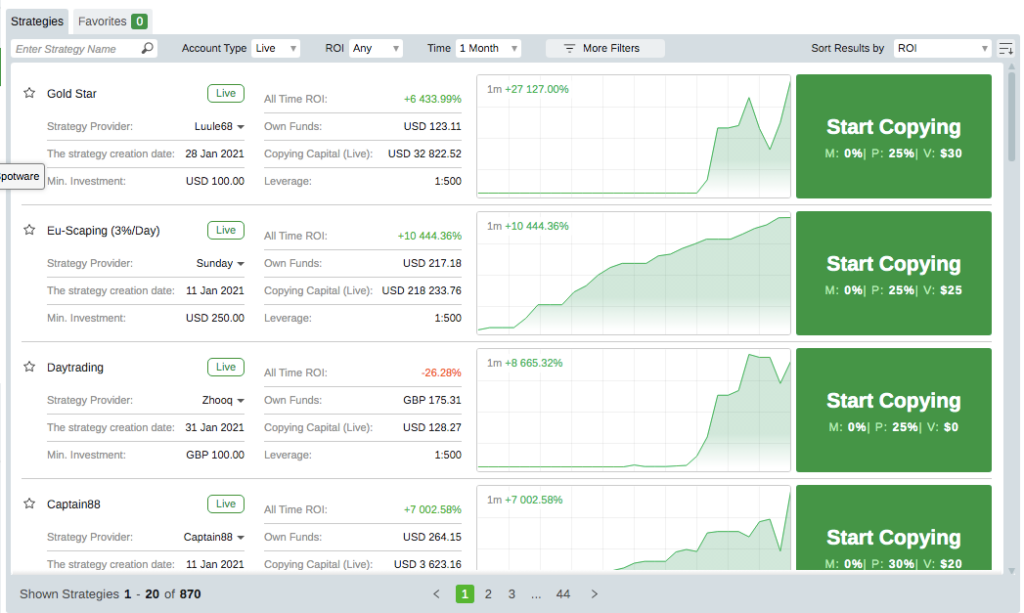
You can easily search Strategy Providers and filter by age, fee amount, number of trade copiers, or the capital amount. Once you have chosen a provider, click on their cTrader ID to expand additional information such as average profit and total own funds.
Note that you can copy any strategy with a demo account if the strategy provider has selected ‘allow copying for Demo.’ The strategy provider can also ‘allow copying for Live’ (real money) copiers.
Once you have selected a provider, your allocated funds will be converted into a copy trading account and all the open positions of the strategy are opened for you with the current market rates. You can stop copying and restart again at any time by going into the copy trading account settings.
If you’re unsure whether copy trading is for you, there are a number of online reviews you can check out. It’s also worth comparing the copy trading function against other popular services such as eToro or ZuluTrade.
cTrader’s copy trading and automated features are really impressive. They’ve allowed me to test automated strategies and even follow other traders’ strategies, which has been a great learning tool and a simple way to diversify.
Christian HarrisBroker Analyst and EditorMobile App
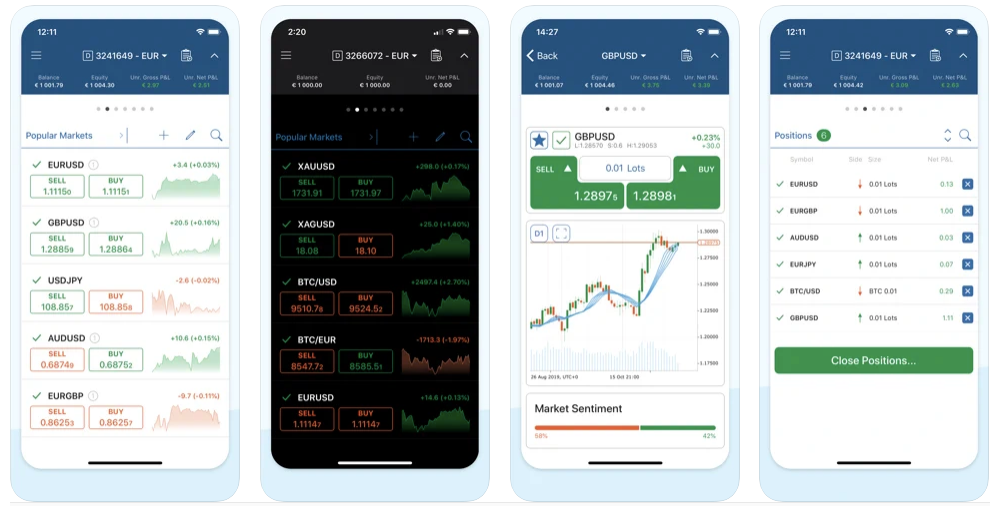
Available for smartphones and tablets, including Apple iOS and Google Android devices, the cTrader mobile app features fluid and responsive charts on an attractive and customizable design.
As with the desktop version, you can switch between dark or light mode to suit your preferences. There are also intuitive mobile-adapted features to make trading on-the-go easy and seamless, such as zoom and scroll functionality and QuickTrade mode.
The app supports 5 chart rendering types (bar, candlestick, dots, line and area charts) plus 4 chart types (standard, tick, Renko and range).
Impressively, cTrader Mobile also comes with all 65 technical indicators and 8 drawing tools, as well as a news feed, live market sentiment, price alerts and trade statistics.
You can also fully manage your account transactions and settings straight from the easy-to-navigate dashboard, plus configure your own push and email notifications.
Yet while I love the desktop version, the mobile app can sometimes be frustrating. It sometimes lags, especially when I’m checking trades or trying to make adjustments on the go. It’s reliable enough but could use some improvement on stability.
Christian HarrisBroker Analyst and EditorcTrader Mobile is available in 22 languages and you can download it in seconds from the App Store for iOS devices, or Google Play for Android phones.
Additional Features
Other impressive features that you will find include:
- QuickTrade – Allows traders to respond quickly to the markets by opening, closing and modifying orders within one or two clicks from every platform section. You can also hover over the red and green bars to view the live market sentiment indicator.
- Hotkeys & Keyboard Shortcuts – Traders can create handy shortcuts from within the settings panel for speed, comfort and convenience when trading.
- cTrader Automate – Formerly known as cAlgo, cTrader Automate is the platform’s algorithmic trading solution, where you can build robots and customise indicators such as the Hull Moving Average or Harmonic Pattern indicator.
- Copy Trading – cTrader Copy allows strategy providers to earn through multiple fee types, including performance, management, and volume-based fees. Investors can automatically replicate the trades of strategy providers by paying fees set by the strategy provider, ranging from 0 to 30%.
- Economic Calendar & News – Accessible from the Active Symbol Panel (ASP), the economic calendar displays significant market events, whilst the news tab offers the latest developments from a range of top sources.
- cTrader Store – Includes thousands of developers offering custom bots, tools, heatmaps and indicators. For example, you can download a session indicator, a risk-reward tool, indicator alerts, or even a lot, position or risk size calculator.
- Community – The platform offers an active community forum, plus a library of tools shared by fellow traders, a help centre and automated trading consultants.
- ChartShots – Individuals can share ideas and strategies with other traders, with options to share to social media platforms or embed into their own web pages.
- Chart Templates – Up to 50 chart templates can be saved for future use, which can accommodate a variety of strategies, timeframes or chart types.
- Autochartist – Integrated into the TradeWatch panel, Autochartist is a third-party market-scanning tool designed to highlight the best trading opportunities in real-time.
- Trading Central – Trading Central, a third-party real-time market scanner integrated into the TradeWatch panel, automatically detects potential trading entries and exits (‘Targets’) across multiple instruments.
- Export data – You can export historical data in Excel or HTML format, straight from the TradeWatch window.
cTrader Vs MetaTrader 4
If you’re wondering whether to choose cTrader or MetaTrader 4 (MT4) and how the platforms compare, we’ve weighed up the key criteria:
- Interface & Ease of Use – We love cTrader for its modern and uncluttered design, with light and dark themes and detachable windows. MetaTrader 4 is more outdated, though is arguably more familiar to experienced traders. Beginners may therefore prefer cTrader, though it is entirely down to personal preference.
- Technical Analysis – cTrader includes over 70 built-in indicators and drawing tools, whilst MetaTrader 4 offers over 50. For this reason, cTrader does have the edge over MT4 in terms of the manual trading capabilities.
- Charts – There are 9 timeframes available in MetaTrader 4, whereas cTrader offers over 50 across 9 chart types. cTrader also offers an additional chart type compared to MT4 (the dot chart) plus a chart-linking feature and detachable windows.
- Automated Trading – cTrader uses the C# programming language for cBots, whereas MetaTrader 4 uses the native MQL4 language for Expert Advisors (EAs). Overall, MetaTrader 4 is still the favourite for the wider range of automated tools and the more established online community.
- Market Depth – cTrader’s DoM is available in three types: standard depth, price depth and VWAP depth, which is an excellent and sought-after feature. The basic version of MT4, however, does not support depth of market.
- Order Types – With cTrader, you can place pending orders even when the market is closed, which is not allowed in MetaTrader 4. cTrader also offers advanced take profit and stop loss and also displays more detailed order tickets, compared to MT4.
cTrader Vs MetaTrader 5
If you’re choosing between cTrader or MetaTrader 5 (MT5), consider the following:
- Interface & Ease of Use – Whilst MetaTrader 5 did include some cosmetic updates, it does still follow the old-school design that many traders are used to. Again, it is entirely down to personal preference, but some newbies are likely to find the cTrader interface more attractive and easy to navigate.
- Technical Analysis – Both cTrader and MetaTrader 5 have an almost equal number of indicators, though MT5 offers a few more objects, such as Gann and Channel tools. Overall, the two platforms perform well in this area.
- Charts – cTrader has chart-linking and detachable charts, which allows traders more flexibility to spread charts across multiple monitors. MT5, on the other hand, does not offer this feature. Furthermore, cTrader boasts over double the number of time frames than MT5, which has 21.
- Automated Trading – When it comes to algorithmic trading, both platforms are very different, with cTrader using the common C# coding language and MetaTrader 5 using MQL5. Nonetheless, MT5 was not received as well as MT4, which already offered the core functionalities that traders need. For this reason, cTrader is a favourable choice over MT5 in this area.
- Market Depth – MT5 only offers one type of market depth, whilst cTrader offers three. cTrader’s highly sophisticated DoM tool responds to many short-term traders’ desires to view the full depth of bids and offers at each price. For day traders who deal in large volumes, cTrader is the better choice for market depth functionality.
- Order Types – Apart from the ability to place pending orders when the market is closed in cTrader, there is not a great deal of difference between the two platforms when it comes to order types. Nonetheless, cTrader does make it easier to optimise order protection settings before entering the market, showing clear risk and reward figures, for example.
One limitation is that not as many brokers support cTrader as they do MetaTrader. I’ve had to search for brokers that offer it, sometimes restricting my choice of finding the best trading conditions.
Christian HarrisBroker Analyst and EditorBottom Line
cTrader is no doubt a strong contender against industry giant, MetaTrader 4, with a vast range of technical indicators, Depth of Market options, and competitive web integrations.
Novices may be drawn to the attractive design and automated trading capabilities, though MT4 is likely to remain the overall favourite for experienced traders already familiar with MetaQuotes software.
To get started, use DayTrading.com’s pick of the top cTrader brokers.
FAQ
Which Is The Best cTrader Broker?
This will depend on your specific needs. But see our choice of the best brokers with cTrader, updated for 2026, to see our favorite picks following extensive tests and analysis.
Article Sources
The writing and editorial team at DayTrading.com use credible sources to support their work. These include government agencies, white papers, research institutes, and engagement with industry professionals. Content is written free from bias and is fact-checked where appropriate. Learn more about why you can trust DayTrading.com