


Skilling Review 2026




Skilling maintains its position as a top pick for budding traders looking for a competitive zero commission account with direct access to a copy trading feature. It will also serve experienced strategy providers looking to earn commissions, or active traders looking to deal forex.
Rating breakdown
Key facts
- Minimum deposit
- $100
- Regulators
- CySEC
- Trading platforms
- Skilling Trader, MT4, MT5, cTrader, TradingView
- Instruments
- Forex, CFDs, Stocks, Indices, Commodities and Cryptos
- Account currencies
- USD, EUR, GBP, SEK, NOK
- Payment options
- Visa, Mastercard, Neteller, PayPal, Trustly, Skrill, Apple Pay, Wire Transfer
Pros
- Skilling offers five trading platforms: Skilling Trader, cTrader, MT4, MT5, and TradingView, each with distinct strengths. MT4 and MT5 supports EA-based strategies, cTrader excels in order management, Skilling Trader offers straightforward web execution, and TradingView specializes in advanced charting. This range provides valuable flexibility for traders
- The Skilling Trader platform maintains a focused design, offering charts, order placement, and risk controls without unnecessary features or promotional content. For systematic traders or those who prefer a streamlined execution environment, this simplicity is an advantage
- Beyond major forex pairs, Skilling’s spreads are often lower than those of larger, more prominent brokers. While not always the lowest, traders focused on raw pricing can find competitive value without needing a full ECN setup
Cons
- Skilling’s educational and research resources are limited to a basic economic calendar, brief market commentary, some lessons, and occasional news headlines, plus the newer AI-powered Skilling Trade Assistant. There aren't comprehensive and structured learning paths
- Skilling depends on TradingView for advanced analytics and does not provide its own platform for Trading Central, Autochartist, or instrument-specific news feeds. This may be sufficient for traders with independent research tools, but it is less comprehensive than brokers offering integrated in-platform content
Skilling review
This Skilling review extends beyond a standard features checklist. We conducted live trades, measured execution speeds, and tested the platform during volatile markets to assess its strengths and weaknesses. We also compared Skilling’s marketing claims with actual trader feedback regarding spreads, charts, funding, and withdrawals.
Regulation & Trust
Skilling operates under a single regulatory authority, CySEC. All eligible clients, including those based in the EU, fall under this regulatory setup. Under CySEC, retail traders receive protections such as leverage caps, negative balance protection, segregated accounts, and coverage by the Investor Compensation Fund (ICF) of up to EUR 20,000 in the event of the firm’s failure.
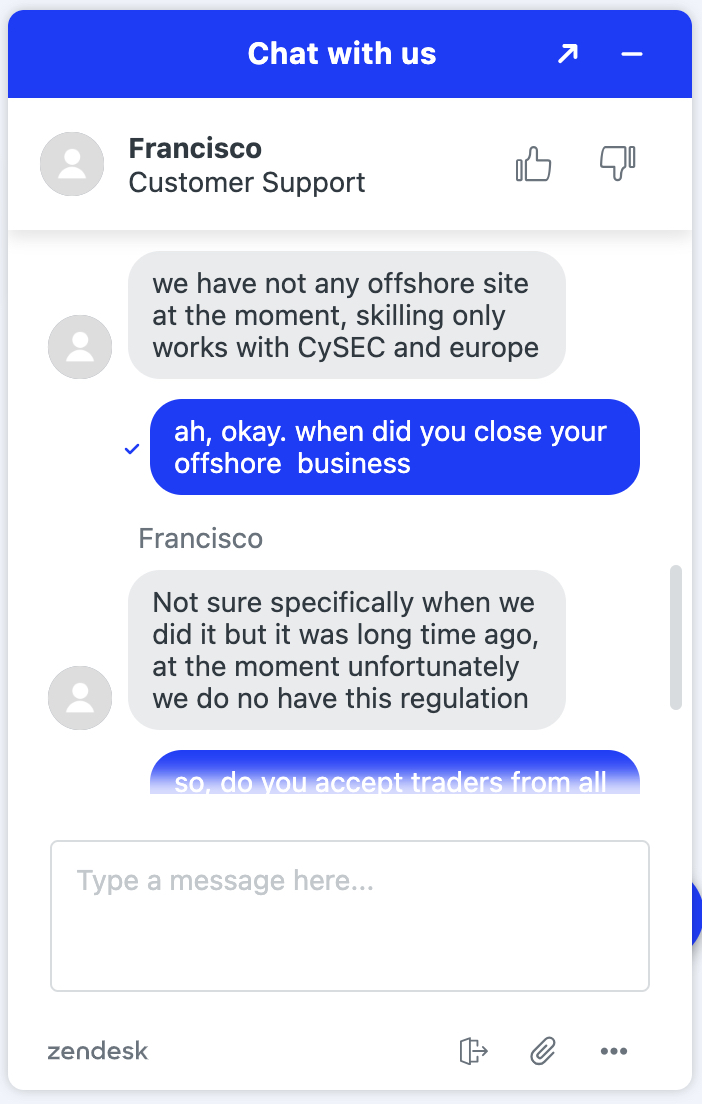
There’s no offshore arm for international clients, meaning clients not in the eligible group — including those in the UK and US — cannot open an account at all. All eligible clients fall under a single regulatory structure.
This makes Skilling’s regulatory model simpler than that of brokers using multi-jurisdiction setups.
- Skilling’s CySEC authorization in Europe means the broker must meet regular audits, capital requirements, and conduct‑of‑business checks, which adds a baseline level of scrutiny that many purely offshore brokers don’t face.
- The use of a single licensing entity in the EU improves transparency: you can easily check license status and file complaints through official channels rather than relying on vague internal policies.
- CySEC regulation mandates segregated client funds in Tier-1 banks, so your money stays separate from company operations.
However, it is important to consider Skilling’s limitations before making a decision.
- Skilling cannot tailor its regulatory setup to different markets, so traders outside the EU cannot access the broker or an alternative offshore structure.
- Because there is no separate offshore entity, Skilling must apply the same MiFID‑style leverage caps, risk‑management rules, and cost structure to all eligible clients, which can make it less competitive against brokers that use lighter‑touch regimes for non‑EU traders.
- A one‑regulator model also concentrates all regulatory risk on CySEC. If that regulator tightens its stance on CFDs, leveraged products, or cross‑border services, Skilling has no fallback entity to shift clients to, which can limit its flexibility in structuring its product set and client base over time.
Regulatory Entities and Safeguards
Skilling’s regulatory structure operates solely under CySEC, with no separate offshore entity for international clients. All eligible traders, including those in the EU, are covered by the same CySEC MiFID‑style regulatory framework.
This means every client has the same capital rules, dispute handling, and compensation limits. There is no alternate setup for non‑EU traders—everyone receives the CySEC framework.
How that translates into DayTrading.com’s regulator-classification framework is shown below.
Skilling Limited (CySEC)
- Entity URL: https://skilling.com
- Verify License: 357/18
- Regulator Classification (Green to Red): CySEC (green-tier – strong safeguards)
- Protections: EU clients are regulated by CySEC and therefore subject to MiFID II, which means segregated client funds, negative balance protection, and leverage capped at 1:30. If the firm were to fail, the Investor Compensation Fund covers losses up to EUR 20,000.
- Who Gets Signed Up Under This Entity: Clients in the EU.
Important: Verify Your Entity & URL
Before opening an account, it’s worth confirming you’re signing up through the official site at skilling.com. Skilling operates a single regulated entity, authorized by CySEC, which covers all eligible clients — so there’s no offshore arm to accidentally end up with, and no parallel structure to navigate.
That said, it’s still good practice to check the legal entity name and regulator in the website footer before you commit. Clone sites and phishing pages can look convincing, and verifying that the URL is skilling.com and that the CySEC license is clearly referenced takes only a moment.
Watch for Clone Scams
Scammers sometimes build fake broker websites that closely mimic the real thing, using web addresses that are just different enough to slip past a quick glance. The changes are often small — a different domain extension, an added word, or a subtle misspelling. Clone-style domains might look something like:
- skilling.co or skilling.io (different extension)
- skilling-platform.com or skilling-broker.net (extra words)
- ski11ing.com or skillings.com (character swap or plural)
These copycat sites exist to steal deposits or personal information. Before logging in or sending any money, check the URL in your browser carefully. The real Skilling website is skilling.com, and the page should clearly reference the correct regulated entity — Skilling Limited.
Logos and official-looking text can be faked, so don’t rely on how a page looks.
The only reliable check is confirming that your browser address bar shows https://www.skilling.com exactly — no extra words, no slight variation — before you enter any credentials or payment details.
| Checkpoint | What to Look For |
|---|---|
| URL Extension | Should be .com (or regional like .com/eu), not .co, .io, or .biz. |
| Spelling | Watch for missing letters (e.g., skillling or skillings). |
| Entity Name | Must match your region (e.g., Skilling Limited for CySEC). |
| Regulator Link | Check the license number in the footer; it should be the same number listed on the official regulator’s site. |
Accounts & Banking
- Skilling’s account lineup is built around clear, easy‑to‑compare profiles, which makes it simple for traders to pick a tier that matches their volume, style, and platform preference without wading through overly complex VIP tiers.
- The MT4 and MT4 Premium options give strategy‑driven and semi‑automated traders a familiar platform environment while still running on Skilling’s regulated, CySEC‑authorized infrastructure, which is more transparent than that of pure offshore MT4‑only brokers.
- The separation between retail tracks (Standard/Premium) lets Skilling keep pricing and support reasonably simple for small accounts, while reserving more tailored service and conditions for experienced traders that actually need them.
- Skilling’s account tiers are all built on the same underlying retail‑style CFD structure, so the real‑world difference in pricing, execution, and risk management is narrower than it might look on paper.
- The MT4 account follows the same spread‑only, non‑ECN logic as the Standard account, which limits the benefit for traders who switch solely for order‑book transparency or true STP‑style fills that other brokers reserve for dedicated MT4‑ECN accounts.
- For active traders seeking very tight spreads or institutional‑style conditions, Skilling’s Premium and MT4 Premium tiers do not match the depth or sophistication of top‑tier brokers’ ECN‑focused accounts, leaving regular retail clients with relatively modest improvements in raw pricing compared to the Standard plan.
Live Accounts
We tested Skilling by opening a Standard account, then cross-referenced that experience against the Premium, MT4, and MT4 Premium tiers.
The Standard account is the entry point for retail traders and beginners — a minimum deposit of EUR 100, multi-currency balances in USD, EUR, GBP, NOK, and SEK, and a spread-only pricing model for most FX and CFDs. There’s nothing complicated about it, which is partly the point. For smaller accounts that want a clean, commission-free structure and a straightforward onboarding process, it does the job well.
Premium is the next step up, aimed at more active traders with a minimum deposit of EUR 5,000 who want better conditions without crossing into institutional territory. Skilling markets it with tighter spreads (from 0.1 pips) on certain instruments and a higher level of service, but it still runs on the same retail-grade CFD and FX infrastructure as the Standard account.
The MT4 accounts are for traders who want to stay within MetaTrader 4 rather than use Skilling’s own Trader platform, cTrader, or TradingView. The Standard-level MT4 account mirrors the economics of the regular Standard tier but reduces the number of tradable assets and excludes equities altogether.
MT4 Premium then builds on that with lower spreads from 0.1 pips but premium-level pricing (minimum deposit of EUR 5,000), targeting active algo traders who want platform familiarity and better execution conditions in one package.
Rounding out the range, Professional (available to eligible clients) and Corporate accounts cater to experienced traders and businesses operating outside the standard retail brackets — though all of them sit within the same CySEC-regulated structure.
The differences between tiers are meaningful, but they’re mostly about who each account suits, rather than any dramatic shift in how the broker operates beneath the surface.
Demo Accounts
Skilling offers a demo account, but you can’t access it without first registering for a live account. You don’t have to go through full verification — no ID documents or proof of address are required at that stage — but you do need to provide your personal details and set up an account before the demo becomes available. For traders who just want to kick the tires anonymously before committing to anything, that’s a meaningful hurdle that not all brokers put in place.
Once you’re in, the demo is more generous than many competitors. It comes loaded with $10,000 in virtual funds and — notably — doesn’t expire. That’s a genuine plus in an industry where time-limited demos are the norm, and it means you can use it as a long-term testing environment rather than feeling pushed toward a live account before you’re ready.
The demo is available across three of the four available platforms Skilling supports — Skilling Trader, cTrader, and MT4 (not TradingView) — so you can get a proper feel for whichever interface you’re planning to use for real.
The infrastructure mirrors what you’d find on a live account, which is worth something. Spreads and instrument availability broadly reflect real conditions, and you’re not being shown a polished demo environment that bears little resemblance to the actual product.
That said, simulated execution and live execution are never identical, and the difference tends to matter most during volatile markets — which are exactly the conditions a demo environment struggles to reproduce faithfully.
Deposits & Withdrawals
Skilling’s funding setup is cleaner than many brokers at this level, but there are a few details buried in the small print that are worth knowing before you move any money.
Deposits are free across the board — Skilling doesn’t add any charges, regardless of method. The lineup covers most bases, including debit and credit cards, bank wire transfers (SEPA and SWIFT), and e-wallets such as Skrill, Neteller, PayPal, Trustly, and Swish.
Cards and e-wallets tend to go through instantly. Trustly is instant for supported banks, though it can take up to three working days for others. Bank wire is the slow lane—anywhere from 1 to 5 working days, depending on your bank.
We found that withdrawals are processed by Skilling within one working day of a request being submitted. After that, the timeline depends on the method: e-wallets clear almost immediately, Trustly takes one to three working days, cards run one to five working days, and bank wire can stretch to five working days once it’s in the banking system.
The fee picture needs a closer look. Skilling markets its funding as free, and for most methods it is — but Skrill and Neteller may charge up to 2.9% on both deposits and withdrawals, which isn’t prominently flagged upfront.
Bank wire deposits are free on Skilling’s end, though your bank may charge a fee, particularly for international SWIFT transfers.
There’s also a clause worth noting: if you request a withdrawal without any trading activity on the account, Skilling reserves the right to charge a 2.5% fee on the withdrawal amount. And while the first withdrawal each calendar month is free, any additional withdrawal requests within the same month attract a flat fee of EUR 12.50 — a detail that may catch you off guard.
One hard rule applies across all methods: withdrawals must go back to the same source used for the original deposit. That’s standard AML practice, but it’s worth keeping in mind if your card has expired or your e-wallet account has changed since you funded it. Third-party deposits aren’t accepted either — the payment method has to belong to the account holder.
Account verification is required before any withdrawal is processed — government-issued ID and proof of address. If you skip verification at account opening, you will hit a delay at the worst possible moment if you need funds in a hurry. Once the documents are in order, the process is generally smooth, according to our experience.
| Skilling | Interactive Brokers | FOREX.com | |
|---|---|---|---|
| Accounts & Banking Rating | |||
| Payment Methods | Apple Pay, Mastercard, Neteller, PayPal, Skrill, Trustly, Visa, Wire Transfer | ACH Transfer, Automated Customer Account Transfer Service, Cheque, TransferWise, Wire Transfer | ACH Transfer, Credit Card, Debit Card, Mastercard, Neteller, PayNow, PayPal, Skrill, Visa, Wire Transfer |
| Minimum Deposit | $100 | $0 | $100 |
| Visit | Visit 49% of retail investor accounts lose money when trading CFDs with this provider. | Visit | Visit |
| Review | Review | Review | Review |
Assets & Markets
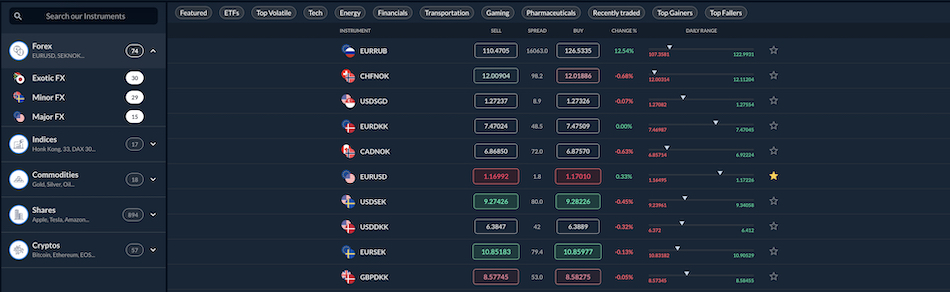
Skilling advertises access to over 1,200 instruments across five asset classes, and on paper, that’s a competitive number. In practice, what you can actually trade depends as much on which account type you hold and which platform you’re using.
Everything at Skilling is traded as a CFD, so there’s no direct ownership of shares or cryptocurrencies, for example. That’s standard for a CySEC-regulated retail broker, but it’s worth stating clearly — particularly if you expect to actually hold the underlying asset.
Forex is the core offering. Skilling provides over 70 currency pairs covering majors, minors, and a solid selection of exotics. One feature worth noting: seven pairs (AUD/USD, EUR/USD, GBP/USD, NZD/USD, USD/CAD, USD/CHF, USD/JPY) are available for weekend trading, which is a genuine differentiator if you want exposure outside regular market hours.
The equity CFD range is broad — around 900 global stocks across major exchanges. That’s a solid number and covers the names most traders are actually looking for. The catch is that MT4 account holders can’t trade these. If stock CFDs are your main focus, the native Skilling Trader, cTrader, or TradingView platforms are the only route.
There are 17 major global indices, including the S&P 500, the NASDAQ 100, and a range of European and Asian/Pacific equivalents such as the FTSE 100 and the Nikkei 225. Commodities are also a little thin — 18 instruments, including gold, silver, crude oil, and natural gas. That may not satisfy traders looking for soft commodities or a broader selection of agricultural products, but it covers the instruments most retail traders actually use.
Over 57 cryptos are also available — Bitcoin, Ethereum, Litecoin, and a handful of others. Retail leverage on crypto is capped at 1:2 under CySEC rules, which significantly limits how these instruments can be used. Traders drawn to Skilling primarily for crypto exposure will likely find the offering underwhelming compared to dedicated crypto platforms.
In addition, Skilling offers over 40 popular ETFs, which is unusual for a CFD‑focused broker and adds real value. Examples include the SPDR S&P 500 (SPY), iShares MSCI China (MCHI), and VanEck Gold Miners (GDX), giving you access to broad‑market exposure without having to trade dozens of individual stocks.
What’s missing is worth flagging as well. There are no bonds, options, interest rates, futures contracts, or thematic baskets. For traders who want to combine CFD trading with broader portfolio exposure in a single account, Skilling has real gaps. Brokers like IG or Saxo offer broader coverage at comparable cost structures.
The instrument count also deserves some scrutiny. The 1,200+ figure includes everything across all platforms and account types — but MT4 accounts are more limited, and some instruments are only accessible via the native Skilling Trader or cTrader. The headline number isn’t misleading, but it’s the kind of figure that looks more uniform than it actually is once you’re inside the platform.
Leverage
Leverage at Skilling is set by CySEC, not the broker — so if you’re expecting to negotiate margin ratios, or are used to much higher leverage at offshore brokers, you will find the conditions here non-negotiable.
For retail clients, the caps comply with the ESMA’s guidelines. Forex majors are available at up to 1:30, minor pairs and gold at 1:20, major indices at 1:20, minor indices and most commodities at 1:10, and stock CFDs at 1:5.
The main route to higher leverage is qualifying as an Elective Professional Client, which unlocks up to 1:200 on forex under the CySEC license. Skilling also applies a dynamic leverage model for professionals — meaning the more exposure you carry in a position, the lower the maximum leverage on that position. The trade-off is significant: professional clients lose negative balance protection, which isn’t a small concession and shouldn’t be glossed over.
For most retail traders, Skilling’s 1:30 cap on forex majors is workable. But if leveraging headroom is your priority, Skilling sits at the conservative end of the spectrum — not by choice, but by regulatory design.
| Skilling | Interactive Brokers | FOREX.com | |
|---|---|---|---|
| Assets & Markets Rating | |||
| Trading Instruments | Forex, CFDs, Stocks, Indices, Commodities and Cryptos | Stocks, Options, Futures, Forex, Funds, Bonds, ETFs, Mutual Funds, Cryptocurrencies | Forex, Futures and Options on Metals, Energies, Commodities, Indices, Bonds |
| Margin Trading | Yes | Yes | Yes |
| Leverage | 1:30 (Retail), 1:200 (Pro) | 1:50 (major forex pairs), 1:2-1:4 (equities) | 1:50 |
| Visit | Visit 49% of retail investor accounts lose money when trading CFDs with this provider. | Visit | Visit |
| Review | Review | Review | Review |
Fees & Costs
Skilling’s fee structure is straightforward on the surface, but the total cost of trading depends heavily on which account type you use and how long you hold positions.
The Standard account is commission-free. Instead, the cost is built into the spread — starting from around 0.8 pips on EUR/USD under normal conditions. That’s competitive for a spread-only account. Premium account holders get significantly narrower spreads from 0.1 pips, but pay a commission of USD 40 per million traded on forex and spot metals.
For high-volume traders, that trade-off typically works in their favor. For everyone else, the Standard account’s all-in spread model is simpler and often cheaper in practice.
Overnight swap fees apply to any position held past 22:00 GMT and are charged daily. On Wednesdays, the charge triples to account for the weekend — standard industry practice, but worth knowing if you regularly carry positions across the week. Swap rates vary by instrument and direction and can be positive or negative depending on the interest rate differential.
On the non-trading side, deposits are free across all methods, except for potential third-party charges on Skrill and Neteller. One withdrawal per calendar month is free, and any additional withdrawals in the same month cost EUR 12.50 each. Thankfully, there’s no inactivity fee, which means you don’t have to worry about your lack of trading activity.
One clause that doesn’t get much attention: if you request a withdrawal without prior trading activity on the account, Skilling reserves the right to charge a 2.5% fee on the withdrawal amount. That’s an unusual condition and one worth reading carefully before funding an account you’re not yet sure you’ll actively use.
Overall, Skilling’s costs are mid-tier — neither the cheapest option available nor an outlier on the expensive side. Brokers like Pepperstone or IC Markets offer tighter raw spreads with lower commissions for high-frequency traders, but for retail traders running standard strategies, Skilling’s pricing is reasonable and clearly disclosed.
| Skilling | Interactive Brokers | FOREX.com | |
|---|---|---|---|
| Fees & Costs Rating | |||
| EUR/USD Spread | 0.4 | 0.08-0.20 bps x trade value | 1.2 |
| FTSE Spread | 22 | 0.005% (£1 Min) | 1.0 |
| Oil Spread | 0.4 | 0.25-0.85 | 2.5 |
| Stock Spread | 1.0 | 0.003 | 0.14 |
| Visit | Visit 49% of retail investor accounts lose money when trading CFDs with this provider. | Visit | Visit |
| Review | Review | Review | Review |
Trade Execution
Trade execution at Skilling is quick and stable for FX and CFDs, which matters if you are trading fast moves on major pairs or indices. In live tests, simple market orders on EUR/USD and similar liquid contracts were usually filled within a few tenths of a second, sitting close to the quoted price with only minor slippage outside big news spikes or liquidity gaps.
Compared with more advanced ECN‑style brokers, Skilling is not built for sub‑millisecond scalping or ultra‑tight spreads on deep‑order books. It keeps pace for regular day trading on popular FX and CFDs, but the raw speed and transparency fall short of what you get from premium brokers that route directly to deep liquidity pools or offer true DMA.
Total latency at Skilling breaks down into a few clear stages:
- Local processing latency: Your own machine handles the click. A modern CPU, SSD, and wired Ethernet give the cleanest start; Wi‑Fi or older hardware adds a small but noticeable delay before the order ever leaves your PC.
- Network latency: The path from your internet connection to Skilling’s servers. Fiber‑type lines give tighter, more consistent fills than mobile or congested Wi‑Fi, especially around open and close times.
- Broker processing latency: Skilling does not publish internal numbers, but in practice, market orders tend to land within roughly 50–150ms, even during busier sessions, with most executions under that ceiling. Limit orders sit a bit slower but still in line with typical retail‑broker behavior.
- Execution latency: Skilling aggregates prices from external liquidity providers rather than giving raw direct‑market access, so fills are steady on the instruments it supports but not as tight as on a true ECN feed.
Round‑trip times of under 200–250ms on a solid desktop connection are common for the main FX and index pairs, which is enough for intraday work even if you are not chasing single‑tick scalps. For an EU‑focused, retail‑style CFD broker, Skilling’s execution is reliable and fast enough for active trading, but it is not designed to compete with the very fastest DMA‑style setups.
Live Trading Test
Testing from a London‑area computer, market orders on major FX pairs like EUR/USD filled under about 150ms during high‑volume periods, such as the European and US overlap. Re‑quotes were rare, and in the first 10–15 minutes of the London and New York opens, price levels stayed close to the quoted spread, which shows Skilling’s routing is stable under normal session pressure.
Standard broadband kept entries and exits reasonably tight for day‑trading FX and indices. Around major macro events, slippage sometimes reached one or two pips on small‑size trades, which is typical for a retail CFD broker rather than a deep‑liquidity ECN.
We increased simulated latency up to around 300ms—similar to using a distant data center or a busy VPN—and execution did slow, but the platform itself remained stable with no crashes or order‑book freezes. For scalpers trading tight ranges, the extra lag took the edge off entries, and reaction‑based trades became harder to time cleanly.
Slippage Analysis
Skilling’s slippage remains fairly tight on liquid FX and indices during normal trading hours, especially on major pairs like EUR/USD and key benchmarks such as the S&P 500. But it widens noticeably around the London and New York opens, during big news events, and in thinner off‑peak periods. That pattern is typical for retail CFD brokers, and it tends to hit scalpers and tight‑range traders harder than those holding positions over hours or days.
Active traders need to watch their fills closely at Skilling. The platform’s charts and basic depth tools help you see price levels and spreads, but varying latency and the way liquidity is aggregated from external providers can still shave off a bit of edge on quick entries and exits. What looks smooth in a demo can feel a bit rougher once live order flow and actual spreads kick in.
Overall, Skilling handles normal day‑trading volume well enough for intraday FX and index CFDs. But if your strategy relies on near‑zero slippage and ultra‑tight spreads in fast, choppy conditions, a broker with deeper liquidity or true ECN‑style access is likely to give you a better fit.
Methodology note
Over five straight days, we ran more than 200 round‑trip trades on a live Skilling account, mostly using market and limit orders on major FX pairs like EUR/USD and on index CFDs such as the S&P 500. Tests were run through the Skilling Trader platform from a London‑area connection, covering the European open, the London–New York overlap, key economic releases, and quieter overnight periods to see how execution behaves under real pressure.
For every trade, we compared the quoted price at entry with the actual fill, then averaged slippage by instrument and time of day, and checked those numbers against Skilling’s published spreads and pricing model. This gave us a realistic view of how much price movement and spread typically eat into edge during normal and volatile conditions.
Platforms & Tools
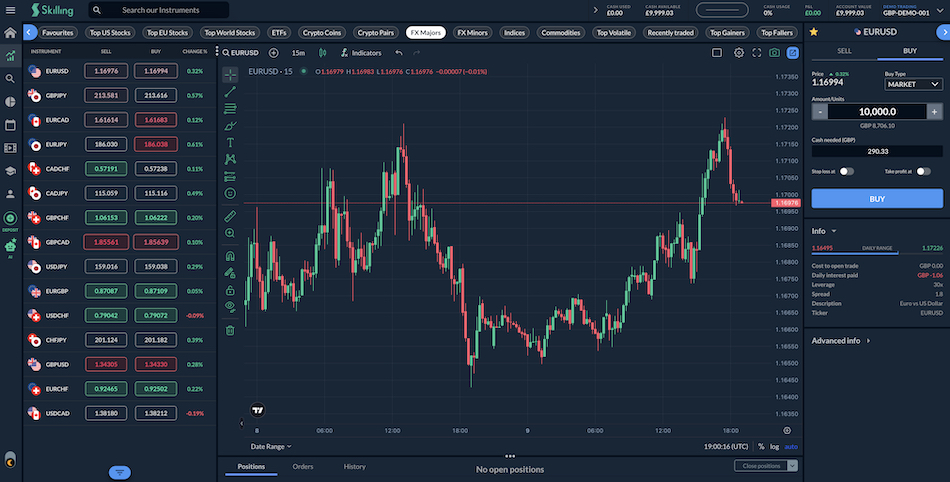
Skilling’s own web-based platform — Skilling Trader — is powered by TradingView and is clean, easy to navigate, and gets the job done for smaller accounts and newer traders. The layout is intuitive, order types cover the basics, and the learning curve is gentle. But it’s not a platform built for depth. The indicator library is plentiful, but customization doesn’t go very far, and there’s no scripting or automation layer to speak of — a noticeable gap if you’re coming from something like cTrader or NinjaTrader.
For traders who need more, Skilling’s cTrader integration is where things improve. The charting is sharper, the order management tools are more capable, and the workspace feels closer to a professional environment. It also supports algorithmic strategies, which the native platform doesn’t.
Importantly, cTrader includes its own built-in copy trading feature — cTrader Copy — that lets you automatically replicate the strategies of traders directly within the platform. It’s a well-developed feature that sits natively in cTrader rather than being bolted on as a separate tool, which makes the experience noticeably cleaner than copy-trading setups at some competing brokers that rely exclusively on MetaTrader.
MT4 is also available, bringing the familiar environment that a large part of the retail trading world still prefers — Expert Advisors (EAs), established indicator libraries, and a workflow that experienced users know inside out.
What’s also no longer absent is MT5, which gives traders more multi-asset capabilities, greater flexible hedging, and newer order management features. A solid addition from Skilling, added in July of 2026.
The research layer largely lives outside the platform itself. Skilling’s TradingView integration is where the serious charting happens — custom indicators, cross-asset watchlists, and a richer analytical environment than anything built into Skilling Trader natively.
There’s no Trading Central or Autochartist integration, so ready-made technical analysis isn’t part of the package.
Taken together, Skilling’s platform stack is practical and accessible, with cTrader providing genuine depth for more active traders. But it doesn’t match brokers that have invested heavily in their own fully loaded in-house ecosystems.
Mobile Apps
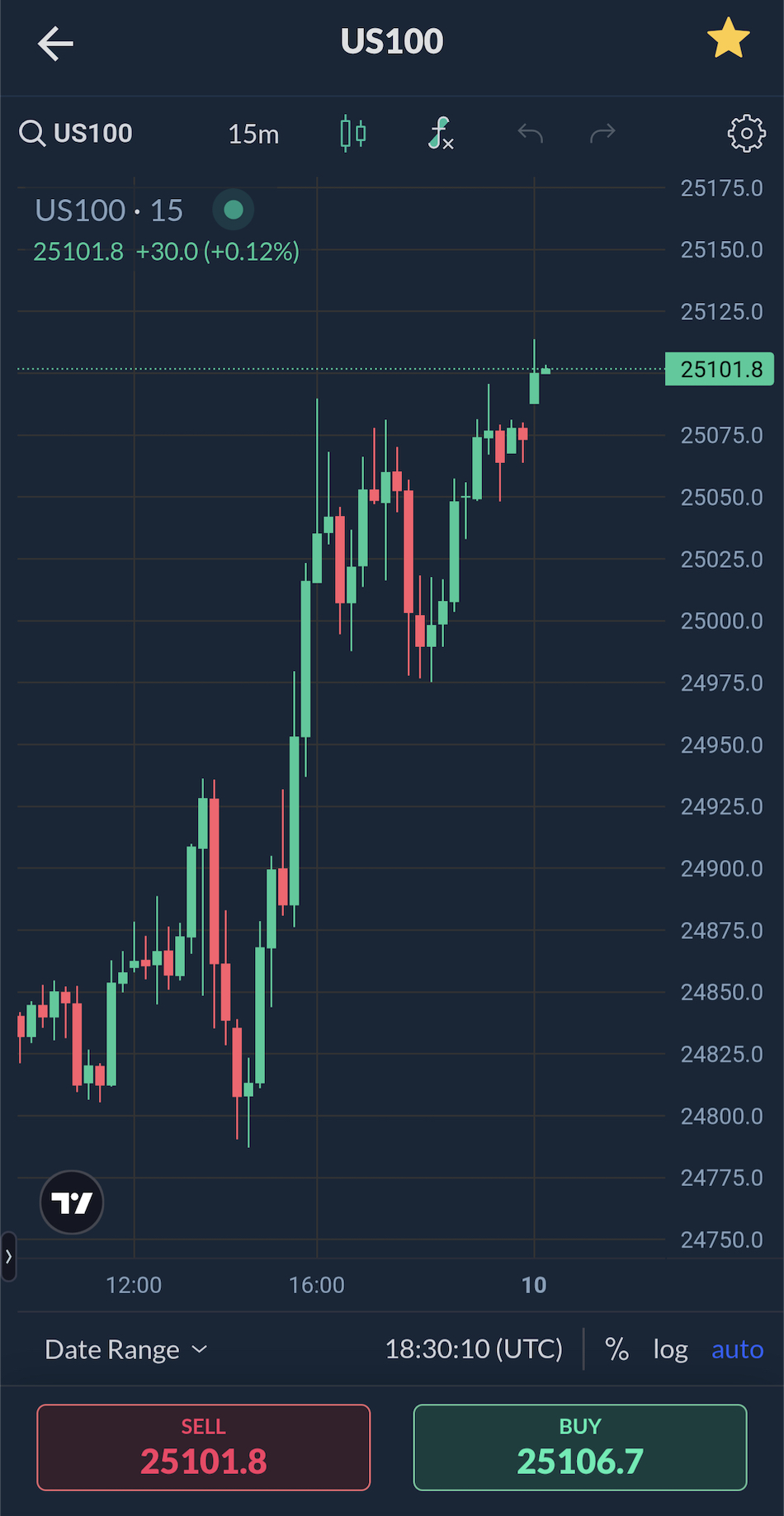
Skilling’s mobile setup covers more ground than most brokers simply because it supports four platforms — Skilling Trader, cTrader, MT4, and TradingView — each with its own iOS and Android app. In theory, that’s broad coverage. In practice, the quality varies enough between them that it’s worth knowing what you’re getting from each.
The Skilling Trader app handles the basics well enough — order entry, simple charts, account monitoring — but it doesn’t feel like a platform that’s been built from the ground up for mobile. It’s more of a scaled-down web terminal than a native app experience, and next to the flagship mobile offerings from larger brokers, the polish isn’t quite there.
cTrader’s mobile app is the pick of the bunch. The visuals are cleaner, scrolling feels smoother, and trade management is more intuitive than on the Skilling-branded app. It carries the platform’s professional character reasonably well onto a smaller screen, though some of the more advanced order management still works better on a desktop.
MT4 and MT5 apps are exactly what long-time users expect — familiar charting, the standard indicator set, and basic EA control. They look dated by modern standards, but they work, and for traders whose workflows are built around MetaTrader, that familiarity counts for something.
TradingView rounds out the lineup and is where the serious charting happens on mobile — full indicator libraries, advanced drawing tools, and saved layouts all carry across well. And unlike some broker integrations where TradingView is analysis-only, Skilling’s integration means you can place and manage trades directly from the TradingView app, making it a genuine trading terminal rather than just a charting layer.
Overall, the mobile coverage is genuinely broad, and that four-app approach means most traders will find something that suits their style. But with the Skilling-branded app in particular, the experience is functional rather than market-leading.
| Skilling | Interactive Brokers | FOREX.com | |
|---|---|---|---|
| Platforms & Tools Rating | |||
| Platforms | Skilling Trader, MT4, MT5, cTrader, TradingView | Trader Workstation (TWS), IBKR Desktop, GlobalTrader, Mobile, Client Portal, AlgoTrader, OmniTrader, TradingView, eSignal, TradingCentral, ProRealTime, Quantower | WebTrader, Mobile, MT4, MT5, TradingView |
| Mobile App | iOS & Android | iOS & Android | iOS & Android |
| Visit | Visit 49% of retail investor accounts lose money when trading CFDs with this provider. | Visit | Visit |
| Review | Review | Review | Review |
Research
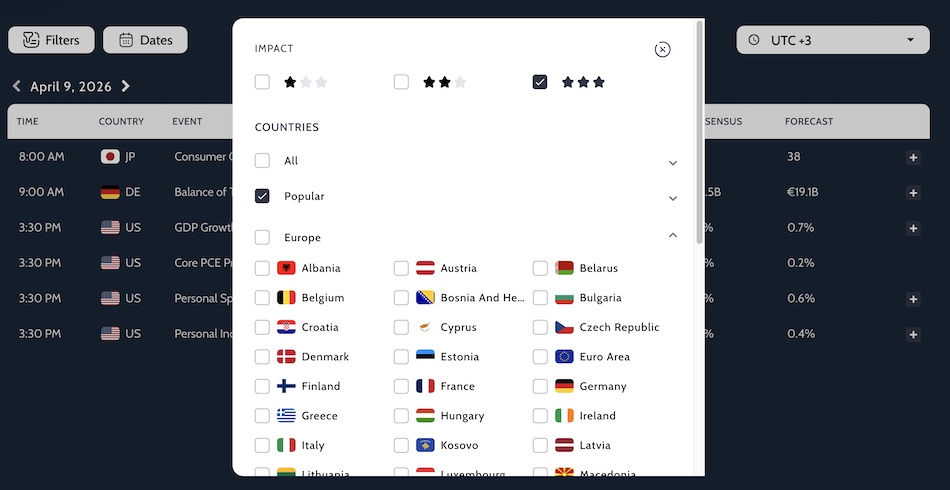
Skilling’s research offering is getting better but it’s still fairly thin. The Skilling Trader platform doesn’t carry instrument-specific news feeds — something you’d take for granted on TradingView — and there’s no integration with third-party analysis providers like Trading Central or Autochartist.
What you do get is a basic economic calendar and occasional short-form market commentary on its blog. That’s enough to stay on top of major events, but it won’t support a serious research workflow. For deeper charting or pattern analysis, you’re expected to look elsewhere.
One positive addition has been the Skilling Trade Assistant. This is an integrated AI tool that’s easy to use and provides more real-time market information, pricing, and trading concepts in real time.
| Skilling | Interactive Brokers | FOREX.com | |
|---|---|---|---|
| Research Rating | |||
| Visit | Visit 49% of retail investor accounts lose money when trading CFDs with this provider. | Visit | Visit |
| Review | Review | Review | Review |
Education
Skilling’s education offering is built entirely around video rather than written articles or guides. The website lays out a short, clear set of video lessons on topics like risk management, chart patterns, and how CFDs work, which is enough to get a beginner started but not enough to build serious trading discipline on its own.
The tone is neutral, and the examples are simple, which makes it suitable for new traders, but the depth stays at an “intro level” rather than approaching a structured learning academy.
On the Skilling Trader platform, there are additional video courses that walk you through the basics of the interface, order types, and risk‑management concepts. These are useful if you learn better by watching than reading, and they help you get comfortable with the platform without having to switch back to the website.
We found Skilling’s education is appropriate for cost‑conscious EU traders who want a light video‑only on‑ramp, but it is not extensive, and serious traders will still need to go elsewhere for deeper strategy, market‑structure, and risk‑management content.
| Skilling | Interactive Brokers | FOREX.com | |
|---|---|---|---|
| Education Rating | |||
| Visit | Visit 49% of retail investor accounts lose money when trading CFDs with this provider. | Visit | Visit |
| Review | Review | Review | Review |
Customer Support
Skilling relies on its help center and FAQs as its first line of support, and for basic questions, it usually works well enough. A quick check on minimum deposits and fees was answered straight from the site, without needing to speak to anyone. The platform guides and general documentation are also clear enough for new users to get set up and place their first trades without much hassle.
Live chat is responsive and typically helpful, but it is not available inside the Skilling Trader platform itself — you have to reach it through the main website. That can be a small irritation if you run into an issue while already logged into the trading interface.
There is also a phone line listed on Skilling’s contact page, which adds a more direct option than chat or email alone. Support is only available from Monday to Friday, between 07:00 and 22:00 CET — there is no coverage at weekends or very late in the evening. That is workable for many EU‑based day traders, but it can feel limiting if you trade outside regular hours or need urgent help on a weekend.
Overall, the written help and self‑serve tools are solid for a retail‑style broker, and live chat and phone support improve the experience when available. But the off‑platform access and limited hours leave some gaps if you need fast, flexible support around the clock.
| Skilling | Interactive Brokers | FOREX.com | |
|---|---|---|---|
| Customer Support Rating | |||
| Visit | Visit 49% of retail investor accounts lose money when trading CFDs with this provider. | Visit | Visit |
| Review | Review | Review | Review |
Community Sentiment
To get a rounded picture of Skilling, we went beyond our own testing and dug into what actual traders are saying. That meant trawling through Trustpilot, forex and day‑trading forums, and broker‑review sites, pulling in 500+ comments about the broker’s platform, spreads, withdrawals, and support.
Overall, the sentiment leans positive, especially on Trustpilot, where many users flag fast execution, low spreads, and responsive support, even if the rating is not quite perfect.
On the support side, Skilling generally responds to most public complaints, but the quality is uneven: some users report quick, clear answers, while others in smaller forums report long waits or unresolved issues with withdrawals and account restrictions.
Recurring complaints tend to follow the same pattern: occasional delays on payouts and questions about how client money is handled when things go wrong.
None of that erases the fact that many EU‑based users appear satisfied with Skilling day to day, especially those who value simple pricing and a CySEC‑regulated retail setup. But the gaps in support follow‑through and the way some disputes play out make it clear that Skilling is more of a cost‑sensitive retail broker than a white‑glove, institution‑grade counterparty.
Is Skilling A Good Broker?
Skilling is a solid, mid‑tier broker for EU‑resident retail traders who want simple pricing and a clear CySEC‑regulated structure. It offers leverage caps, negative‑balance protection, and access to the Investor Compensation Fund up to EUR 20,000, which is more than acceptable for casual and small‑account FX and CFD trading.
At the same time, it has no offshore entity, so non‑EU clients cannot open accounts, and its range of account types and tradable assets is functional but narrow. Execution and spreads are generally in line with the mid‑market, not the tightest, and client‑service depth and research tools are lighter than at larger, premium brokers.
In practice, Skilling is good enough for cost‑conscious EU traders who value clear licensing and simple pricing, as long as they accept the limits on flexibility, product depth, and international access. It is not a bad broker, but it is not a best‑in‑class one. Its main appeal is clarity and affordability, not cutting‑edge tools or maximum flexibility.
How We Tested Skilling
- We tested Skilling on a live account using the broker’s fee tables, product schedule, and regulatory disclosures as references. We checked how Skilling routes trades, and dug into the account types and funding paths it lists, including bank transfers and Visa/Mastercard deposits and withdrawals.
- We ran hands‑on checks on core functions. We opened and closed positions on major FX pairs and selected spot metals, tracked execution behavior around market open, compared the platform’s pricing and spreads against data feeds, and watched how the charts and order‑book tools cope with scalping and longer‑term trades.
- We cross‑checked Skilling’s public funding and withdrawal claims against trader reports on forums and review sites. We found where the broker delivers consistent execution and clean pricing, and where FX‑conversion charges, settlement lags, or back‑and‑forth with support can create friction for live traders.
FAQ
Is Skilling A Good Broker?
Skilling is a decent broker for EU‑based retail traders who want clear regulation, simple pricing, and a straightforward platform, but it is not the best choice for active or institutional‑style traders. It offers solid safeguards under CySEC and competitive spreads on forex and CFDs, while still feeling more like a budget‑friendly mid‑tier operator than a premium, full‑service broker.
Is Skilling Broker Legit?
Skilling is a legitimate, CySEC‑licensed broker, not a scam, and it holds client funds in segregated accounts with clear regulatory oversight. EU‑resident traders get negative‑balance protection and access to the Investor Compensation Fund up to EUR 20,000, which places it in the same basic safety tier as other regulated CFD brokers. That said, it is still a mid‑level retail platform focused on simplicity and low‑cost spreads, so it feels safer than an unregulated broker but not as robust as a top‑tier, bank‑backed institution.
Who Owns Skilling?
Skilling was acquired by the INFINOX ownership group (led by Marc Joppeck) in late 2025.
George Kyriakoudes is the current CEO of Skilling. He took over following the departure of the previous CEO, Michael Kamerman, who stepped down in March 2024.
Best alternatives to Skilling
The highest rated brokers that are most similar to Skilling in United States are Interactive Brokers and FOREX.com. Here is an overview of what makes them great options:
-
1
Interactive Brokers (IBKR) is a premier brokerage, providing access to over 170 markets across 40 countries, along with a suite of comprehensive investment services. With over 40 years of experience, this Nasdaq-listed firm adheres to stringent regulations by the SEC, FCA, CIRO, and SFC, amongst others, and is one of the most trusted brokers for trading around the globe.
-
2

Founded in 2001, FOREX.com is now part of StoneX, a financial services organization serving over one million customers worldwide. Regulated in the US, UK, EU, Australia and beyond, the broker offers thousands of markets, not just forex, and provides excellent pricing on cutting-edge platforms.
Skilling comparison table
| Skilling | Interactive Brokers | FOREX.com | |
|---|---|---|---|
| Rating | 3.4 | 4.3 | 4.3 |
| Markets | Forex, CFDs, Stocks, Indices, Commodities and Cryptos | Stocks, Options, Futures, Forex, Funds, Bonds, ETFs, Mutual Funds, Cryptocurrencies | Forex, Futures and Options on Metals, Energies, Commodities, Indices, Bonds |
| Demo Account | Yes | Yes | Yes |
| Minimum Deposit | $100 | $0 | $100 |
| Minimum Trade | 0.01 Lots | $1 | 0.01 Lots |
| Regulators | CySEC | SEC, FINRA, CFTC, NFA, CIRO, FCA, CBI, ASIC, SFC, SEBI, JFSA, MAS | NFA, CFTC |
| Platforms | Skilling Trader, MT4, MT5, cTrader, TradingView | Trader Workstation (TWS), IBKR Desktop, GlobalTrader, Mobile, Client Portal, AlgoTrader, OmniTrader, TradingView, eSignal, TradingCentral, ProRealTime, Quantower | WebTrader, Mobile, MT4, MT5, TradingView |
| Leverage | 1:30 (Retail), 1:200 (Pro) | 1:50 (major forex pairs), 1:2-1:4 (equities) | 1:50 |
| Payment Methods | 8 | 5 | 10 |
| Visit | – | Visit | Visit |
| Review | – | Read review | Read review |
Compare trading instruments
Compare the markets and instruments offered by Skilling and its competitors. Some markets may only be available via derivatives, and availability may vary by region and entity.
| Skilling | Interactive Brokers | FOREX.com | |
|---|---|---|---|
| CFD | Yes | No | No |
| Forex | Yes | Yes | Yes |
| Stocks | Yes | Yes | Yes |
| Commodities | Yes | Yes | Yes |
| Oil | Yes | No | Yes |
| Gold | Yes | Yes | Yes |
| Copper | Yes | No | Yes |
| Silver | Yes | No | Yes |
| Corn | Yes | No | Yes |
| Crypto | Yes | Yes | No |
| Futures | No | Yes | Yes |
| Options | No | Yes | Yes |
| ETFs | No | Yes | No |
| Bonds | No | Yes | No |
| Warrants | No | Yes | No |
| Spreadbetting | No | No | No |
| Volatility Index | No | No | No |
Skilling vs other brokers
Compare Skilling with any other broker:
The most popular Skilling comparisons:
Customer reviews
Based on 1 Skilling customer reviews submitted by our visitors. Have you traded with Skilling? Please share your experience.
Review Skilling
If you have traded with Skilling, please share your experience and what you think are its strong and weak points.
So I’m still kinda new to the whole day trading game, but I jumped on Skilling cause I’d heard decent stuff and figured the learning side would help me out. I gotta say, their Trade Assist tool was a lifesaver early on, it literally holds your hand through the whole trade setup: picking what to trade, setting your stop loss, take profit, the works. It even places the trade for you. Super in the early days.
The platform itself is super smooth. Loads of tools (most of which I still haven’t touched), but it’s super easy to get the hang of ideal if you’re just getting started like me.
But the video news updates, Hilarious!The intro is straight outta a cheesy 90s promo and the voiceover sounds like an awkward AI robot reading from a script. Kinda goofy, but worth a watch just for laughs. They might wanna polish that bit up though 😂.