Fusion Markets Enables Trading via TradingView App

Contributor Image
Written By
Contributor Image
Written By
James Barra
Head of Content
James is Head of Content and a brokerage expert with a background in financial services. A former management consultant, he's worked on major operational transformation programmes at top European banks. A trusted industry name, James's work at DayTrading.com has been cited in publications like Business Insider.
Contributor Image
Edited By
Contributor Image
Edited By
Tobias Robinson
CEO and Head of Broker Testing Panel
Tobias is the CEO of DayTrading.com, an active investor, and a brokerage expert. He has over 30 years of experience in financial services, including supervising the reviews of more than 500 trading brokers, and contributing via CySEC to the regulatory response to digital options and CFD trading in Europe. Tobias' expertise make him a trusted voice in the industry, where he's been quoted in various financial organizations and outlets, including the Nasdaq.
Contributor Image
Fact Checked By
Contributor Image
Fact Checked By
William Berg
Securities Law Expert
William contributes to several investment websites, leveraging his experience as a consultant for IPOs in the Nordic market and background providing localization for forex trading software. William has worked as a writer and fact-checker for a long row of financial publications.
Updated

Fusion Markets has enabled mobile trading directly through the TradingView app, available from the App Store and Google Play.

Key Takeaways

  • The TradingView app facilitates precision charting with 15+ styles, 100+ prebuilt indicators, 100,000+ public indicators and 90+ drawing tools.
  • Mobile traders get access to the world’s largest trading network with 50+ million users, 8+ million Pine Scripts and live streams.
  • The Fusion Markets support team, available on live chat, phone and email, can help with setup issues.

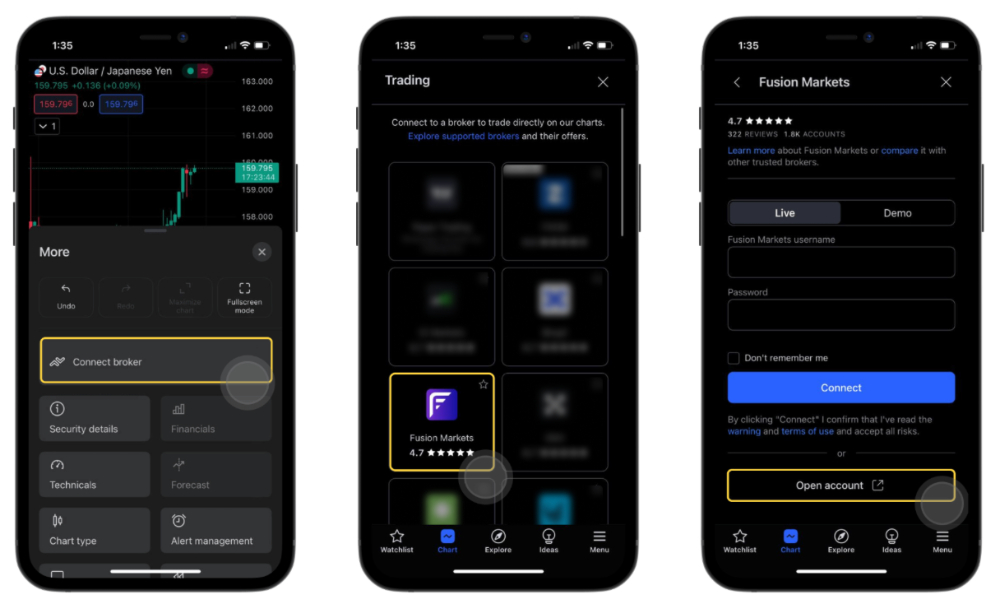
You can connect your Fusion account with TradingView Mobile in several steps:

  1. Download the TradingView app from the respective Apple or Android store.
  2. Sign in to your TradingView account, open a chart and press the three dots menu.
  3. Press ‘Connect broker’ and choose ‘Fusion Markets’. If you can’t see Fusion, select ‘See all brokers’ at the bottom and find Fusion.
  4. Click ‘Open account’ if you’re a new user. If you’re an existing user, sign in with your credentials and press ‘Connect’.
  5. In the Client Hub, press ‘Live Account’ or ‘Demo Account’.
  6. Pick ‘TradingView’ under the trading platform.
  7. Launch TradingView to start trading.

Setting up Fusion Markets account on TradingView app

About Fusion Markets

Fusion Markets was established in Australia in 2017 and is registered with the ASIC, VFC and FSA.

Fusion distinguishes itself with excellent pricing for forex and CFD trading, featuring spreads from 0.9 pips in the Classic account and spreads from 0.0 with a $4.50 commission in the ZERO account.

Clients can trade currency pairs, commodities, stocks, indices, and cryptos on the TradingView platform and app, while MT4, MT5 and cTrader are also supported.

New traders can get started with no minimum deposit and a choice of 10 account currencies, including USD, EUR and AUD.

Your capital is at risk. Trade only with funds you can afford to lose.
Fusion Markets is an online broker established in 2017 and regulated by the ASIC, VFSC and FSA. It is best known for its low-cost forex and CFD trading, although its multiple account types and copy trading solutions cater to a range of traders. New clients can sign up and start trading in 3 easy steps.