




Short-term trading is a game of precision, speed, and strategy, and Quantower delivers a suite of tools tailored to meet these needs. It’s a powerhouse platform designed for serious traders – whether you’re scalping, day trading, or experimenting with algorithms.
Let’s explore Quantower’s key features, insights from our tests, and the best brokers supporting this platform.
Quantower stands out in the competitive world of trading platforms because of its versatility and functionality. Here’s why short-term, day traders like me love it:
- Customizable Interface: Personalize your workspace to fit your trading style.
- Lightning-Fast Execution: Crucial for scalping and day trading strategies.
- Wide Integration: A seamless connection with multiple brokers for flexibility.
 Paul HolmesAuthor
Top 3 Quantower Brokers
Based on our latest tests, here’s our ranking of the best brokers compatible with Quantower:
-
- Demo account
- Regulator: FSC-Belize, FSC-Mauritius
- Min. deposit: $10
-
- Demo account
- Instruments: Spot, Futures, Swaps, Options, X-Perps
- Regulator: FinCEN, VARA
-
- Demo account
- Regulator: CySEC, FSA, BVI
- Min. deposit: $50



Learn how we test brokers and why you can trust our ratings.
Here is a short overview of each broker's pros and cons
- Axiory 3.6/5 Founded in 2011, Axiory is a regulated forex and CFD broker offering tight spreads and highly leveraged trading on industry-leading platforms: MT4, MT5 and cTrader. The broker has won multiple global awards and is regulated by the FSC in Belize and the FSC in Mauritius.
- OKX 4.1/5 OKX is a respected cryptocurrency firm, established in 2017, that offers a large suite of products, from trading to NFTs. Traders can access over 400 crypto tokens via OTC trading and derivatives. With an excellent web platform, developer tools and dynamic charts, OKX is a popular choice for technical traders.
- TopFX 3.8/5 TopFX, a Cyprus-headquartered company, has been an instrumental player in the financial services industry since its establishment in 2010, earning a solid reputation as a reliable broker for active traders. Initially, the company offered liquidity services to institutional clients, including hedge funds, banks, and brokers. However over the years, TopFX has grown to include retail traders in its clientele. It was one of the first brokers in the world to offer cTrader, a testament to its commitment to innovation.
Quantower Brokers Comparison
| Broker | Instruments | Regulators | Minimum Deposit |
|---|---|---|---|
| Axiory | CFDs, Forex, Indices, Commodities, ETFs, Stocks | FSC-Belize, FSC-Mauritius | $10 |
| OKX | Spot, Futures, Swaps, Options, X-Perps | FinCEN, VARA | 10 USDT |
| TopFX | CFDs, Forex, Shares, Indices, Metals, Energies, ETFs, Cryptocurrency | CySEC, FSA, BVI | $50 |
Community Sentiment
See how users rate these brokers based on the average customer ratings submitted on DayTrading.com, plus ratings from Trustpilot, the Apple App Store and Google Play.
| Broker | Our Users' Rating | Trustpilot Score | Trustpilot Reviews | iOS App Rating | Android App Rating |
|---|---|---|---|---|---|
| Axiory | - | 69 | |||
| OKX | 1811 | ||||
| TopFX | - | 485 |
Axiory
Axiory remains a top choice for beginners with its low deposit, unlimited demo account and high-quality education. Experienced day traders will also appreciate the advanced capabilities of the cTrader platform, although the range of 350+ instruments may be too restricting.
 William Berg, Reviewer
Axiory quick facts
- Demo Account
- ✔Yes
- Instruments
- CFDs, Forex, Indices, Commodities, ETFs, Stocks
- Regulator
- FSC-Belize, FSC-Mauritius
- Platforms
- MyAxiory App, MT4, MT5, cTrader, AutoChartist, Quantower
- Minimum Deposit
- $10
- Minimum Trade
- 0.01 Lots
- Account Currencies
- USD, EUR
Pros
- The broker continues to improve its market coverage by introducing real stocks alongside stock CFDs
- Upgraded infrastructure now gives execution speeds of 29 milliseconds, while Axiory guarantees zero or positive slippage on 70% of trades
- A good range of accounts are available with just a $10 minimum deposit required and Islamic swap-free versions
Cons
- Axiory doesn’t hold any top-tier licenses in Europe, the US or the Asia-Pacific region
- Only USD and EUR are accepted as account base currencies, so many clients may have to pay conversion fees
- The broker’s range of 350+ instruments is much smaller than the hundreds offered by most leading firms
OKX
OKX is a top pick for crypto traders looking for emerging coins and crypto projects to invest in. Traders can also make use of the broker's copy trading service and automated bots.
William Berg, Reviewer
OKX quick facts
- Demo Account
- ✔Yes
- Instruments
- Spot, Futures, Swaps, Options, X-Perps
- Regulator
- FinCEN, VARA
- Platforms
- AlgoTrader, Quantower
- Minimum Deposit
- 10 USDT
- Minimum Trade
- Variable
- Account Currencies
- USD, EUR, GBP, INR, JPY, SGD, RUB, AED, SAR
Pros
- Traders can access historical market data for spot and futures combining OHLC data, aggregate trades and trading history
- In 2025, OKX secured a MiFID II license, enabling it to offer regulated derivatives products across Europe, providing peace of mind
- X-Perps, added in 2026, provides opportunities on traditional financial assets, including US stocks and commodities
Cons
- The broker's platform and features may be complex for novices
- The quality of customer support was inconsistent based on testing
- The firm offers limited regulatory oversight, though this is common among crypto exchanges
TopFX
TopFX is a strong choice for day trading due to ultra-low latency with execution times under 25 milliseconds. It also offers access to advanced charting platforms, MT4 and cTrader, with tight spreads and low commissions that can significantly reduce costs for active traders.
 Christian Harris, Reviewer
TopFX quick facts
- Demo Account
- ✔Yes
- Instruments
- CFDs, Forex, Shares, Indices, Metals, Energies, ETFs, Cryptocurrency
- Regulator
- CySEC, FSA, BVI
- Platforms
- MT4, MT5, cTrader, AutoChartist, TradingCentral, Quantower
- Minimum Deposit
- $50
- Minimum Trade
- 0.01 Lots
- Account Currencies
- USD, EUR, GBP
Pros
- Active traders get excellent trade execution with speeds under 25ms, combined with consistent pricing, minimal slippage or requotes, and fast deposits and withdrawals during testing.
- TopFX continues to deliver first-class support following years of real-money trading with responses on live chat in minutes and email replies in 24 hours for technical assistance.
- TopFX is committed to supporting a diverse range of day traders, including those who prefer manual, algorithmic, and strategy-based trading with a choice of flexible accounts.
Cons
- TopFX supports three platforms (cTrader, MT4 and MT5), but there's no option to trade on the increasingly popular TradingView. The lack of a proprietary platform for beginner traders is also an entry barrier.
- Although it produces in-house market analysis content, notably the Daily Market Digest, and includes Autochartist and Trading Central, the woeful educational offering is limiting for beginners, especially compared to category leaders like XTB.
- Despite a growing selection of 600+ instruments, you can't invest directly in real assets, such as stocks, ETFs, and crypto, and TopFX does not offer interest on uninvested cash like alternatives such as IBKR.
Why Use Quantower’s API Integration With These Brokers?
- Flexibility: Easily adapt your trading strategies with Quantower’s powerful tools.
- Customization: Use the Quantower API to build and test strategies that match your trading style.
- Seamless Data Flow: Enjoy uninterrupted data feeds and smooth order execution.
Connecting To Brokers Through APIs
Quantower makes it remarkably simple to connect and use its API with brokerages like OANDA or platforms like cTrader. Here’s how it works step-by-step:
Connecting Quantower To OANDA Via API
1. Create An API Token On OANDA
- Log in to your OANDA account.
- Navigate to the API settings under your account dashboard.
- Generate a new API token and copy it for use in Quantower.
2. Set Up The Connection In Quantower
- Open Quantower and go to the Connections Manager.
- Select OANDA from the list of supported brokers.
- Paste your OANDA API token into the required field.
- Choose your trading environment (live or demo).
3. Start Trading
- Once connected, Quantower will display your account balance, open positions, and market data.
- Use features like advanced charting, order placement, and risk management directly with OANDA’s pricing and liquidity.
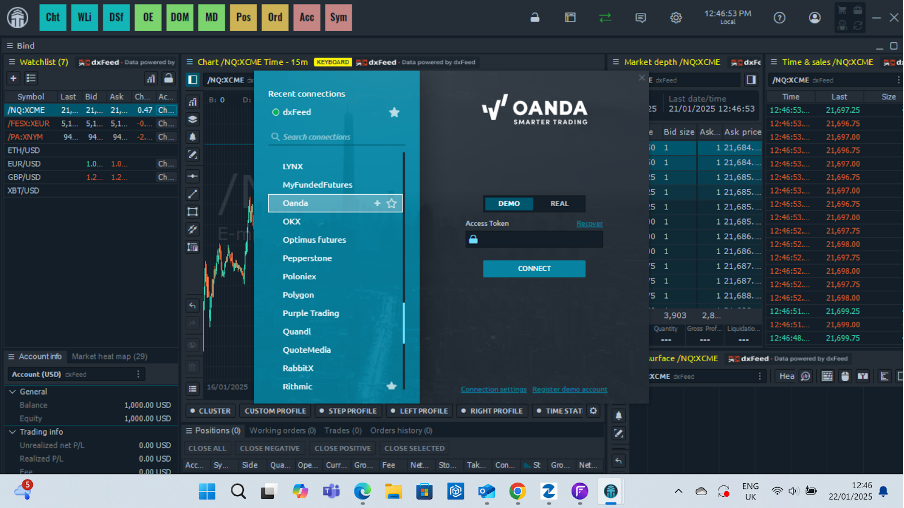
The integration is seamless, and you can use OANDA’s data feed with Quantower’s powerful tools, such as the Depth of Market (DOM) and algorithmic trading.
This combination is perfect for traders who want OANDA’s reliability paired with Quantower’s advanced trading environment.
Using Quantower With cTrader API
1. Set Up cTrader API Access
- Log in to your cTrader brokerage account (e.g., IC Markets or Pepperstone).
- Obtain API credentials, usually from the platform’s developer or integration section.
2. Configure Quantower For cTrader
- In Quantower’s Connections Manager, find cTrader among the supported platforms.
- Input your API credentials (client ID, secret key, and other required details).
- Test the connection to ensure it’s active.
3. Start Using cTrader Data In Quantower
- cTrader’s deep liquidity and data precision combine with Quantower’s superior analytics.
- Use the Volume Analysis and Order Flow tools for better trading insights.
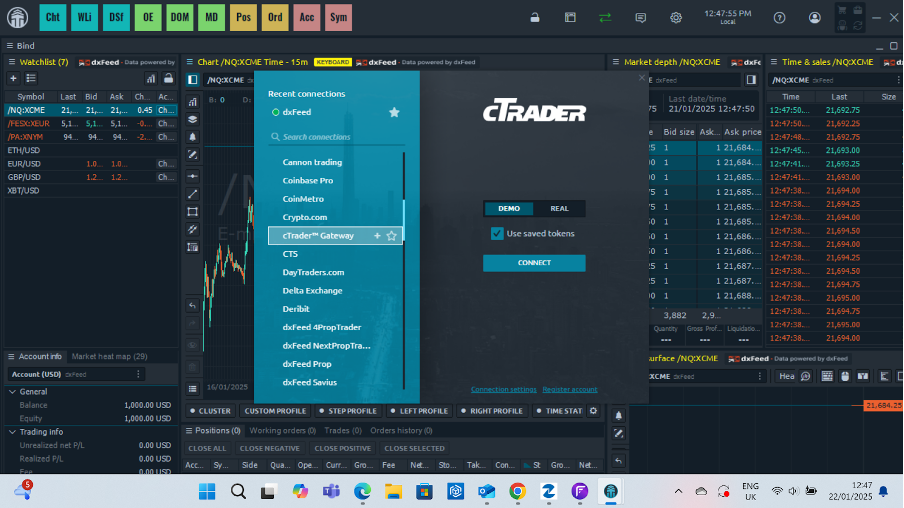
Why It’s Simple:
cTrader already supports advanced trading capabilities, and Quantower’s intuitive interface enhances this with features like algorithmic trading and Market Replay.
You don’t need deep technical knowledge to make this work; it’s designed to integrate seamlessly.
Key Features Of Quantower
Advanced Charting Tools
- Over 40+ built-in indicators like RSI, MACD, and Bollinger Bands.
- Support for custom indicators, which can be created using the Quantower scripting API.
- Multiple chart types, including candlestick, bar, and Renko.
The charting capabilities of Quantower are phenomenal. I found myself saving time by easily switching between timeframes and applying indicators without any lag.
Paul HolmesAuthor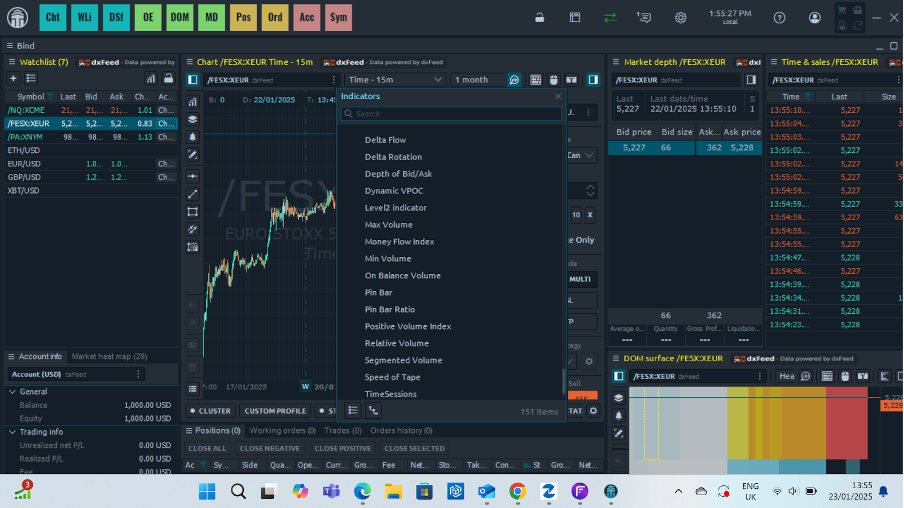
Algorithmic Trading
- Build and test your trading algorithms directly within the platform.
- The built-in Backtesting Tool lets you validate strategies with historical data before going live.
Risk Management Tools
- Built-in tools for setting stop losses, take profits, and trailing stops.
- Position sizing calculators to help you manage risk effectively.
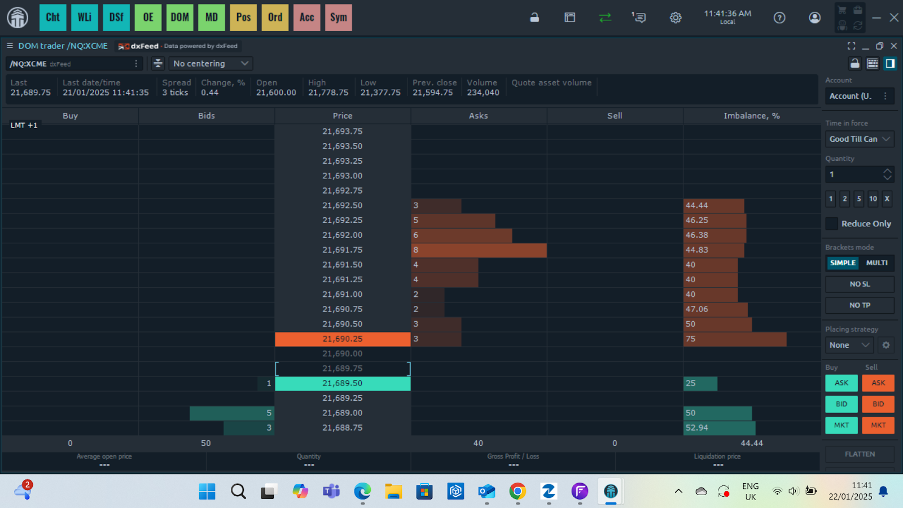
Depth Of Market (DOM)
- The DOM window offers a detailed view of market liquidity and order flow.
- It is ideal for scalpers who need precise data to enter and exit trades.
Market Replay
- Rewind and replay past trading sessions to review market behavior and refine strategies.
- An invaluable tool for learning and improving performance.
Using the Market Replay feature allowed me to identify flaws in my strategy and make adjustments that boosted my profitability.
Paul HolmesAuthorData Aggregation
- Combine feeds from multiple brokers or exchanges to get a unified market view.
- Ensure better decision-making with accurate and comprehensive data.
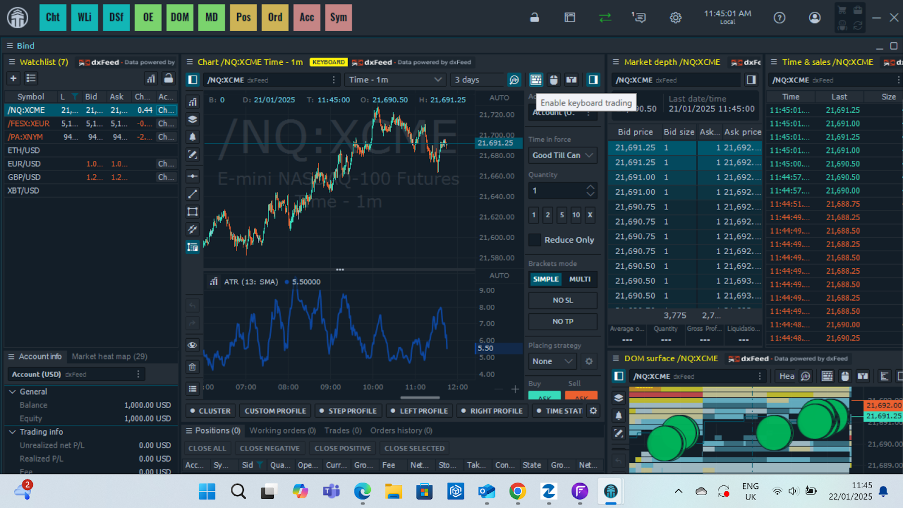
Customizable Hotkeys
- Configure hotkeys for quick actions like placing orders, modifying trades, or cancelling all orders.
- A lifesaver for day traders who need rapid response times.
Multi-Monitor Support
- Seamlessly extend your workspace across multiple monitors.
- Perfect for active traders who monitor multiple assets or strategies simultaneously.
Trading Simulator
- Practice trading without risking real money.
- Simulate real-time conditions to test new strategies or get familiar with the platform.
Cross-Platform Functionality
- Quantower is available for Windows and Mac users.
- Mobile app integration is in development, promising seamless trading on the go.
Quantower In Action: A Trader’s Perspective
I set up the platform to evaluate Quantower’s utility for short-term trading and focused on its core features. My objective was to test the usability, speed, and effectiveness of its tools in a live trading environment. Here’s how it went:
Setting Up My Workspace
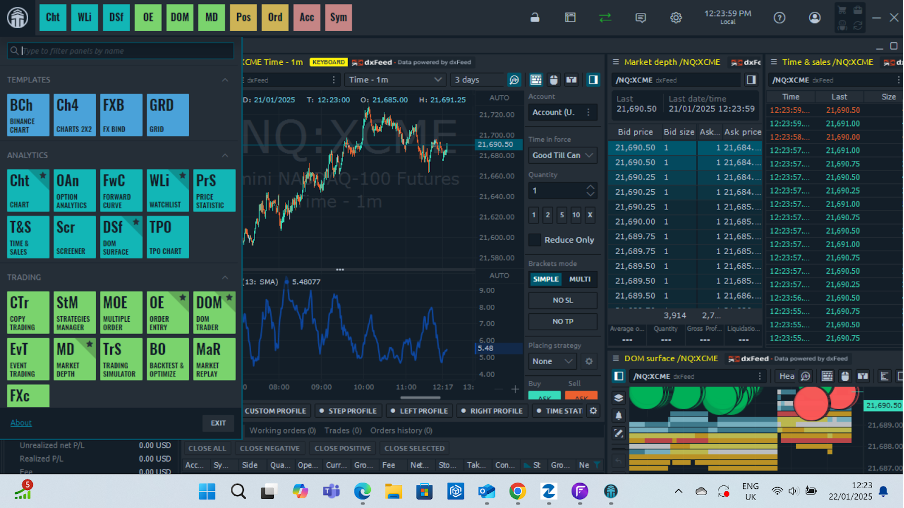
From the start, I noticed the platform’s sleek and customizable interface. Setting up my workspace was intuitive:
- I connected a demo account to test stock and futures trading.
- Using Quantower’s workspace linking feature, I synced my charts, watchlist, and order book. This ensured that changes to one were reflected across all linked windows.
- The multi-monitor support was a standout feature; I spread my trading tools across two screens without performance lags.
- Importantly, the workspace felt personal and efficient, enhancing my ability to focus on critical trading data without distractions.
Charting Features
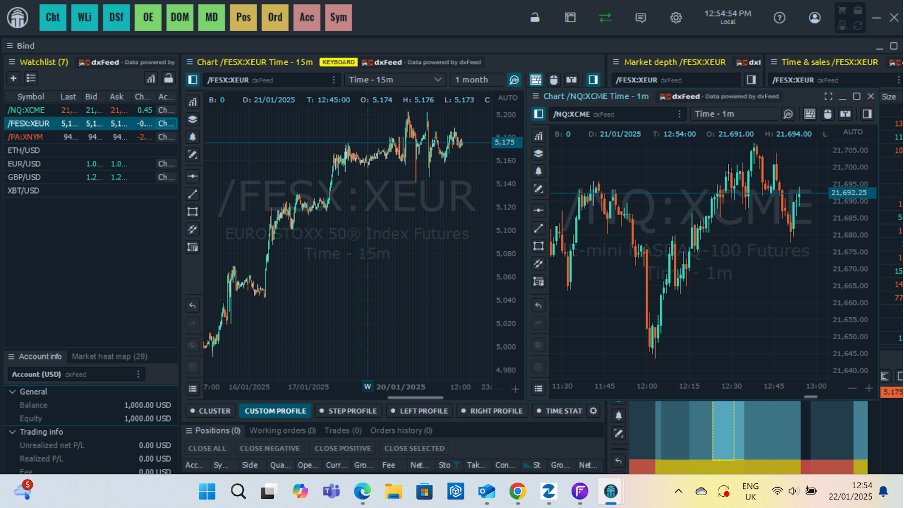
Quantower’s charting is a dream for technical traders.
- I tested indicators like RSI, Bollinger Bands, and Fibonacci retracements. These loaded quickly and were easy to configure.
- Switching between timeframes (1 minute to 1 hour) was seamless, with no noticeable delays.
- I tried their multi-chart layouts, which allowed me to view different timeframes for the same asset.
As a scalper, the responsiveness of charts is crucial. I appreciated how smoothly the platform handled live data streams, especially during volatile market hours.
Paul HolmesAuthorTesting Depth Of Market (DOM)
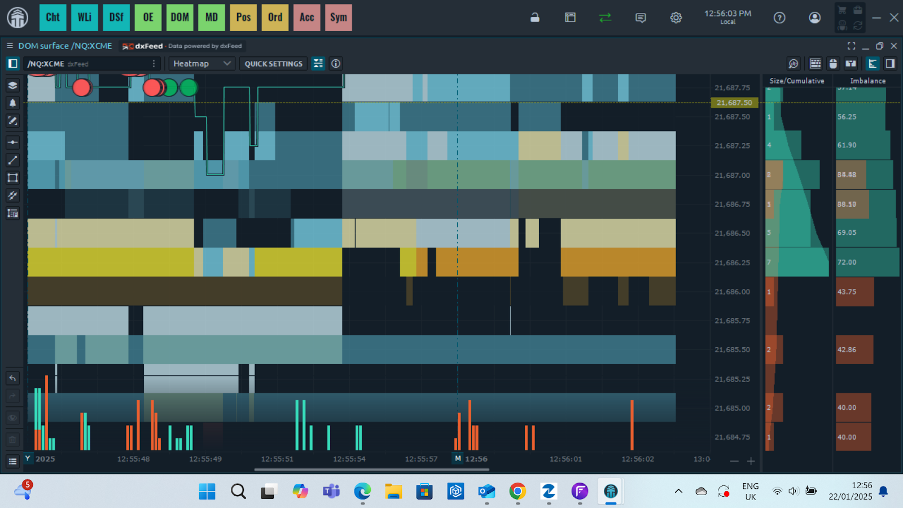
For short-term traders, the Depth of Market (DOM) is essential. I focused on futures and crypto trading to evaluate order flow and liquidity.
- The DOM displayed detailed buy and sell levels with precise updates.
- I placed several limit orders directly from the DOM. The execution speed was impressive, with minimal slippage.
- I used the volume heatmap to spot liquidity clusters, which helped me identify potential breakout points.
Result: This tool felt indispensable for scalping. By spotting high-volume zones, I positioned myself ahead of rapid price moves.
Algorithmic Trading And Backtesting
I created a simple moving average crossover strategy using Quantower’s scripting API. The process was beginner-friendly yet powerful:
- I scripted a 50/200 MA crossover.
- Ran the strategy through six months of historical forex data using the backtesting feature.
- The backtest results included detailed metrics like profit factor, drawdowns, and win rate.
Outcome: The backtest revealed inefficiencies in my initial strategy. After tweaking stop-loss levels, I improved my net profitability.
Market Replay For Practice
The Market Replay tool became a personal favorite. I selected a high-volatility trading session from the previous week and replayed the market data.
- Practiced entering and exiting trades at 2x speed.
- I paused at key moments to analyse price action and refine my reactions.
Takeaway: This feature significantly improved my ability to trade under pressure. It’s an invaluable tool for both beginners and experienced traders looking to sharpen their skills.
Risk Management In Real-Time
Quantower’s risk management tools were tested extensively during live trading sessions:
- The position sizing calculator ensured that my trades aligned with my risk tolerance.
- Setting trailing stops and take-profit orders was quick and straightforward.
- I tested OCO (One Cancels the Other) orders, which worked flawlessly.
Benefit: Effective risk management is non-negotiable for short-term trading, and Quantower makes it easy to implement strategies that protect your capital.
Results And Overall Impressions
After a week of testing, here’s how Quantower performed from my perspective as an experienced short-term trader:
- Execution Speed: Lightning-fast, crucial for scalping and day trading.
- Usability: Intuitive interface with deep customization options.
- Reliability: Stable during high volatility and peak trading hours.
- Standout Features: DOM, backtesting, Market Replay, and multi-monitor support stood out.
- Improvements Needed: While the desktop platform excels, mobile functionality is still under development, limiting flexibility for on-the-go traders.
Tips
Drawing on my time personally using the platform, here are my key tips to get the most out of the software:
- Maximize Hotkey Efficiency: Spend time setting up hotkeys to reduce the number of clicks required during high-stress trading moments.
- Leverage Chart Linking: Use the workspace linking feature to connect multiple charts and tools for synchronised analysis.
- Dive into the Community: Quantower has a vibrant user community where traders share custom indicators and scripts. For example, I discovered a volatility indicator shared in their forums.
- Experiment with Market Replay: Revisit historical market data to understand how your strategy performs under different conditions.
Pricing And Accessibility
Quantower offers flexible pricing options to cater to traders of all levels:
- Free Plan: Includes essential features like charting, fundamental indicators, and limited broker connections.
- Pro Plan: Unlocks advanced features such as multi-connectivity, algorithmic trading, and DOM. Pricing is competitive, with monthly and annual subscription options available.
- Lifetime License: This is for traders who want unlimited access without recurring fees.
I got a great feel for the system with a free seven-day trial. But I reckon the Pro Plan is the best value for short-term traders due to its access to multiple brokers and advanced tools like Market Replay and backtesting.
Paul HolmesAuthorPros And Cons Of Quantower
Pros
- Intuitive and highly customizable interface
- Broad broker and exchange compatibility
- Excellent tools for short-term traders, including DOM and hotkeys
- Strong community support and resources
Cons
- Steep learning curve for beginners
- Limited mobile functionality (currently under development)
- Advanced features are locked behind the Pro Plan
Bottom Line
Quantower is a software that deserves your attention if you’re serious about day trading. It combines advanced features, intuitive design, and extensive broker support to give traders the tools they need to succeed.
While it may have a learning curve, the potential payoff in trading efficiency and precision is well worth the effort. Take it for a seven-day test drive, and it might become your new trading command centre.
Article Sources
The writing and editorial team at DayTrading.com use credible sources to support their work. These include government agencies, white papers, research institutes, and engagement with industry professionals. Content is written free from bias and is fact-checked where appropriate. Learn more about why you can trust DayTrading.com