



A forex demo account is the safest way to learn forex trading. The best demo accounts will offer an app, as well as an online account. They will also match the live platform and offer full functionality to ensure the experience is comparable. Read on to find the best forex demo account for you.
Top 6 Forex Demo Accounts
-
- GBPUSD Spread: 0.5
- EURUSD Spread: 0.18
- EURGBP Spread: 0.5
-
- GBPUSD Spread: 1.5
- EURUSD Spread: 1.3
- EURGBP Spread: 1.4
-
- GBPUSD Spread: 0.4
- EURUSD Spread: 0.1
- EURGBP Spread: 0.4
-
- GBPUSD Spread: 0.9
- EURUSD Spread: 0.86
- EURGBP Spread: 0.9
-
- GBPUSD Spread: 1
- EURUSD Spread: 2
- EURGBP Spread: 2
-
- GBPUSD Spread: From 1.5 pips (Standard Account)
- EURUSD Spread: From 1.5 pips (Standard Account)
- EURGBP Spread: From 1.5 pips (Standard Account)






Learn how we test brokers and why you can trust our ratings.
Here is a short summary of why we think each broker belongs in this top list:
- Vantage 4.7/5 Vantage offers 55+ currency pairs - above the industry average, so experienced traders can explore plenty of opportunities. Vantage's deep liquidity pool provides forex spreads from 0.0 pips in the ECN accounts, alongside a competitive commission that's typically $6.00 round trip per standard lot. There are also no deposit fees or hidden charges.
- Markets.com 4.4/5 Markets.com offers over 50 major, minor and exotic currency pairs. The range is around the industry average, though spreads are fairly competitive, starting from 0.6 pips for EUR/USD. There’s also an excellent range of tools and education, including forex calculators and trading videos.
- FXCC 4.6/5 FXCC's key selling point is its forex trading conditions. ECN spreads come in as low as 0.0 pips during peak trading hours, while it supports a wider range of currency pairs than the majority of rivals with over 70 forex assets. Additionally, you have access to MT4, which was built specifically for forex trading and excels for its charting tools.
- IG 4.8/5 IG offers an above-average suite of 80+ currency pairs on its proprietary web platform, mobile app or MetaTrader 4, with more advanced charts and forex analysis tools available on the ProRealTime software. Forex spreads are competitive based on tests, starting from 0.1 pips on majors like the EUR/USD.
- OnFin 2.8/5 OnFin offers trading on over 50 major, minor and exotic pairs. What stands out is the huge leverage available to turbocharge positions alongside access to MT4, which was designed for FX traders. That said, spreads trail the cheapest forex brokers from our analysis, even in the ECN account where you’ll still pay a high $4 commission.
- Errante 4.0/5 Errante traders can access 50+ forex pairs with leverage up to 1:500 (location dependant). The broker offers fast execution and tight spreads, especially to clients with VIP and Tailor-Made accounts.
Best Forex Demo Accounts Comparison
| Broker | Forex Assets | EUR/USD Spread | Forex App Rating | Minimum Deposit | Regulator |
|---|---|---|---|---|---|
| Vantage | 55+ | 0.18 | $50 | FCA, ASIC, FSCA, VFSC, CIMA | |
| Markets.com | 50+ | 1.3 | $200 | ASIC, CySEC, FSCA, BVI FSC | |
| FXCC | 70+ | 0.1 | $0 | CySEC, MISA | |
| IG | 80+ | 0.86 | $0 | CFTC, NFA, FCA, BaFin, ASIC, FINMA, MAS, JFSA, FMA, DFSA, BMA | |
| OnFin | 50+ | 2 | - | $1 | MISA |
| Errante | 50+ | From 1.5 pips (Standard Account) | - | $50 | CySEC, FSA |
Community Sentiment
See how users rate these brokers based on the average customer ratings submitted on DayTrading.com, plus ratings from Trustpilot, the Apple App Store and Google Play.
| Broker | Our Users' Rating | Trustpilot Score | Trustpilot Reviews | iOS App Rating | Android App Rating |
|---|---|---|---|---|---|
| Vantage | 15615 | ||||
| Markets.com | 1257 | ||||
| FXCC | 220 | ||||
| IG | 10134 | ||||
| OnFin | 29 | ||||
| Errante | 100 |
Vantage
Vantage remains an excellent option for CFD traders seeking a tightly-regulated broker with access to the reliable MetaTrader platforms. The fast sign-up process and $50 minimum deposit make it very straightforward to start day trading quickly.
 Jemma Grist, Reviewer
Vantage quick facts
- GBPUSD Spread
- 0.5
- EURUSD Spread
- 0.18
- EURGBP Spread
- 0.5
- Total Assets
- 55+
- Platforms
- ProTrader, MT4, MT5, TradingView, TradingCentral, DupliTrade
- Account Currencies
- USD, EUR, GBP, CAD, AUD, NZD, JPY, HKD, SGD, PLN
Pros
- The ECN accounts are very competitive with spreads from 0.0 pips and a $1.50 commission per side (Pro ECN account)
- There are no short-term strategy restrictions with hedging and scalping permitted
- It’s quick and easy to open a live account – taking less than 5 minutes
Cons
- The average execution speeds of 100ms to 250ms are slower than alternatives based on tests
- A steep $10,000 deposit is needed for the best trading conditions, which include the $1.50 commission per side
- It's a shame that some clients will need to register with the offshore entity, which offers less regulatory protection
Markets.com
Markets.com is best suited to retail investors who trade frequently but don’t want to calculate commissions, thanks to its spread-only pricing (EUR/USD around 1.3 pips). It especially appeals to short-term traders who value fast execution, flexible asset choice spanning 2,200+ instruments and proprietary tools like hedge fund confidence indices and insider trade alerts.
 Christian Harris, Reviewer
Markets.com quick facts
- GBPUSD Spread
- 1.5
- EURUSD Spread
- 1.3
- EURGBP Spread
- 1.4
- Total Assets
- 50+
- Platforms
- Web Platform, MT4, MT5, TradingCentral
- Account Currencies
- USD, EUR, GBP, AUD, ZAR, SEK, NOK, DKK, CHF, PLN, CZK
Pros
- Markets.com provides commission-free trading on most assets with spreads starting from around 0.6 pips on major forex pairs, making it cost-effective for casual traders.
- Within the 2,200+ CFDs, Markets.com offers thematic baskets like the Warren Buffett Blend and Cannabis Blend, which behaved like ready-made mini-ETFs during testing, saving the work of balancing weights manually.
- Markets.com’s Hedge Fund Confidence and Insider Trading tools pulls SEC filings into the dashboard within 24 hours of disclosure, helping to spot fund moves and C-suite buys before most retail newsfeeds updated.
Cons
- Inactivity charges kick in after just 3 months, while variable spreads are wider than top ECN brokers during testing, which may deter day traders and high-frequency traders.
- While CySEC and FSCA oversight is solid, the SVGFSA and BVIFSC entities offers 1:500 leverage under a light-touch framework, meaning protections like compensation schemes and strict conduct rules lag behind the strictest regulatory standards.
- During sign-up, we hit unclear account type explanations and got stuck in an email verification loop that locked us out for an hour - way less streamlined than other brokers we’ve tested.
FXCC
FXCC continues to prove itself an excellent option for day traders with a particularly strong selection of 70+ currency pairs, ultra-tight spreads from 0.0 pips during testing, and a free VPS for qualifying traders.
Jemma Grist, Reviewer
FXCC quick facts
- GBPUSD Spread
- 0.4
- EURUSD Spread
- 0.1
- EURGBP Spread
- 0.4
- Total Assets
- 70+
- Platforms
- MT4, MT5
- Account Currencies
- USD, EUR, GBP, CAD
Pros
- FXCC’s ECN XL account has been built with active traders in mind, featuring spreads from 0.0 with no commission, while also passing our execution speed benchmark for day traders.
- Customer support still relies on human agents with response times of under three minutes on live chat during our tests and knowledgeable reps - a welcome break from the frustrating AI chatbots increasingly offered by brokers.
- The free VPS for qualifying traders and the ability to build or buy EAs on MetaTrader make FXCC a strong option for algo traders.
Cons
- Although the economic calendar has benefited from a facelift, FXCC still offers very little in terms of market research beyond basic daily technical analysis and aggregated market news, with no tools like Autochartist or social sentiment data.
- Although regulated by the CySEC, FXCC’s offshore entity operates with weak regulatory oversight from MISA and may not provide safeguards like investor compensation in the event of broker insolvency.
- FXCC charges steep withdrawal fees on many of its payment methods, including $45 for bank transfers and 2% crypto transfers, which may cut into the returns of traders making regular withdrawals.
IG
IG continues to provide a comprehensive package with an intuitive web platform, best-in-class education for beginners, advanced charting tools bolstered by its recent TradingView integration, real-time data, and robust trade execution for experienced day traders.
Christian Harris, Reviewer
IG quick facts
- GBPUSD Spread
- 0.9
- EURUSD Spread
- 0.86
- EURGBP Spread
- 0.9
- Total Assets
- 80+
- Platforms
- Web, L2 Dealer, MT4, TradingView, AutoChartist, TradingCentral, ProRealTime
- Account Currencies
- USD, EUR, GBP, CAD, AUD, JPY, ZAR, SEK, DKK, CHF, HKD, SGD
Pros
- IG offers an extensive collection of professional and engaging educational resources, including webinars, articles, and analysis.
- As a well-established broker, IG operates under strict regulatory guidelines in multiple jurisdictions, maintaining a high level of trust.
- The IG app offers a superb mobile trading experience with a clean design that helped it secure Runner Up at our 'Best Trading App' award.
Cons
- IG has discontinued its swap-free account, reducing its appeal to Islamic traders.
- Beginners might find IG’s fee structure complex, with various fees for different types of trades or services, potentially leading to confusion or unexpected charges.
- IG applies an inactivity fee of $12-$18 per month after 2 years, deterring casual investors.
OnFin
OnFin is best suited to experienced day traders who prioritize high leverage over regulatory protections and want to use MT4 or MT5. The ECN account stands out as the top choice for active traders, offering raw spreads from 0 pips, catering to scalpers and intraday traders.
Christian Harris, Reviewer
OnFin quick facts
- GBPUSD Spread
- 1
- EURUSD Spread
- 2
- EURGBP Spread
- 2
- Total Assets
- 50+
- Platforms
- MT4, MT5
- Account Currencies
- USD
Pros
- OnFin’s dedicated copy trading platform lets you follow multiple strategies at once, compare their profitability, and fine-tune how much capital is allocated to each. While not as advanced as eToro, it still offers a useful social trading layer for hands-off traders.
- The MT5 sign-up process has been streamlined, now taking less time and fewer documents to register and connect to the OnFin trading environment in the Metaquotes software.
- With entry points as low as $1 on the Mini account and $50 for ECN access, OnFin is accessible to traders on a tight budget. Its fixed spreads, while not the cheapest we’ve seen, may also appeal to newer traders seeking price certainty.
Cons
- You must register for a live account before accessing the demo, unlike most brokers that offer instant access. The demo is also restricted to MT5, defaults to USD only, and doesn’t allow setting local currencies like GBP or EUR without a manual request.
- At sign-up, we were only asked to choose MT4 or MT5, with no explanation of the four account types (ECN, Standard, Mini, Fix) or how they differ. We had to dig through support pages post-registration to understand our options - a frustrating experience, especially for beginners.
- Licensed by MISA in Mohéli, Comoros, OnFin lacks oversight from major regulators. There are no guarantees on client fund safety, no compensation schemes, and no formal recourse if something goes wrong.
Errante
We recommend Errante for users seeking multi-asset trading on the MT4, MT5, cTrader and TradingView platforms. The copy trading platform and straightforward sign-up process will also suit newer traders.
 William Berg, Reviewer
Errante quick facts
- GBPUSD Spread
- From 1.5 pips (Standard Account)
- EURUSD Spread
- From 1.5 pips (Standard Account)
- EURGBP Spread
- From 1.5 pips (Standard Account)
- Total Assets
- 50+
- Platforms
- MT4, MT5, cTrader, TradingView
- Account Currencies
- USD, EUR
Pros
- Copy trading available
- Open an account in four easy steps
- Good range of cryptocurrencies including Bitcoin
Cons
- Small selection of shares
- Advanced educational content is expensive to unlock
- High deposits to unlock advanced account tiers with more favorable trading terms
What Is a Forex Demo Account?
A forex demo account is a type of trading account where the customer is given free “play money” to practice trading with. It can be seen as a form of “forex trading simulator” with no financial risk to the trader. It is also a great way to try out a broker’s trading platform before using real money.
These accounts act as a practical and convenient way for traders to practice in a safe environment. Sometimes, platforms will offer a form of tutorial alongside their demo account, while others will offer a sign in where the user can then create and experiment with trading at their leisure.
There are several different versions of demo account available on the market, which we’ll look at in detail further down in this guide.
Other than the functionality and tools included in demo accounts, these specific offerings from companies provide a viable and effective way for beginners to learn how to trade without the risk of losing their own money or the money of others.
For traders starting out, demo accounts can be an incredibly valuable resource, even once they’ve decided which platform they’d like to use in the long-term.
Forex Demo Accounts vs Real Money Accounts
What’s the difference between a forex demo account and a real money account?
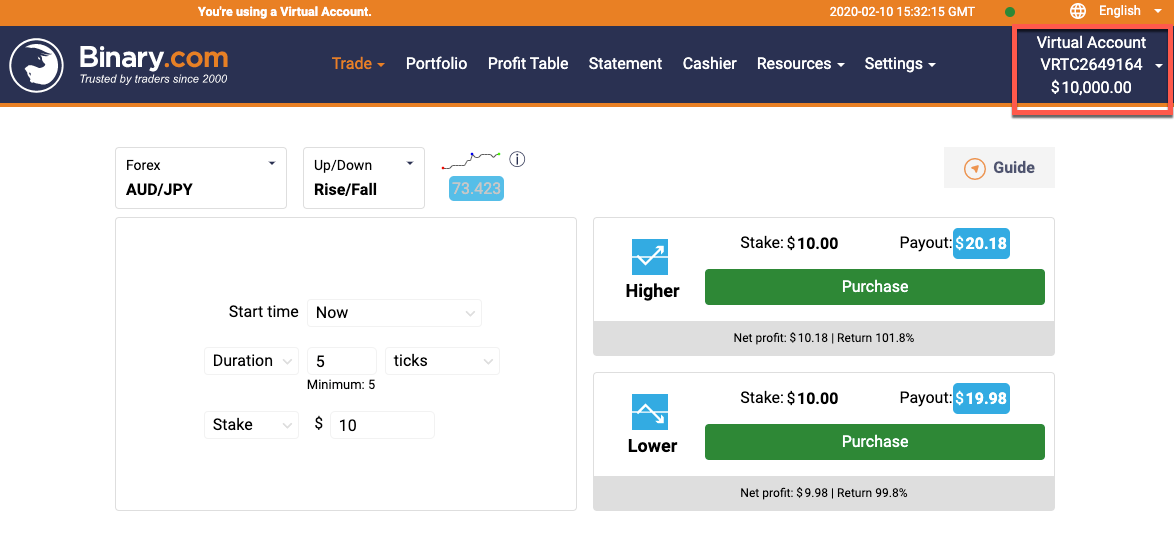
With demo or virtual accounts, the trading balance is a fictional balance. Winning or losing trades will impact the balance, but no ‘real’ money is at stake. If you blow your balance, you can contact the support team and ask for it to be reset.
A real money account requires you to deposit money – and the risks you take with it are real. Especially where leverage or margin is used.
In theory, this should be the one and only difference with Demo and Real accounts. In practise, that single change impacts almost every decision.
The psychological differences between trading with real money, and trading a virtual balance are huge. Pressing ‘buy’ on a trade is much harder when real money is at stake, and snatching at profits is more likely.
Competitions and contests are one way that can help bridge the psychological gap – the tension of trying to win a competition is similar to risking real money – but still not quite the same. So there is no actual answer to resolving this difference – it is just a case of making sure you are aware of it.
A good broker should ensure every other element of a demo account is exactly the same as a genuine account.
How To Compare Forex Demo Accounts
If you’re ready to start looking into the demo accounts that might be available, step one is doing your research.
There are several different types of account available from some of the best online Forex traders, but it’s all about finding what works best for you.
Certain brands may have restrictions in terms of usage for their demo accounts, including time limits, virtual cash limits and more. Carefully reading what your chosen platforms offer is an excellent place to start.
Here are a few of the types of demo accounts you may come across to get you started:
No Time Limit / Unlimited Accounts
As one of the most common demo accounts you’ll come across, many but not all good Forex trading platforms will offer an unlimited demo account to try out.
This means once you log in to your demo account – which, in most cases, will be a different access point to the standard trading platform – you’re free to test out your trading as little and as much as you want. There is no expiration.
Unlimited accounts aren’t just ideal for beginners – they’re perfect for testing out new techniques, back testing, and brushing up on your trading in the long-term too.
No Registration Accounts
No registration demo accounts are accounts you can access without any need to sign up with the platform.
This means no marketing emails, no personal details provided and no communications. For those that want a brief glimpse at what a trading platform can offer, a no registration account is an excellent option.
However, accounts with no registration will be lost the second you leave the page, meaning you can’t come back to continue your existing trades or continue testing a specific practice or idea.
Free Accounts
In most cases, demo accounts are free-of-charge. You’ll rarely come across a platform that’s asking you to pay or put money into what is essentially a testing stage.
No trading costs should apply to those using demo accounts, because none of the money being used is real.
This means you can access demo accounts for multiple different trading platforms at no cost, allowing you to thoroughly and adequately decide which platform is the best for you based on first-hand research.
Forex Demo Account Platforms
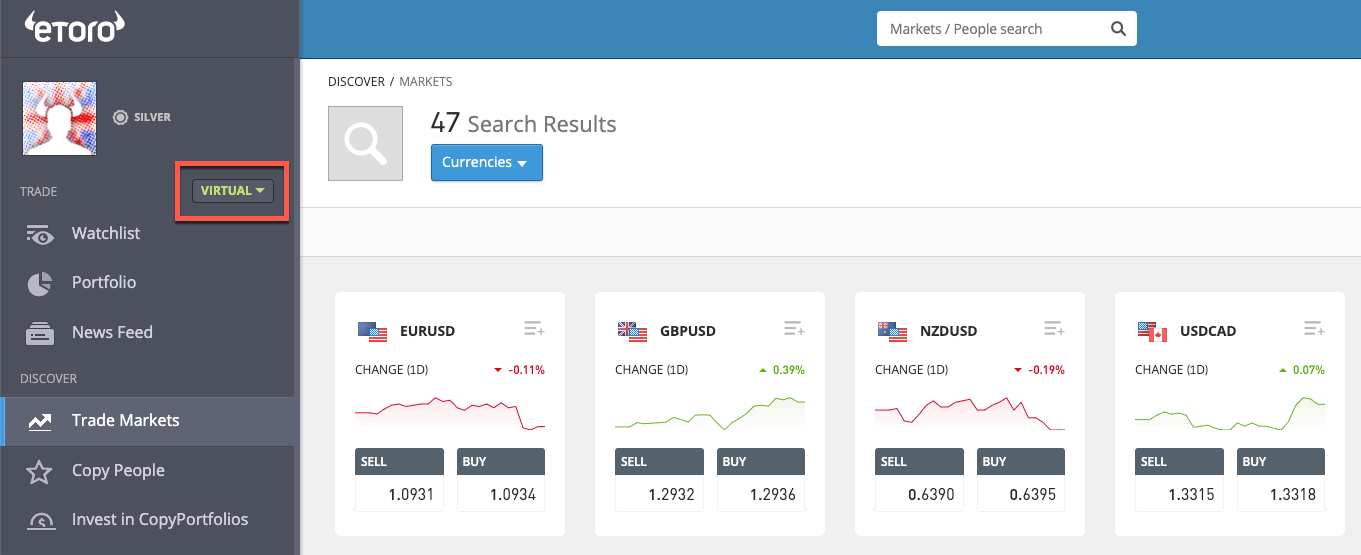
When it comes to accessing the demo accounts you like the look of the most, the next step is looking at what is compatible with your current setup. There are multiple different options available out there for demo account platforms – which you pick is up to you:
MetaTrader 4
Also known as MT4, MetaTrader 4 is a very popular platform used for trading and analytics. While a newer MT5 (below) version is available, MT4 continues to be favourite for many traders. This is thanks to its robust design and familiar controls, making it a top pick for many long-time traders. MT4 is used for Windows OS.
MetaTrader 5
MetaTrader 5, or MT5, is the newer version of the MT4 platform, offering a multi-functional platform that has a host of new features not included in the original MT4. For new traders, starting off on this platform provides you with the most up-to-date option on the market from this popular developer.
Mac OS
The MetaTrader platforms mentioned above are exclusively on the Windows operating system, though some individuals do find workarounds to use this popular software within the Mac OS.
For the majority of traders, however, the use of specifically brand-designed platforms is the solution, with many companies offering their own proprietary Mac OS software alongside Windows and Linux options.
cTrader
A UK-designed platform by Spotware that supports trading and charting, cTrader is a pared-back platform option that looks slick and is incredibly user-friendly. For new traders that want something simple and easy, cTrader is an excellent platform of choice.
Mobile App
Alongside desktop applications, there has been a steep increase in the number of forex traders using forex trading apps for trading on-the-go. This could be through entirely mobile systems or integrated apps for existing trading platforms. We go into further detail about mobile applications for Forex trading below.
Forex Demo Account Competitions
One of the most valuable additions that many traders enjoy from specific Forex trading platforms is contests and competitions.
While these are commonplace on real money trading platforms, they are also increasingly common for use with demo accounts.
This brings an extra touch of reality to virtual trading, helping to bridge that gap between testing out trading and doing it for real. It’s well-worth investigation demo accounts that offer addition interaction like this, as it provides a good impression of how actual money trading would look to those who aren’t quite there yet.
Typical contests and competitions for forex demo accounts may include weekly, monthly, and even daily rushes to achieve specific numbers and beat your fellow demo-users. In many cases, these wins can result in real cash prizes – providing the rush of trading without the risk of using your own money.
This makes contests an excellent middle ground between using your own wallet and simply practising for nothing in a demo setting.
Apps
The evolution of mobile forex trading apps has meant great things for Forex traders. Not only can you now trade from anywhere, but all the information is available at your fingertips with just a tap and a swipe.
The best Forex apps are available for both iPhone and Android. There’s plenty of choices out there, especially when it comes to apps that are companions to a more extensive desktop platform.
Where Can I Download Apps?
Downloading apps for Forex trading can be as easy as visiting the iOS App Store or the Google Play Store and finding an app that sounds interesting to you.
Equally, you can search directly for specific apps if they are something you’ve already tested out on desktop, or you can even go straight to a particular broker’s website and download your mobile app from them immediately.
As with any mobile applications, it’s straightforward to install your favourite trading platform onto your phone – and then you can use it from anywhere.
What You Should Know As A Beginner
As a complete beginner to the world of forex trading, what should you know? The most important thing to understand before you begin trading with real money is what exactly you want out of a platform.
Would you like extensive functionality, or would you prefer as many types of analysis as possible? Do you want something you can access from mobile, or is desktop preferable? Do you use Windows or Mac OS?
Finding the best platform for you means doing your research, understanding what you need and working towards it.
The joy of demo accounts is the fact that they are entirely free.
For those entirely new for forex trading, they provide a great space to learn, grow and develop away from costly mistakes and expensive accidents. Feel free to create as many demo accounts as you want to find the best fit for you – it’s not often you’ll fall in love with the first thing you try, so don’t be afraid to get out there and give it all a go.
Once you’ve shopped around a bit, you’ll be in a far better place to find something that works for you.
Comparing Forex Demo Accounts
When you start researching demo accounts, knowing what’s important to you is the best place to start.
Comparison factors can enable you to find platforms that work for you, as opposed to ones that are just ‘the best’ in general. Factors to consider should include what kind of thing you’d like to trade, as some forex day trading brokers have a wider variety of options than others.
You should also consider whether the platform has all the features you want. While some systems are feature-rich with countless add-ons and widgets, some are far more simplistic for a more streamlined experience.
Know what’s important to you can allow you to compare accounts based on your wants – instead of just going for the best-reviewed platform out there right now.
Trader Location
There might be some changes in availability based on your location as a trader. Most brokers will offer the forex demo account to the same regions where they offer the real account. So if a brand accepts traders from Australia, you should be able to open a demo account in Australia too.
It is not always this simple however. While regions such as South Africa and Asia (India, Singapore, Philippines etc) will find things straightforward, regulation can impact things elsewhere. So traders in the US, Canada and the EU, may find that regulators impact what brokers can offer. Certain options may not be available.
But in very general terms, if you can open a real money account, you should be able to open a forex demo account first.
Finding The Best Account For You
Once you’ve got a strong concept of what you’re looking for, it’s time to hunt down that elusive perfect platform.
Forex demo accounts can come in handy here, allowing you to narrow down which platform is best for you. Once you’ve found a platform that looks to be perfect, don’t leap straight into trading. Instead, fully utilise their demo account to ensure you’re adequately familiar with all this particular platform entails.
With more knowledge and experience behind you, you can’t go wrong.
If you’re testing the water of Forex trading for the first time, demo accounts can be your best friend. Used the right way, they can even be profitable for new traders – both in terms of contests and in terms of the knowledge gained through additional learning time and risk-free interaction. Why not give them a go today?