




A forex demo account is the safest way to learn forex trading. The best demo accounts will offer an app, as well as an online account. They will also match the live platform and offer full functionality to ensure the experience is comparable. Read on to find the best forex demo account for you.
Top 6 Forex Demo Accounts
-
- GBPUSD Spread: 0.4
- EURUSD Spread: 0.1
- EURGBP Spread: 0.4
-
- GBPUSD Spread: 0.1
- EURUSD Spread: 0.0
- EURGBP Spread: 0.1
71.28% of retail traders lose money when trading CFDs -
- GBPUSD Spread: 0.13
- EURUSD Spread: 0.05
- EURGBP Spread: 0.09
-
- GBPUSD Spread: 1.5
- EURUSD Spread: 0.9
- EURGBP Spread: 1.5
-
- GBPUSD Spread: 1.3
- EURUSD Spread: 1.2
- EURGBP Spread: 1.4
-
- GBPUSD Spread: 0.5
- EURUSD Spread: 0.2
- EURGBP Spread: 0.5






Learn how we test brokers and why you can trust our ratings.
Here is a short overview of each broker's pros and cons
- FXCC 4.6/5 FXCC's key selling point is its forex trading conditions. ECN spreads come in as low as 0.0 pips during peak trading hours, while it supports a wider range of currency pairs than the majority of rivals with over 70 forex assets. Additionally, you have access to MT4, which was built specifically for forex trading and excels for its charting tools.
- Eightcap 4.6/5 Eightcap offers 50+ currency pairs in line with the industry average but trailing category leaders like CMC Markets with its 300+ currency pairs. However, Eightcap stands out with institutional-level spreads from 0.0 pips on major pairs like the EUR/USD, alongside low $3.50/side commissions. The broker also offers rich forex data to inform trading decisions, including key fundamentals, bullish/bearish indicators and a calendar that tracks key events in the foreign exchange market.
- Fusion Markets 4.6/5 Fusion Markets offers an excellent selection of 90+ currency pairs, providing a range of short-term trading opportunities. It continues to excel for its ultra-tight spreads from 0.0 pips and exceptionally low commissions of $2.25 per side. You also get access to leading forex software in MetaTrader 4.
- AvaTrade 4.9/5 AvaTrade delivers 50+ currency pairs with tight spreads from 0.9 pips and zero commissions. Trade majors, minrs, and exotics 24/5 on leading forex platforms, notably MT4, with sophisticated charting tools and forex education to sharpen your edge, including a dedicated guide to 'Currency Trading'.
- FOREX.com 4.3/5 FOREX.com continues to uphold its stature as a premier FX broker, offering 80 currency pairs and boasting some of the most competitive fees in the industry. With EUR/USD spreads dipping as low as 0.0 and $7 commission per $100k, it stands out.
- Axi 3.7/5 Axi’s 70+ currency pairs is its strongest market offering and beats out rivals like AvaTrade, which offers only 50+. Combine this with an elevated MT4 offering through the NextGen add-on, and Axi remains an excellent broker for forex traders.
Best Forex Demo Accounts Comparison
| Broker | Forex Assets | EUR/USD Spread | Forex App Rating | Minimum Deposit | Regulator |
|---|---|---|---|---|---|
| FXCC | 70+ | 0.1 | $0 | CySEC, MISA | |
| Eightcap | 50+ | 0.0 | $100 | FCA, ASIC, CySEC, FSC, SCB, FSA | |
| Fusion Markets | 90+ | 0.05 | $0 | ASIC, VFSC, FSA | |
| AvaTrade | 50+ | 0.9 | $300 | ASIC, CySEC, FSCA, ISA, CBI, JFSA, BVI, FSRA/ADGM, AFM, CMA-Kenya, CIRO (via Friedberg Direct) | |
| FOREX.com | 84 | 1.2 | $100 | NFA, CFTC, CIRO, FCA, CySEC, ASIC, FSA, MAS, CIMA, CMA-UAE | |
| Axi | 70+ | 0.2 | $0 | FCA, ASIC, FMA, DFSA, FSC |
Community Sentiment
See how users rate these brokers based on the average customer ratings submitted on DayTrading.com, plus ratings from Trustpilot, the Apple App Store and Google Play.
| Broker | Our Users' Rating | Trustpilot Score | Trustpilot Reviews | iOS App Rating | Android App Rating |
|---|---|---|---|---|---|
| FXCC | 220 | ||||
| Eightcap | 3909 | ||||
| Fusion Markets | 10051 | ||||
| AvaTrade | 13567 | ||||
| FOREX.com | 2529 | ||||
| Axi | 7999 |
FXCC
FXCC continues to prove itself an excellent option for day traders with a particularly strong selection of 70+ currency pairs, ultra-tight spreads from 0.0 pips during testing, and a free VPS for qualifying traders.
 Jemma Grist, Reviewer
FXCC quick facts
- GBPUSD Spread
- 0.4
- EURUSD Spread
- 0.1
- EURGBP Spread
- 0.4
- Total Assets
- 70+
- Platforms
- MT4, MT5
- Account Currencies
- USD, EUR, GBP, CAD
Pros
- Customer support still relies on human agents with response times of under three minutes on live chat during our tests and knowledgeable reps - a welcome break from the frustrating AI chatbots increasingly offered by brokers.
- FXCC has stepped up its offering over the years, adding MT5 to its suite of platforms, hundreds of stocks and more cryptos to its product line-up, plus a copy trading feature and greater margin trading opportunities.
- The free VPS for qualifying traders and the ability to build or buy EAs on MetaTrader make FXCC a strong option for algo traders.
Cons
- FXCC charges steep withdrawal fees on many of its payment methods, including $45 for bank transfers and 2% crypto transfers, which may cut into the returns of traders making regular withdrawals.
- Although regulated by the CySEC, FXCC’s offshore entity operates with weak regulatory oversight from MISA and may not provide safeguards like investor compensation in the event of broker insolvency.
- Although FXCC has bolstered its range of markets with US, European and Asian stocks, the choice of metals and energies is light, and there are no soft commodities.
Eightcap
Eightcap delivers in every area for day traders with a growing selection of charting platforms, education via Labs, and AI-powered tools. Now sporting 120+ crypto CFDs, it's also become a stand-out choice for crypto trading, winning our 'Best Crypto Broker' award two years in a row.
 Christian Harris, Reviewer
Eightcap quick facts
- GBPUSD Spread
- 0.1
- EURUSD Spread
- 0.0
- EURGBP Spread
- 0.1
- Total Assets
- 50+
- Platforms
- MT4, MT5, TradingView, TradeLocker
- Account Currencies
- USD, EUR, GBP, CAD, AUD, NZD, SGD
Pros
- Eightcap stands out with a selection of powerful trading tools and resources, including MT4 and MT5, and more recently the 100-million strong social trading network TradingView.
- With tight spreads from 0 pips, low commission fees, Eightcap provides cost-effective and flexible trading conditions that can accommodate an array of strategies, including day trading and scalping.
- Eightcap Challenges, the broker's prop trading firm, is multi-regulated, removing the third-party risks we commonly see with white-label prop firms, and its tailoring its funded accounts to crypto traders with around 150 crypto pairs, plus it's integrated into the TradingView interface.
Cons
- Eightcap needs to continue bolstering its suite of 800+ instruments to match category leaders like Blackbull Markets with its 26,000+ assets, featuring a particularly weak selection of commodities.
- Despite a useful library of educational guides and e-books in Labs, Eightcap still trails IG’s comprehensive toolkit for aspiring traders with its dedicated IG Academy app and 18 course categories.
- The demo account expires after 30 days and can only be extended upon request - a notable inconvenience compared to the likes of XM with its unlimited demo mode.
Fusion Markets
Fusion Markets is a standout option for forex traders looking for excellent pricing with spreads near zero, industry-low commissions and recently TradingView integration. It’s a particularly good broker for Australian traders where the company is headquartered and regulated by the ASIC.
Jemma Grist, Reviewer
Fusion Markets quick facts
- GBPUSD Spread
- 0.13
- EURUSD Spread
- 0.05
- EURGBP Spread
- 0.09
- Total Assets
- 90+
- Platforms
- MT4, MT5, cTrader, TradingView, DupliTrade
- Account Currencies
- USD, EUR, GBP, CAD, AUD, NZD, JPY, CHF, HKD, SGD
Pros
- Fusion Markets continues to impress with its pricing that provides tight spreads with below-average commissions that will appeal to active day traders.
- Withdrawal processing times have been slashed to under an hour and can be processed 24/7, making it faster and easier for active traders to withdraw any gains.
- Fusion Markets is set up to support algo traders with a sponsored VPS solution and a 25% discount if you opt for the NYC Servers VPS for MT4 or cTrader.
Cons
- While the selection of currency pairs trumps most rivals, the broker's alternative investment offering is average with no stock CFDs beyond the US.
- There is no proprietary trading platform or app built with beginners in mind, a notable drawback compared to AvaTrade.
- Traders outside of Australia must sign up with weakly regulated global entities with limited safeguards, though in August 2026 they made negative balance protection available to all eligible accounts.
AvaTrade
AvaTrade offers active traders everything they need: an intuitive WebTrader, powerful AvaProtect risk management, a smooth 5-minute sign-up process, and dependable support you can rely on in fast-moving markets.
Jemma Grist, Reviewer
AvaTrade quick facts
- GBPUSD Spread
- 1.5
- EURUSD Spread
- 0.9
- EURGBP Spread
- 1.5
- Total Assets
- 50+
- Platforms
- WebTrader, AvaTradeGO, AvaOptions, AvaFutures, MT4, MT5, AlgoTrader, TradingView, TradingCentral, DupliTrade
- Account Currencies
- USD, EUR, GBP, CAD, AUD, ZAR
Pros
- The WebTrader excelled in our hands-on tests, sporting a user-friendly interface for beginners, complete with robust charting tools like 6 chart layouts and 60+ technical indicators.
- AvaTrade launched AvaFutures to offer low-margin access to global markets, then expanded in 2025 as one of the first brokers to add CME’s Micro Grain Futures, and then later in the year went further by integrating with TradingView.
- Support at AvaTrade performed excellently during testing, with response times of 3 minutes and localized support in major trading jurisdictions, including the UK, Europe and the Middle East.
Cons
- AvaTrade’s WebTrader has improved, but work is still needed in terms of customizability – frustratingly widgets like market watch and watchlists can’t be hidden, moved, or resized.
- While signing up is a breeze, AvaTrade lacks an ECN account like Pepperstone or IC Markets, which provides the raw spreads and ultra-fast execution many day traders are looking for.
- The AvaSocial app is good but not great – the look and feel, plus the navigation between finding strategy providers and account management needs upgrading to rival category leaders like eToro.
FOREX.com
FOREX.com remains a best-in-class brokerage for active forex traders of all experience levels, with over 80 currency pairs, tight spreads from 0.0 pips and low commissions. The powerful charting platforms collectively offer over 100 technical indicators, as well as extensive research tools.
Christian Harris, Reviewer
FOREX.com quick facts
- GBPUSD Spread
- 1.3
- EURUSD Spread
- 1.2
- EURGBP Spread
- 1.4
- Total Assets
- 84
- Platforms
- WebTrader, Mobile, MT4, MT5, TradingView
- Account Currencies
- USD, EUR, GBP, CAD, AUD, JPY, CHF, PLN
Pros
- There’s a wealth of educational resources including tutorials, webinars, and a stacked YouTube channel to help you get educated in the financial markets.
- The in-house Web Trader continues to stand out as one of the best-designed platforms for aspiring day traders with a slick design and over 80 technical indicators for market analysis.
- With over 20 years of experience, excellent regulatory oversight, and multiple accolades including runner-up in our 'Best Forex Broker' awards, FOREX.com boasts a global reputation as a trusted brokerage.
Cons
- FOREX.com's MT4 platform offers approximately 600 instruments, significantly fewer than the over 5,500 available on its non-MetaTrader platforms.
- Demo accounts are frustratingly time-limited to 90 days, which doesn’t give you enough time to test day trading strategies effectively.
- The group being FOREX.com, GAIN Capital Group LLC, had to pay a $700k fine to NFA for improperly handling some client accounts.
Axi
Axi is a stand-out option if you want to day trade forex on the MetaTrader 4 platform thanks to the broker’s growing selection of 70+ currency pairs, the MT4 NextGen upgrade, and tight spreads from just 0.2 pips if you opt for the Pro account.
Christian Harris, Reviewer
Axi quick facts
- GBPUSD Spread
- 0.5
- EURUSD Spread
- 0.2
- EURGBP Spread
- 0.5
- Total Assets
- 70+
- Platforms
- Axi Copy Trading, MT4, AutoChartist
- Account Currencies
- USD, EUR, GBP, CHF, PLN
Pros
- Advanced traders can now sign up for the Axi Select funded trader program through the broker’s offshore entity, providing funding up to $1 million with a 90% profit share, which multiple traders have achieved.
- Axi's latest copy trading app is really intuitive based on our tests with useful filtering options to match strategies with individual risk preferences.
- Axi offers a terrific MT4 experience, enhanced with the NextGen plug-in for advanced order management and analytics, and complete with low execution latency of approximately 30ms.
Cons
- Axi is falling behind by only offering MT4 when many rivals now support MT5, cTrader, TradingView and proprietary software for a slicker experience with more advanced tools.
- Despite performing well whenever we use it, Axi's support is unavailable 24/7, which can be inconvenient for traders in different time zones or those needing assistance outside standard trading hours.
- Axi still has our confidence but issues with the ASIC and FMA in recent years mean it needs to continue providing a secure environment while adhering to licensing conditions.
What Is a Forex Demo Account?
A forex demo account is a type of trading account where the customer is given free “play money” to practice trading with. It can be seen as a form of “forex trading simulator” with no financial risk to the trader. It is also a great way to try out a broker’s trading platform before using real money.
These accounts act as a practical and convenient way for traders to practice in a safe environment. Sometimes, platforms will offer a form of tutorial alongside their demo account, while others will offer a sign in where the user can then create and experiment with trading at their leisure.
There are several different versions of demo account available on the market, which we’ll look at in detail further down in this guide.
Other than the functionality and tools included in demo accounts, these specific offerings from companies provide a viable and effective way for beginners to learn how to trade without the risk of losing their own money or the money of others.
For traders starting out, demo accounts can be an incredibly valuable resource, even once they’ve decided which platform they’d like to use in the long-term.
Forex Demo Accounts vs Real Money Accounts
What’s the difference between a forex demo account and a real money account?
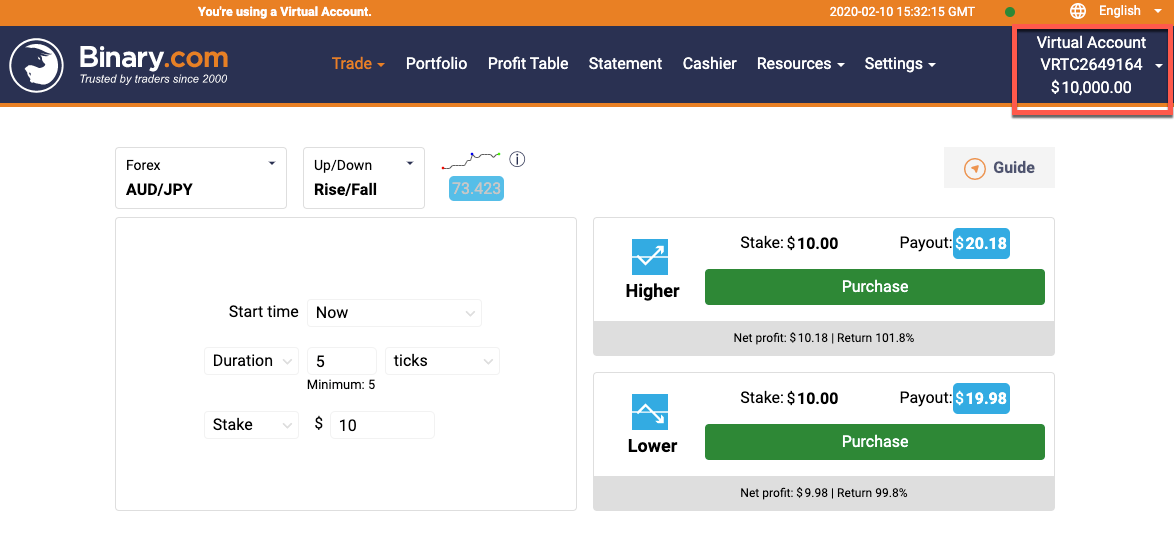
With demo or virtual accounts, the trading balance is a fictional balance. Winning or losing trades will impact the balance, but no ‘real’ money is at stake. If you blow your balance, you can contact the support team and ask for it to be reset.
A real money account requires you to deposit money – and the risks you take with it are real. Especially where leverage or margin is used.
In theory, this should be the one and only difference with Demo and Real accounts. In practise, that single change impacts almost every decision.
The psychological differences between trading with real money, and trading a virtual balance are huge. Pressing ‘buy’ on a trade is much harder when real money is at stake, and snatching at profits is more likely.
Competitions and contests are one way that can help bridge the psychological gap – the tension of trying to win a competition is similar to risking real money – but still not quite the same. So there is no actual answer to resolving this difference – it is just a case of making sure you are aware of it.
A good broker should ensure every other element of a demo account is exactly the same as a genuine account.
How To Compare Forex Demo Accounts
If you’re ready to start looking into the demo accounts that might be available, step one is doing your research.
There are several different types of account available from some of the best online Forex traders, but it’s all about finding what works best for you.
Certain brands may have restrictions in terms of usage for their demo accounts, including time limits, virtual cash limits and more. Carefully reading what your chosen platforms offer is an excellent place to start.
Here are a few of the types of demo accounts you may come across to get you started:
No Time Limit / Unlimited Accounts
As one of the most common demo accounts you’ll come across, many but not all good Forex trading platforms will offer an unlimited demo account to try out.
This means once you log in to your demo account – which, in most cases, will be a different access point to the standard trading platform – you’re free to test out your trading as little and as much as you want. There is no expiration.
Unlimited accounts aren’t just ideal for beginners – they’re perfect for testing out new techniques, back testing, and brushing up on your trading in the long-term too.
No Registration Accounts
No registration demo accounts are accounts you can access without any need to sign up with the platform.
This means no marketing emails, no personal details provided and no communications. For those that want a brief glimpse at what a trading platform can offer, a no registration account is an excellent option.
However, accounts with no registration will be lost the second you leave the page, meaning you can’t come back to continue your existing trades or continue testing a specific practice or idea.
Free Accounts
In most cases, demo accounts are free-of-charge. You’ll rarely come across a platform that’s asking you to pay or put money into what is essentially a testing stage.
No trading costs should apply to those using demo accounts, because none of the money being used is real.
This means you can access demo accounts for multiple different trading platforms at no cost, allowing you to thoroughly and adequately decide which platform is the best for you based on first-hand research.
Forex Demo Account Platforms
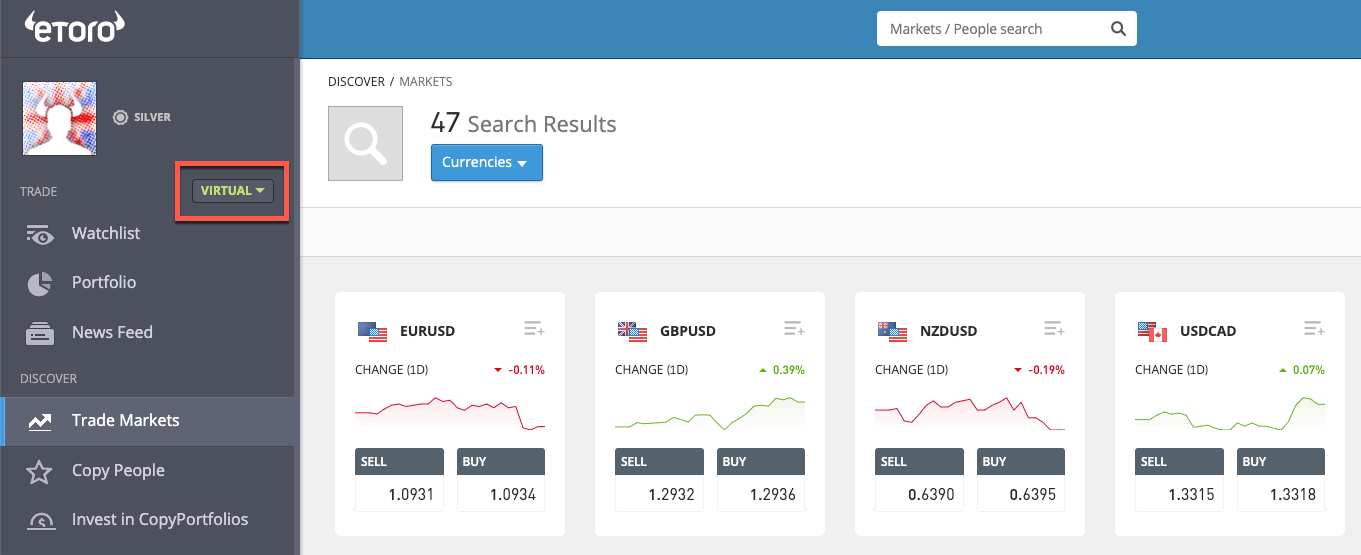
When it comes to accessing the demo accounts you like the look of the most, the next step is looking at what is compatible with your current setup. There are multiple different options available out there for demo account platforms – which you pick is up to you:
MetaTrader 4
Also known as MT4, MetaTrader 4 is a very popular platform used for trading and analytics. While a newer MT5 (below) version is available, MT4 continues to be favourite for many traders. This is thanks to its robust design and familiar controls, making it a top pick for many long-time traders. MT4 is used for Windows OS.
MetaTrader 5
MetaTrader 5, or MT5, is the newer version of the MT4 platform, offering a multi-functional platform that has a host of new features not included in the original MT4. For new traders, starting off on this platform provides you with the most up-to-date option on the market from this popular developer.
Mac OS
The MetaTrader platforms mentioned above are exclusively on the Windows operating system, though some individuals do find workarounds to use this popular software within the Mac OS.
For the majority of traders, however, the use of specifically brand-designed platforms is the solution, with many companies offering their own proprietary Mac OS software alongside Windows and Linux options.
cTrader
A UK-designed platform by Spotware that supports trading and charting, cTrader is a pared-back platform option that looks slick and is incredibly user-friendly. For new traders that want something simple and easy, cTrader is an excellent platform of choice.
Mobile App
Alongside desktop applications, there has been a steep increase in the number of forex traders using forex trading apps for trading on-the-go. This could be through entirely mobile systems or integrated apps for existing trading platforms. We go into further detail about mobile applications for Forex trading below.
Forex Demo Account Competitions
One of the most valuable additions that many traders enjoy from specific Forex trading platforms is contests and competitions.
While these are commonplace on real money trading platforms, they are also increasingly common for use with demo accounts.
This brings an extra touch of reality to virtual trading, helping to bridge that gap between testing out trading and doing it for real. It’s well-worth investigation demo accounts that offer addition interaction like this, as it provides a good impression of how actual money trading would look to those who aren’t quite there yet.
Typical contests and competitions for forex demo accounts may include weekly, monthly, and even daily rushes to achieve specific numbers and beat your fellow demo-users. In many cases, these wins can result in real cash prizes – providing the rush of trading without the risk of using your own money.
This makes contests an excellent middle ground between using your own wallet and simply practising for nothing in a demo setting.
Apps
The evolution of mobile forex trading apps has meant great things for Forex traders. Not only can you now trade from anywhere, but all the information is available at your fingertips with just a tap and a swipe.
The best Forex apps are available for both iPhone and Android. There’s plenty of choices out there, especially when it comes to apps that are companions to a more extensive desktop platform.
Where Can I Download Apps?
Downloading apps for Forex trading can be as easy as visiting the iOS App Store or the Google Play Store and finding an app that sounds interesting to you.
Equally, you can search directly for specific apps if they are something you’ve already tested out on desktop, or you can even go straight to a particular broker’s website and download your mobile app from them immediately.
As with any mobile applications, it’s straightforward to install your favourite trading platform onto your phone – and then you can use it from anywhere.
What You Should Know As A Beginner
As a complete beginner to the world of forex trading, what should you know? The most important thing to understand before you begin trading with real money is what exactly you want out of a platform.
Would you like extensive functionality, or would you prefer as many types of analysis as possible? Do you want something you can access from mobile, or is desktop preferable? Do you use Windows or Mac OS?
Finding the best platform for you means doing your research, understanding what you need and working towards it.
The joy of demo accounts is the fact that they are entirely free.
For those entirely new for forex trading, they provide a great space to learn, grow and develop away from costly mistakes and expensive accidents. Feel free to create as many demo accounts as you want to find the best fit for you – it’s not often you’ll fall in love with the first thing you try, so don’t be afraid to get out there and give it all a go.
Once you’ve shopped around a bit, you’ll be in a far better place to find something that works for you.
Comparing Forex Demo Accounts
When you start researching demo accounts, knowing what’s important to you is the best place to start.
Comparison factors can enable you to find platforms that work for you, as opposed to ones that are just ‘the best’ in general. Factors to consider should include what kind of thing you’d like to trade, as some forex day trading brokers have a wider variety of options than others.
You should also consider whether the platform has all the features you want. While some systems are feature-rich with countless add-ons and widgets, some are far more simplistic for a more streamlined experience.
Know what’s important to you can allow you to compare accounts based on your wants – instead of just going for the best-reviewed platform out there right now.
Trader Location
There might be some changes in availability based on your location as a trader. Most brokers will offer the forex demo account to the same regions where they offer the real account. So if a brand accepts traders from Australia, you should be able to open a demo account in Australia too.
It is not always this simple however. While regions such as South Africa and Asia (India, Singapore, Philippines etc) will find things straightforward, regulation can impact things elsewhere. So traders in the US, Canada and the EU, may find that regulators impact what brokers can offer. Certain options may not be available.
But in very general terms, if you can open a real money account, you should be able to open a forex demo account first.
Finding The Best Account For You
Once you’ve got a strong concept of what you’re looking for, it’s time to hunt down that elusive perfect platform.
Forex demo accounts can come in handy here, allowing you to narrow down which platform is best for you. Once you’ve found a platform that looks to be perfect, don’t leap straight into trading. Instead, fully utilise their demo account to ensure you’re adequately familiar with all this particular platform entails.
With more knowledge and experience behind you, you can’t go wrong.
If you’re testing the water of Forex trading for the first time, demo accounts can be your best friend. Used the right way, they can even be profitable for new traders – both in terms of contests and in terms of the knowledge gained through additional learning time and risk-free interaction. Why not give them a go today?