




Apple Pay is a low-cost, fast and secure payment gateway used by millions around the world. A popular and convenient way to pay for shopping, public transport, grocery trips, and increasingly, retail trading accounts. Its widespread popularity can, in part, be attributed to its straightforward setup, accessibility, and low fees.
In this review, we explore its true merits for online trading, from getting started to fees, security and processing speeds. We also list the best trading brokers that accept Apple Pay deposits in 2026.
Best Apple Pay Brokers in France
Based on our evaluations, these are the top 6 brokers that offer Apple Pay deposits:
-
- Demo account
- Platforms: MT4, MT5, TradingCentral
- Min. deposit: $5
-
- Demo account
- Min. deposit: $0
- Min. trade: 0.01 Lots
73-89% of retail investor accounts lose money when trading CFDs -
- Demo account
- Instruments: Spot, Futures, Swaps, Options, X-Perps
- Regulator: FinCEN, VARA
-
- Demo account
- Regulator: FCA, ASIC, CySEC, SCA, SCB, CMA-Kenya
- Platforms: Web Platform, MT4, TradingView
-
- Demo account
- Regulator: FSC
- Platforms: WebTrader, MT5
-
- Demo account
- Platforms: TradeLocker, MT5, TradeLocker
- Min. deposit: $5






Learn how we test brokers and why you can trust our ratings.
Here is a summary of why we recommend these brokers in October 2026:
- XM 4.8/5 XM is a globally recognized forex and CFD broker with 20+ million clients in 190+ countries. Since 2009, this trusted broker has been delivering low trading fees across its growing roster of 1000+ instruments. It also offers a comprehensive MetaTrader experience that we've observed firsthand placing test trades.
- Pepperstone 4.8/5 Established in Australia in 2010, Pepperstone is a top-rated forex and CFD broker with over 830,000 clients worldwide. It offers access to 1,400+ instruments on leading platforms MT4, MT5, cTrader and TradingView, maintaining low, transparent fees. Pepperstone is also regulated by trusted authorities like the FCA, ASIC, and CySEC, helping to ensure a secure environment for day traders at all levels.
- OKX 4.1/5 OKX is a respected cryptocurrency firm, established in 2017, that offers a large suite of products, from trading to NFTs. Traders can access over 400 crypto tokens via OTC trading and derivatives. With an excellent web platform, developer tools and dynamic charts, OKX is a popular choice for technical traders.
- Capital.com 4.0/5 Established in 2016, Capital.com initially focused on CFDs across forex, indices, stocks, commodities, and crypto, aimed squarely at active traders. Over the years it has added more instruments, obtained multiple regulatory licenses, improved its charting tools, and introduced an 1X account that lets you trade without using margin (borrowed funds), now catering to a diverse mix of traders worldwide.
- TabTrade 3.0/5 Established in 2026, TabTrade is a CFD broker based in Saint Lucia. It offers a choice of three accounts (Standard, Edge, VIP) with spread-only and spread plus commission pricing, access to over 1,000 tradeable assets, and leverage up to 1:1000.
- HeroFX 3.3/5 Established in 2022, HeroFX is an offshore forex and CFD broker based in Saint Lucia. It offers MT5 and TradeLocker trading platforms with forex, stocks, indices, commodities, crypto, and high leverage up to 1:500. The minimum deposit is $5, and it supports scalping and automated trading.
Compare The Best Apple Pay Brokers
| Broker | Minimum Deposit | Instruments | Platforms | Leverage |
|---|---|---|---|---|
| XM | $5 | CFDs, Forex, Stocks, Commodities, Indices, Thematic Indices, Precious Metals, Energies | MT4, MT5, TradingCentral | 1:30 |
| Pepperstone | $0 | CFDs, Forex, Currency Indices, Stocks, Indices, Commodities, ETFs, Crypto CFDs, Spread Betting | Pepperstone Trading Platform, MT4, MT5, cTrader, TradingView | 1:30 (Retail), 1:500 (Pro) |
| OKX | 10 USDT | Spot, Futures, Swaps, Options, X-Perps | AlgoTrader, Quantower | - |
| Capital.com | $20 | CFDs on Forex, Stocks, Indices, Commodities, ETFs, Crypto | Web Platform, MT4, TradingView | 1:30 |
| TabTrade | $0 | CFDs on Forex, Stocks, Indices, Commodities, Metals, Crypto, ETFs | WebTrader, MT5 | 1:1000 |
| HeroFX | $5 | CFDs, Forex, Stocks, Indices, Commodities, Crypto | TradeLocker, MT5, TradeLocker | 1:500 |
Community Sentiment
See how users rate these brokers based on the average customer ratings submitted on DayTrading.com, plus ratings from Trustpilot, the Apple App Store and Google Play.
| Broker | Our Users' Rating | Trustpilot Score | Trustpilot Reviews | iOS App Rating | Android App Rating |
|---|---|---|---|---|---|
| XM | 3078 | ||||
| Pepperstone | 3712 | ||||
| OKX | 1770 | ||||
| Capital.com | 15219 | ||||
| TabTrade | - | 30 | |||
| HeroFX | - | 65 |
XM
With a low $5 minimum deposit, advanced charting platforms in MT4 and MT5, expanding range of markets, and a Zero account offering spreads from 0.0, XM provides all the essentials for active traders.
 Christian Harris, Reviewer
XM quick facts
- Demo Account
- ✔Yes
- Instruments
- CFDs, Forex, Stocks, Commodities, Indices, Thematic Indices, Precious Metals, Energies
- Regulator
- CySEC, DFSA, FSCA, SCA, FSA, FSC-Belize, FSC-Mauritius, CMA-Kenya, CMA-UAE
- Platforms
- MT4, MT5, TradingCentral
- Minimum Deposit
- $5
- Minimum Trade
- 0.01 Lots
- Account Currencies
- USD, EUR, GBP, JPY, ZAR
Pros
- XM stands out for its commitment to trader education, with a wealth of well-presented resources, including webinars, tutorials, and even real-time trading sessions through XM Live.
- XM has rolled out platform upgrades with integrated TradingView charts and an XM AI assistant, delivering faster execution, smarter analysis, and a sleeker, more intuitive trading experience.
- XM’s customer support has delivered over years of testing, with 24/7 assistance in 30 languages, response times of under 2 minutes and a growing Telegram channel.
Cons
- XM is falling behind the curve by not offering cTrader, which is favored over MetaTrader by some serious traders for its smoother user experience and superior charting package.
- While the XM app stands out for its usability and exclusive copy trading products, the selection of technical analysis tools needs to be improved to meet the needs of advanced traders.
- XM relies solely on the MetaTrader platforms for desktop trading, so there’s no in-house downloadable solution for a more beginner-friendly user experience with unique features.
Pepperstone
Pepperstone stands out as a top choice for day trading, offering razor-sharp spreads, ultra-fast execution, and advanced charting platforms for experienced traders. New traders are also welcomed with no minimum deposit, extensive educational resources, and exceptional 24/5 support (18h a day on weekends).
Christian Harris, Reviewer
Pepperstone quick facts
- Demo Account
- ✔Yes
- Instruments
- CFDs, Forex, Currency Indices, Stocks, Indices, Commodities, ETFs, Crypto CFDs, Spread Betting
- Regulator
- FCA, ASIC, CySEC, BaFin, DFSA, SCA, SCB, CMA-Kenya
- Platforms
- Pepperstone Trading Platform, MT4, MT5, cTrader, TradingView
- Minimum Deposit
- $0
- Minimum Trade
- 0.01 Lots
- Account Currencies
- USD, EUR, GBP, CAD, AUD, NZD, JPY, CHF, HKD, SGD
Pros
- Award-winning customer support is available via telephone, email or live chat with response times of <5 minutes during testing and friendly agents knowledgeable about its products and trading tools.
- There’s support for a range of industry-leading charting platforms including MT4, MT5, TradingView, and cTrader, catering to various short-term trading styles, including algo trading.
- After adding spread betting through TradingView, Pepperstone provides a seamless, tax-efficient trading experience with advanced analysis tools for financial spread bettors in supported countries.
Cons
- Overnight holding fees are higher than that found with some Market Maker brokers (usually Benchmark + 2.5%). This makes pepperstone an ideal broker for day traders and forex scalpers but less suitable for swing traders who often keep position open overnight.
- Execution may not feel as reliable in fast markets as headline speeds suggest. In our own testing, execution was fast at desired prices, but some community complaints focus on slippage, stop-loss fills and spread-sensitive order triggers during volatile conditions.
- Despite improvements to its range of markets, crypto CFD offerings are still fairly limited compared to other brokers who focus on this area, such as Eightcap, and there's no option to invest in real coins.
OKX
OKX is a top pick for crypto traders looking for emerging coins and crypto projects to invest in. Traders can also make use of the broker's copy trading service and automated bots.
 William Berg, Reviewer
OKX quick facts
- Demo Account
- ✔Yes
- Instruments
- Spot, Futures, Swaps, Options, X-Perps
- Regulator
- FinCEN, VARA
- Platforms
- AlgoTrader, Quantower
- Minimum Deposit
- 10 USDT
- Minimum Trade
- Variable
- Account Currencies
- USD, EUR, GBP, INR, JPY, SGD, RUB, AED, SAR
Pros
- In 2025, OKX secured a MiFID II license, enabling it to offer regulated derivatives products across Europe, providing peace of mind
- Traders can access historical market data for spot and futures combining OHLC data, aggregate trades and trading history
- Active traders can expect competitive maker and taker fees, from 0.02% and 0.05%, respectively
Cons
- In 2025 OKX agreed to pay over $500 million in penalties for violating AML laws in the US
- The broker's platform and features may be complex for novices
- The firm offers limited regulatory oversight, though this is common among crypto exchanges
Capital.com
Capital.com is a great match for day traders with its thousands of CFDs, SmartFeed providing tailored market updates, and TradingView charts for advanced technical indicators paired with Capital.com’s fast and reliable order execution.
Christian Harris, Reviewer
Capital.com quick facts
- Demo Account
- ✔Yes
- Instruments
- CFDs on Forex, Stocks, Indices, Commodities, ETFs, Crypto
- Regulator
- FCA, ASIC, CySEC, SCA, SCB, CMA-Kenya
- Platforms
- Web Platform, MT4, TradingView
- Minimum Deposit
- $20
- Minimum Trade
- 0.01 Lots
- Account Currencies
- USD, EUR, GBP, AUD, SEK, NOK, DKK, CHF, HKD, PLN, CZK, AED, HUF, MXN
Pros
- Capital.com has an especially strong selection of forex (120+), commodities (70+) and cryptos (500+ pairs), catering to traders interested in these asset classes and needing depth.
- The Capital.com app performed excellently during testing, with smooth orders, trade management and alerts, while it sits among the highest rated trading apps on the App Store for iOS users.
- Capital.com offers a unique 1X CFD account option that lets you trade without leverage, though market risk still exists. This is great for beginners or cautious day traders who want exposure without the risks of margin or overnight fees, something few CFD brokers provide. Availability depends on jurisdiction.
Cons
- While Capital.com supports MT4, it lacks MT5 integration, limiting access to advanced trading features, including additional timeframes, indicators, and order types.
- Capital.com offers primarily a standard CFD account and a professional account (subject eligibility) with higher leverage, but it lacks ECN/raw spread accounts or tiered pricing, which can limit trading flexibility for high-volume scalpers.
- The broker’s research resources focus on educational content and in-house analysis but do not currently include third-party tools such as Trading Central, Autochartist, sentiment indicators, and professional-level screeners that some top competitors offer.
TabTrade
TabTrade is best suited to retail traders who are comfortable using MT5, want broad CFD access, and can deposit at least $250 for the Edge account to get the raw-spread pricing that makes the broker attractive for frequent, short-term trading.
 James Barra, Reviewer
TabTrade quick facts
- Demo Account
- ✔Yes
- Instruments
- CFDs on Forex, Stocks, Indices, Commodities, Metals, Crypto, ETFs
- Regulator
- FSC
- Platforms
- WebTrader, MT5
- Minimum Deposit
- $0
- Minimum Trade
- 0.01 Lots
- Account Currencies
- USD, EUR, GBP, CAD, AUD, CHF, SGD
Pros
- TabTrade's support team, especially live chat, performed excellently during our second round of tests with 100% of queries answered sufficiently and in under 60 seconds.
- What impressed us for a new broker was the presence of infrastructure aimed at serious traders, with VPS hosting, FIX API access and Equinix-linked execution, helping active traders deploy fast-paced setups across global markets.
- The MT5 platform, available on desktop, web and mobile, gives experienced traders the tools they actually need - one-click dealing, custom indicators, EAs and execution as low as 20ms on some accounts. cTrader and TradingView are also coming soon (not available when we checked the platform area in July and again in September 2026).
Cons
- Research and education resources need work, with more of a focus on onboarding and account setup than on the kind of market analysis, sentiment data, or strategy development many active traders want.
- Some of the broker’s strongest selling points are gated behind higher tiers, with the VIP account requiring a punchy $25,000 deposit and priority support locked behind the TabTrade+ monthly subscription plan.
- Although it secured an FSC license in 2026, TabTrade is still based offshore where mandated regulatory safeguards are weaker than in tightly regulated regions, meaning clients don't receive protections like access to an investor compensation scheme.
HeroFX
HeroFX is best for algo traders who want to deposit and withdraw in crypto and are willing to sacrifice regulatory protections for raw spreads from 0.0, high leverage up to 1:500, and access to the powerful charting package from TradeLocker or Expert Advisors on MT5. It also suits demo traders with competitions offering cash prizes and a $1M virtual balance – the highest we’ve seen.
Christian Harris, Reviewer
HeroFX quick facts
- Demo Account
- ✔Yes
- Instruments
- CFDs, Forex, Stocks, Indices, Commodities, Crypto
- Platforms
- TradeLocker, MT5, TradeLocker
- Minimum Deposit
- $5
- Minimum Trade
- 0.01 Lots
- Account Currencies
- USD
Pros
- The Hero10X account multiplies deposits by 10 (e.g. $50 to $500 tradable balance, up to a $1M ceiling), creating a prop-firm-style buffer for taking more positions without evaluation phases or profit splits.
- HeroFX's MT5 handled detailed technical analysis during testing with 21 timeframes, market depth, an economic calendar and stable EA execution, while TradeLocker’s TradingView-powered charts, drag-and-drop layout and SL/TP risk slider make it feel fast and flexible for intraday trades.
- The Raw Spread account delivered spreads from 0.0 pips with $1-per-lot commissions during our use, which undercuts the ~$3-per-lot charge we've seen at many mainstream brokers and noticeably outperformed the Zero Commission account on busy market days.
Cons
- There’s no in-house economic calendar, news feed, market commentary or education hub, forcing all research and learning to be sourced externally and leaving newer traders with zero structured support.
- The product range is average at best, with around 70 FX pairs (five majors), nine indices, seven metals, three energy markets, around 60 stock CFDs and a dozen or so crypto pairs, enough for newer traders but sparse next to multi-asset brokers that offer hundreds of FX pairs and thousands of shares.
- HeroFX is an unregulated broker operating offshore from Saint Lucia broker with no access to a compensation scheme or resolution service, leaving deposits exposed to broker failure or disputes. It's a high-risk broker to trade with.
How Did We Choose The Best Apple Pay Brokers?
To uncover the top Apple Pay brokers, we:
- Referred to our library of 143 online platforms, pinpointing all those that accept Apple Pay payments
- Verified that they support Apple Pay deposits and withdrawals for online trading
- Ranked them by their rating, combining over 200 data points with our in-depth evaluations
About Apple Pay
Apple Pay is a digital wallet that permits contactless payments using near-field communications (NFC) technology. Users can store their debit or credit card information on their Apple device(s) and can access funds in just a few simple clicks. Payments can be made on all iPhone, iPad, Mac, and Apple Watch devices (list of compatible devices provided below).
Apple Pay was launched in the US in 2014 and was subsequently rolled out internationally a year later. The digital wallet is accepted by millions of retailers worldwide, with key websites including Amazon, Tesco, eBay, Uber (including Uber Eats), Zara, and KFC integrating it into the payment options offered. In addition, an increasing number of trading brokers are now accepting Apple Pay deposits and withdrawals.
When we compare Apple Pay vs competitors such as Google Pay and PayPal, the former’s market share has historically been greater. For the time being, its usage and general integration are unrivalled, which bodes well for future growth in retail investing.
Fees
The payment solution is supported by several US, UK and global banks including HSBC, Yorkshire Bank, Halifax and Barclays. These banks, like most, do not charge fees for using the Apple wallet.
Typically, trading brokers do not charge for depositing and withdrawing with Apple Pay. There are some exceptions, however, the fee may not be specific to Apple Pay.
Other brokers do not charge to deposit. As the digital wallet continues to be integrated by online brokerages, fee policies may change so it is worth checking the latest information on our Apple Pay broker reviews.
Some third parties, such as a credit or debit card provider, may charge an additional transaction fee. Always check the terms of the platform or provider you are using.
Speed
Set Up
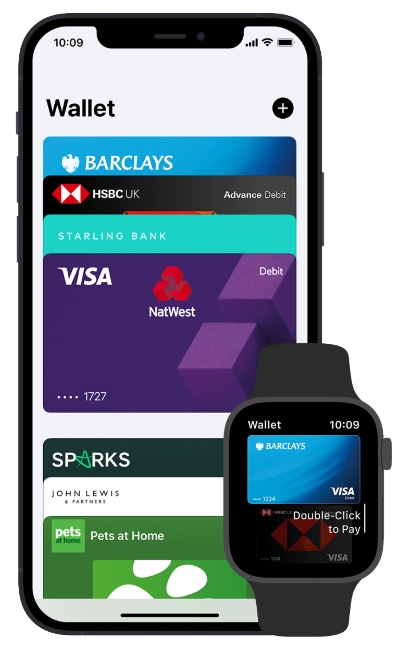
The process for adding a credit or debit card to your Apple Pay wallet takes just a few minutes. Simply select the wallet icon on your device and then add a card in the drop-down menu.
From there, users can then link Apple Pay to their trading account through the Funding Methods tab on the broker’s website or app. The brokerage will have to offer Apple Pay as an accepted deposit method in order to use it.
Payments
Apple Pay transactions are usually deposited instantly. However, processing times may vary between brokers. Additional checks and processes can be added by third parties which can delay receipt.
Refunds typically depend on the broker or merchant’s refund policy. Visit their website for full terms and conditions.
Privacy & Security
Apple Pay security protocols are robust. So much so, that buyer protection using the digital wallet is thought to be greater than traditional plastic cards. Users are protected at all stages throughout the payment cycle against scams and fraudulent activity.
Verification
When adding new cards to your wallet, users are required to have completed the verification process. Without doing so, you are unable to gain access to the device or wallet. Traders will be required to provide a contact number where they will receive a verification code either via text or iMessage (this won’t work with a limited signal).
If there is an error with the code or your phone number is invalid then the payment method will be declined. Customers can ring an Apple help number to arrange a verification call back with your bank or contact customer service online via a support email address. Apple won’t permit a new card to be added to your wallet without completing verification.
Login
The login process is also secure. Simply login in to your chosen device using either face ID, a secure passcode or a fingerprint. From there you can navigate to the wallet icon which should be visible on your homepage.
The wallet’s drop-down list securely stores recent transaction history and monthly subscriptions but does not share card information with merchants and trading brokers.
Emergencies
If your device is stolen or lost, payments can be frozen by logging into your iCloud account or putting it in ‘lost mode’.
Note: users also benefit from Stripe functionality such as APIs. It’s also worth considering the security protocols and safety measures used by your trading broker.
How To Deposit Using Apple Pay
Before you can start using Apple Pay to fund a trading account such as XM, there are a few simple steps to complete:
Check Your Account Balance
Apple Pay does not hold any money. It is a payment processing interface that allows you to access funds held in a bank account and use them at a payment portal. Therefore, linked cards must hold funds or have access to funds in order to make a deposit into a trading account.
Add Your Card
Before you can deposit into your trading account you will need to add a card to your wallet. This can be done by scanning or manually inputting your card number. All traditional bank cards are accepted as well as Monzo and Revolut. The wallet provides a shortcut to remove a card, set a default card, or update card info. Multiple cards can be added.
Deposit Your Funds
Once your cards have been added and verified, you are ready to deposit into your trading account. Most Apple Pay deposits and withdrawals are instant, however, specific broker processing times may vary so check the company’s website. Deposits and withdrawals can be made either on a broker’s website or a mobile app.
Outside of the standard Apple Pay guidelines, brokerages may also require additional information or further identification before you can fund your account using the wallet. There may also be minimum and maximum amounts traders can deposit or withdraw at online brokers. Head to the trading platform’s website for more information on limits and verification processes. Alternatively, see our list of top Apple Pay brokers for details.
Note, most brokers offer a demo account that traders can utilize before putting their capital at risk.
Pros Of Trading With Apple Pay
There are many benefits to using Apple Pay, these include:
- No fees
- No daily limit
- Automatically installed for free on Apple devices
- Growing list of trading brokers that support Apple Pay deposits
- Secure with multi-level verification process including face ID for each transaction
- Deposits and withdrawals are instant but may be subject to broker processing times
- Can be used to purchase cryptos such as Bitcoin (BTC) or Ripple (XRP) through sites such as Coinmama
- Cashback with Apple Pay is available if traders sign up to the Apple Card for Apple-related purchases
- Most traditional banks support Apple Pay as well as newer banks such as Monzo with no payment plan required
Cons Of Trading With Apple Pay
There are a few drawbacks to Apple Pay:
- Not available to traders with Android devices
- Although increasing, trading brokers that accept the digital wallet are still relatively limited
- Traders in India and Zimbabwe cannot use the payment method. Qatar only recently began accepting payments
List Of Compatible Devices
- iPhone models with Face ID or Touch ID, except for iPhone 5S
- iPad Pro, iPad Air, iPad and iPad Mini models with Face ID or Touch ID
- Apple Watch Series 1 and later
- Mac models with Touch ID
Is Apple Pay Good For Day Trading?
Apple Pay offers a cheap, quick and straightforward deposit and withdrawal method for traders. It also provides users with a high level of security throughout the payment process. For traders with an Apple device that are looking for a convenient way to make regular deposits, it could be a good option.
One key drawback is its limited integration with brokers. Only a select few brokerages currently accept Apple Pay deposits, However, with retail investing on the rise and the popularity of Apple devices unlikely to diminish anytime soon, there is an expectation that integration will grow.
FAQ
Is Apple Pay Safe And Secure To Use With Brokers?
Yes, Apple has a built-in level of security at each stage of the transaction. This includes the login process, adding a new card, and at the point of paying or making deposits to trading accounts. That said, it’s also important to trade with a trusted and regulated broker with robust safeguarding features.
Are Apple Pay Trading Deposits Limitless?
Apple Pay payments are unlimited however brokers may cap the maximum amount that can be deposited or withdrawn. In addition, brokerages may limit the number of transactions that can be requested over a specific period. If a payment won’t work, check the broker’s terms.
Is It Cheap To Deposit To My Trading Account Using Apple Pay?
Apple Pay is completely free. There are no monthly fees. Any applicable fees are issued by a third party such as a credit or debit card provider, or by the platform or merchant. Most brokers offer free Apple Pay deposits.