
Best TradeLocker Brokers In 2026



TradeLocker is a next-generation trading platform that’s quick, intuitive, and built for serious day traders. With lightning-fast execution, seamless TradingView charting, and a clean, responsive interface, it works great on both desktop and mobile – no clutter, no lag.
Whether you’re scalping the 1-minute or swing trading the daily, it delivers the tools without the bloat of older platforms. And its TradingView integration isn’t just a feature – it’s core to the experience, giving you pro-level indicators and charting from the off.
But performance depends on your broker. The best brokers don’t just connect you to TradeLocker – they optimize it, ensuring faster fills, better pricing, and a dependable trading environment. We know because we’ve tested and retested TradeLocker brokers, removing some firms from our toplist and adding new ones.
4 Best Brokers With TradeLocker 2026
Based on our latest tests, these are the top brokers that offer TradeLocker in September 2026:
- Eightcap: Trusted and well-regulated, excellent TradeLocker integration with fast execution, suited to active traders.
- Focus Markets: Regulated, reliable execution, flexible funding, wide range of 130+ cryptos and crypto indices.
- Plexytrade: Crypto-first setup, smooth TradeLocker performance, ideal for crypto-focused traders.
- HeroFX: Raw spreads with below-average commission, Raw account built for day traders.
Compare Top TradeLocker Brokers
Here’s a quick side-by-side of the standout TradeLocker providers:
| Minimum Deposit | Typical Spreads (EUR/USD) | Max Leverage | Supported Assets | Regulation | |
|---|---|---|---|---|---|
| Eightcap | $100 | From 0.0 pips | 1:500 | CFDs, forex, crypto, stocks, indices, commodities | ASIC, FCA, CySEC, SCB |
| Focus Markets | $100 | From 0.0 pips | 1:1000 | CFDs, forex, stocks, indices, commodities, crypto, ETFs | ASIC |
| PlexyTrade | $50 | From 0.1 pips | 1:2000 | CFDs, forex, crypto, stocks, indices, commodities | Unregulated* |
| HeroFX | $5 | 1.1 pips | 1:500 | CFDs, forex, crypto, stocks, indices, commodities | Unregulated* |
Broker-Specific Differences: Same Platform, Different Experience
One of the biggest surprises in our testing? Not all TradeLocker brokers deliver the same experience.
The core platform is the same – same TradingView charts, same sleek layout – but what really matters to traders varies depending on the broker behind the scenes.
We put our top picks – Eightcap, Focus Markets, Plexytrade and HeroFX – through side-by-side tests, placing the same trades on the same assets at the same times. The differences weren’t always huge, but they were noticeable and in some cases, they could definitely impact your PnL over time.
Here’s what we found:
Execution Speed And Slippage
- Eightcap came out ahead on execution speed, especially on major FX pairs during peak hours. Orders were consistently filled in under 100ms.
- Focus Markets, HeroFX and Plexytrade were still quick, but we noticed more slippage on high-volatility crypto pairs like BTC/USD.
Example: During a market-moving CPI release, our BTC long on Sage FX (a broker we’ve since removed from our toplist ) filled with zero slippage. The same trade on Plexytrade slipped. It’s not significant, but it’s worth noting for scalpers.
Spreads And Trading Costs
- Most of our top brokers advertise raw spreads starting from around 0.1 pips, which mostly held true in our tests.
- Eightcap seemed to offer slightly tighter spreads on FX pairs (EUR/USD averaged close to 0.0 pips).
- Focus Markets impressed on forex spreads, starting from 0.0 pips.
- Plexytrade was fairly consistent with crypto spreads, especially on altcoins like ETH/BTC.
- HeroFX fell behind in testing, with forex spreads closer to 1.1 pips during testing in its HeroFX Zero account.
Brokers charge a commission on most pairs from our tests, but overnight fees vary slightly, so check the fine print if you hold positions past rollover.
Account Security And Wallet Options
- All brokers let you deposit and withdraw via crypto, but Eightcap has more payment options tailored to different regions and a particularly strong selection of digital wallets like PayPal.
- Focus Markets impressed with its wide range of 8+ base currencies, catering to traders in various regions, with base currencies in USD, EUR, GBP, CAD, AUD, NZD, JPY, and SGD.
- Plexytrade’s wallet setup is simpler but still easy to use. We appreciated the low $50 deposit requirement, perfect for testing the platform with minimal risk.
- HeroFX is a strong choice for the growing class of traders looking for mobile money deposits with Apple Pay and Google Pay.
Platform Customization And Add-Ons
While TradeLocker itself doesn’t support custom plugins (yet), brokers can tweak specific default settings like:
- Chart themes (Eightcap and Focus Markets defaults to dark mode, Plexytrade uses light).
- Asset groupings in the watchlist, though our first place Eightcap offers the most with 800+ instruments on TradeLocker.
- Max leverage by asset (Plexytrade offers up to 1:2000, Eightcap up to 1:500, Focus Markets up to 1:500, and HeroFX up to 1:500).
- Use alongside other brokers’ tools, with Eightcap’s FlashTrader for daily trade ideas and AI calendar stand-outs for active traders.
Support And Onboarding
- Eightcap support was mixed – its AI assistant couldn’t answer one of our specific questions about TradeLocker integration, but could on forex trading in TradeLocker within 1 minute.
- Plexytrade impressed us with live chat response times; they answered within 30 seconds and followed up by email.
- HeroFX support fell behind the other firms we tested, with assistance only available after logging a ticket in the client area – not great for immediate help if you run into an issue while in the TradeLocker platform.
- We didn’t get a response from Focus Markets on live chat during testing – not ideal if you have problems with the TradeLocker setup or
So, Which Broker Should You Go With?
If you’re into forex scalping or trading news events, Eightcap edges out due to its faster fills and tighter FX spreads. If you want a well-regulated TradeLocker broker (and you should), Eightcap and Focus Markets are the obvious choices, especially Focus Markets if you want extensive crypto trading opportunities.
If you want a simple entry point and the most leverage (which raises risks), Plexytrade offers a no-fuss experience.
If you want the lowest commissions and a wide choice of account options, notably Islamic and contest modes, then HeroFX may be a compelling choice.
Below are detailed reviews of what it’s like to use TradeLocker at each of our top providers.
Eightcap TradeLocker Review
Is Eightcap Good For TradeLocker?
Eightcap is fairly unique in that it’s the first mainstream, well-regulated broker to support TradeLocker.
They may have been late to the party, adding the software option in 2026, but they’ve nailed the implementation. The layout is smooth, execution is lightning fast, and their FX and crypto spreads were among the tightest we saw in our hands-on testing.
They also offer a more robust backend than all the offshore brokers, with features and tools that measure up against some of the biggest brokerages in the market, not just those that support TradeLocker. It’s by some way our top pick for traders wanting to use TradeLocker.
Broker Snapshot
- Founded: 2009
- Regulation: ASIC (green tier), FCA (green tier), CySEC (green tier), SCB (red tier) – tiers align DayTrading.com’s regulator classification system
- Minimum Deposit: $100
- Leverage: Up to 1:500
- Assets: Forex, crypto, commodities, indices, stocks
- Trading Fees: Raw spreads with $3.50 commission per lot in Raw Account or commission-free in Standard Account with spreads from 1.0 pip
- Funding: Bank cards, wire transfer, digital wallets, crypto, local payment solutions
Pros
- Fast, reliable execution, especially on major FX pairs
- Excellent user experience inside TradeLocker
- Authorized by three respected regulators
- Tight spreads during most sessions
- Additional trading tools
Cons
- Average AI chat support on TradeLocker questions and issues
- Some spreads widen significantly outside of peak hours
- TradeLocker isn’t available to Eightcap clients in all regions
Best For
- Active forex traders and scalpers
- Day traders seeking ultra-tight spreads
- Traders looking for daily alerts
- Traders who want ultra-fast execution via TradeLocker
Execution on EUR/USD is near-instant based on testing, even during high-impact news. If you’re into scalping, Eightcap’s TradeLocker setup is probably one of the best out there.
Focus Markets TradeLocker Review
Is Focus Markets Good For TradeLocker?
Focus Markets added TradeLocker integration in 2026. It has dozens of technical indicators, an integrated news stream, and configure risk settings.
Focus Markets is particularly well suited to FX and crypto traders with its extensive range of 130+ cryptocurrencies, plus its wide range of base currencies and fiat and crypto payment options.
Broker Snapshot
- Founded: 2014
- Regulation: ASIC (Australia)
- Minimum Deposit: $100
- Leverage: Up to 1:1000 (Global), 1:30 (Australia)
- Assets: CFDs, forex, stocks, indices, commodities, crypto
- Trading Fees: Raw account with spreads from 0.0 pips and $3.50 commission or Standard commission-free account with spreads from 1.0 pip
- Funding: Crypto, bank cards, e-wallets
Pros
- Access to TradeLocker on desktop, mobile and web
- Fast-paced trading on over 90 cryptos and other global markets
- Tight spreads in fast-moving markets catering to day traders
Cons
- Trails alternatives in this list on research and education
- One offshore branch in St Vincent and the Grenadines in addition to the Australian entity
- Later TradeLocker integration than all other brokers in this list so less proven record
- Poor support based on hands-on tests, notably no response on live chat
Best For
- Day traders seeking raw spreads and fixed commissions
- Margin traders wanting access to 130+ crypto and crypto index CFDs, hundreds of stock CFDs, and other global markets
Focus Markets may have been late to the TradeLocker party, but its integration impressed during testing, especially for short-term crypto traders seeking low spreads, reliable execution, and margin trading opportunities. Sign up was quick, even if research tools and customer support still needs work.
Plexytrade TradeLocker Review
Is Plexytrade Good For TradeLocker?
Plexytrade is a newer name on the block, but it’s quickly building a rep among crypto traders and those who want a low-barrier way into TradeLocker.
The integration is clean, and their version of TradeLocker runs fast, without any of the lag or bugs we’ve seen on some smaller broker setups.
During our testing, we found Plexytrade’s version of TradeLocker super smooth, especially when switching between markets or placing trades from the TradingView charts. Execution was solid, and the minimal deposit ($50) makes it easy to try without commitment.
Broker Snapshot
- Founded: 2022
- Regulation: Offshore (unregulated, like many high-leverage crypto brokers)
- Minimum Deposit: $50
- Leverage: Up to 1:2000
- Assets: CFDs, forex, indices, stocks, commodities, crypto
- Trading Fees: Raw spreads, no commission on most trades
- Funding: Crypto only
Pros
- Great for crypto traders (especially altcoins)
- Seamless TradeLocker integration with TradingView
- Fast and friendly support
Cons
- Not regulated (higher risk for large balances)
- Limited fiat payment options (crypto only)
- Slightly higher slippage on fast-moving pairs during high volatility
Best For
- New traders who want to try TradeLocker without a big commitment
- Traders looking for fast access and a minimalist experience
- Crypto-focused traders
I opened a $25 account just to test the waters and was honestly surprised how smooth everything felt. The BTC spreads were tighter than expected.
HeroFX TradeLocker Review
Is HeroFX Good For TradeLocker?
HeroFX offers easy-access TradeLocker integration on desktop, web and mobile. It has over 100 technical indicators and integrated risk tools like stop loss, take profit orders, and helpful calculators.
HeroFX also has some unique features vs other TradeLocker brokers we’ve tested. That includes Contest accounts, providing large virtual bankrolls to test trading strategies, plus the Hero10X account, which amplifies deposits by 10, though we noted in the terms it limits drawdown at 10%, so one mishap could freeze you out quickly.
Broker Snapshot
- Founded: 2022
- Regulation: Offshore (unregulated)
- Minimum Deposit: $5
- Leverage: Up to 1:500
- Assets: Forex, crypto, commodities, indices, stocks
- Trading Fees: Raw Spread account with commission or Zero Commission account
- Funding: Crypto, bank cards, mobile money, wire transfer
Pros
- Fast access to TradeLocker on desktop, mobile and web
- User-friendly, glitch-free TradeLocker experience
- Deposits and withdrawals via mobile solutions
- Over 70 major, minor and exotic FX pairs on TradeLocker
Cons
- Still offshore and unregulated
- Spreads widen significantly outside of peak hours during testing
- Frustrating support experience requiring access to the client area and limited human assistance via chat or telephone
Best For
- Low sign up with account incentives
- Forex traders wanting to use TradeLocker across devices
- Traders who deposit and withdraw using mobile solutions like Apple Pay or Google Pay
TradeLocker worked smoothly without any technical glitches, fostering confidence if you use active, short-term trading strategies like me. Getting started is easy, even if the support needs improving.
Which TradeLocker Broker Should You Choose?
At this point, it’s pretty clear that TradeLocker has carved out a sweet spot for traders who want a clean, fast, TradingView-powered experience, but picking the right broker to run TradeLocker on? That’s where things get personal.
Here’s our breakdown of the best TradeLocker brokers by trader type, based on our testing, platform feel, and real-world usability.
Best Overall: Eightcap
Since joining the list of TradeLocker brokers in January 2026, and after putting it through our tests, Eightcap jumped to the top of our list. It’s the most trusted, well-regulated brokerage offering clients TradeLocker.
Its fees are very low for active traders, while its additional tools like the AI-powered economic calendar and daily trading ideas help inform and steer short-term trades, and they aren’t offered by most other TradeLocker brokers we’ve tested.
Why Eightcap?
- The only well-regulated TradeLocker broker
- Lowest fees for day traders, especially the Raw account
- Excellent tools to support analysis and trades on TradeLocker
Best For Beginners: Eightap
If you’re just getting started with online trading, Eightcap makes it easy.
The $100 minimum deposit may be higher than PlexyTrade and HeroFX, but it’s still accessible and it’s a stronger pick from a regulation and safety perspective, which are more important for newer traders. The wider educational tools are also a step above the other brokers in our rankings.
Why Eightcap?
- Intuitive account area and fast setup
- Strong for regulation and brand reputation
- Secure account funding
Best For Scalpers And Day Traders: Eightcap
For active traders who care about every pip and every millisecond, Eightcap’s TradeLocker setup is a beast.
Execution is seriously snappy, and the raw spread account gives scalpers and intraday traders the tight pricing they need.
Why Eightcap?
- Tight spreads, even on majors
- Lightning-fast execution during peak hours
- Customizable watchlists and fast chart responsiveness
Best For Crypto Traders: Focus Markets
Looking to actively trade crypto 24/7? Focus Markets is well suited here, with deep crypto market support and many altcoin pairs available directly in TradeLocker.
Eightcap is also an excellent option for TradeLocker traders who want cryptos – it has added to its roster of crypto CFDs over the years and also picked up DayTrading.com’s ‘Best Cryptocurrency Broker’ award in 2025.
Why Focus Markets?
- Broad crypto asset list of 130+ cryptos but also crypto indices
- Crypto-only funding and withdrawals via BTC (no fiat hassle)
- Spreads on BTC and ETH were tight during our tests
The best way to know if a broker is worth it? Trade with them. Most TradeLocker brokers we’ve evaluated let you start with $5–$100 and offer demo trading accounts. Set up a few trades, test the support, and see how the platform runs on your device.
How We Chose The Best TradeLocker Brokers
TradeLocker might be offered by over 5 brokers, but not all of them are worth your time. That’s why we didn’t just copy a list off supporting brokerages TradeLocker’s website. Instead, we took a no-nonsense, hands-on approach to pick our top providers.
Our selection process had two core phases:
- Expert Curation – We started by narrowing the field. The industry experts that sit on our testing panel hand-picked a shortlist of brokers that actually integrate TradeLocker well.
- Real Testing – Then we rolled up our sleeves. Experienced traders on our team opened accounts, placed trades, and ran side-by-side tests across multiple brokers. We tracked slippage, execution speed, spread consistency, support quality, and overall platform smoothness.
The result? We’re only comfortable putting our name behind three brokers that support TradeLocker – Eightcap, Focus Markets, Plexytrade, and HeroFX.
Exploring The TradeLocker Platform
So what’s it like to use TradeLocker? One word: clean.
The first time I logged in, the layout felt refreshingly uncluttered. There were no overwhelming menus or clunky pop-ups, just a slick, minimalist interface that put your charts and trades front and centre, exactly where they should be.
Here’s how everything breaks down once you’re inside the TradeLocker platform:
Dashboard Layout: All Killer, No Filler
As soon as you load up the platform, you’re greeted with a spacious charting window powered by TradingView. You’ll also find a small but mighty left-hand navigation bar where you can quickly jump between:
- Markets (customizable watchlists)
- Orders
- Positions
- Wallets
- History
The entire experience feels more like a modern app than a legacy trading terminal, which is a breath of fresh air.
Charting: TradingView Integration
This is hands-down one of the biggest selling points. TradeLocker doesn’t just bolt on TradingView; it builds the entire trading experience around it. That means:
- Dozens of indicators and drawing tools
- Multiple timeframes, from 1-second to 1-month
- Customizable chart styles (candles, bars, Heikin Ashi, etc.)
- Smooth chart syncing across desktop and mobile
Whether you’re backtesting a strategy or eyeballing your next breakout, everything feels familiar, especially if you’re already a fan of TradingView.
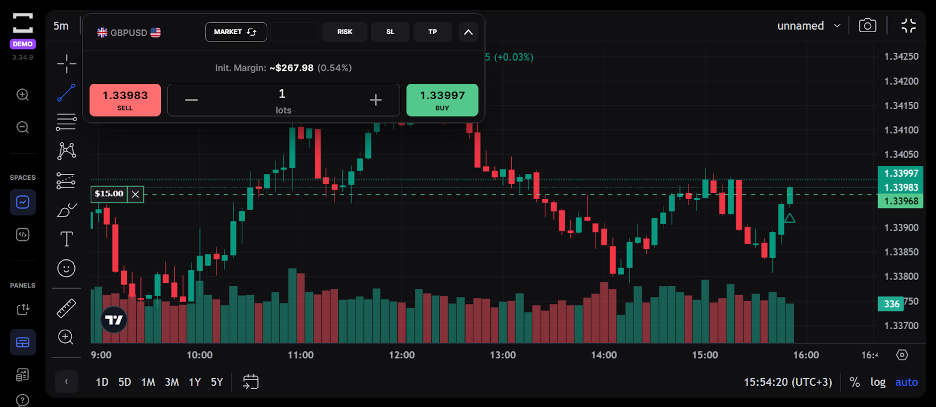
Order Entry: Fast, Simple, and Customizable
Placing trades on Trade Locker is quick and snappy. Click the buy/sell button from the chart or your watchlist, and the order panel slides in with:
- Market, limit, stop, and stop-limit options
- Adjustable lot size and leverage
- TP/SL inputs with visual chart markers
- Estimated margin, cost, and PnL preview
I really like how easy it was to fine-tune position size without hopping through three different menus. It’s all right there, smooth and logical.
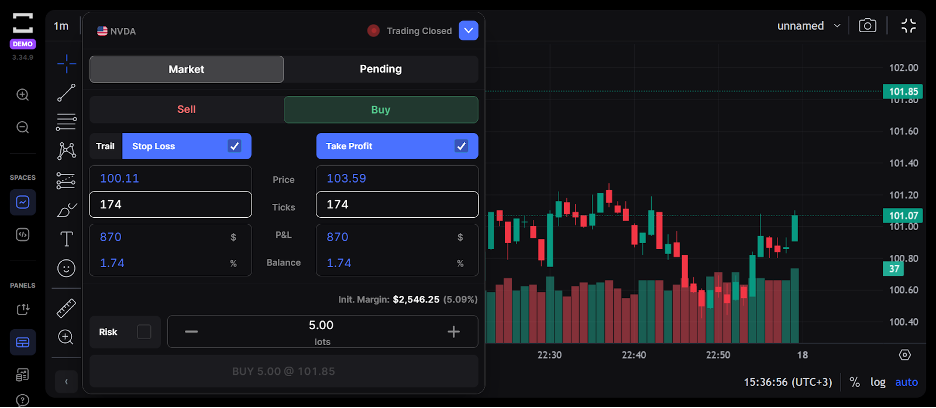
Watchlists And Market Scanner
You can create custom watchlists, select from lists like forex majors, pin your favourite instruments, and sort by market type (forex, crypto, indices, etc.).
The live quotes are cleanly displayed, and switching between symbols is super fast; no awkward lag or loading hiccups like you get with some web platforms.
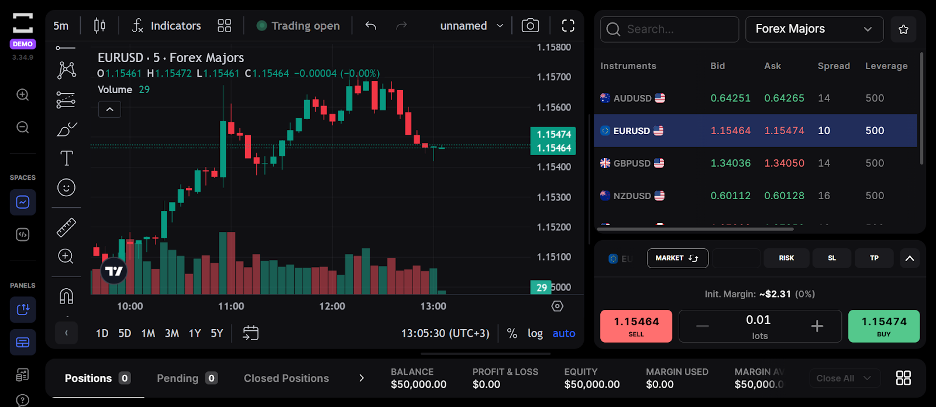
Mobile Trading: Surprisingly Good
I tried TradeLocker on Android and iPhone, and the experience was solid. You still get complete charting and quick order access, and your open trades are just a tap away.
Great for managing trades on the go without feeling stuck with a watered-down version of the platform.
Bottom Line
TradeLocker is only as good as the broker behind it. The charting is slick, and the UI is top-tier, but your execution, pricing, and support all depend on who you sign up with.
If you’re still unsure, start small. Open demo or low-balance accounts with Eightcap, Focus Markets, Plexytrade and HeroFX – our go-to choices, test out your style, and go from there.
TradeLocker is built to be trader-friendly, so take your time and make sure the broker you pick is, too.
FAQ
Is TradeLocker Suitable For Day Trading?
Yes, we’ve found it’s actually one of the better browser-based platforms for short-term traders. Fast execution, clean layout, and no app downloads make getting in and out of trades easy.
That said, you’ll need to pair it with a broker that offers tight spreads and low latency, like Eightcap.
The TradeLocker software is best used with raw spread or ECN-style accounts if you’re day trading.
Can I Use TradeLocker With A Demo Account?
Yes, absolutely. Most brokers that support TradeLocker offer free demo accounts so you can test the platform risk-free.
It’s a great way to get a feel for the interface, charting tools, and order execution – especially if you’re new or just trying out a new strategy.
Is TradeLocker Better Than MetaTrader?
It depends on what you value. If you’re after a modern, intuitive UI with built-in TradingView charts, TradeLocker easily beats MetaTrader in looks and usability.
But if you rely heavily on custom indicators or automated EAs, MetaTrader (especially MT4) still has the edge. I say this having spent years using MT4.
TradeLocker vs MetaTrader:
- TradeLocker = cleaner interface, better charting, smoother mobile experience
- MetaTrader = stronger for algorithmic trading and legacy tools
Do All Brokers Support TradeLocker?
No, not yet. TradeLocker is still relatively new, so only a growing list of brokers currently offer it.
You’ll need to look specifically for brokers with TradeLocker support, such as Eightcap, Focus Markets, Plexytrade, HeroFX, and a few others. The list of partner brokers has actually shrunk – it used to be over 20 in 2025, but in 2026, it dropped to under 10.
Always check the broker’s platform list before signing up.
Is TradeLocker Safe For Live Trading?
Yes, TradeLocker is safe to use, but remember, the broker you use it with determines how secure and trustworthy your trading experience will be. That’s why Eightcap is the obvious pick since adding TradeLocker integration in 2026, standing out as the most trusted and regulated provider in the market.
The platform handles order routing and charting smoothly, but always go with transparent brokers about their policies, pricing, and withdrawals.
Can I Trade Crypto, Forex, And Indices On TradeLocker?
Yes, you can, as long as your broker supports those markets.
TradeLocker’s layout is asset-agnostic, meaning you can chart and trade anything your broker offers. From Bitcoin to EUR/USD to US30, it’s all about what’s available on the backend.
Some brokers even offer synthetic assets or prop firm-style accounts through TradeLocker.
Does TradeLocker Support Algorithmic Trading Or Bots?
Yes, TradeLocker supports trading bots via TradeLocker Studio.
This feature allows traders to create, backtest, and deploy automated trading strategies without requiring coding skills. You can describe your trading strategy using natural language inputs, and the AI-powered Studio will generate the corresponding bot code.
These bots can be tested using historical data to evaluate performance before deployment.
Are There Any Fees For Using TradeLocker?
TradeLocker itself doesn’t charge fees, but your broker might.
The costs you’ll face, like spreads, commissions, or overnight swaps, come from the broker you’re using. TradeLocker is just the interface; the broker sets the pricing model.
Always double-check your broker’s fee page or live account specs.
Can I Customize Indicators And Templates On TradeLocker?
You can customize a lot, but not everything. Since TradeLocker uses TradingView charts, you can add popular indicators, switch themes, and save chart layouts.
However, you won’t be able to import custom TradingView scripts or community-built indicators – yet.
You get the essentials, not the complete TradingView ecosystem.
Article Sources
The writing and editorial team at DayTrading.com use credible sources to support their work. These include government agencies, white papers, research institutes, and engagement with industry professionals. Content is written free from bias and is fact-checked where appropriate. Learn more about why you can trust DayTrading.com