




Expert Advisors (EAs) are programable trading robots available on MetaTrader 4 and MetaTrader 5. This tutorial will explain how Expert Advisors work and how to set them up on MT4 and MT5. We also cover the pros and cons of trading forex, stocks and more with EAs.
Expert Advisor Brokers
-
- Demo account
- Platforms: MT4, MT5, TradingCentral
- Min. deposit: $5
-
- Demo account
- Regulator: FSC
- Platforms: R StocksTrader, MT4, MT5, TradingView
-
- Demo account
- Regulator: ASIC, VFSC, FSA
- Platforms: MT4, MT5, cTrader, TradingView, DupliTrade
-
- Demo account
- Instruments: CFDs, Forex, Indices, Shares, Commodities
- Regulator: ASIC, CySEC, FSCA, FSC
-
- Demo account
- Regulator: FMA, FSA
- Min. deposit: $0
-
- Demo account
- Regulator: ASIC, CySEC, FSCA, BVI FSC
- Platforms: Web Platform, MT4, MT5, TradingCentral






Learn how we test brokers and why you can trust our ratings.
Here is a short summary of why we think each broker belongs in this top list:
- XM 4.8/5 XM is a globally recognized forex and CFD broker with 20+ million clients in 190+ countries. Since 2009, this trusted broker has been delivering low trading fees across its growing roster of 1000+ instruments. It also offers a comprehensive MetaTrader experience that we've observed firsthand placing test trades.
- RoboForex 4.5/5 RoboForex is an online broker, established in 2009 and registered with the FSC in Belize. Traders can choose from five accounts (Prime, ECN, R StocksTrader, ProCent, Pro) catering to different needs with trades from 0.01 lots and spreads from 0 pips. RoboForex has also enhanced its offering over the years, adding CFD instruments and launching its stock trading platform, plus the CopyFX system.
- Fusion Markets 4.6/5 Fusion Markets is an online broker established in 2017 and regulated by the ASIC, VFSC and FSA. It is best known for its low-cost forex and CFD trading, although its multiple account types and copy trading solutions cater to a range of traders. New clients can sign up and start trading in 3 easy steps.
- FBS 4.3/5 Founded in 2009, FBS is an award-winning CFD broker operating in over 150 countries with a client base exceeding 27 million traders. Traders are supported at every stage of their journey with 24/7 assistance, market analytics, trading calculators, and competitive pricing with zero commissions.
- BlackBull 4.5/5 BlackBull is a New Zealand-based CFD broker providing diverse trading opportunities on over 2,180 instruments. After undergoing a rebrand in 2023, it now sports a modern look and feel complete with professional-grade trading tools and ultra-fast execution speeds averaging 20ms.
- Markets.com 4.4/5 Established in 2008, Markets.com is a long-standing, multi-regulated broker with oversight from the CySEC and FSCA. It offers unique features to track hedge fund moves and insider trades, while providing stock signals to alert traders to market opportunities. Its choice of accounts (Classic to Professional) caters to all levels of active trader. 72.3% of retail accounts lose money.
Community Sentiment
See how users rate these brokers based on the average customer ratings submitted on DayTrading.com, plus ratings from Trustpilot, the Apple App Store and Google Play.
| Broker | Our Users' Rating | Trustpilot Score | Trustpilot Reviews | iOS App Rating | Android App Rating |
|---|---|---|---|---|---|
| XM | 3133 | ||||
| RoboForex | 773 | ||||
| Fusion Markets | 10051 | ||||
| FBS | 10177 | ||||
| BlackBull | 3515 | ||||
| Markets.com | 1257 |
XM
With a low $5 minimum deposit, advanced charting platforms in MT4 and MT5, expanding range of markets, and a Zero account offering spreads from 0.0, XM provides all the essentials for active traders, even earning our ‘Best MT4/MT5 Broker’ award in recent years.
 Christian Harris, Reviewer
XM quick facts
- Demo Account
- ✔Yes
- Instruments
- CFDs, Forex, Stocks, Commodities, Indices, Thematic Indices, Precious Metals, Energies
- Regulator
- CySEC, DFSA, FSCA, SCA, FSA, FSC-Belize, FSC-Mauritius, CMA-Kenya, CMA-UAE
- Platforms
- MT4, MT5, TradingCentral
- Minimum Deposit
- $5
- Minimum Trade
- 0.01 Lots
- Account Currencies
- USD, EUR, GBP, JPY, ZAR
Pros
- XM’s growing roster of 1,400+ instruments provides diverse short-term trading opportunities, with unique turbo stocks, fractional shares, and more recently thematic indices.
- XM secured a category 5 license from the Securities and Commodities Authority (SCA) of the United Arab Emirates in late 2025, strengthening its regulatory credentials and making it a strong option for traders in the Middle East.
- XM stands out for its commitment to trader education, with a wealth of well-presented resources, including webinars, tutorials, and even real-time trading sessions through XM Live.
Cons
- Although trusted and generally well-regulated in some regions, XM also has global entities registered with the weak regulators like FSC (Belize) and FSA (Seychelles), whilst UK clients are no longer accepted, reducing its market reach.
- XM relies solely on the MetaTrader platforms for desktop trading, so there’s no in-house downloadable solution for a more beginner-friendly user experience with unique features.
- XM is falling behind the curve by not offering cTrader, which is favored over MetaTrader by some serious traders for its smoother user experience and superior charting package.
RoboForex
RoboForex is great if you want a vast range of 12,000+ day trading markets with ECN accounts, powerful charting and loyalty promotions. It also stands out for stock traders with its user-friendly R StocksTrader platform, featuring 3,000+ shares, fees from $0.01 and sophisticated watchlists.
Christian Harris, Reviewer
RoboForex quick facts
- Demo Account
- ✔Yes
- Instruments
- CFDs, Forex, Stocks, Indices, Commodities, ETFs, Futures, Crypto
- Regulator
- FSC
- Platforms
- R StocksTrader, MT4, MT5, TradingView
- Minimum Deposit
- $10
- Minimum Trade
- 0.01 Lots
- Account Currencies
- USD, EUR
Pros
- RoboForex is known for its tight spreads starting from 0 pips and low minimum deposits from $10, making it accessible to those on a budget. The ability to trade with micro lots further lowers the barrier to entry for new traders.
- The broker offers two commission-free withdrawals each month in the Free Funds Withdrawal program, helping day traders to minimize transaction costs.
- In 2026, RoboForex introduced swap-free trading across all accounts, removing overnight interest charges, and potentially appealing to swing forex traders, though spreads and commissions may still apply.
Cons
- RoboForex provides a variety of account types, which, while offering flexibility, can be overwhelming for newer traders trying to choose the most suitable option for their trading style. Alternatives, notably eToro, provide a smoother entry into online trading with one retail account.
- Despite 15+ years in the industry and registering with the Financial Commission, RoboForex is authorized by one ‘Red-Tier’ regulator – the FSC in Belize, lowering the level of regulatory protections for traders.
- RoboForex now restricts base currency options to USD and EUR. This limitation may inconvenience day traders preferring to manage their accounts in other currencies, while potentially leading to conversion fees.
Fusion Markets
Fusion Markets is a standout option for forex traders looking for excellent pricing with spreads near zero, industry-low commissions and recently TradingView integration. It’s a particularly good broker for Australian traders where the company is headquartered and regulated by the ASIC.
 Jemma Grist, Reviewer
Fusion Markets quick facts
- Demo Account
- ✔Yes
- Instruments
- CFDs, Forex, Stocks, Indices, Commodities, Crypto
- Regulator
- ASIC, VFSC, FSA
- Platforms
- MT4, MT5, cTrader, TradingView, DupliTrade
- Minimum Deposit
- $0
- Minimum Trade
- 0.01 Lots
- Account Currencies
- USD, EUR, GBP, CAD, AUD, NZD, JPY, CHF, HKD, SGD
Pros
- The market analysis features, Market Buzz and Analyst Views, are great tools for discovering opportunities and conveniently integrated into the client dashboard.
- Fusion Markets offers best-in-class support with very fast, friendly and helpful responses during tests and no frustrating automated chatbot to navigate.
- Average execution speeds of around 37 milliseconds are noticeably faster than many rivals and can help day traders secure optimal prices in fast-moving markets.
Cons
- Fusion Market trails alternatives, notably IG, in the education department with limited guides and live video sessions to upskill new traders.
- There is no proprietary trading platform or app built with beginners in mind, a notable drawback compared to AvaTrade.
- The demo account expires after 30 days, limiting its potential as a useful trading tool alongside a real-money account.
FBS
FBS is an excellent choice for day traders at every level and budget, with just a $5 minimum deposit and intensive academy for aspiring traders alongside access to MT4 and MT5.
Christian Harris, Reviewer
FBS quick facts
- Demo Account
- ✔Yes
- Instruments
- CFDs, Forex, Indices, Shares, Commodities
- Regulator
- ASIC, CySEC, FSCA, FSC
- Platforms
- FBS App, MT4, MT5
- Minimum Deposit
- $5
- Minimum Trade
- 0.01 Lots
- Account Currencies
- USD, EUR, AUD, JPY
Pros
- FBS offers lightning-fast execution speeds from just 10 milliseconds, placing it among the industry leaders for highly active traders like scalpers who demand rapid order processing.
- 24/7 customer support that performed excellently during testing is available, alongside a $5 minimum deposit, and a huge variety of 200+ funding options, making it ideal for traders with small accounts.
- The trading firm has picked up over 90 awards and amassed more than 27 million clients, making it one of the largest and most established brokers globally.
Cons
- There are only four base currencies available - EUR, USD, AUD and JPY (region dependant) - which isn't practical for minimizing currency conversion fees for many global traders, and is especially striking given the broker’s user base spans over 150 nations.
- Despite enhancing the selection of currency pairs, now providing over 70, FBS still trails industry leaders like BlackBull Markets in its market offering with a particularly narrow selection of commodities and indices.
- Although the FBS app offers a terrific mobile trading experience for aspiring traders and MT4/MT5 cater to advanced traders, the absence of cTrader and TradingView, which are increasingly offered by alternatives like Pepperstone, will deter day traders familiar with these platforms.
BlackBull
After improving its trading infrastructure with Equinix servers in London, reducing latency for traders, BlackBull is an obvious choice if you want to day trade stock CFDs with ECN pricing. With competitive spreads and no commission on a growing roster of digital tokens paired with USD, BlackBull also works for active crypto traders.
Christian Harris, Reviewer
BlackBull quick facts
- Demo Account
- ✔Yes
- Instruments
- CFDs, Stocks, Indices, Commodities, Futures, Crypto
- Regulator
- FMA, FSA
- Platforms
- BlackBull Invest, BlackBull CopyTrader, MT4, MT5, cTrader, TradingView, AutoChartist
- Minimum Deposit
- $0
- Minimum Trade
- 0.01 Lots
- Account Currencies
- USD, EUR, GBP, CAD, AUD, NZD, JPY, ZAR, SGD
Pros
- With two ECN-powered accounts (Standard and Prime), plus Prime+ - an active trader rewards program offering trading rebates - BlackBull accommodates beginners through to high-volume active traders.
- After partnering with ZuluTrade and Myfxbook, alongside improvements to its own CopyTrader, and finally enabling cTrader Copy, BlackBull offers one of the most comprehensive copy trading experiences we've seen.
- BlackBull offers every ingredient for day traders; fast execution speeds of <100ms and tight spreads from 0.0 pips.
Cons
- Despite a growing selection of 2,180+ assets, including additions to its Asia Pacific indices, they are mainly stocks with an average selection of currency pairs and indices.
- Although the Education Hub now features improvements like webinars and tutorials, the courses we’ve explored need more focus on explaining the wider economic factors influencing prices.
- Unlike most top brokers, BlackBull charges an irritating $5 withdrawal fee, which can detract from the overall cost-effectiveness, especially for active traders who frequently move funds.
Markets.com
Markets.com is best suited to retail investors who trade frequently but don’t want to calculate commissions, thanks to its spread-only pricing (EUR/USD around 1.3 pips). It especially appeals to short-term traders who value fast execution, flexible asset choice spanning 2,200+ instruments and proprietary tools like hedge fund confidence indices and insider trade alerts.
Christian Harris, Reviewer
Markets.com quick facts
- Demo Account
- ✔Yes
- Instruments
- CFDs, Forex, Stocks, Commodities, Indices, Crypto, ETFs, Bonds
- Regulator
- ASIC, CySEC, FSCA, BVI FSC
- Platforms
- Web Platform, MT4, MT5, TradingCentral
- Minimum Deposit
- $200
- Minimum Trade
- 0.01 Lots
- Account Currencies
- USD, EUR, GBP, AUD, ZAR, SEK, NOK, DKK, CHF, PLN, CZK
Pros
- Markets.com’s Hedge Fund Confidence and Insider Trading tools pulls SEC filings into the dashboard within 24 hours of disclosure, helping to spot fund moves and C-suite buys before most retail newsfeeds updated.
- Within the 2,200+ CFDs, Markets.com offers thematic baskets like the Warren Buffett Blend and Cannabis Blend, which behaved like ready-made mini-ETFs during testing, saving the work of balancing weights manually.
- Switching between the proprietary web platform (great for alerts and quick analysis) and MT5 (strong for algorithmic EAs) was smooth in our tests; positions synced across desktop, web, and mobile without gaps or re-quotes.
Cons
- The proprietary web platform felt a bit basic once we pushed into advanced charting with fewer drawing/indicator options than full TradingView or MetaTrader.
- Inactivity charges kick in after just 3 months, while variable spreads are wider than top ECN brokers during testing, which may deter day traders and high-frequency traders.
- While CySEC and FSCA oversight is solid, the SVGFSA and BVIFSC entities offers 1:500 leverage under a light-touch framework, meaning protections like compensation schemes and strict conduct rules lag behind the strictest regulatory standards.
How Expert Advisors Work
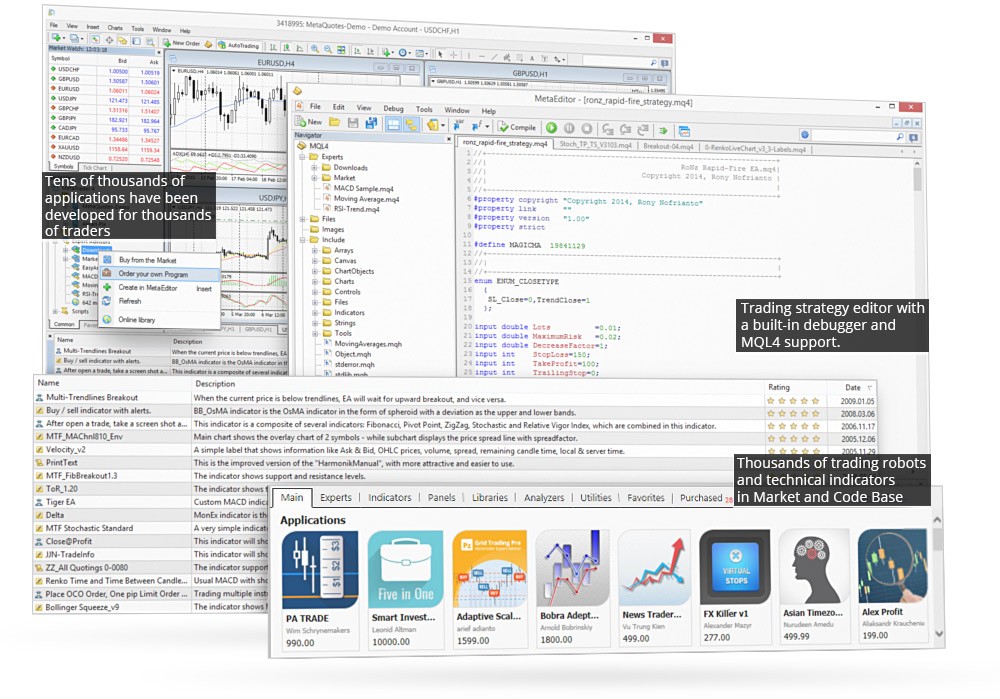
Expert Advisors are trading algorithms, also known as bots, that can be deployed on the MT4 and MT5 platforms. EAs are built in the IDE (Integrated Development Environment) and can be used to trade forex, indices and commodities, amongst others. They are essentially designed to execute positions and strategies based on pre-determined criteria.
The built-in MetaEditor facilitates the development and testing of automated trading strategies on both MetaTrader platforms. And importantly, 950+ bots are available for free from Code Base while 1,700+ paid-for Expert Advisors can be purchased from the MetaTrader Market. Alternatively, EA developers can sell individual robots via the Freelance service. Paid for bots range from $10 up to several thousand US Dollars.
Parameters
Fundamentally, Expert Advisors follow a long list of yes/no rules that they consider when either alerting you to a potential trading opportunity or automatically executing positions themselves.
For those interested in the fully automated route, EAs can be left to open and close positions around the clock, seven days a week. Of course, regular monitoring and refinement are advised as profits aren’t guaranteed.
Pros
Versatile
One of the key selling points of Expert Advisors is that they can be used to develop a range of complex trading strategies, based on an unlimited set of criteria. They can be applied to scalping strategies, intraday trading systems, and swing trading setups. Importantly, they can also be tested against historical market data to gauge results.
Emotion
Another significant advantage is that Expert Advisors take the emotion out of trading. Algorithms are not affected by recent trades that have gone sour. Instead, they make decisions based entirely on logic and pre-agreed parameters.
Time
EAs can save time. Instead of manually monitoring the forex or stock market and entering and closing positions all day, an Expert Advisor can do it for you. This frees up more time to explore new markets and develop fresh strategies.
Price
Finally, EAs can be cost-effective. Users can download free bots from Code Base or pay for more advanced algorithms from the MetaTrader Market. You can also pay for bespoke bots to be built using the MetaQuotes Freelance service.
Of course, as with most things, good EAs are likely to come with a hefty price tag and even those do not guarantee consistent returns.
Cons
24/7 Trading
To run a forex EA around the clock, you will need to set up a Virtual Private Server (VPS), which often comes at a cost. And even then, it’s best to keep regular checks on progress to avoid risking substantial losses.
Profits
Unfortunately, there are scams and misrepresented EAs on MT4 and MT5. Often promising high returns with limited evidence to support claims and no track record of profits, these are to be avoided.
Beginners should carefully review bots before downloading a free solution or paying for an EA. The Code Base and Market both publish important metrics about the Expert Advisors available, including a rating, setup guidance, risk parameters, and suitable markets.
News
Expert Advisors are entirely data-driven so they don’t always respond to news events as you would expect. They aren’t able to predict all market reactions and trends so they cannot be left entirely to their own devices.
Getting Started
How To Enable Expert Advisors In MT4
Open up the MetaTrader 4 terminal and select the ‘Options’ menu under ‘Tools’. A window will then appear with the Expert Advisor section. You can then click to ‘Allow automated trading’. The platform should then enable the use of EAs.
Using Expert Advisors On MT4
To add Expert Advisors to your forex MT4 account, open MT4 and locate ‘File’. Next, click ‘Open data folder’ and choose ‘MQL4’. You should then be able to choose between ‘Expert Advisors’ and ‘Indicators’, depending on the type of input you want. You can then copy over the desired file or bot. Once complete, restart the MT4 terminal and the EA should be available in the ‘Navigator’ window.
If the Expert Advisor is available in Code Base, then the process of adding it is far simpler. Just find the desired EA or indicator and hit the ‘Free download’ or ‘Buy Expert Advisor’ buttons. Once downloaded, you can activate the EA by dragging it onto your chart and setting your variables.
How To Enable Expert Advisors In MT5
Open the MetaTrader 5 terminal and select the ‘Platform option’. Next, navigate to the ‘Expert Advisors’ tab in the pop-up menu and make sure the ‘Automated trading’ box is ticked. Once ticked, EAs can be used on your desktop or mobile MT5 application.
Using Expert Advisors On MT5
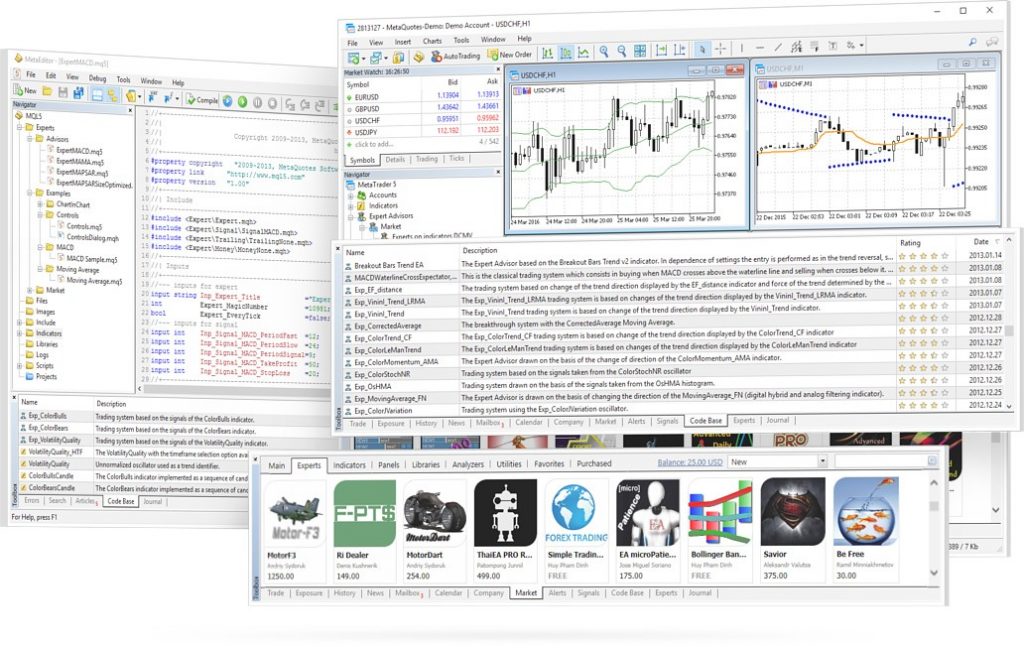
Similar to MT4, open the terminal and select ‘File’. Next, click on the ‘Open data folder’ and choose ‘MQL5’. You can then select either ‘Expert Advisors’ or ‘Indicators’. From there, you can copy over the file. Now you simply need to refresh the application and the new EA should be available in the window. Once visible, you can drag and drop the bot onto your chart to adjust any parameters.
Testing EAs
The good news is that most Expert Advisors on Code Base and the MetaTrader Market have user reviews. Many of the premium bots and indicators for sale also come with a free demo solution so that you can backtest algorithms against historical market data. Robots are usually scaled back in terms of features with the simulator, but they still give you a good indication of future performance.
Helpfully, Code Base and the Market both list the best performing Expert Advisors in 2026 and split out bots by different markets and strategies, such as forex or gold and day trading or longer-term investing.
Creating Your Own Expert Advisors
Established traders may want to build their own bot for personal use or sell their algorithm. For this, users will need to develop bots in the respective platform programming language. For MetaTrader 4, this is MQL4 while for MetaTrader 5, this is MQL5.
EAs are developed in the intuitive IDE (Integrated Development Environment) alongside MetaEditor. These are important tools that help you build, test and refine MT4 and MT5 robots to operate on forex, stock or commodity markets. Fortunately, there is a host of useful tutorials and guides online, as well as MQL4 and MQL5 forums. Other useful tips and recommendations on building your own trading bot can be found at IG and Pepperstone.
Once you have built your Expert Advisor, you can put it to work on your account, offer it as a free download on Code Base, or sell it on the MetaTrader Market.
Bottom Line
Expert Advisors are algorithms that automatically monitor the markets and execute trades based on pre-defined criteria. EAs can be used for trading popular financial markets, including forex, on both MetaTrader 4 and MetaTrader 5. A collection and database of useful tutorials and bot builder programmes are available online, especially on the MetaTrader website.
To download an EA today, head to Code Base or the MetaTrader Market.
FAQs
Are Expert Advisors Safe?
There is no guarantee of profits when trading with EAs. Whilst some of the best bots do generate decent returns, these can be pricey and often out of reach for beginners. Always check reviews of free bots before hitting download and be wary of installing Expert Advisors from third-party websites, as they could contain malicious code or be operating a scam.
Do Forex Expert Advisors Really Work?
Some FX Expert Advisors produce regular returns trading major, minor and exotic currency pairs. Of course, they will only operate effectively if trade parameters have been set up correctly. Check user reviews before downloading any free forex EAs and also backtest bots against historical data before risking funds.
Are Expert Advisors Profitable?
Some EAs have cracked creating impressive returns while others produce consistent losses. How successful a bot is ultimately depends on how well it has been developed and refined. The best performing EAs can be found on the MetaTrader Market but may come with a hefty price tag, sometimes costing thousands of dollars.
What Platforms Can You Use Expert Advisors On?
Expert Advisors are primarily available on the MetaTrader 4 (MT4) and MetaTrader 5 (MT5) platforms. With that said, automated trading systems and services can also be found on other popular terminals, including cTrader.
Are Expert Advisors Allowed In Trading Competitions?
This is entirely dependent on the company running the competition. Some companies restrict their use. As a result, it’s best to check terms and conditions before signing up. Importantly, it is worth noting that retail Expert Advisors are legal in most major trading jurisdictions.