




Expert Advisors (EAs) are programable trading robots available on MetaTrader 4 and MetaTrader 5. This tutorial will explain how Expert Advisors work and how to set them up on MT4 and MT5. We also cover the pros and cons of trading forex, stocks and more with EAs.
Expert Advisor Brokers
-
- Demo account
- Platforms: MT4, MT5, TradingCentral
- Min. deposit: $5
-
- Demo account
- Min. deposit: $100
- Min. trade: 0.01 Lots
-
- Demo account
- Regulator: FCA, ASIC, CMVM , FSCA, SCB, FSA
- Platforms: TN Trader, MT4, TradingView
-
- Demo account
- Min. deposit: $0
- Min. trade: 0.01 Lots
73-89% of retail investor accounts lose money when trading CFDs -
- Demo account
- Regulator: FCA, ASIC, CySEC, FSC, SCB, FSA
- Platforms: MT4, MT5, TradingView, TradeLocker
71.28% of retail traders lose money when trading CFDs -
- Demo account
- Regulator: ASIC, VFSC, FSA
- Platforms: MT4, MT5, cTrader, TradingView, DupliTrade






Learn how we test brokers and why you can trust our ratings.
Here is a short overview of each broker's pros and cons
- XM 4.8/5 XM is a globally recognized forex and CFD broker with 20+ million clients in 190+ countries. Since 2009, this trusted broker has been delivering low trading fees across its growing roster of 1000+ instruments. It also offers a comprehensive MetaTrader experience that we've observed firsthand placing test trades.
- AvaTrade 4.9/5 Established in 2006, AvaTrade is a leading forex and CFD broker trusted by over 400,000 traders. Operating under regulation in 9 jurisdictions, AvaTrade processes an impressive 2+ million trades each month. Through like MT4, MT5, and its proprietary WebTrader, the broker provides a growing selection of 1,250+ instruments. Whether it’s CFDs, AvaOptions, or the more recent AvaFutures, short-term traders at all levels will find opportunities. With terrific education and 24/5 multilingual customer support, AvaTrade delivers the complete trading experience.
- Trade Nation 4.4/5 Trade Nation is a top FX and CFD broker regulated in multiple jurisdictions including the UK and Australia. The firm offers low-cost fixed and variable spreads on 1000+ assets with robust trading platforms and training materials. The Signal Centre can also be used for trade ideas.
- Pepperstone 4.8/5 Established in Australia in 2010, Pepperstone is a top-rated forex and CFD broker with over 830,000 clients worldwide. It offers access to 1,400+ instruments on leading platforms MT4, MT5, cTrader and TradingView, maintaining low, transparent fees. Pepperstone is also regulated by trusted authorities like the FCA, ASIC, and CySEC, helping to ensure a secure environment for day traders at all levels.
- Eightcap 4.6/5 Eightcap is a multi-regulated forex and CFD broker established in Australia in 2009. The broker has proven popular with active day traders, providing 800+ instruments with tight spreads and notable improvements in recent years, integrating the leading TradingView platform, alongside AI-powered financial calendars and algo trading tools with zero coding experience required.
- Fusion Markets 4.6/5 Fusion Markets is an online broker established in 2017 and regulated by the ASIC, VFSC and FSA. It is best known for its low-cost forex and CFD trading, although its multiple account types and copy trading solutions cater to a range of traders. New clients can sign up and start trading in 3 easy steps.
Community Sentiment
See how users rate these brokers based on the average customer ratings submitted on DayTrading.com, plus ratings from Trustpilot, the Apple App Store and Google Play.
| Broker | Our Users' Rating | Trustpilot Score | Trustpilot Reviews | iOS App Rating | Android App Rating |
|---|---|---|---|---|---|
| XM | 3133 | ||||
| AvaTrade | 13567 | ||||
| Trade Nation | 2147 | ||||
| Pepperstone | 3678 | ||||
| Eightcap | 3909 | ||||
| Fusion Markets | 10051 |
XM
With a low $5 minimum deposit, advanced charting platforms in MT4 and MT5, expanding range of markets, and a Zero account offering spreads from 0.0, XM provides all the essentials for active traders, even earning our ‘Best MT4/MT5 Broker’ award in recent years.
 Christian Harris, Reviewer
XM quick facts
- Demo Account
- ✔Yes
- Instruments
- CFDs, Forex, Stocks, Commodities, Indices, Thematic Indices, Precious Metals, Energies
- Regulator
- CySEC, DFSA, FSCA, SCA, FSA, FSC-Belize, FSC-Mauritius, CMA-Kenya, CMA-UAE
- Platforms
- MT4, MT5, TradingCentral
- Minimum Deposit
- $5
- Minimum Trade
- 0.01 Lots
- Account Currencies
- USD, EUR, GBP, JPY, ZAR
Pros
- XM stands out for its commitment to trader education, with a wealth of well-presented resources, including webinars, tutorials, and even real-time trading sessions through XM Live.
- XM’s Zero account is ideal for day trading with spreads from 0.0 pips, 99.35% of orders executed in <1 second, and no requotes or rejections.
- XM’s growing roster of 1,400+ instruments provides diverse short-term trading opportunities, with unique turbo stocks, fractional shares, and more recently thematic indices.
Cons
- XM is falling behind the curve by not offering cTrader, which is favored over MetaTrader by some serious traders for its smoother user experience and superior charting package.
- While the XM app stands out for its usability and exclusive copy trading products, the selection of technical analysis tools needs to be improved to meet the needs of advanced traders.
- Although trusted and generally well-regulated in some regions, XM also has global entities registered with the weak regulators like FSC (Belize) and FSA (Seychelles), whilst UK clients are no longer accepted, reducing its market reach.
AvaTrade
AvaTrade offers active traders everything they need: an intuitive WebTrader, powerful AvaProtect risk management, a smooth 5-minute sign-up process, and dependable support you can rely on in fast-moving markets.
 Jemma Grist, Reviewer
AvaTrade quick facts
- Demo Account
- ✔Yes
- Instruments
- CFDs, Forex, Stocks, Indices, Commodities, ETFs, Bonds, Crypto, Spread Betting, Futures
- Regulator
- ASIC, CySEC, FSCA, ISA, CBI, JFSA, BVI, FSRA/ADGM, AFM, CMA-Kenya, CIRO (via Friedberg Direct)
- Platforms
- WebTrader, AvaTradeGO, AvaOptions, AvaFutures, MT4, MT5, AlgoTrader, TradingView, TradingCentral, DupliTrade
- Minimum Deposit
- $100
- Minimum Trade
- 0.01 Lots
- Account Currencies
- USD, EUR, GBP, CAD, AUD, ZAR
Pros
- The WebTrader excelled in our hands-on tests, sporting a user-friendly interface for beginners, complete with robust charting tools like 6 chart layouts and 60+ technical indicators.
- Support at AvaTrade performed excellently during testing, with response times of 3 minutes and localized support in major trading jurisdictions, including the UK, Europe and the Middle East.
- Years on, AvaTrade remains one of the few brokers offering a bespoke risk management tool, AvaProtect, that insures losses up to $1M for a fee and is easy to activate on the platform.
Cons
- AvaTrade’s WebTrader has improved, but work is still needed in terms of customizability – frustratingly widgets like market watch and watchlists can’t be hidden, moved, or resized.
- The AvaSocial app is good but not great – the look and feel, plus the navigation between finding strategy providers and account management needs upgrading to rival category leaders like eToro.
- While signing up is a breeze, AvaTrade lacks an ECN account like Pepperstone or IC Markets, which provides the raw spreads and ultra-fast execution many day traders are looking for.
Trade Nation
Trade Nation suits discretionary traders who want to speculate on major indices like the US 500 or liquid FX pairs, and want the predictable all-in costs of fixed spreads. In tests, we found the fixed-spread TN Trader environment particularly useful for trading around scheduled economic releases owing to its reliable charting environment and because published spreads stayed capped.
Christian Harris, Reviewer
Trade Nation quick facts
- Demo Account
- ✔Yes
- Instruments
- CFDs, Forex, Indices, Shares, Commodities, Futures, Bonds, Spread Betting (UK and Ireland only), Cryptos (Bahamas entity only)
- Regulator
- FCA, ASIC, CMVM , FSCA, SCB, FSA
- Platforms
- TN Trader, MT4, TradingView
- Minimum Deposit
- $0
- Minimum Trade
- 0.1 Lots
- Account Currencies
- USD, EUR, GBP, AUD, ZAR, SEK, NOK, DKK
Pros
- The broker expanded into Europe with regulated online trading services after securing authorization from Portugal's CVMV, boosting its safety protections for European residents.
- Trade Nation's 2026 partnership with Volt has sped up payments for Australian traders, who can now make instant deposits and withdrawals using PayID, with the faster payout capabilities planned for clients in the UK and EU.
- In testing of the TN Trader account under normal market conditions, fixed spreads held while fills were prompt on major forex pairs, with a slight drift in the entry level as price ticked between click and fill.
Cons
- There is no raw or ECN pricing tier, which are often prefered by day traders. No matter how much you deposit or trade, you use the same fixed (or variable on MT4) pricing as beginners, making it unsuitable for scalpers especially.
- Withdrawals can take up to five business days, which is around the industry average but slower than the 1-3 days we’re increasingly seeing brokers offer in an attempt to quash withdrawal complaints from retail investors.
- The 2–20% rebate scheme is closed to FCA, CMVM, and ASIC clients, meaning active day traders in these regions who would benefit from transaction rebates cannot claim them.
Pepperstone
Pepperstone stands out as a top choice for day trading, offering razor-sharp spreads, ultra-fast execution, and advanced charting platforms for experienced traders. New traders are also welcomed with no minimum deposit, extensive educational resources, and exceptional 24/5 support (18h a day on weekends).
Christian Harris, Reviewer
Pepperstone quick facts
- Demo Account
- ✔Yes
- Instruments
- CFDs, Forex, Currency Indices, Stocks, Indices, Commodities, ETFs, Crypto CFDs, Spread Betting
- Regulator
- FCA, ASIC, CySEC, BaFin, DFSA, SCA, SCB, CMA-Kenya
- Platforms
- Pepperstone Trading Platform, MT4, MT5, cTrader, TradingView
- Minimum Deposit
- $0
- Minimum Trade
- 0.01 Lots
- Account Currencies
- USD, EUR, GBP, CAD, AUD, NZD, JPY, CHF, HKD, SGD
Pros
- Pepperstone emerges as a low-cost broker, especially for serious day traders with spreads from 0.0 in the Razor account and rebates up to 30% (index and commodities) and $3/lot (forex) through the Active Trader program.
- Offers a dedicated CopyTrading app for traders who want a less active approach to trading, available in some countries.
- There’s support for a range of industry-leading charting platforms including MT4, MT5, TradingView, and cTrader, catering to various short-term trading styles, including algo trading.
Cons
- Pepperstone has removed support for several tools that elevated the trading experience for active retail traders, notably Autochartist, Capitalise.ai and a free VPS for qualifying traders (now only pro traders in some countries).
- Execution may not feel as reliable in fast markets as headline speeds suggest. In our own testing, execution was fast at desired prices, but some community complaints focus on slippage, stop-loss fills and spread-sensitive order triggers during volatile conditions.
- Overnight holding fees are higher than that found with some Market Maker brokers (usually Benchmark + 2.5%). This makes pepperstone an ideal broker for day traders and forex scalpers but less suitable for swing traders who often keep position open overnight.
Eightcap
Eightcap delivers in every area for day traders with a growing selection of charting platforms, education via Labs, and AI-powered tools. Now sporting 120+ crypto CFDs, it's also become a stand-out choice for crypto trading, winning our 'Best Crypto Broker' award two years in a row.
Christian Harris, Reviewer
Eightcap quick facts
- Demo Account
- ✔Yes
- Instruments
- CFDs in Forex, Stocks, Indices, Commodities, Crypto
- Regulator
- FCA, ASIC, CySEC, FSC, SCB, FSA
- Platforms
- MT4, MT5, TradingView, TradeLocker
- Minimum Deposit
- $100
- Minimum Trade
- 0.01 Lots
- Account Currencies
- USD, EUR, GBP, CAD, AUD, NZD, SGD
Pros
- With tight spreads from 0 pips, low commission fees, Eightcap provides cost-effective and flexible trading conditions that can accommodate an array of strategies, including day trading and scalping.
- Eightcap has brought in GOLD247 for 24/7 trading opportunities on a gold/USD CFD with leverage up to 1:20, minimum trade size of 0.01 lots, and no commission, appealing to weekend traders interested in the precious metal.
- Eightcap Challenges, the broker's prop trading firm, is multi-regulated, removing the third-party risks we commonly see with white-label prop firms, and its tailoring its funded accounts to crypto traders with around 150 crypto pairs, plus it's integrated into the TradingView interface.
Cons
- In spite of an increasing variety of tools, Eightcap doesn't offer industry favorites like Autochartist or Trading Central, which offer cutting-edge charting analytics, live news, and market insights for short-term traders.
- The demo account expires after 30 days and can only be extended upon request - a notable inconvenience compared to the likes of XM with its unlimited demo mode.
- Eightcap needs to continue bolstering its suite of 800+ instruments to match category leaders like Blackbull Markets with its 26,000+ assets, featuring a particularly weak selection of commodities.
Fusion Markets
Fusion Markets is a standout option for forex traders looking for excellent pricing with spreads near zero, industry-low commissions and recently TradingView integration. It’s a particularly good broker for Australian traders where the company is headquartered and regulated by the ASIC.
Jemma Grist, Reviewer
Fusion Markets quick facts
- Demo Account
- ✔Yes
- Instruments
- CFDs, Forex, Stocks, Indices, Commodities, Crypto
- Regulator
- ASIC, VFSC, FSA
- Platforms
- MT4, MT5, cTrader, TradingView, DupliTrade
- Minimum Deposit
- $0
- Minimum Trade
- 0.01 Lots
- Account Currencies
- USD, EUR, GBP, CAD, AUD, NZD, JPY, CHF, HKD, SGD
Pros
- The range of charting platforms and social trading features is excellent, with MT4, MT5, cTrader and more recently TradingView, catering to a wide range of trader preferences.
- Fusion Markets is set up to support algo traders with a sponsored VPS solution and a 25% discount if you opt for the NYC Servers VPS for MT4 or cTrader.
- Fusion Markets continues to impress with its pricing that provides tight spreads with below-average commissions that will appeal to active day traders.
Cons
- Traders outside of Australia must sign up with weakly regulated global entities with limited safeguards, though in August 2026 they made negative balance protection available to all eligible accounts.
- Fusion Market trails alternatives, notably IG, in the education department with limited guides and live video sessions to upskill new traders.
- There is no proprietary trading platform or app built with beginners in mind, a notable drawback compared to AvaTrade.
How Expert Advisors Work
Expert Advisors are trading algorithms, also known as bots, that can be deployed on the MT4 and MT5 platforms. EAs are built in the IDE (Integrated Development Environment) and can be used to trade forex, indices and commodities, amongst others. They are essentially designed to execute positions and strategies based on pre-determined criteria.
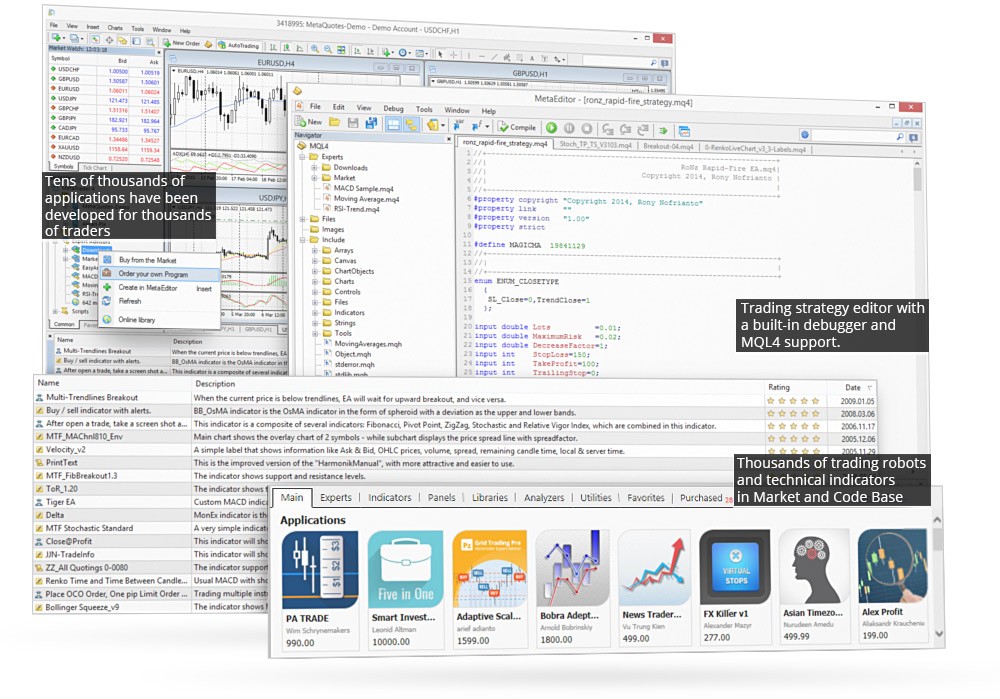
The built-in MetaEditor facilitates the development and testing of automated trading strategies on both MetaTrader platforms. And importantly, 950+ bots are available for free from Code Base while 1,700+ paid-for Expert Advisors can be purchased from the MetaTrader Market. Alternatively, EA developers can sell individual robots via the Freelance service. Paid for bots range from $10 up to several thousand US Dollars.
Parameters
Fundamentally, Expert Advisors follow a long list of yes/no rules that they consider when either alerting you to a potential trading opportunity or automatically executing positions themselves.
For those interested in the fully automated route, EAs can be left to open and close positions around the clock, seven days a week. Of course, regular monitoring and refinement are advised as profits aren’t guaranteed.
Pros
Versatile
One of the key selling points of Expert Advisors is that they can be used to develop a range of complex trading strategies, based on an unlimited set of criteria. They can be applied to scalping strategies, intraday trading systems, and swing trading setups. Importantly, they can also be tested against historical market data to gauge results.
Emotion
Another significant advantage is that Expert Advisors take the emotion out of trading. Algorithms are not affected by recent trades that have gone sour. Instead, they make decisions based entirely on logic and pre-agreed parameters.
Time
EAs can save time. Instead of manually monitoring the forex or stock market and entering and closing positions all day, an Expert Advisor can do it for you. This frees up more time to explore new markets and develop fresh strategies.
Price
Finally, EAs can be cost-effective. Users can download free bots from Code Base or pay for more advanced algorithms from the MetaTrader Market. You can also pay for bespoke bots to be built using the MetaQuotes Freelance service.
Of course, as with most things, good EAs are likely to come with a hefty price tag and even those do not guarantee consistent returns.
Cons
24/7 Trading
To run a forex EA around the clock, you will need to set up a Virtual Private Server (VPS), which often comes at a cost. And even then, it’s best to keep regular checks on progress to avoid risking substantial losses.
Profits
Unfortunately, there are scams and misrepresented EAs on MT4 and MT5. Often promising high returns with limited evidence to support claims and no track record of profits, these are to be avoided.
Beginners should carefully review bots before downloading a free solution or paying for an EA. The Code Base and Market both publish important metrics about the Expert Advisors available, including a rating, setup guidance, risk parameters, and suitable markets.
News
Expert Advisors are entirely data-driven so they don’t always respond to news events as you would expect. They aren’t able to predict all market reactions and trends so they cannot be left entirely to their own devices.
Getting Started
How To Enable Expert Advisors In MT4
Open up the MetaTrader 4 terminal and select the ‘Options’ menu under ‘Tools’. A window will then appear with the Expert Advisor section. You can then click to ‘Allow automated trading’. The platform should then enable the use of EAs.
Using Expert Advisors On MT4
To add Expert Advisors to your forex MT4 account, open MT4 and locate ‘File’. Next, click ‘Open data folder’ and choose ‘MQL4’. You should then be able to choose between ‘Expert Advisors’ and ‘Indicators’, depending on the type of input you want. You can then copy over the desired file or bot. Once complete, restart the MT4 terminal and the EA should be available in the ‘Navigator’ window.
If the Expert Advisor is available in Code Base, then the process of adding it is far simpler. Just find the desired EA or indicator and hit the ‘Free download’ or ‘Buy Expert Advisor’ buttons. Once downloaded, you can activate the EA by dragging it onto your chart and setting your variables.
How To Enable Expert Advisors In MT5
Open the MetaTrader 5 terminal and select the ‘Platform option’. Next, navigate to the ‘Expert Advisors’ tab in the pop-up menu and make sure the ‘Automated trading’ box is ticked. Once ticked, EAs can be used on your desktop or mobile MT5 application.
Using Expert Advisors On MT5
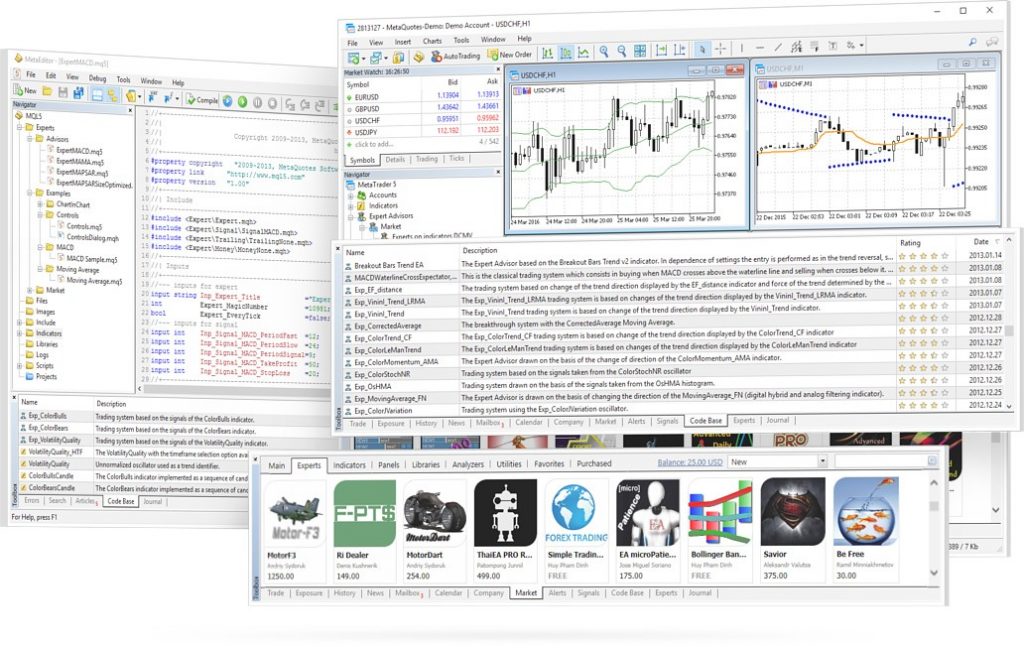
Similar to MT4, open the terminal and select ‘File’. Next, click on the ‘Open data folder’ and choose ‘MQL5’. You can then select either ‘Expert Advisors’ or ‘Indicators’. From there, you can copy over the file. Now you simply need to refresh the application and the new EA should be available in the window. Once visible, you can drag and drop the bot onto your chart to adjust any parameters.
Testing EAs
The good news is that most Expert Advisors on Code Base and the MetaTrader Market have user reviews. Many of the premium bots and indicators for sale also come with a free demo solution so that you can backtest algorithms against historical market data. Robots are usually scaled back in terms of features with the simulator, but they still give you a good indication of future performance.
Helpfully, Code Base and the Market both list the best performing Expert Advisors in 2026 and split out bots by different markets and strategies, such as forex or gold and day trading or longer-term investing.
Creating Your Own Expert Advisors
Established traders may want to build their own bot for personal use or sell their algorithm. For this, users will need to develop bots in the respective platform programming language. For MetaTrader 4, this is MQL4 while for MetaTrader 5, this is MQL5.
EAs are developed in the intuitive IDE (Integrated Development Environment) alongside MetaEditor. These are important tools that help you build, test and refine MT4 and MT5 robots to operate on forex, stock or commodity markets. Fortunately, there is a host of useful tutorials and guides online, as well as MQL4 and MQL5 forums. Other useful tips and recommendations on building your own trading bot can be found at IG and Pepperstone.
Once you have built your Expert Advisor, you can put it to work on your account, offer it as a free download on Code Base, or sell it on the MetaTrader Market.
Bottom Line
Expert Advisors are algorithms that automatically monitor the markets and execute trades based on pre-defined criteria. EAs can be used for trading popular financial markets, including forex, on both MetaTrader 4 and MetaTrader 5. A collection and database of useful tutorials and bot builder programmes are available online, especially on the MetaTrader website.
To download an EA today, head to Code Base or the MetaTrader Market.
FAQs
Are Expert Advisors Safe?
There is no guarantee of profits when trading with EAs. Whilst some of the best bots do generate decent returns, these can be pricey and often out of reach for beginners. Always check reviews of free bots before hitting download and be wary of installing Expert Advisors from third-party websites, as they could contain malicious code or be operating a scam.
Do Forex Expert Advisors Really Work?
Some FX Expert Advisors produce regular returns trading major, minor and exotic currency pairs. Of course, they will only operate effectively if trade parameters have been set up correctly. Check user reviews before downloading any free forex EAs and also backtest bots against historical data before risking funds.
Are Expert Advisors Profitable?
Some EAs have cracked creating impressive returns while others produce consistent losses. How successful a bot is ultimately depends on how well it has been developed and refined. The best performing EAs can be found on the MetaTrader Market but may come with a hefty price tag, sometimes costing thousands of dollars.
What Platforms Can You Use Expert Advisors On?
Expert Advisors are primarily available on the MetaTrader 4 (MT4) and MetaTrader 5 (MT5) platforms. With that said, automated trading systems and services can also be found on other popular terminals, including cTrader.
Are Expert Advisors Allowed In Trading Competitions?
This is entirely dependent on the company running the competition. Some companies restrict their use. As a result, it’s best to check terms and conditions before signing up. Importantly, it is worth noting that retail Expert Advisors are legal in most major trading jurisdictions.