




Finding the best brokers for third party trading software can be crucial whether you are new to trading or just looking to upgrade your methods. Brokers can be divided into those with integrated platforms and others that support third-party trading software. This article will explain the differences between the two and detail the advantages and disadvantages of third party trading software. Read on to discover significant factors and features that the best brokers for third party trading software offer.
Brokers With The Best Third-Party Trading Software
Our experts have ranked the 6 brokers with the best third-party tools based on usability, features and accessibility:
-
- Demo account
- Regulator: FCA, ASIC, CySEC, FSC, SCB, FSA
- Platforms: MT4, MT5, TradingView, TradeLocker
71.28% of retail traders lose money when trading CFDs -
- Demo account
- Platforms: MT4, MT5, TradingCentral
- Min. deposit: $5
76.15% of accounts lose money when trading CFDs with this provider. -
- Demo account
- Min. deposit: $100
- Min. trade: 0.01 Lots
65% of retail accounts lose money with this provider. -
- Demo account
- Min. deposit: $0
- Min. trade: 0.01 Lots
73-89% of retail investor accounts lose money when trading CFDs with this provider. -
- Demo account
- Regulator: FCA, ASIC, CMVM , FSCA, SCB, FSA
- Platforms: TN Trader, MT4, TradingView
-
- Demo account
- Regulator: ASIC, CySEC, VFSC, FSA
- Platforms: MT4, MT5, cTrader, TradingView, DupliTrade




Learn how we test brokers and why you can trust our ratings.
This is why we think these brokers are the best in this category in 2026:
- Eightcap 4.6/5 Eightcap is a multi-regulated forex and CFD broker established in Australia in 2009. The broker has proven popular with active day traders, providing 800+ instruments with tight spreads and notable improvements in recent years, integrating the leading TradingView platform, alongside AI-powered financial calendars and algo trading tools with zero coding experience required.
- XM 4.8/5 XM is a globally recognized forex and CFD broker with 20+ million clients in 190+ countries. Since 2009, this trusted broker has been delivering low trading fees across its growing roster of 1000+ instruments. It also offers a comprehensive MetaTrader experience that we've observed firsthand placing test trades.
- AvaTrade 4.9/5 Established in 2006, AvaTrade is a leading forex and CFD broker trusted by over 400,000 traders. Operating under regulation in 9 jurisdictions, AvaTrade processes an impressive 2+ million trades each month. Through like MT4, MT5, and its proprietary WebTrader, the broker provides a growing selection of 1,250+ instruments. Whether it’s CFDs, AvaOptions, or the more recent AvaFutures, short-term traders at all levels will find opportunities. With terrific education and 24/5 multilingual customer support, AvaTrade delivers the complete trading experience.
- Pepperstone 4.8/5 Established in Australia in 2010, Pepperstone is a top-rated forex and CFD broker with over 830,000 clients worldwide. It offers access to 1,400+ instruments on leading platforms MT4, MT5, cTrader and TradingView, maintaining low, transparent fees. Pepperstone is also regulated by trusted authorities like the FCA, ASIC, and CySEC, helping to ensure a secure environment for day traders at all levels.
- Trade Nation 4.4/5 Trade Nation is a top FX and CFD broker regulated in multiple jurisdictions including the UK and Australia. The firm offers low-cost fixed and variable spreads on 1000+ assets with robust trading platforms and training materials. The Signal Centre can also be used for trade ideas.
- Fusion Markets 4.6/5 Fusion Markets is an online broker established in 2017 and regulated by the ASIC, VFSC and FSA. It is best known for its low-cost forex and CFD trading, although its multiple account types and copy trading solutions cater to a range of traders. New clients can sign up and start trading in 3 easy steps.
Community Sentiment
See how users rate these brokers based on the average customer ratings submitted on DayTrading.com, plus ratings from Trustpilot, the Apple App Store and Google Play.
| Broker | Our Users' Rating | Trustpilot Score | Trustpilot Reviews | iOS App Rating | Android App Rating |
|---|---|---|---|---|---|
| Eightcap | 3910 | ||||
| XM | 3095 | ||||
| AvaTrade | 13713 | ||||
| Pepperstone | 3732 | ||||
| Trade Nation | 2192 | ||||
| Fusion Markets | 10543 |
Eightcap
Eightcap delivers in every area for day traders with a growing selection of charting platforms, education via Labs, and AI-powered tools. Now sporting 120+ crypto CFDs, it's also become a stand-out choice for crypto trading, winning our 'Best Crypto Broker' award two years in a row.
 Christian Harris, Reviewer
Eightcap quick facts
- Demo Account
- ✔Yes
- Instruments
- CFDs in Forex, Stocks, Indices, Commodities, Crypto
- Regulator
- FCA, ASIC, CySEC, FSC, SCB, FSA
- Platforms
- MT4, MT5, TradingView, TradeLocker
- Minimum Deposit
- $100
- Minimum Trade
- 0.01 Lots
- Account Currencies
- USD, EUR, GBP, CAD, AUD, NZD, SGD
Pros
- Eightcap added TradeLocker in 2026 for certain regions, marking it out as the best regulated TradeLocker broker, while still delivering Eightcap's ultra-fast execution and low fees for active traders on the charting software.
- After bolstering its roster in 2021, Eightcap offers one of the most extensive selections of cryptocurrency CFDs in the market, with crypto/fiat pairs, crypto/crypto pairs, plus crypto indices for broader exposure to the market.
- Eightcap stands out with a selection of powerful trading tools and resources, including MT4 and MT5, and more recently the 100-million strong social trading network TradingView.
Cons
- Despite a useful library of educational guides and e-books in Labs, Eightcap still trails IG’s comprehensive toolkit for aspiring traders with its dedicated IG Academy app and 18 course categories.
- Eightcap needs to continue bolstering its suite of 800+ instruments to match category leaders like Blackbull Markets with its 26,000+ assets, featuring a particularly weak selection of commodities.
- In spite of an increasing variety of tools, Eightcap doesn't offer industry favorites like Autochartist or Trading Central, which offer cutting-edge charting analytics, live news, and market insights for short-term traders.
XM
With a low $5 minimum deposit, advanced charting platforms in MT4 and MT5, expanding range of markets, and a Zero account offering spreads from 0.0, XM provides all the essentials for active traders.
Christian Harris, Reviewer
XM quick facts
- Demo Account
- ✔Yes
- Instruments
- CFDs, Forex, Stocks, Commodities, Indices, Thematic Indices, Precious Metals, Energies
- Regulator
- CySEC, DFSA, FSCA, SCA, FSA, FSC-Belize, FSC-Mauritius, CMA-Kenya, CMA-UAE
- Platforms
- MT4, MT5, TradingCentral
- Minimum Deposit
- $5
- Minimum Trade
- 0.01 Lots
- Account Currencies
- USD, EUR, GBP, JPY, ZAR
Pros
- XM’s Zero account is ideal for day trading with spreads from 0.0 pips, 99.35% of orders executed in <1 second, and no requotes or rejections.
- XM’s customer support has delivered over years of testing, with 24/7 assistance in 30 languages, response times of under 2 minutes and a growing Telegram channel.
- XM’s growing roster of 1,400+ instruments provides diverse short-term trading opportunities, with unique turbo stocks, fractional shares, and more recently thematic indices.
Cons
- Although trusted and generally well-regulated in some regions, XM also has global entities registered with the weak regulators like FSC (Belize) and FSA (Seychelles), whilst UK clients are no longer accepted, reducing its market reach.
- XM relies solely on the MetaTrader platforms for desktop trading, so there’s no in-house downloadable solution for a more beginner-friendly user experience with unique features.
- While the XM app stands out for its usability and exclusive copy trading products, the selection of technical analysis tools needs to be improved to meet the needs of advanced traders.
AvaTrade
Celebrating 20 Years in the industry, AvaTrade offers active traders everything they need: an intuitive WebTrader, powerful AvaProtect risk management, a smooth 5-minute sign-up process, and dependable support you can rely on in fast-moving markets.
 Jemma Grist, Reviewer
AvaTrade quick facts
- Demo Account
- ✔Yes
- Instruments
- CFDs, Forex, Stocks, Indices, Commodities, ETFs, Bonds, Crypto, Spread Betting, Futures
- Regulator
- ASIC, CySEC, FSCA, ISA, CBI, JFSA, BVI, FSRA/ADGM, AFM, CMA-Kenya, CIRO (via Friedberg Direct)
- Platforms
- WebTrader, AvaTradeGO, AvaOptions, AvaFutures, MT4, MT5, AlgoTrader, TradingView, TradingCentral, DupliTrade
- Minimum Deposit
- $100
- Minimum Trade
- 0.01 Lots
- Account Currencies
- USD, EUR, GBP, CAD, AUD, ZAR
Pros
- AvaTrade launched AvaFutures to offer low-margin access to global markets, then expanded in 2025 as one of the first brokers to add CME’s Micro Grain Futures.
- Years on, AvaTrade remains one of the few brokers offering a bespoke risk management tool, AvaProtect, that insures losses up to $1M for a fee and is easy to activate on the platform.
- AvaFutures traders can now use TradingView for 100+ indicators, screeners and a calendar, the sharing of trade ideas, commissions from $0.45, intraday margins from $60, and access to exchanges like CME and EUREX.
Cons
- The AvaSocial app is good but not great – the look and feel, plus the navigation between finding strategy providers and account management needs upgrading to rival category leaders like eToro.
- AvaTrade’s WebTrader has improved, but work is still needed in terms of customizability – frustratingly widgets like market watch and watchlists can’t be hidden, moved, or resized.
- While signing up is a breeze, AvaTrade lacks an ECN account like Pepperstone or IC Markets, which provides the raw spreads and ultra-fast execution many day traders are looking for.
Pepperstone
Pepperstone stands out as a top choice for day trading, offering razor-sharp spreads, ultra-fast execution, and advanced charting platforms for experienced traders. New traders are also welcomed with no minimum deposit, extensive educational resources, and exceptional 24/5 support (18h a day on weekends).
Christian Harris, Reviewer
Pepperstone quick facts
- Demo Account
- ✔Yes
- Instruments
- CFDs, Forex, Currency Indices, Stocks, Indices, Commodities, ETFs, Crypto CFDs, Spread Betting
- Regulator
- FCA, ASIC, CySEC, BaFin, DFSA, SCA, SCB, CMA-Kenya
- Platforms
- Pepperstone Trading Platform, MT4, MT5, cTrader, TradingView
- Minimum Deposit
- $0
- Minimum Trade
- 0.01 Lots
- Account Currencies
- USD, EUR, GBP, CAD, AUD, NZD, JPY, CHF, HKD, SGD
Pros
- Pepperstone provides trading in pre-IPO perpetual futures, including adding Anthropic in October 2026, giving traders 24/7 opportunities to speculate on anticipated share prices using cash-settled CFDs.
- Pepperstone has greatly improved the deposit and withdrawal experience in recent years, adding Apple Pay and Google Pay in 2025, as well as PIX and SPEI for clients in Brazil and Mexico in 2024.
- There’s support for a range of industry-leading charting platforms including MT4, MT5, TradingView, and cTrader, catering to various short-term trading styles, including algo trading.
Cons
- Despite improvements to its range of markets, crypto CFD offerings are still fairly limited compared to other brokers who focus on this area, such as Eightcap, and there's no option to invest in real coins.
- Overnight holding fees are higher than that found with some Market Maker brokers (usually Benchmark + 2.5%). This makes pepperstone an ideal broker for day traders and forex scalpers but less suitable for swing traders who often keep position open overnight.
- Pepperstone has removed support for several tools that elevated the trading experience for active retail traders, notably Autochartist, Capitalise.ai and a free VPS for qualifying traders (now only pro traders in some countries).
Trade Nation
Trade Nation suits discretionary traders who want to speculate on major indices like the US 500 or liquid FX pairs, and want the predictable all-in costs of fixed spreads. In tests, we found the fixed-spread TN Trader environment particularly useful for trading around scheduled economic releases owing to its reliable charting environment and because published spreads stayed capped.
Christian Harris, Reviewer
Trade Nation quick facts
- Demo Account
- ✔Yes
- Instruments
- CFDs, Forex, Indices, Shares, Commodities, Futures, Bonds, Spread Betting (UK and Ireland only), Cryptos (Bahamas entity only)
- Regulator
- FCA, ASIC, CMVM , FSCA, SCB, FSA
- Platforms
- TN Trader, MT4, TradingView
- Minimum Deposit
- $0
- Minimum Trade
- 0.1 Lots
- Account Currencies
- USD, EUR, GBP, AUD, ZAR, SEK, NOK, DKK
Pros
- In testing of the TN Trader account under normal market conditions, fixed spreads held while fills were prompt on major forex pairs, with a slight drift in the entry level as price ticked between click and fill.
- Trade Nation accounts can now be linked with TradingView, providing advanced multi-charts and the ability to execute trades directly.
- The demo comes with a $5,000 practice account and you can request a one-on-one platform walkthrough by callback - this level of personal help is rare.
Cons
- There is no raw or ECN pricing tier, which are often prefered by day traders. No matter how much you deposit or trade, you use the same fixed (or variable on MT4) pricing as beginners, making it unsuitable for scalpers especially.
- The 2–20% rebate scheme is closed to FCA, CMVM, and ASIC clients, meaning active day traders in these regions who would benefit from transaction rebates cannot claim them.
- Offshore SCB and FSA entities allow retail clients up to 1:200 and 1:500 leverage compared to 1:30 in regions like the UK, Europe and Australia, so an FSA client can have 16 times the exposure of a UK retail client on the same trade, but with less oversight and no compensation scheme.
Fusion Markets
Fusion Markets is a standout option for forex traders looking for excellent pricing with spreads near zero, industry-low commissions and recently TradingView integration. It’s a particularly good broker for Australian traders where the company is headquartered and regulated by the ASIC.
Jemma Grist, Reviewer
Fusion Markets quick facts
- Demo Account
- ✔Yes
- Instruments
- CFDs, Forex, Stocks, Indices, Commodities, Crypto
- Regulator
- ASIC, CySEC, VFSC, FSA
- Platforms
- MT4, MT5, cTrader, TradingView, DupliTrade
- Minimum Deposit
- $0
- Minimum Trade
- 0.01 Lots
- Account Currencies
- USD, EUR, GBP, CAD, AUD, NZD, JPY, CHF, HKD, SGD
Pros
- Average execution speeds of around 37 milliseconds are noticeably faster than many rivals and can help day traders secure optimal prices in fast-moving markets.
- Withdrawal processing times have been slashed to under an hour and can be processed 24/7, making it faster and easier for active traders to withdraw any gains.
- Fusion Markets is set up to support algo traders with a sponsored VPS solution and a 25% discount if you opt for the NYC Servers VPS for MT4 or cTrader.
Cons
- Fusion Market trails alternatives, notably IG, in the education department with limited guides and live video sessions to upskill new traders.
- Traders outside of Australia and Europe must sign up with weakly regulated global entities with limited safeguards, though in August 2026 they made negative balance protection available to all eligible accounts.
- The demo account expires after 30 days, limiting its potential as a useful trading tool alongside a real-money account.
What Is Third-Party Trading Software?
To decide on the best brokers for third party trading software, it is useful to learn what this encompasses. When trading on forex, cryptocurrency and stock markets, a trading platform is an interface that allows interaction between users and the markets. In most cases, there will be a financial intermediary between a trader and the market, known as a broker. Brokers deal with financial transactions like buy and sell orders and options contracts on behalf of traders, either in exchange for fees or valuable data on trading patterns. To facilitate the communication of information like real-time asset prices, trading charts and order books with traders, brokers will employ trading platforms.
Many brokers create bespoke trading software for their platform, often designed to be uncomplicated and easy to use and aiming not to overwhelm or intimidate traders. Other brokers allow traders to choose their preferred trading software from a range of third party providers. Numerous brokers offer both options, allowing traders to progress from a simpler, in-house platform to trading with more advanced third-party software.
The upside of brokers with third party trading software support is that the external software often supports far more advanced options for tracking and trading on markets. Traders may be provided with a more complete picture of history and patterns and can compare these in real-time. Importantly for high-level traders, the best brokers for third party trading software can offer support for expert advisors, known as EAs, for automated trading.
Types Of Third Party Trading Software
When using the best brokers for third party trading software support, clients will look for different types of software to support their specific desires. Some third-party software will bundle these together but many traders opt for specific tools for each purpose.
Standalone Trading Platforms
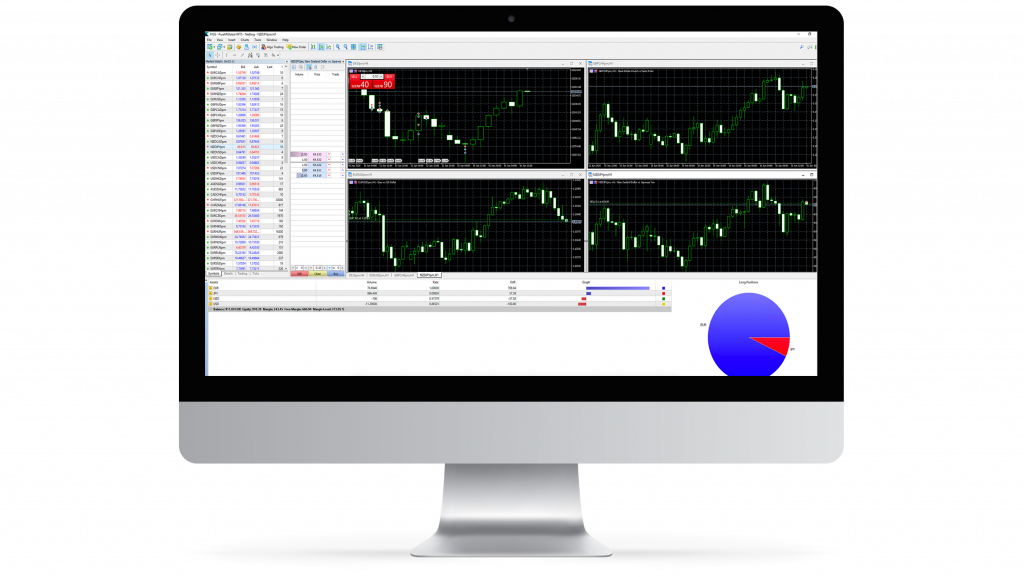
The fundamental piece of third party trading software is the trading platform. The platform is responsible for displaying current market prices and charts and executing trades quickly and without issues. Advanced features such as backtesting trading strategies and comprehensive market scanning set these apart from the more basic integrated platforms.
Individual trading platforms will be designed for different assets or markets, with separate areas of trading often requiring unique features and data presentations. Specialised software is available for cryptocurrencies like Bitcoin and Ethereum, commodities like gold and oil and e-mini options trading. Platforms may only function in specific regions, such as the Indian or Canadian markets.
Many trading platforms encompass some of the features of more specialised software, such as signals generators or EAs. While good for reducing cost, this may come at the price of accuracy or speed compared to individual software options. Two of the most popular external trading platforms are MetaTrader 4 and MetaTrader 5 and many of the best brokers for third party trading software will offer one or both of these.
Signals Software
This third party trading software aims to analyse data from the market and recognise patterns and trends to alert users to opportunities. These are called “signals” and project future price movements in assets. Particularly popular in forex trading for their simplicity, signals provide traders with suggestions as to buy and sell prices, as well as stop-losses to manage risk.
Signals range in accuracy and reliability depending on the software used to generate them. Often, the more expensive a signals generating software is, the more precise their predictions may be. Nonetheless, a lower or medium cost software could still yield significant profits for traders. The best brokers for third party trading software will provide integration support for good value signals products.
Arbitrage Software
When trading forex or cryptocurrency, it is possible to profit from the lack of a centralised exchange. Arbitrage involves exploiting discrepancies in the price of an asset between exchanges, allowing you to turn the difference into profit. Trading without software is a high-risk and inefficient strategy, as arbitrage trading opportunities tend to exist for a very short period.
To monitor and trade on as many markets and exchanges as possible, a trader requires reliable and powerful hardware to run this software. Arbitrage software needs to be fast to place these trades where seconds can mean the difference between profit and loss. The software will also need to run in conjunction with as many exchanges as possible to maximise potential profits. The best brokers for third party trading software in terms of arbitrage software may also provide a free virtual private server (VPS), from which the package can be run quickly and consistently.
Journalling Software
This form of third party software does not take part in any trading activity, instead comprehensively recording trades within a digital logbook. This tool is essential for full-time traders that need to keep accurate records of profit and loss to comply with local taxation rules. A journaling software that can distinguish between taxable and tax-exempt profits can save traders valuable time and ensure the accuracy of reported figures.
This type of third party trading software also serves another important purpose. Analysis of trading performance is a crucial element when looking to optimise a trading strategy. To this end, journaling software allows users to review past mistakes and successes, helping to understand the advantages and pitfalls of their approach.
Technical Analysis Software
Some of the best brokers for third party trading software provide additional analysis tools, which aim to provide traders with the relevant information and data required to make informed decisions. Where traders can be influenced by emotions such as excitement or anger, technical analysis takes away these factors, empowering data-based trading. This software is designed to provide greater breadth and depth to market monitoring compared to integrated platform solutions.
Technical analysis software help traders by quickly evaluating and flagging trading patterns before suggesting specific entry and exit points for a trade. Third-party technical analysis software can include dynamic watch lists that enable real-time, simultaneous monitoring of stocks and assets and customisable indicators that track fundamental data and social media for trading opportunities. Any trader needs capable and extensive technical analysis if looking for extended success in the market. Competent technical analysis software should be a priority for those considering the best brokers for third party trading software.
For many years, hedge funds and the world’s most prominent investment corporations have relied on automated trading to manage complicated investment strategies. Consumer trading robots have come a long way since their induction into the retail markets. More and more retail traders are trusting automation to generate profits that humans could not, taking advantage of the speed and scalability of automated trading.
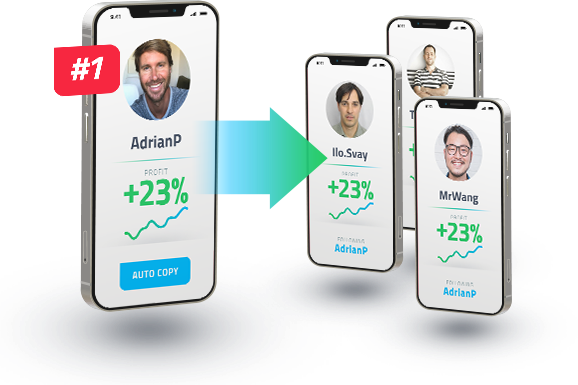
One form of automated trading is copy trading, which follows the trades of a preset market leader. Copy trading is regularly marketed towards new traders as an opportunity to use anothers’ experience and insight to profit. However, you often have little to no agency over the trades themselves and are left vulnerable to potentially costly mistakes of another person. Many firms support integrated copy trading functionalities, though the best brokers for third party trading software will also allow the integration of external packages.
More experienced traders look to expert advisors and robots as an implementation strategy. They set parameters based on their approach to produce an algorithm without human input. These parameters will be as simple or complex as the code behind them, with entry and exit prices, stop-losses and trailing stops generated based on multiple factors set by the trader. These algorithms can enact many trades nearly simultaneously while working round the clock in markets that facilitate it.
Pros Of Third Party Trading Software
Here are some of the best reasons for favouring brokers suitable for third party trading software:
- Backtesting – A feature that proves the worth of using the best brokers for third party trading software is the capacity for backtesting. This allows traders to use historical market data to test the efficacy and accuracy of their trading instruments. Platforms that include a backtesting function can run simulations with their trading robots or see how receptive their signals are to past market changes. Using a backtesting facility, strategies can be perfected using real data and errors in software can be identified and rectified. Backtesting is valuable as it allows traders to sort out these issues before trading with real funds.
- Scalable Market Tracking & Trading – Another benefit of third party trading software is the ability to track more assets simultaneously. The most advanced market scanners can analyse data in real-time from tens of thousands of assets, alerting traders instantly to significant changes. Robots have a similar ability to place multiple trades within a fraction of a second, far out-scaling what even a team of humans might be capable of.
- Advanced Technical Tools – While integrated software platforms will offer basic indicators and some drawing tools for traders to use, those who wish to create bespoke indicators and access unlimited technical tools may need to turn to other trading software. Integrated packages may have a limited news section but external options will often feature live updates on stocks and tools, drawing from data sets that include social media. For traders that engage in options contracts, the value of both top-notch technical tools and rapid sentiment updates cannot be understated.
- A Choice Of Platform – Relying on brokers’ integrated platforms when trading is restrictive, trapping you within software that some users may find unintuitive or lacking features. Using the best brokers for third party software tools allows a choice of platforms for traders to use, so most traders should find a few that suit their needs. Furthermore, using a third-party package removes a variable when deciding which broker to trade with, allowing greater scope for focus on important considerations such as fees and asset range.
- Try Before You Buy – Many providers of third party trading software allow traders to trial their platforms and products before committing to a purchase. These free trials allow potential customers to familiarise themselves with the software and learn whether it can meet their needs. By trading with demo funds in such an account, traders can gain valuable experience in their chosen market with no risk.
- Unique Trading Opportunities – Because of the near-instantaneous trading capabilities of robots, third party trading software creates favourable conditions for methods like arbitrage and scalping. These strategies can be difficult to implement successfully when trading manually due to the fast-moving nature of markets and exchanges. A delay of just a few seconds can lead to large losses when caught between trades. Automation helps solve this issue, making both of these strategies viable for sustained profit.
Cons Of Third Party Trading Software
Despite the abundance of features and options provided by the best brokers for third party trading software, there are some notable disadvantages to consider:
- Creating False Trends – Third-party trading software can be subject to incorrect reading and predicting of patterns. While no forecasts can ever be guaranteed, a malfunction in trading software can lead to more than just a few missed trades. This was demonstrated in 2012 by Knight Capital Group, which lost over $440 million in minutes when their trading software glitched and misplaced trades on their behalf. While a mistake of this size is extremely rare, a smaller-scale glitch can still damage trading profits for anyone.
- Software & Hardware Costs – This is perhaps the most substantial disadvantage of favouring the best brokers for third party trading software. Advanced software can set traders back hundreds of dollars a month. Hardware capable of computing advanced algorithms can also be a very costly investment. Traders can bypass this upfront cost by hosting their software on remote servers but this rental cost will soon add up.
- Automation Drawbacks – Some traders may imagine that automating their trades using robots will mean that they can take a hands-off approach to trading. However, this is not the case. Robot software should be monitored regularly to catch faults such as connection issues, software problems and market anomalies that can impact your trading strategies. Furthermore, the removal of the ultimate decision making by humans has drawbacks. Automated trades can take place independently of greater market events that can drastically impact profits. As long as the prerequisites are met, the robot will trade with no greater perspective than it has been programmed to consider.
- Confusing & Complex Software – When compared with integrated trading software offerings, the added features and complex layouts can be confusing. There can be a steep learning curve when adapting to advanced trading software, with multitudes of data and charts to choose from. For those new to trading or only wishing to make a few, simple trades, third party trading software may be overwhelming or overkill for what they need from a trading platform.
- Accessibility And Reliability – Due to the advanced nature of some third-party software options, systems that can run advanced and complex trading setups will usually be immobile, making trading on the go impractical. While traders can leave their software running unsupervised, this may not be wise. Compared with the cloud-based integrated platforms that can run on laptops or mobile apps, many third party trading apps suffer from a lack of accessibility. While all types of trading software are subject to reliability issues, as third party trading software usually relies on an individual’s hardware to process trades and contracts, it can be less reliable.
Next Steps
Now that you are familiar with the details of third party trading software, you may be looking to get started. There are two main elements to this decision: selecting a, or multiple, suitable packages for your needs and finding the best brokers for third party trading software to trade with.
How To Choose Trading Software
When deciding on which third party trading to use, it is a good idea to demo a particular tool before committing to a purchase. Here are some attributes that you can use to refine your trial list:
- Availability Of Markets & Assets – As mentioned earlier, different software will be compatible with or optimised for individual markets and trading methods. The first step when deciding on which third party trading software to utilise is making sure that it operates on the markets or strategies you require. For example, a particular arbitrage software may be perfect for forex but not work on cryptocurrency exchanges, while other software may be compatible with US markets but not work on Indian and Chinese markets, or vice versa.
- Reliability & Reputation – To trade effectively, traders should use dependable third-party trading software. Software prone to crashing or freezing can seriously hamper trading, even more so when using a method reliant on fast transactions. It is worth researching the reputation of a specific third party trading software and gauging user sentiment, checking for any red flags around transaction speed or overall software stability. Also important is the level of support offered through regular updates.
- Features & Capacity – There is a wide range of third party trading software available, each designed with the needs of diverse traders in mind. Some capabilities that users will find attractive are backtesting and real-time market scanning. As well as this, a specific trading software will have a different capacity for processing trades or tracking assets simultaneously.
- Cost Efficiency – Finding a balance between features and cost is one of the most important considerations when choosing third-party trading software. Those considering third party trading software should strive to avoid overpaying for features and trading capacity they do not need. While having room to expand your trading and tracking capacity may seem attractive to traders, more isn’t always better here. The price of the most capable software can be extremely high. Traders should instead aim for software that provides them with features they are comfortable using and only the capacity for tracking and trading that they will use.
How To Find The Best Brokers For Third Party Trading Software
There are many brokers with third party trading software support, so traders will be spoilt for choice when it comes to selecting one. However, here are some attributes that best brokers for third party trading software will excel in:
- Trusted & Reliable – The most important qualities in a broker are honesty and dependability. When selecting a broker to use for third party trading software, you want their transaction process to be fast and secure, as well as to store your funds safely. Many brokers are regulated by independent financial authorities that ensure they fulfil their obligations to traders. Look for reviews from trusted sites to gauge whether you should consider trading with a specific broker.
- Compatible With Preferred Software – Another fundamental to consider is whether a broker supports the third party trading software that you favour. The best brokers for third party trading software will support a wide range of additional technical instruments and programs. However, if your preferred tool is not supported, then you should consider finding another firm rather than compromising on necessary software features.
- Low Fees – For many traders, fees are a primary element of whether to trade with a particular broker or look elsewhere. Fees can be levied on deposits and withdrawals, as well as trading transactions. Watch out for brokers that attempt to hide fees with confusing fee structures. For low margin trading such as scalping and arbitrage, keeping fees down can be vital to turning a profit. Options and longer-term trading are not immune to the effects of fees either. When making greater volumes of trades, fees will add up quickly, so it is imperative to find a broker with low fees to generate the most potential profit.
- Availability Of Assets, Markets & Trading Variants – There is no point in having software capable of trading on thousands of assets and complex options if these are not supported by the broker making your transactions. It is worth making sure your chosen broker facilitates the types of trading you wish to carry out on the assets and markets you require.
- Open APIs For Custom Software – For traders who wish to create custom software and robots, a platform’s Application Programming Interface, or API, may be restrictive. When looking to combine additional software with a broker’s platform, this is crucial to consider. If a particular feature is crucial for you then you need to make sure to choose a platform with an API that offers that function.
Final Word
Finding the best brokers for third party trading software depends entirely on the requirements of the trader, while some may be completely fine with the integrated options offered. However, external software can open up opportunities for new profits, strategies and markets, while enhancing capacity to predict trends and make orders. When it comes to the best brokers for third party trading software, there are several elements to consider. Traders should prioritise finding a trusted and reliable broker, also taking into account variables like fees and availability of a range of assets and markets. Following this guide, you should be able to find trading software well suited to your needs and identify the best brokers for integrating third party trading software.
FAQs
Should I Use One Of The Best Brokers For Third Party Trading Software?
While using purely integrated broker trading software is often adequate for beginner traders and those who trade sporadically, more experienced traders should consider third-party trading software. Access to advanced features and the ability to create unique indicators are valuable assets to serious traders. Automated trading also increases efficiency and can result in enhanced profits for traders.
Can I Trade Cryptocurrency With The Best Brokers For Third Party Trading Software?
Third-party trading software can be used to trade across many markets, including worldwide major stocks and shares markets, forex, cryptocurrency, penny stocks, e-minis and commodities. Different tools will often be optimised for different markets and assets, so no matter what you wish to trade, there will likely be a third party software solution for you.
Are Many Brokers Compatible With Third-Party Trading Software?
The best brokers for third party trading software will often support a range of tools and packages, though some firms may limit their availability. If you wish to build or commission custom trading software, it is important to make sure your chosen platform supports an open API.
Can I Create My Own Custom Trading Software?
The wide range of customisability opportunities in third party trading programs is suitable for many traders but some may want to create bespoke software for their own specific needs. If you cannot code it yourself, bespoke software will often be expensive to commission. Custom software will likely have more bugs than thoroughly tested commercially available software. However, the complete control over the features included as well as the ability to create a personally intuitive layout will appeal to some traders.
Should I Automate My Trading With Third-Party Trading Software?
There are lots of advantages to automating your trading with some of the best brokers for third party trading software. Perhaps the greatest is the speed of trading, with external trading software able to seize momentary opportunities by completing trades in fractions of a second. The capacity to complete multiple trades at any one time also cannot be understated, alongside the reassurance of backtesting your automated trading strategy.
However, some traders could be reluctant to hand over complete control of their funds to an algorithm. Robots are not immune to errors in perception or execution and, left unchecked, a malfunction could prove costly to a trader.