




cBots are trading robots that run on the cTrader platform. They are essentially algorithms that scan the markets and execute trades in line with predetermined inputs. Spanning multiple strategies and trading systems, they can be downloaded from several leading brokers.
In this user guide, we explain how cBots work, share programming tips, and list the best brokers with cBots in 2026.
Top-Rated Brokers With cBots
After specifically checking and evaluating their automated cBot trading environment, these brokers came out on top:
-
- Demo account
- Min. deposit: $0
- Min. trade: 0.01 Lots
73-89% of retail investor accounts lose money when trading CFDs -
- Demo account
- Regulator: ASIC, CySEC, VFSC, FSA
- Platforms: MT4, MT5, cTrader, TradingView, DupliTrade
-
- Demo account
- Regulator: FMA, FSA
- Min. deposit: $0
-
- Demo account
- Regulator: ASIC, CySEC, FSA, FSCA, FSC, SCB, CMA-Kenya
- Min. deposit: $0
-
- Demo account
- Regulator: FSC
- Platforms: Web, MT4, MT5, cTrader
-
- Demo account
- Regulator: CySEC
- Min. deposit: $100
65% of retail investor accounts lose money when trading CFDs with this provider.






Learn how we test brokers and why you can trust our ratings.
Here is a short summary of why we think each broker belongs in this top list:
- Pepperstone 4.8/5 Pepperstone’s cTrader delivers ultra-fast execution and tight spreads - often around 0.0-0.2 pips on majors - with low commissions from $7 per round turn. When we used it, order routing was seamless, no minimum deposit restrictions applied, and advanced charting plus algorithmic trading tools enhanced usability for active traders.
- Fusion Markets 4.6/5 Fusion Markets’ cTrader impressed us with ultra-low spreads from 0.0 pips and a $7 commission per round turn. During our hands-on testing, execution was quick and stable. Advanced features like customizable indicators and smart order types enhance trading for all skill levels.
- BlackBull 4.5/5 BlackBull Markets’ cTrader delivers tight spreads from 0.0 pips with competitive commissions around $6–$7 per lot. When we tested it, execution speed was consistently fast, supported by deep liquidity. Features like automated trading and customizable interface make it a strong choice for active and professional traders.
- FP Markets 4.2/5 FP Markets’ cTrader delivers ultra-tight spreads from 0.0 pips with low commissions near $7 per lot. When we tested its cTrader solution, execution was consistently fast and stable. Advanced features like algorithmic trading, custom indicators, and one-click order execution cater well to active traders.
- LiteFinance 4.0/5 LiteFinance is an offshore-regulated broker with 55 forex pairs and a range of international stocks as well as a smaller list of indices, commodities and cryptocurrencies. With support for the MetaTrader 4 and MetaTrader 5 platforms as well as a proprietary mobile app, there is a good selection of tools available. The broker offers a Classic commission-free account as well as an ECN account with spreads starting from zero and a commission per lot.
- Skilling 3.4/5 Skilling’s cTrader offers competitive spreads starting around 0.0 pips with low commissions tailored for active traders. During our tests of it, execution speed was solid and reliable for day traders. The platform’s advanced charting tools and automated trading capabilities enhance efficiency for both beginners and experienced traders.
Compare Automated Trading Options
Check these providers offer cBots alongside any other automated trading services:
| Broker | Automated Trading Tools |
|---|---|
| Pepperstone | Expert Advisors (EAs) on MetaTrader, cBots on cTrader |
| Fusion Markets | Expert Advisors (EAs) on MetaTrader, cBots on cTrader |
| BlackBull | Expert Advisors (EAs) on MetaTrader, cBots on cTrader |
| FP Markets | Expert Advisors (EAs) on MetaTrader, cBots on cTrader |
| LiteFinance | Expert Advisors (EAs) on MetaTrader, cBots on cTrader |
| Skilling | Expert Advisors (EAs) on MetaTrader, cBots on cTrader |
Community Sentiment
See how users rate these brokers based on the average customer ratings submitted on DayTrading.com, plus ratings from Trustpilot, the Apple App Store and Google Play.
| Broker | Our Users' Rating | Trustpilot Score | Trustpilot Reviews | iOS App Rating | Android App Rating |
|---|---|---|---|---|---|
| Pepperstone | 3720 | ||||
| Fusion Markets | 10376 | ||||
| BlackBull | 3522 | ||||
| FP Markets | 10379 | ||||
| LiteFinance | 687 | ||||
| Skilling | 442 |
Pepperstone
Pepperstone stands out as a top choice for day trading, offering razor-sharp spreads, ultra-fast execution, and advanced charting platforms for experienced traders. New traders are also welcomed with no minimum deposit, extensive educational resources, and exceptional 24/5 support (18h a day on weekends).
 Christian Harris, Reviewer
Pepperstone quick facts
- Demo Account
- ✔Yes
- Instruments
- CFDs, Forex, Currency Indices, Stocks, Indices, Commodities, ETFs, Crypto CFDs, Spread Betting
- Regulator
- FCA, ASIC, CySEC, BaFin, DFSA, SCA, SCB, CMA-Kenya
- Platforms
- Pepperstone Trading Platform, MT4, MT5, cTrader, TradingView
- Minimum Deposit
- $0
- Minimum Trade
- 0.01 Lots
- Account Currencies
- USD, EUR, GBP, CAD, AUD, NZD, JPY, CHF, HKD, SGD
Pros
- There’s support for a range of industry-leading charting platforms including MT4, MT5, TradingView, and cTrader, catering to various short-term trading styles, including algo trading.
- Pepperstone has greatly improved the deposit and withdrawal experience in recent years, adding Apple Pay and Google Pay in 2025, as well as PIX and SPEI for clients in Brazil and Mexico in 2024.
- Pepperstone provides trading in pre-IPO perpetual futures, including adding Anthropic in October 2026, giving traders 24/7 opportunities to speculate on anticipated share prices using cash-settled CFDs.
Cons
- Pepperstone has removed support for several tools that elevated the trading experience for active retail traders, notably Autochartist, Capitalise.ai and a free VPS for qualifying traders (now only pro traders in some countries).
- Overnight holding fees are higher than that found with some Market Maker brokers (usually Benchmark + 2.5%). This makes pepperstone an ideal broker for day traders and forex scalpers but less suitable for swing traders who often keep position open overnight.
- Despite improvements to its range of markets, crypto CFD offerings are still fairly limited compared to other brokers who focus on this area, such as Eightcap, and there's no option to invest in real coins.
Fusion Markets
Fusion Markets is a standout option for forex traders looking for excellent pricing with spreads near zero, industry-low commissions and recently TradingView integration. It’s a particularly good broker for Australian traders where the company is headquartered and regulated by the ASIC.
 Jemma Grist, Reviewer
Fusion Markets quick facts
- Demo Account
- ✔Yes
- Instruments
- CFDs, Forex, Stocks, Indices, Commodities, Crypto
- Regulator
- ASIC, CySEC, VFSC, FSA
- Platforms
- MT4, MT5, cTrader, TradingView, DupliTrade
- Minimum Deposit
- $0
- Minimum Trade
- 0.01 Lots
- Account Currencies
- USD, EUR, GBP, CAD, AUD, NZD, JPY, CHF, HKD, SGD
Pros
- Fusion Markets offers best-in-class support with very fast, friendly and helpful responses during tests and no frustrating automated chatbot to navigate.
- Fusion Markets is set up to support algo traders with a sponsored VPS solution and a 25% discount if you opt for the NYC Servers VPS for MT4 or cTrader.
- The market analysis features, Market Buzz and Analyst Views, are great tools for discovering opportunities and conveniently integrated into the client dashboard.
Cons
- There is no proprietary trading platform or app built with beginners in mind, a notable drawback compared to AvaTrade.
- Traders outside of Australia and Europe must sign up with weakly regulated global entities with limited safeguards, though in August 2026 they made negative balance protection available to all eligible accounts.
- While the selection of currency pairs trumps most rivals, the broker's alternative investment offering is average with no stock CFDs beyond the US.
BlackBull
After improving its trading infrastructure with Equinix servers in London, reducing latency for traders, BlackBull is an obvious choice if you want to day trade stock CFDs with ECN pricing. With competitive spreads and no commission on a growing roster of digital tokens paired with USD, BlackBull also works for active crypto traders.
Christian Harris, Reviewer
BlackBull quick facts
- Demo Account
- ✔Yes
- Instruments
- CFDs, Stocks, Indices, Commodities, Futures, Crypto
- Regulator
- FMA, FSA
- Platforms
- BlackBull Invest, BlackBull CopyTrader, MT4, MT5, cTrader, TradingView, AutoChartist
- Minimum Deposit
- $0
- Minimum Trade
- 0.01 Lots
- Account Currencies
- USD, EUR, GBP, CAD, AUD, NZD, JPY, ZAR, SGD
Pros
- BlackBull offers every ingredient for day traders; fast execution speeds of <100ms and tight spreads from 0.0 pips.
- With two ECN-powered accounts (Standard and Prime), plus Prime+ - an active trader rewards program offering trading rebates - BlackBull accommodates beginners through to high-volume active traders.
- After partnering with ZuluTrade and Myfxbook, alongside improvements to its own CopyTrader, and finally enabling cTrader Copy, BlackBull offers one of the most comprehensive copy trading experiences we've seen.
Cons
- Despite a growing selection of 2,180+ assets, including additions to its Asia Pacific indices, they are mainly stocks with an average selection of currency pairs and indices.
- Although the Education Hub now features improvements like webinars and tutorials, the courses we’ve explored need more focus on explaining the wider economic factors influencing prices.
- Unlike most top brokers, BlackBull charges an irritating $5 withdrawal fee, which can detract from the overall cost-effectiveness, especially for active traders who frequently move funds.
FP Markets
FP Markets strikes an ideal balance between affordability and quality for active traders. They’ve managed to keep trading costs low while expanding their investment offering, charting tools, and research features, all while providing excellent support you can rely on for urgent trading queries.
Christian Harris, Reviewer
FP Markets quick facts
- Demo Account
- ✔Yes
- Instruments
- CFDs, Forex, Stocks, Indices, Commodities, Bonds, ETFs, Crypto
- Regulator
- ASIC, CySEC, FSA, FSCA, FSC, SCB, CMA-Kenya
- Platforms
- Iress, MT4, MT5, cTrader, TradingView, AutoChartist, TradingCentral
- Minimum Deposit
- $0
- Minimum Trade
- 0.01 Lots
- Account Currencies
- USD, EUR, GBP, CAD, AUD, NZD, JPY, CHF, HKD, SGD
Pros
- FP Markets has integrated top-notch research tools from Trading Central and Autochartist, helping traders identify short-term opportunities based on chart patterns, indicators, and other technical factors.
- FP Markets delivers fast and dependable support, available 24/5 with average response times of less than 1 minute during testing.
- AI-powered sentiment analysis, trading signals and real-time NewsIQ research, integrated with MT4 and MT5, has been added via FP Markets Intelligence.
Cons
- While pricing in the Raw account is excellent, spreads in the Standard account trail the cheapest brokers with a 1.1-pip average spread on the EUR/USD compared to the 0.8-pip average at IC Markets.
- FP Markets trails the best MetaTrader brokers, despite offering a Trader's Toolbox on MT4, just 130 instruments are available, limiting opportunities for serious traders, especially compared to Pepperstone with its 1,300 assets.
- Although Traders Hub provides rich research, notably the Daily Report, Technical Report, Market Insights, and Fundamental Analysis, it needs to widen its daily content variety and keep its forex news updated to match category leaders like IG.
LiteFinance
LiteFinance will suit traders seeking a long-standing broker to trade forex, stocks, commodities, indices, cryptocurrencies, and newer assets like equity perpetuals. The social trading system will also suit investors looking to learn from seasoned traders, though careful risk controls are required when copy trading.
 Tobias Robinson, Reviewer
LiteFinance quick facts
- Demo Account
- ✔Yes
- Instruments
- Forex, CFDs, indices, shares, commodities, cryptocurrencies
- Regulator
- FSC
- Platforms
- Web, MT4, MT5, cTrader
- Minimum Deposit
- $10
- Minimum Trade
- 0.01 Lots
- Account Currencies
- USD, EUR
Pros
- Great trading platform support with MT4, MT5 and a proprietary app
- Good range of forex pairs
- Automated trading via APIs
Cons
- Not overseen by any top-tier regulator
- Wide spreads on the Classic account
- Some complaints online about difficulties withdrawing funds
Skilling
Skilling maintains its position as a top pick for budding traders looking for a competitive zero commission account with direct access to a copy trading feature. It will also serve experienced strategy providers looking to earn commissions, or active traders looking to deal forex.
Christian Harris, Reviewer
Skilling quick facts
- Demo Account
- ✔Yes
- Instruments
- Forex, CFDs, Stocks, Indices, Commodities and Cryptos
- Regulator
- CySEC
- Platforms
- Skilling Trader, MT4, MT5, cTrader, TradingView
- Minimum Deposit
- $100
- Minimum Trade
- 0.01 Lots
- Account Currencies
- USD, EUR, GBP, SEK, NOK
Pros
- The Skilling Trader platform maintains a focused design, offering charts, order placement, and risk controls without unnecessary features or promotional content. For systematic traders or those who prefer a streamlined execution environment, this simplicity is an advantage
- Beyond major forex pairs, Skilling’s spreads are often lower than those of larger, more prominent brokers. While not always the lowest, traders focused on raw pricing can find competitive value without needing a full ECN setup
- Skilling offers five trading platforms: Skilling Trader, cTrader, MT4, MT5, and TradingView, each with distinct strengths. MT4 and MT5 supports EA-based strategies, cTrader excels in order management, Skilling Trader offers straightforward web execution, and TradingView specializes in advanced charting. This range provides valuable flexibility for traders
Cons
- Skilling’s educational and research resources are limited to a basic economic calendar, brief market commentary, some lessons, and occasional news headlines, plus the newer AI-powered Skilling Trade Assistant. There aren't comprehensive and structured learning paths
- Skilling depends on TradingView for advanced analytics and does not provide its own platform for Trading Central, Autochartist, or instrument-specific news feeds. This may be sufficient for traders with independent research tools, but it is less comprehensive than brokers offering integrated in-platform content
What Are cBots?
A cBot is a trading robot that runs on the cTrader terminal. Similar to EAs on MetaTrader, custom algorithms are used to automatically execute trading positions. The best cBots utilize multiple charting and technical tools with advanced orders and sophisticated risk management parameters. The top programs also offer increased accuracy and objectivity.
cBots are created using cTrader Automate, an embedded part of the cTrader application. Robots are developed using the C# programming language and .NET. Traders will need a basic understanding of each, though user guides, courses and tutorial videos can be found online.
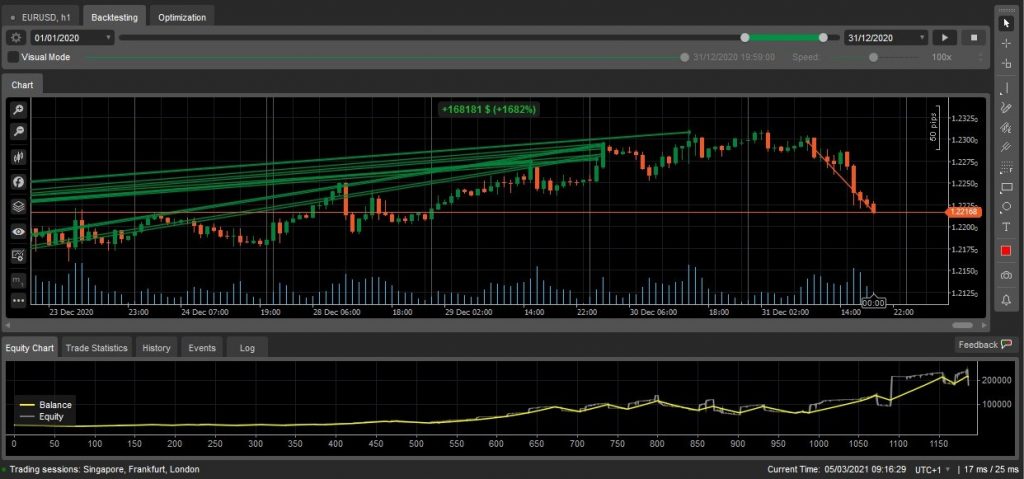
Importantly, cBots are hosted on the cTrader platform, but when live they run on a separate terminal to minimize lag. Traders can also backtest bots against historical trends to optimize strategies. In addition, there is a code editor on the cTrader site and a deal map.
How cBots Work
cBots are programmed using custom configurations so they can open and close positions without the trader having to monitor markets. They often utilize the same technical indicators that investors rely on with manual techniques. The difference is that the cBot is effectively on autopilot – identifying trends and capitalizing on opportunities without human intervention.
Integrated into cTrader is an Automate Code Editor, helping traders to build, test and refine robots. There are two kinds of operation methods, synchronous and asynchronous. Synchronous operation means that each statement in the code has to be completed before the next one begins, whereas asynchronous means the next statements can be executed before the server receives a response from the previous one.
How To Create A cBot
On cTrader, select the cBot/Algorithm tab. The platform will then list programs available for download, some free and some that come with a charge. On the same page, you should see an option to ‘Add new algorithm’. Note, that you will need a trading account with a broker that supports the cTrader platform to log in.
The platform will then offer default code to help you develop a trading system. Here you can start customizing your cBot. You can use code examples from the API Reference Explorer or copy and paste it from another source.
When you have finished programming the various buy and sell instructions and risk management parameters, select ‘Build’ to finalize the program. If cTrader was unable to build the bot, it will show you exactly where the code failed so that you can amend it.
Once your bot has been built successfully, you can start using it on the cTrader platform.
Note, if you want to build a cBot but have no coding experience or time to learn, you can hire a developer to program your strategy. You can source and negotiate with developers on the cTrader community forum.
How To Select a cBot
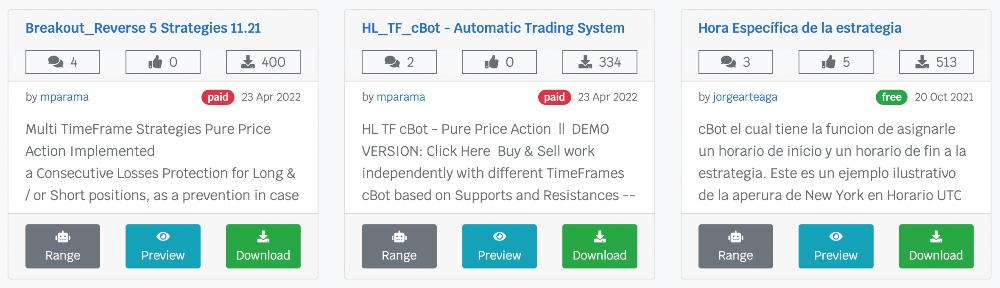
You can download cBots that have been created by other developers. This might suit beginners and those without an effective strategy.
Importantly, selecting a bot is about finding a strategy that aligns with your investment objectives and risk tolerance. The best cBots have high user ratings and a clear preview mode. It’s also worth looking at comments from other users to gauge how successful the system is.
cBots normally come with a description written by the developer, and this should give you a good idea of what the bot was created to do and how it will perform.
Best cBots
You can compare and download cBots in a few different places. First and foremost, there is the cTrader website where you can select from either free or paid cBots. There is also ClickAlgo, a company that specializes in cTrader automation options. Below is a list of some of the most popular and effective cBots from these two platforms:
- cTrader Neptune – 10 forex cBots using a black-box automated system, with a news event manager and adjustable parameters included. Developed by ClickAlgo.
- cTrader Advanced Forex Trading Robot – a good introduction to algorithmic trading, semi-automated with advanced risk management. This cBot also supports certain cryptocurrencies such as Bitcoin. Also developed by ClickAlgo.
- Elliot Wave Robot – a cBot for applying Elliot Wave trading principles. Automatically positions both long and short orders.
All of these robots are paid-for solutions, where prices vary depending on the developer or platform and the going rate today. There are also free bots available on cTrader. All of these programs are user-generated, and the free options tend to be uploaded by traders who are seeking feedback on their bots, or from developers who want to offer a sample to those interested in buying more.
Many developers also run their own sites to sell bots. However, be wary of who you are buying from. It is best to check reviews and conduct plenty of research to avoid scams. Overall, ClickAlgo has the most advanced marketplace for cBots, with a huge range of options that come from a reliable source.
Advantages of cBots
Trading via cBots offers several benefits:
- Speed – cBots can analyze markets at a speed that humans cannot. Programmed correctly, they can scan millions of data points and utilize multiple indicators simultaneously.
- Accuracy – human error is always a risk when trading. cBots, on the other hand, are programmed with specificity that allows them to perform accurately, potentially reducing the risk of errors.
- Objectivity – manual trading can lead to reduced objectivity. However, automated trading takes the psychological element out of active trading.
- Time Efficiency – cBots can be active throughout the day and over the weekends whenever trading hours are open. This frees up time to focus on other value-add activities.
Drawbacks of cBots
There are also some downsides to trading with cBots:
- Hardware requirements – uninterrupted runtime is essential to most trading systems. Some traders may want to opt for a dedicated server to reduce downtime.
- Unpredictability – market trends can change rapidly with breaking news, and this can negatively impact how a robot trades. As a result, investors still need to monitor their trading system to prevent issues.
- Reliability – there are no guarantees that the cBot you download will generate returns, especially the free programs. Make sure you check user reviews and ratings before you invest real money. Also see if the developer offers a free trial.
cTrader vs MetaTrader
If you are looking to choose between cTrader and MetaTrader for automated trading, then there are a few things to consider.
The key difference is the programming language. cTrader offers C# as its coding language, giving it more customizable and flexible tools. cTrader also offers a more intuitive and beginner-friendly interface. In terms of order execution, MetaTrader 4, MetaTrader 5 and cTrader are on equal footing.
But while MetaTrader 4 remains the favorite for automated trading, there is something to be said for the usability of the cTrader program.
Final Word On cBots
cBots can be an excellent way to automate an effective trading strategy. New traders can also use cBots designed and developed by seasoned investors, though often at a cost. Importantly, automated trading takes away some of the heavy lifting associated with online trading.
Use our list of brokers that offer cBots to build or buy a trading bot today.
FAQs
How Does A cBot Work?
cBots are preprogrammed automated trading tools that take action according to a set of rules and criteria. They automatically enter and exit trades in line with specific parameters. Both free and paid-for programs are available.
How Should I Select A cBot?
You should download a cBot that aligns with your investment style and risk appetite. Also check for user reviews and ratings, a description from the developer, plus the number of downloads. Be wary of bots that promise huge returns – these could be a scam.
Can You Run Multiple cBots At Once?
Yes, it is possible to run more than one cBot at the same time. Users are free to download multiple bots, though regular monitoring is still required. cBots for various markets can also be activated simultaneously.
Should I Make My Own cBot?
If you have an effective trading strategy then automation could be a sensible option. cTrader offers a user-friendly developer interface, plus manuals and user guides to help new traders get started.
Will My cBot Keep Trading After I Close The cTrader Platform?
When you close the cTrader platform, your cBots will no longer function. You need to keep the application open if you want your bots to continue trading.