
Brokers with API access (application programming interface) are gaining popularity thanks to the rise of automated trading, advancements in technology and the increasing size of financial markets. Our tests show APIs are not just trivial trading tools, but provide opportunities for advanced software integration and strategy implementation.
Dig into our selection of best brokers with API access and find out how to get the most out of an application programming interface for online trading.
Top 6 API Brokers
After our latest hands-on tests, we recommend these brokers with a trading API:
-
- Demo account
- Min. deposit: $300
- Min. trade: 0.01 Lots
345 readers visited AvaTrade in the last 30 days, 18 of them from Canada -
- Demo account
- Regulator: FCA, ASIC, FMA, DFSA, FSC
- Platforms: Axi Copy Trading, MT4, AutoChartist
-
- Demo account
- Instruments: Spot, Futures, Swaps, Options, X-Perp Stocks
- Regulator: VARA
50 readers visited OKX in the last 30 days, 1 of them from Canada -
- Demo account
- Instruments: Stocks, Options, ETFs, ADRs, OTCs
- Regulator: SEC, FINRA, MAS, SFC, ASIC, CIRO, JFSA, SC
-
- Demo account
- Regulator: FSC
- Platforms: WebTrader, MT5
-
- Platforms: Own, TradingView
- Min. deposit: Varies by payment method
- Min. trade: $1






Learn how we test brokers and why you can trust our ratings.
What Makes These Brokers The Best for API Access?
Here’s why these platforms stood out in our API tests, from reliability and documentation to speed and integration options:
- AvaTrade is the best broker for API trading in Canada in 2026 4.9/5 During our tests, AvaTrade’s API stood out for its reliable execution and low-latency order routing, especially when paired with their AvaOptions platform. We found integration straightforward, though limited to FIX protocol. Spreads held steady even during volatility, which made automated strategy performance more predictable across major FX pairs.
- Axi 3.7/5 In our tests of Axi's API, execution latency averaged around 110 milliseconds, suitable for day trading but may limit high-frequency traders. They offer tight spreads, from 0.0 pips on Pro accounts, and provide a free VPS for low-latency trading. However, Axi's exclusive use of MetaTrader 4 may not appeal to those seeking more advanced platforms.
- OKX 4.1/5 OKX is a respected cryptocurrency firm, established in 2017, that offers a large suite of products, from trading to NFTs. Traders can access over 400 crypto tokens via OTC trading and derivatives. With an excellent web platform, developer tools and dynamic charts, OKX is a popular choice for technical traders.
- Moomoo 3.2/5 Moomoo is an SEC-regulated app-based investment platform that offers a straightforward and affordable way to invest in Chinese, Hong Kong, Singaporean, Australian and US stocks, ETFs and other assets. Margin trading is available and the brand offers a zero-deposit account as well as several bonuses.
- TabTrade 3.8/5 Established in 2026, TabTrade is a CFD broker based in Saint Lucia. It offers an expanded choice of accounts (Standard, Edge, VIP, Cent, Swap-Free) with spread-only and spread plus commission pricing, access to over 1,000 tradeable assets, and leverage up to 1:1000.
- Crypto.com 3.5/5 Exchange REST & WebSocket API
How Safe Are These Platforms For API-Based Trading?
We assessed each broker’s trustworthiness to help API traders protect their funds and systems:
| Broker | Trust Rating | Guaranteed Stop Loss | Negative Balance Protection | Segregated Accounts |
|---|---|---|---|---|
| AvaTrade | ✘No | ✔Yes | ✔Yes | |
| Axi | ✘No | ✔Yes | ✔Yes | |
| OKX | ✘No | ✘No | ✘No | |
| Moomoo | ✘No | ✘No | ✔Yes | |
| TabTrade | ✘No | ✘No | ✔Yes | |
| Crypto.com | ✘No | ✘No | ✔Yes |
Are These API Brokers Good for Advanced Traders?
Experienced developers will value these brokers’ low-latency infrastructure, flexible data access, and other complementary tools:
| Broker | Automated Trading | VPS | AI | Pro Account | Max Leverage* | Low Latency | Extended Hours |
|---|---|---|---|---|---|---|---|
| AvaTrade | Expert Advisors (EAs) on MetaTrader | ✘No | ✔Yes | ✔Yes | 1:50 | ✔Yes | ✘No |
| Axi | Expert Advisors (EAs) on MetaTrader, Myfxbook | ✔Yes | ✔Yes | ✔Yes | 1:500 | ✔Yes | ✘No |
| OKX | ✔Yes | ✘No | ✔Yes | ✘No | - | ✔Yes | ✔Yes |
| Moomoo | Moomoo OpenAPI | ✘No | ✔Yes | ✘No | 1:2 | ✔Yes | ✔Yes |
| TabTrade | Expert Advisors (EAs) on MetaTrader, FIX API | ✔Yes | ✘No | ✘No | 1:1000 | ✔Yes | ✘No |
| Crypto.com | DCA Auto-Staking | ✘No | ✘No | ✘No | - | ✘No | ✔Yes |
*Maximum leverage on any instrument. Actual leverage can vary by asset, client type, entity and country.
Compare The Top API Broker Ratings
See how each broker with API access scored across all our testing areas:
| Broker | Trust | Platforms | Assets | Mobile | Fees | Accounts | Research | Education | Support |
|---|---|---|---|---|---|---|---|---|---|
| AvaTrade | |||||||||
| Axi | |||||||||
| OKX | |||||||||
| Moomoo | |||||||||
| TabTrade | |||||||||
| Crypto.com |
Community Sentiment
See how users rate these brokers based on the average customer ratings submitted on DayTrading.com, plus ratings from Trustpilot, the Apple App Store and Google Play.
| Broker | Our Users' Rating | Trustpilot Score | Trustpilot Reviews | iOS App Rating | Android App Rating |
|---|---|---|---|---|---|
| AvaTrade | 13808 | ||||
| Axi | 8414 | ||||
| OKX | 1792 | ||||
| Moomoo | 735 | ||||
| TabTrade | - | 32 | |||
| Crypto.com | - | 9515 |
Why Use AvaTrade For API Trading?
Celebrating 20 Years in the industry, AvaTrade offers active traders everything they need: an intuitive WebTrader, powerful AvaProtect risk management, a smooth 5-minute sign-up process, and dependable support you can rely on in fast-moving markets.
 Jemma Grist, Reviewer
AvaTrade quick facts
- Demo Account
- ✔Yes
- Instruments
- CFDs, Forex, Stocks, Indices, Commodities, ETFs, Bonds, Crypto, Spread Betting, Futures
- Regulator
- ASIC, CySEC, FSCA, ISA, CBI, JFSA, BVI, FSRA/ADGM, AFM, CMA-Kenya, CIRO (via Friedberg Direct)
- Platforms
- WebTrader, AvaTradeGO, AvaOptions, AvaFutures, MT4, MT5, AlgoTrader, TradingView, TradingCentral, DupliTrade
- Minimum Deposit
- $300
- Minimum Trade
- 0.01 Lots
- Account Currencies
- USD, EUR, GBP, CAD, AUD, ZAR
Pros
- Years on, AvaTrade remains one of the few brokers offering a bespoke risk management tool, AvaProtect, that insures losses up to $1M on forex, gold and silver for a fee and is easy to activate on the platform.
- AvaTrade launched AvaFutures to offer low-margin access to global markets, then expanded in 2025 as one of the first brokers to add CME’s Micro Grain Futures.
- AvaFutures traders can now use TradingView for 100+ indicators, screeners and a calendar, the sharing of trade ideas, commissions from $0.45, intraday margins from $60, and access to exchanges like CME and EUREX.
Cons
- AvaTrade’s WebTrader has improved, but work is still needed in terms of customizability – frustratingly widgets like market watch and watchlists can’t be hidden, moved, or resized.
- The AvaSocial app is good but not great – the look and feel, plus the navigation between finding strategy providers and account management needs upgrading to rival category leaders like eToro.
- While signing up is a breeze, AvaTrade lacks an ECN account like Pepperstone or IC Markets, which provides the raw spreads and ultra-fast execution many day traders are looking for.
Why Use Axi For API Trading?
Axi is a stand-out option if you want to day trade forex on the MetaTrader 4 platform thanks to the broker’s growing selection of 70+ currency pairs, the MT4 NextGen upgrade, and tight spreads from just 0.2 pips if you opt for the Pro account.
 Christian Harris, Reviewer
Axi quick facts
- Demo Account
- ✔Yes
- Instruments
- CFDs, Forex, Stocks, Indices, Commodities, Crypto
- Regulator
- FCA, ASIC, FMA, DFSA, FSC
- Platforms
- Axi Copy Trading, MT4, AutoChartist
- Minimum Deposit
- $0
- Minimum Trade
- 0.01 Lots
- Account Currencies
- USD, EUR, GBP, CHF, PLN
Pros
- The growing educational resources in the Axi Academy, including free eBooks, video tutorials and notably interactive quizzes, are excellent for supporting beginner traders.
- Axi offers a terrific MT4 experience, enhanced with the NextGen plug-in for advanced order management and analytics, and complete with low execution latency of approximately 30ms.
- Axi's latest copy trading app is really intuitive based on our tests with useful filtering options to match strategies with individual risk preferences.
Cons
- Despite performing well whenever we use it, Axi's support is unavailable 24/7, which can be inconvenient for traders in different time zones or those needing assistance outside standard trading hours.
- Axi is falling behind by only offering MT4 when many rivals now support MT5, cTrader, TradingView and proprietary software for a slicker experience with more advanced tools.
- Axi still has our confidence but issues with the ASIC and FMA in recent years mean it needs to continue providing a secure environment while adhering to licensing conditions.
Why Use OKX For API Trading?
OKX is a top pick for crypto traders looking for emerging coins and crypto projects to invest in. Traders can also make use of the broker's copy trading service and automated bots.
 William Berg, Reviewer
OKX quick facts
- Demo Account
- ✔Yes
- Instruments
- Spot, Futures, Swaps, Options, X-Perp Stocks
- Regulator
- VARA
- Platforms
- AlgoTrader, Quantower
- Minimum Deposit
- 10 USDT
- Minimum Trade
- Variable
- Account Currencies
- USD, EUR, GBP, INR, JPY, SGD, RUB, AED, SAR
Pros
- There's a vast developer lab plus access to a marketplace of pre-built trading bots with auto-arbitrage
- There's an impressive range of blockchain products, including DeFi services, NFTs and games, alongside 400+ established and emerging coins
- OKX has 50 million global clients and a license from the Dubai Virtual Assets Regulatory Authority
Cons
- The firm offers limited regulatory oversight, though this is common among crypto exchanges
- The broker's platform and features may be complex for novices
- The quality of customer support was inconsistent based on testing
Why Use Moomoo For API Trading?
Moomoo remains an excellent choice for new and intermediate stock traders who want to build a diverse investment portfolio. What really stands out is the broker's user-friendly app and the low trading fees.
Jemma Grist, Reviewer
Moomoo quick facts
- Demo Account
- ✔Yes
- Instruments
- Stocks, Options, ETFs, ADRs, OTCs
- Regulator
- SEC, FINRA, MAS, SFC, ASIC, CIRO, JFSA, SC
- Platforms
- Desktop Platform, Mobile App
- Minimum Deposit
- $0
- Minimum Trade
- $0
- Account Currencies
- USD, CAD, AUD, JPY, MYR, HKD, SGD, CNY
Pros
- Moomoo's analytics and insights are impressive and detailed compared to other brands
- API Skills provides agentic investing to retail traders, whereby users can connect their personal AI agents like Claude or OpenAI to Moomoo's infrastructure to execute algo strategies in plain natural language
- The broker offers access to extended pre-market trading hours
Cons
- Moomoo has faced multiple regulatory penalties in recent years, including fines and orders in 2026 that stopped it temporarily accepting some Japanese and Chinese clients
- There is no negative balance protection, which is a common safety feature at top-tier-regulated brokers
- The account range is narrow compared to other brokerages in its class with no managed portfolios or robo-advisor solutions
Why Use TabTrade For API Trading?
TabTrade is best suited to retail traders who are comfortable using MT5, want broad CFD access, and can deposit at least $250 for the Edge account to get the raw-spread pricing that makes the broker attractive for frequent, short-term trading.
 James Barra, Reviewer
TabTrade quick facts
- Demo Account
- ✔Yes
- Instruments
- CFDs on Forex, Stocks, Indices, Commodities, Metals, Crypto, ETFs
- Regulator
- FSC
- Platforms
- WebTrader, MT5
- Minimum Deposit
- $0
- Minimum Trade
- 0.01 Lots
- Account Currencies
- USD, EUR, GBP, CAD, AUD, CHF, SGD
Pros
- An Islamic account is available on MT5 that can be opened straight from the client portal without requiring further sign-off, removing swaps for eligible traders and charging a service fee for each 7-day period that trades are held.
- TabTrade's support team, especially live chat, performed excellently during our second round of tests with 100% of queries answered sufficiently and in under 60 seconds.
- The MT5 platform, available on desktop, web and mobile, gives experienced traders the tools they actually need - one-click dealing, custom indicators, EAs and execution as low as 20ms on some accounts. cTrader and TradingView are also coming soon (not available when we checked the platform area in July and again in September 2026).
Cons
- Although it secured an FSC license in 2026, TabTrade is still based offshore where mandated regulatory safeguards are weaker than in tightly regulated regions, meaning clients don't receive protections like access to an investor compensation scheme.
- Research and education resources need work, with more of a focus on onboarding and account setup than on the kind of market analysis, sentiment data, or strategy development many active traders want.
- Some of the broker’s strongest selling points are gated behind higher tiers, with the VIP account requiring a punchy $25,000 deposit and priority support locked behind the TabTrade+ monthly subscription plan.
Why Use Crypto.com For API Trading?
Crypto.com is a snug fit for aspiring crypto traders who want to buy, sell and trade over 400 digital tokens. Its strike options and prediction markets spanning financial, economic, election, sport, and cultural events via its CFTC-regulated entity also make it a secure option for US traders interested in binary-style contracts on an intuitive app.
Christian Harris, Reviewer
Crypto.com quick facts
- Demo Account
- ✘No
- Instruments
- Crypto, Stocks, ETFs, OTC Options, Tokenized Stocks
- Regulator
- MAS, AMF, CySEC, CBI, ASIC, FINTRAC, CIMA, VARA, OAM, HCMC, CFTC, OSC, KoFIU, FCA (registered for MLR only), SEC (securities only)
- Platforms
- Own, TradingView
- Minimum Deposit
- Varies by payment method
- Minimum Trade
- $1
- Account Currencies
- USD, EUR, GBP, CAD, AUD, NZD, ZAR, TRY, SEK, NOK, DKK, CHF, HKD, PLN, CZK, AED, SAR, HUF, BRL, KES
Pros
- Crypto.com has integrated TradingView charts, providing exactly the suite of charting and technical analysis tools day traders use to analyze short-term price movements.
- In 2026 Crypto.com brought in BTC Rewards for the Crypto.com Visa Signature® Credit Card, catering to crypto enthusiasts who not only trade in crypto but also want to spend in it.
- Crypto.com has expanded beyond crypto in some regions, offering over 9000 stocks and ETFs for traders looking to build diverse portfolios and opportunities in different sectors.
Cons
- Customer support primarily relies on chatbots and email, with limited reliable phone support from our testing. This can lead to delays in resolving urgent issues, such as account access or transaction problems, which can be frustrating for crypto day traders who need quick assistance.
- Withdrawal fees apply to crypto transfers and fiat withdrawals, and these can be significant for active traders making smaller transfers. The minimum withdrawal limits are also relatively high, which restricts flexibility for managing smaller portfolios or quick liquidity needs.
- The app's high bid-ask spreads on many coins can be costly for traders placing market orders. Wide spreads mean the price you pay when buying is noticeably higher than the price you receive when selling, cutting into profits, especially on lower-volume trades.
How DayTrading.com Chose The Best Brokers With API Access
For each broker in our toplist, we conducted hands-on testing of their API access. We evaluated connection reliability, speed, documentation quality, and overall user experience, focussing on the needs of active traders.
Our goal was to assess how well each API supports fast execution, strategy automation, and seamless integration, and we recorded our findings to rank the best options available.
How APIs Work In Trading
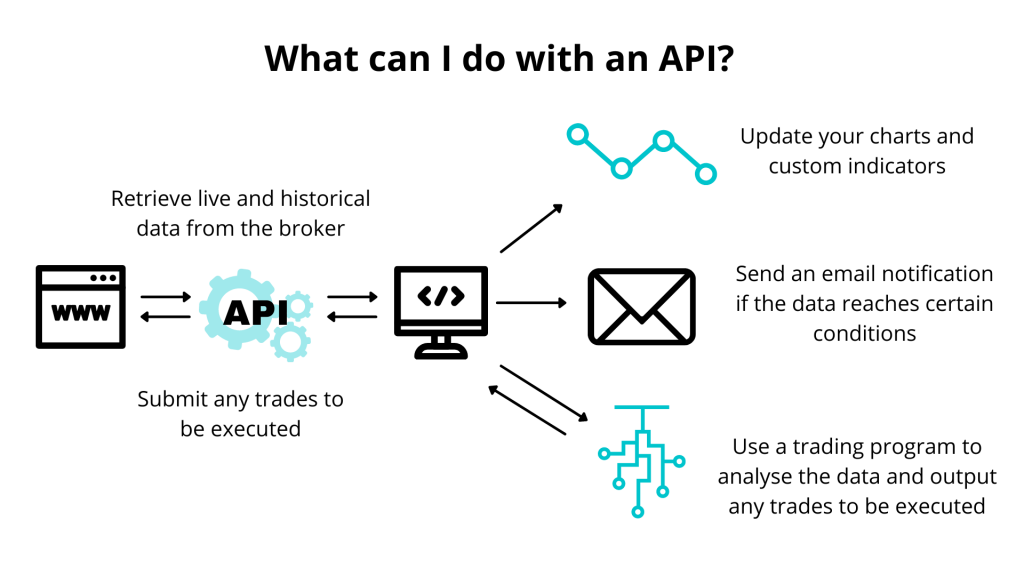
An application programming interface (API) is a set of programming code that requests data and sends instructions between software platforms.
APIs are becoming more and more widespread in a range of industries and the number of trading brokers with APIs is steadily growing from our research.
APIs essentially act as a communication bridge for information between a broker’s servers and custom software applications employed by the user.
APIs have several useful applications including sending orders from third-party trading software or receiving live or historical data. For example, an API can be used to connect a set of automated trading algorithms with your preferred broker’s trading platform.
APIs play an important part in many automated trading strategies. In the past, traders would have had to filter through opportunities on one platform and potentially place trades on another. Now that brokers with APIs are becoming more common, this process has been simplified.
Algorithmic trading via APIs allows users to exploit useful trading opportunities by placing instant, accurate trades, removing the need for manual supervision.
Using programming languages such as Python, traders can develop their own applications or complex strategies and automatically execute trades using their broker’s API.
There are two main uses for APIs in trading:
Third-Party Applications – Traders using third-party applications, such as MetaTrader 4, may need access to the broker’s API for pricing data and the ability to place trades.
Developer Applications – Using programming languages like Python, Java or C++, many short-term traders are now beginning to develop their own automated trading applications. APIs allow them to access a broker’s pricing data and place trades.
If you want to find more broker-specific information about a particular API, you should be able to find the API documentation on the firm’s main site. This will give you information on how to authenticate the API, what data is available, how to place orders through the API and other technical details.
Some brokers with APIs will also provide a library of pre-written code to make interaction easier. This will usually be in the broker’s native coding language. This library will usually contain a set of functions for placing a trade, allowing you to avoid writing your own and speeding up the development process.
Pros Of Trading With An API
- Automate Trading – APIs are essential for connecting your automation algorithms with your broker’s servers. This goes for fully and semi-automated trading strategies. Algorithmic trading is very useful to implement strategies that would be very difficult and time-consuming to do manually, like high-frequency trading.
- Historical Data – Automated trading systems require historical data. With an API, you can seamlessly obtain this information and store, analyze and use it to your liking. Traders often use historical data for backtesting strategies.
- Custom Indicators – APIs allow traders to automate their own trading signals and indicators. There are many libraries within various coding languages in which custom indicator solutions can be found.
- Create Custom Alerts – If you are looking for customized notifications sent to your email, you can use an API to retrieve stock prices, spreads or even the value of your portfolio and notify you when these fulfil certain conditions.
- Create Your Own Trading Terminal – If your broker’s trading terminal is not exactly what you are looking for, you can build your own custom terminal and use your broker’s API to populate it with data and implement trading functionalities.
Cons Of Trading With An API
- Steep Learning Curve – If you are new to coding, APIs can seem quite daunting. It is recommended you practise first with an API for a demo account before placing real trades. There are many tutorials online and brokers with APIs offer examples on their documentation to help you get started.
- Limits & Quotas – Brokerages will often limit the frequency with which you can use the API to avoid overloading their bandwidth. For example, they may limit how many trades you can do per minute or hour, how often you can fetch information or which historical data you can access. Ensure that your broker’s limits are enough for your trading needs and implement limits in your code so you do not exceed the allowed quota.
- Fees – Most brokers with API support offer them for free but, if you want to go over their established limits, you might need to pay a fee and some brokers might charge a commission on your profit only for using the API.
- Security – To access your broker’s API you will need a key, which acts as a password. However, there are different protocols for APIs and they all offer different characteristics, often with a trade-off between speed and security. Research the protocol used by your broker and the security measures they implement for a secure experience.
Getting Started With A Broker’s API
- Consider Your Strategy: Decide which trading strategy you will be using and write a simple version in your programming language of choice. Make sure you understand the requirements of your strategy – for example, consider how much historical data you will need, which will be your trading frequency, any third-party applications you’d like to use and which assets are you looking to trade.
- Choose The Best Broker With An API For Your Specific Needs: You will need to evaluate brokers according to their general features, as well as their API tools. Some of the characteristics to consider are countries where they accept clients, market access, security, fees and customer service. Furthermore, some of the API features you need to think about are:
- API Demo: Do they offer a demo account and can you access it via the API? This will allow you to test your code and strategies with low risk and ensure that a paid account will be a good fit for your needs.
- Coding Language & Data Formatting: Ensure the API works with a language that you are comfortable with and that the format of the outputted data can be well understood by your program. JSON is a well-known data format that can be read by different coding languages.
- Documentation: A well-explained API is a must, especially for beginners. Choose a broker that offers complete documentation with examples and code snippets to make the learning curve easier.
- Support: The broker’s customer support should also cover their API, so they can help with more technical questions or issues.
- Quotas & Fees: If a broker has a limit on API trading, ensure your trading needs are well within this limit or that you are happy to pay the corresponding fees.
- API Type: Do you prefer REST, WebSocket or SOAP APIs? They each have specific characteristics, though the differences may not be huge if you are just getting started.
- Open An Account & Register For The API: Open an account with your selected broker, ideally a demo account, and register for API access. You will then get a key that you can use to log in.
- Set Up The API & Test Your Strategy: Check that you can access the API with no trouble, try out the code examples provided and connect your strategy to the API. Also, link your API to any third-party software you would like to use. When you are comfortable, test your strategy. It is recommended you do so for a few weeks to fully de-bug any technical issues that come up and tweak your strategy if needed.
- Use The Trading API With A Live Account: Once you are happy with your broker and their API and your strategy has been tested, you are ready to go live. Always ensure you monitor your strategy and the API and do not hesitate to contact the broker’s help desk or trading community if you have any issues.
Bottom Line
Brokers with APIs and their use are becoming increasingly ubiquitous. They allow users to create custom terminals and implement advanced trading strategies through automation.
Having a good grasp of coding languages such a Python, Java and C++ will give you the edge when trading using brokers with APIs. However, there are numerous free online tutorials about coding and APIs and many good brokers that we’ve tested provide comprehensive documentation to help get you started.
FAQ
What Should I Compare When Looking For Brokers With APIs?
When starting with APIs, make sure you can test your code on a free demo account. Find out which coding language and format are used by the broker and ensure you are comfortable with them. Make sure the broker has comprehensive API documentation, as well as reasonable fees and limitations.
Do Brokers Charge To Use APIs?
Alongside regular brokerage fees, some firms we’ve tested place limitations on the information you can receive using their API. For example, you may only be able to update your live data once every 5 minutes. Brokers may also charge additional fees if you wish to increase the amount of information you can receive.
Should I Start Using My Broker’s API?
Trading using a broker’s API can have advantages for active traders that specialize in algorithmic trading and want to develop more complex strategies.
However, make sure you are aware that you will need to have at least basic to intermediate programming knowledge to start trading via an API.