
Autochartist Review 2026



Autochartist is a technical analysis trading tool that uses financial data to provide users with market intelligence. We unpack its top features, review the key tools, and explain how active traders can use the software. We also list the best brokers with access to Autochartist.
Top Autochartist Brokers
Sorry, there are no brokers that accept traders from your location (United States). If this location is incorrect, please change it.
What Is Autochartist?
Autochartist is a financial analytics suite that provides technology solutions based on financial markets data. This includes technical analysis tools that aid with volatility and risk analysis, making it popular with day traders.
It’s primarily a market scanner, providing pattern recognition and market alerts. It can be used for various types of analysis, whether you’re looking to trade in forex, gold, stocks or crypto such as Bitcoin.
There used to be an Autochartist Academy (autochartist.academy), but in our latest checks the Academy site was not accessible, and the Autochartist website no longer appears to show an ‘Academy’ section, though references to ‘Autochartist Academy’ still exist in some older Autochartist materials.
How It Works
Traders often access the services through registration with a participating broker.
MT4/MT5 access is commonly via a desktop plugin (often Windows-based), plus web/mobile delivery via broker portals and Autochartist services.
Features
Autochartist is a collection of trading tools that can be used independently or in parallel to try and enhance trading performance, though they do not guarantee you’ll make returns.
Autochartist Interface
Using the Autochartist interface, investors can search for trading opportunities for specific ticker symbols.
The interface uses five parameters to measure chart pattern quality: clarity, initial trend, volume, uniformity and breakout strength.
Trading Platform Plugins
Autochartist is typically accessed via your broker’s integration or via the official Autochartist plugin/installer (availability depends on broker and region).
The current setup process is generally installer-based rather than manually copying an .ex4 file (the old route).
After installing, you’ll usually find the Autochartist tool listed under Expert Advisors in MetaTrader – drag it onto a chart, then follow the on-screen prompts to sign in (some users authenticate through their broker, while others may use an Autochartist account, depending on their access type).
Market Reports
The Autochartist Market Report newsletter is released three times a day (before Tokyo, London, and New York sessions), containing information about high-impact market events, current trading signals and the latest market indicators.
It also includes a ‘Trade of the Day’ via some brokers that is released on weekdays, such as EUR/USD and EUR/GBP, or specific reports such as ‘XAU/USD Excessive Bullish Movement’.
Correlating Alerts Email
These email alert communications are lower frequency than the market reports but provide potentially valuable insights and setups by explaining Autochartist settings in high detail to VIP traders.
SMS and Push Notifications
Trading updates can be provided via text message or push notifications to a mobile smartphone. SMS messages also include links to directly access your mobile trading platform, allowing traders to enter or exit a position with relative ease on the go.
Mobile App
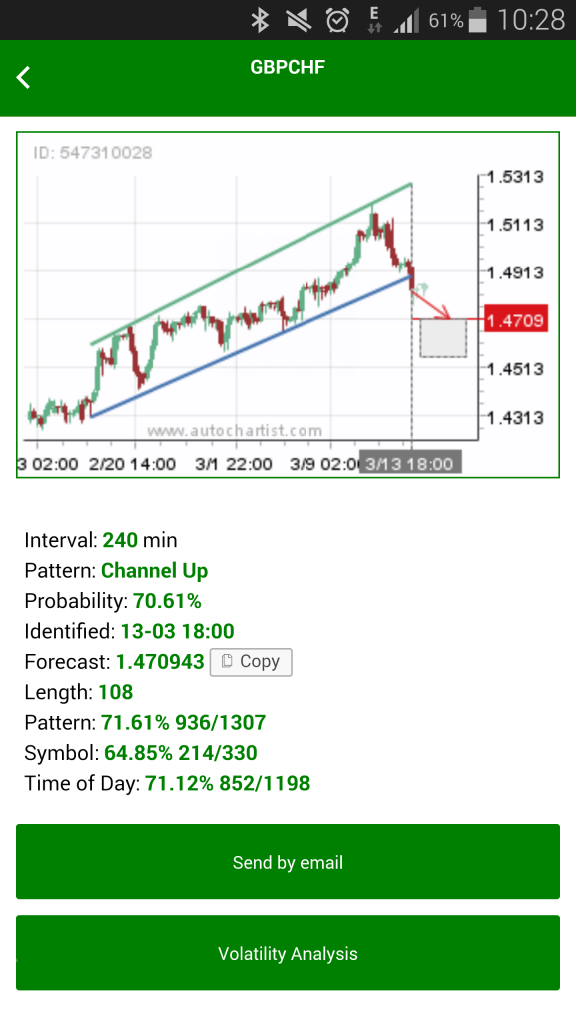
The Autochartist mobile app is available for download on the App Store for iPhone/iPad (iOS) and Google Play Store for Android. It allows users to select their broker and receive trade setups using the broker’s data.
Users can log in using a QR code, removing the need to remember a username and password.
RSS Feeds
Autochartist offers RSS feeds that publish market updates and analysis, but the frequency and content can vary by feed and broker.
Sometimes, it explains how to interpret the different trading opportunities and patterns identified by the service. Useful insights for those learning how to trade.
Support
Autochartist provides a trader knowledgebase (Autochartist for Traders) and the MetaTrader plugin guide instructs users to contact support@autochartist.com for errors – both are direct support channels.
However, if you’re day trading and run into a service issue, you could also contact your broker directly in case it’s a problem on their side.
Tips
Here we list the top tips when taking advantage of the Autochartist tools:
- The user manual is a simple but detailed step-by-step guide, which is valuable for new users. A quick-start user manual PDF file is also available online for traders looking for a summary version.
- The service also provides performance statistics that summarise which chart patterns and indicators hit their forecast level. Being able to review these trading signals afterwards helps users to understand accuracy for different markets.
- The free YouTube Quick Start Guide is a useful resource. For traders using the MetaTrader platform, the video on how to use the MT4 plugin is also a good way to get started.
- The service can also send links to demo products, which differ depending on whether you are a trader or broker. To use this feature, sign up directly through the website.
- Autochartist allows users to search for articles by tags, such as ‘big movement’, which can be useful for finding relevant information.
Bottom Line
Autochartist is a highly rated service that comes integrated with many broker’s trading platforms at no extra cost. By reviewing previous performance statistics, customers can understand how Autochartist can add the most value to their trading activity.
However, as with any trading, using the service comes with its risks and shouldn’t be considered a sure way to improve trading results. Traders will still need to do independent work to verify suggestions and employ strict risk management practices.
FAQs
How Does Autochartist Work?
Most retail traders access Autochartist through a participating broker, but some users may have direct, or what’s known as ‘subscriber access’, depending on the offering.
Once you have access you can use Autochartist’s tools, such as market analysis and insights.
How Do I Download Autochartist?
Some brokers provide Autochartist embedded in their platform/portal, but MT4/MT5 users often download and install the Autochartist plugin, and mobile users can download the Autochartist app, though availability depends on broker access.
 |
||
| Autochartist is a technical analysis tool that assists with trade set up and patterns, as well as providing signals, market reports and other useful features. | ||