
Securing Your Trading Account In 2026: How To Protect Your Capital From Digital Theft



Just because you sign up with a regulated broker, it doesn’t mean your trading account is necessarily secure. Nowadays, a broker’s license is just part of the equation; your setup is also important. Weak multi-factor authentication (MFA), home routers that are exposed, fake calls from a broker’s ‘support team’, and more, can all leave your account, and thus your funds, exposed. This guide explains how trading accounts can get compromised and the controls you can put in place to help secure your funds and personal details.
This content is educational information and not formal legal advice.
Key Takeaways
- In the UK alone, victims lost £2.4 million every day to investment fraud in 2025, which equates to roughly £1,675 every minute. Many other countries are fighting a similar tidal wave of trading scams.
- This guide gets technical because it needs to explain important security concepts. However, our message is straightforward: protect your trading account like it holds real money, because it does. Here are 10 actions we recommend traders take:
- Stop relying on SMS codes. Text-message login codes are better than nothing, but they are not strong enough for serious trading accounts.
- Upgrade to stronger login protection. Use a hardware security key or passkey-based login where your broker supports it.
- Use a separate device for trading. Do your trading on a laptop or tablet used only for trading. Keep social media, casual browsing, downloads, and random apps off it.
- Keep your trading device clean and updated. Install updates, use antivirus/security tools, keep the firewall on, and avoid running everything as an administrator.
- Lock down your home router. Change the default router password, use strong Wi-Fi encryption, update the firmware, and turn off features you do not use.
- Be careful when travelling. Avoid hotel and airport Wi-Fi where possible. Use your own mobile connection and understand that sudden location changes may trigger broker checks.
- Use a VPN wisely. A VPN can help protect traffic, especially on risky networks, but it will not save you if your device is already infected or you hand access to a scammer.
- Watch out for fake broker support. Scammers may pretend to be your broker, compliance team, fraud desk, or account manager. Always verify through the official broker website or secure portal.
- Never share passwords or full login codes. No legitimate broker should ask for your password, your full MFA code, or remote access to your computer.
- Keep your own records. Save copies of statements, deposits, withdrawals, trade confirmations, support messages, login alerts, and security changes.
The Evolution Of Trading Risk (2026)
There is a basic mistake many traders still make. They assume that because their broker is regulated, their account is secure. This is not the same thing. Regulation by bodies such as the UK Financial Conduct Authority (FCA), Australian Securities & Investments Commission (ASIC), or Kenya’s Capital Markets Authority (CMA) helps with firm supervision, licensing, complaint channels, and misconduct at the corporate level. This does not secure your browser session, your laptop, your WiFi, or the password you are using on several different sites, even though you know you shouldn’t.
Compared to 10 years ago, the security model has shifted, chiefly due to the advent of more powerful and widely available AI tools. Retail traders used to worry mainly about crude phishing emails and suspicious links. Those still exist, but the more expensive attacks now sit one layer higher. Session hijacking, clone sites, infostealer malware, remote access scams, device code phishing, and AI assisted impersonation all aim to get around the old “I have 2FA enabled, so I’m fine” story.
Microsoft’s April 2026 write up on an AI-powered device code phishing campaign explicitly recommends more phishing-resistant methods, such as FIDO tokens or Microsoft Authenticator with passkey, and warns against telephony based MFA because of SIM jacking risk.
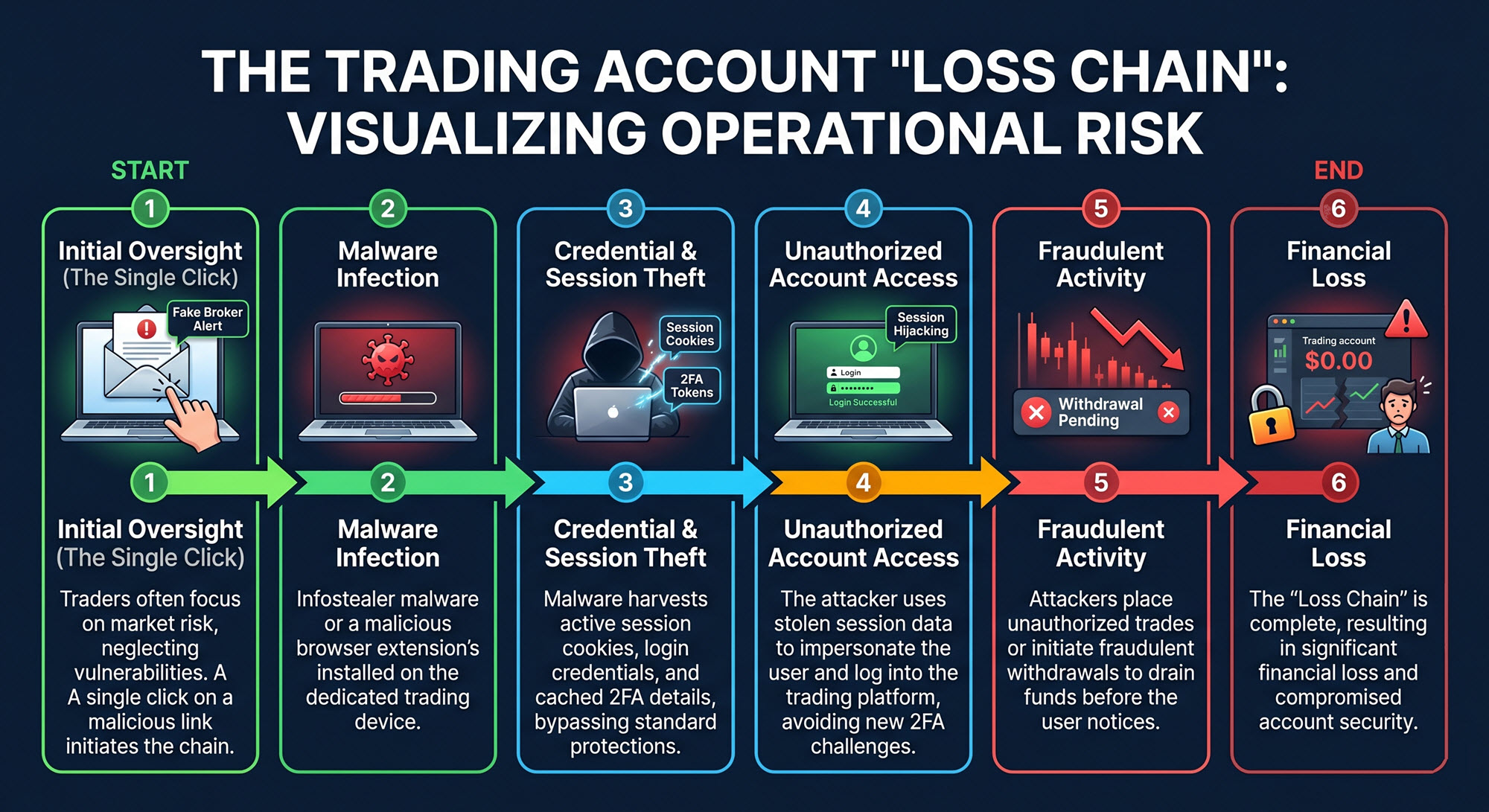
With that said, we have written this guide from a controls and audit perspective rather than a gadget review perspective. The aim is not to point out a particular technical solution that works best right now, in 2026, and tell everyone to get it. Instead, we will take a look at how a trading account gets compromised, how the loss chain develops, and controls that can help break that chain. Traders are good at market risk. Many are much weaker on operational risk, and that is a big problem.
The Core Security Setup
Move From Ordinary 2FA To Phishing Resistant MFA
The first upgrade is straightforward. Stop treating all forms of two-factor authentication as equal. They are not. SMS codes are better than password-only access, but they are not where a serious account should stop.
The National Institute of Standards and Technology (NIST), a U.S. federal science and technology agency, recommends using authenticators that provide phishing resistance, and Microsoft’s April 2026 campaign guidance says the same thing in plainer form by recommending FIDO tokens or Authenticator with passkey while advising against telephony-based MFA because of SIM jacking risk. In other words, the market has already moved past the stage where a text message code counts as a strong end state for your trading account.
For most traders, that means one of two practical choices:
- The stronger option is a physical security key, such as a FIDO-compatible hardware key. Google’s Advanced Protection Program says accounts protected by external keys are much safer from attacks than accounts that only require a password, and recommends registering a backup key as well.
- The second workable option is a passkey stored in a trusted authenticator environment. Microsoft’s Authenticator documentation states that users can sign in with a passkey in the app and complete phishing-resistant authentication with a biometric sign-in or device PIN.
This is the point where many people say they already have an authenticator app, and therefore the box is ticked. That is too casual. Some authenticator setups still rely on one-time codes that can be phished or socially engineered out of the user. The FBI’s May 2025 warning about impersonation campaigns notes that fraudsters may use social engineering to convince targets to disclose a 2FA code, and it says those codes should never be shared over email, text, or encrypted messaging. Hardware-bound or passkey-based methods are stronger because they are designed to resist that exact sort of theft.
Understand The Advantages And Limitations Of A FIDO-Compatible Hardware Key
A FIDO-compatible hardware key is a small physical device, e.g. a USB key or Near Field Communication (NFC) key used for secure login. It works as a strong second factor (or password replacement) for authentication. The FIDO-compatible hardware key stores cryptographic credentials and proves your identity when you attempt to log in.
FIDO stands for Fast Identity Online, and it is a set of open security standards created by the FIDO Alliance, an industry consortium that includes companies like Google, Microsoft, Apple, and others. FIDO standards define passwordless and multi-factor authentication methods that are resistant to phishing. The most important modern version is FIDO2, which includes WebAuthn (used in browsers and websites) and CTAP (communication between device and security key).
This is how authentication with a FIDO-compatible hardware key works:
- You try to log in.
- The website sends a cryptographic challenge.
- Your hardware key signs it using a private key stored inside the device. (Your private key never leaves the hardware device.)
- The website verifies it using the matching public key.
FIDO hardware offers increased resilience against password reuse attacks, credential theft from data breaches, many forms of remote hacking, and certain types of phishing.
The downside of the system is that if you lose your only hardware key, you will be locked out of your trading account. It is therefore advisable to have at least two hardware keys. Both keys should be stored safely, of course, and the backup key should be in an even safer spot, to ensure they are not both stolen or destroyed in the same event.
What Is An Authenticator App (TOTP Codes)?
Authenticator apps that use TOTP codes are apps that generate a rotating 6-digit code roughly every 30 seconds. Google Authenticator and Microsoft Authenticator are two well-known examples.
Unlike SMS codes, they are not tied to a phone number.
Compared to FIDO-compatible hardware keys, they are more sensitive to certain types of phishing. Also, if your phone is stolen or compromised, an attacker can gain access to the app unless overall phone security is high. Phone content backups are another risk point.
Should I Use SMS Codes To Login To My Trading Account?
With SMS verification, a temporary login code is sent via text message (SMS). SMS codes are not recommended for trading accounts, since the security level is not high enough.
SMS codes are vulnerable to SIM swapping attacks, and text messages can also be intercepted in certain situations. If your phone number is hijacked or reassigned, security for your trading account will be compromised. SMS codes are vulnerable to phishing attacks, since they work when shared.
Why You Should Use A Dedicated Trading Device
The second upgrade is less common but very effective. Use a dedicated laptop or tablet for trading only. No casual browsing, no Telegram groups, no random PDF downloads, no browser extensions you “probably need,” and no email logins you do not have to perform there. This is not paranoia. It is the separation of duties applied to a particular device.
The purpose is to reduce exposure to the ordinary flow of garbage that introduces malware, credential stealers, rogue browser extensions, and poisoned downloads. Traders often focus on their broker login page and ignore the rest of the device. Many attackers do the opposite. They compromise the device first, then wait for the broker login to become useful.
A dedicated device also changes your operating rhythm in a useful way. If a machine is only used for market access, software updates are easier to control, browser history is easier to understand, installed applications are easier to audit, and suspicious activity is easier to spot. This matters for any trader, but especially for high net worth traders who are more likely to receive actually targeted attempts.
A dedicated trading advice is also easier to store safely when not in use, and you can avoid bringing it along when you travel, unless it is necessary.
Harden The Operating System, Not Just Your Password
A trading device should not be run as an always privileged machine. An always privileged machine is a computer that is consistently operated with administrator-level permissions, rather than using standard (limited) user access for everyday tasks.
On systems like Microsoft Windows, there are typically two levels of access:
- Standard user → limited permissions (safer)
- Administrator (privileged) → full control over the system
An always privileged machine is one where the user is logged in as an administrator all the time, or applications automatically run with elevated (admin) privileges without restriction. This is risky because running everything with admin rights defeats protections like User Account Control (UAC), which is designed to require approval before making system-level changes, and limit what malware or malicious scripts can do.
If a machine is “always privileged”, malicious code can easily gain full system control immediately, which means it can proceed to install more software, modify system files, and disable security tools.
For the computer you use for trading, you want strict control and isolation. Running with standard permissions instead of making it an always privileged machine makes it more difficult for an attacker to compromise the whole system. Instead of an always-privileged setup, use a standard user account for normal operation. Only elevate privileges when they are actually needed (via UAC prompts) and restrict sensitive processes as much as possible.
Microsoft’s User Account Control (UAC) overview explains how UAC improves security by limiting the access that malicious code has to execute with administrator privileges, and notes that processes launched with a standard user token run with standard user permissions. Microsoft’s newer Administrator protection guidance goes further, stating that users should run with the least privilege needed and elevate only when necessary.
Administrative privileges create a significant attack vector and that malware often relies on those privileges to disable security features or make system-wide changes. For daily trading activity, that translates into one plain rule: use a non-administrator account for routine work and reserve elevation for updates and controlled maintenance.
The same principle applies to exposed services and ports. The safest course of action is to disable unnecessary, unused, exploitable, or plaintext services and protocols, and disable risky or unnecessary services and ports such as RDP and SMBv1 when they are not needed.
For an individual trader, the exact list will vary by machine, though the principle stays the same. Every unnecessary service expands the attack surface. A trading computer does not need to behave like a lab machine. Keep it patched, encrypted, and small in scope.
Your trading computer should keep the firewall on, device encryption enabled, and the operating system fully patched. Microsoft’s Windows Security materials point users to device security, Secure Boot, core isolation, and encryption controls, while its firewall guidance says the correct method is to leave the Windows Firewall service running and manage profiles rather than disabling it outright.
For more information, read the recommendations published by the Cybersecurity and Infrastructure Security Agency (CISA), a U.S. federal government agency that operates under the Department of Homeland Security.
- Weak Security Controls and Practices Routinely Exploited for Initial Access
- Technical Approaches to Uncovering and Remediating Malicious Activity
Beef Up Your Home Router Security
Home router security deserves more attention than it usually gets. CISA’s home Wi Fi guidance says to ensure the router uses WPA3 Personal encryption or WPA2 AES, disable remote management, and disable WPS. CISA’s home network security note repeats the instruction to turn off remote management, because router settings should not be exposed over the internet unless there is a very good reason. For a home that includes a trader, that means treating the router as part of the financial control environment.
We’ve seen that a weak router can quietly undermine an otherwise strong account. If the wireless network is poorly configured, running outdated firmware, or exposing management features to the internet, the trader is creating unnecessary risk below the application layer.The right habit is to keep router firmware current, use strong,unique admin credentials, disable remote administration, prefer WPA3 where possible, and segment guest devices away from the trading machine.
The router matters so much because it sees all traffic going in and out of your home. It controls who can connect, and it can redirect, intercept, and block connections. If the router is compromised, the attacker can do many harmful things. They can, for instance, perform DNS hijacking, redirect you to fake login pages (even if you type in the correct URL), monitor your traffic to gather useful information, and attack devices inside your network.
Router Security Checklist
- Change the default credentials: Change the default router password to one that is strong and only known to you. Do not reuse a password from any other account or device. You can usually change the credentials by opening a browser window and going to 192.168.1.1 or 192.168.0.1. Log in with the current admin credentials. (If you haven’t changed them, they are the ones printed on the router.) Change the username (if possible) and the password. Default credentials are widely known, and attackers use them.
- Use strong WiFi encryption (WPA3 or WPA2 AES): This impacts who can join your network. WPA3 Personal is the best choice, but WPA2 AES is acceptable if WPA3 Personal is not available. Weak or lacking encryption makes it easier for attackers to join your network. Once inside, they can scan your devices, intercept unprotected traffic, and carry out local attacks.
- Disable remote management: Remote management allows you to log into your router from the internet, even from outside your home. When this feature is enabled, your router is exposed to the world, and attackers can access it by exploiting known firmware vulnerabilities or simply trying the common default passwords. (Many users never change their router password.) To find the settings, look for things such as “remote access”, “web access from WAN”, or “Cloud management”. Turn the setting OFF to prevent your router login page from being exposed to everyone with an internet connection.
- Disable WPS (Wi-Fi Protected Setup): This is the “push button to connect” feature. It is handy, but has in the past proven to be vulnerable to brute-force attacks. Even when patched, it is an unnecessary attack surface that can allow attackers to obtain your WiFi password.
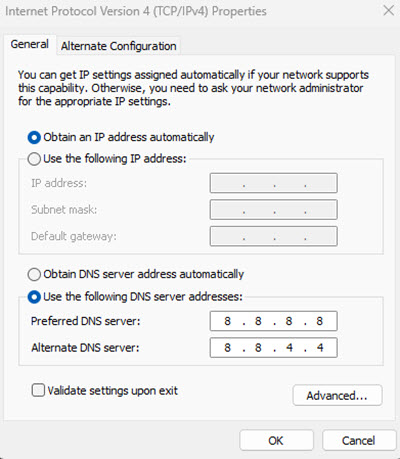
- Secure DNS: Only use trusted DNS providers. Some routers allow DNS locking to prevent tampering. Without enough security, you become vulnerable to attackers who redirect you to a fake trading site.
- Segment your network: Put your dedicated trading computer on a separate network or VLAN. Keep IoT (Internet of Things) devices such as security cameras, smart speakers, and smart TVs isolated. Isolation means they are kept in their own network segment, so they can’t easily access your other devices. IoT devices are common entry points for attacks.
- Limit local access: Don’t share Wi-Fi with unknown users. Set up a guest network for visitors. In some cases, a guest network for other household members is also warranted. Not everyone takes security as seriously as you do.
- Limit physical access: Limit who can physically access the router in your home.
- Keep firmware updated: Router firmware vulnerabilities are commonly known and often exploited. Check for updates periodically. (Firmware is a special type of software that is built into hardware devices and controls how they work at a low level.)
- Continuously monitor for anomalies: Some routers will allow you to see connected devices and detect connections. Look for “Connected devices” or “DHCP clients”. Remove or investigate anything you don’t recognize.
- Turn off unused features: Disable features you do not use. Examples: UPnP and Port forwarding, unless you actually use them.
Examples of signs your router might be compromised:
- Internet behaving strangely
- Unknown devices connected
- DNS settings have changed
- Login password no longer works
If you suspect something, a good starting point is to do a factory reset on the router, and then go through the checklist and configure it from scratch. Do not reuse any credentials.
Understand The Advantages And Limits Of Your VPN
VPNs have become popular in recent years. In fact, some of our team use them almost daily for online trading and running platform tests. But while a VPN is useful, it is not a magic amulet.
A VPN protects traffic in transit. It does not clean a compromised device, remove an infostealer, or stop a remote access scam after you have already approved the connection. If the endpoint is dirty, the tunnel is not your main problem. This is why device hygiene comes before network hygiene in a serious protocol. Traders often reverse the order because buying a VPN subscription feels like action.
A VPN (Virtual Private Network) is a tool that creates a secure, encrypted connection between your device and the internet. When you use a VPN, it hides your real IP address, encrypts your internet traffic, and routes your connection through a remote server (in another location). Instead of websites seeing your real location, they see the VPN server’s location.
Online traders can use a VPN to boost their protection against certain types of hacking attempts and reduce exposure of their real IP address. It can be especially important if you, for some reason, must use a public WiFi connection, although traders should ideally avoid this even with a VPN in place. For traders who travel, a VPN can be used to make it look like you are logging into the trading platform from your home region.
Some brokers block VPN usage for security, legal, and risk-control reasons. It’s not because VPNs are inherently “bad”, but because they make it harder for brokers to verify who is really accessing the account.
A VPN can also cause latency issues, as it can slow down the connection. This is especially noticeable for trading strategies that rely on extremely fast execution.
VPNs also have important uses outside of security. They can, as an example, be used to reduce execution times and slippage.
Network Hygiene When Traveling
For many retail traders, the ability to trade from any part of the world is part of the appeal with this source of revenue. It is important to remember, however, that the traveling trader can run into issues that the office worker who stays put will avoid. Travel changes device behavior, IP addresses change, broker fraud systems start asking questions, and the temptation to use hotel or airport WiFi rises. Get your own mobile network connection to avoid having use public wireless networks.
For travelers, a dedicated VPN endpoint or consistent residential or business IP can be useful. Many brokers use IP reputation and geo anomaly checks as part of fraud monitoring. A trader who logs in from Nairobi, then Dubai, then Frankfurt, and then an airport public network, can trigger auto locks, additional verification, or temporary blocks.
A stable exit point can reduce that noise. It is not a security control by itself, but it supports security by making legitimate activity look more normal to the broker’s systems. The objective is not to “hide” from the broker. It is to look consistently like yourself and avoid “crying wolf” to the fraud monitor system.
Sophisticated Threats: Session Hijacking And Deepfakes
Why 2FA Can Fail After Login
One of the most expensive misunderstandings in retail trading security is the belief that two-factor authentication permanently protects the session after login. It does not. It protects the login event. If an attacker steals the authenticated session token or session cookie after that event, the attacker may be able to ride the existing session without repeating the MFA challenge.
CISA’s page about Browser Session Hijacking describes the technique plainly, and CISA’s hybrid identity guidance notes that FIDO2 offers resistance to low-skill attacks such as phishing, password stuffing, replay attacks, session hijacking, and man-in-the-middle attacks. It will not make session hijacking impossible, but it will make it more difficult.
The usual path for this type of attack is not dramatic. The trader clicks a poisoned attachment, installs a malicious browser extension, or runs a file that drops infostealer malware. The malware harvests cookies, session tokens, saved credentials, or browser data. The attacker imports that session into another environment and might now be able to operate as the trader.
That is why browser discipline matters. The dedicated device should use one clean browser profile for the broker and almost nothing else. Browser extensions should be close to zero. Auto-saving of passwords into the browser should be avoided for the core broker account if a proper password manager is available. Active sessions should be reviewed, and stale sessions should be terminated.
AI Social Engineering
The second threat that has changed shape fast is impersonation, since advanced AI tools has made this much easier than before. FBI’s May 2025 public service announcement included information about how fraudsters are now using AI-generated voice messages to impersonate senior officials and build rapport before pushing targets to another platform or harvesting account access.
The announcement also said AI-generated content has now advanced to the point that it is often difficult to identify. There are other studies that have flagged the evolution of deepfake adverts and their dangers in the investing and wider financial space.
Independent verification through trusted channels is very important. Microsoft’s April 2026 campaign note shows the same pattern. This is no longer the age of obviously fake accents and poor spelling. The scams are sharper, faster, and much better at seeming right.
For traders, fake support is a common entry point. The call or message claims to come from a broker account manager, fraud desk agent, tax liaison, KYC specialist, or security verification team. The target is told there is a suspicious login, a blocked withdrawal, a sanctions check, an urgent compliance issue, or similar. Then comes the real request: install AnyDesk, TeamViewer, Zoom screen share, or some other remote access or screen sharing tool so the “agent” can help.
ASIC’s scam warning says that if someone asks for remote access to your computer, it is probably a scam. The FCA’s screen sharing scam page says scammers may ask victims to download legitimate software such as AnyDesk, Teams, TeamViewer, or Zoom, and then use that access to reach financial accounts. The fact that the software itself is well-known and reputable does not give you protection against scammers who use it for their own ends.
The verification method is important. Do not put all your faith in an inbound phone number, caller ID, WhatsApp avatar, or polished email signature. Stick to the number or portal published on the broker’s own official site or in your account documents, initiate contact yourself, and document the interaction. For large accounts, a private verbal code or standing callback protocol with the broker’s known desk can be a reasonable path. It feels old fashioned because it is old fashioned, and a lot of good controls are.
Even when verification seems to check out, pay attention to the request itself. Is it sane? Or is it a glaring red flag that you want to overlook because you believe the request comes from a legitimate source? The rule of thumb here is blunt:
- No legitimate broker should ask for your password.
- No legitimate broker should ask for your full MFA code over chat or text.
- No legitimate broker should require remote control of your machine to “fix a withdrawal” or “verify” a compliance issue.
Real firms may ask you to log into the secure portal, upload documents, or respond through a recorded support channel. They do not need to drive your laptop.
The Legal And Tax Safety Net
This is educational information and not formal legal advice. Legal advice needs to be tailored to the specific jurisdiction or jurisdictions involved.
Security is not only about prevention, it is also about documentation and evidence. Once an account is disputed, a trader will benefit from having a strong and detailed record. That means maintaining an independent audit ledger of deposits, withdrawals, daily balances, trade confirmations, support tickets, device changes, IP changes, security events, and all points of contact.
This is the same logic tax authorities use when they examine records after the fact. If you report an issue to the applicable financial authority or the police, they are likely to ask for documents, records, and other information. If you cannot show a clear record of transactions and other events, you have a weaker position. This is true for both account disputes with a broker, dealing with the tax agency, and when you need to report fraud or other criminal activity.
The point here is simple. Your legal and tax paperwork is part of your security armour. Not because it stops the breach or prevents taxation, but because it impacts how weak or strong your case will be.
Keeping A Detailed Ledger
Ideally, keep a ledger chronology in exportable form. Not screenshots alone, and definitely not just memory. Do not trust the broker to keep all relevant info for you; make copies and store them independently. This will include a proper file set with broker statements, bank records, wallet records where relevant, device change notes, login alert emails, and support transcripts.
When a compromise occurs, details become important:
- When did the access begin?
- What instructions were actually given?
- Which withdrawals were authorized and how?
- How fast did the broker and the payment processor respond after notice?
A trader with a private ledger is much harder to brush aside.
Broker Control Failure
If an account loss follows a broker control failure, such as poor fraud response, weak internal controls, a failure to act on clear compromise notice, or misleading handling of a regulated complaint, the customer may have stronger recourse against the broker, although it depends on the jurisdiction and license.
In the UK, the FCA says you should complain to the firm first and make a record of how and when you did so. The Financial Ombudsman says it can help with investment complaints where the firm is FCA-regulated. In Australia, ASIC says firms need internal dispute resolution and AFCA membership, and AFCA says complaints should first go through the firm’s own process. In Kenya, the CMA runs a complaints portal for regulatory non-compliance and misconduct. These routes do not guarantee recovery, but they do create procedural leverage when the firm’s conduct is part of the problem.
Trader Negligence
In many trading scam cases, there is negligence on the side of the trader. If the trader gave away the password, approved a bogus MFA prompt, installed remote access software for a scammer, or ignored clear warnings, getting any money back from your broker or payment processor becomes more difficult.
Regulators still want firms to handle complaints fairly, but the factual position is worse because the compromise followed the customer’s own authorized action. That is why prevention controls matter so much. Once the case becomes “you approved the session”, the argument shifts sharply against the account holder.
Estate Planning
This is a step that traders often ignore because it feels morbid. Who can lawfully access your account if you become incapacitated or die? And who knows the account even exists?
When an account holder dies, the law is usually fairly straightforward, and the person handling the estate can contact the brokerage company directly to make a claim for the estate, provided that they know about the account. That said, we’ve read north of 20 user reviews of different legacy brokers like Fidelity, Schwab and Vanguard on sites like Trustpilot that reveal it can be harder than it looks to get access to funds in a bereavement situation.
If you only become incapacitated, the situation will be even more complex, since there is no estate. Legally, you are still the owner of the account, even if you are unconscious. Do you want someone to be able to access your trading account in this type of situation? If so, you need to plan in advance. Trading accounts protected by hardware keys, strong passwords, and dedicated devices are not something your best friend can easily gain access to unless you have put a plan in place beforehand. Also, accessing without your clear permission could be a crime, even if done in good faith. Make sure the person will be provided with clear evidence of your permission.
The answer is not to weaken security. The answer is documented continuity planning. Depending on the jurisdiction, this can for instance, include a current will that lists the account or accounts, a proper power of attorney (“living will”) where relevant, a secure record of where backup keys are held, and a named executor or trusted person who can work with the broker and the estate. This is operational resilience applied to a human life event. Markets are not patient with probate confusion.
Security Audit Checklist
Implement a protocol of recurring checks throughout the year, instead of saving everything for an annual clean-up or desperately trying to fix everything at once because something has spooked you.
A short routine that actually happens is better than any complex and ambitious plan that never goes anywhere.
Here is an example of what a short audit checklist can look like. Tailor it to your needs, preferences, and any updated relevant security advice.
| Frequency | Task |
|---|---|
| Weekly | Check active sessions in the broker dashboard, review login alerts, and clear the dedicated browser’s cache and stale sessions. |
| Monthly | Update the trading platform, operating system, browser, router firmware, and security tools. Confirm the firewall, device encryption, and phishing-resistant MFA are still active. |
| Quarterly | Rotate master passwords where rotation is justified by risk, review password manager entries, recheck backup hardware keys, and review any API keys or third-party app permissions tied to the account. |
| Annually | Review legal authority over the account, including power of attorney, executor instructions, beneficiary information where applicable, and the location of backup keys and the audit ledger. |
A broker can be regulated and still not save you from a hijacked browser session. A trading strategy can be profitable and still be wrecked by one weak laptop. In 2026, account security is no longer a minor admin issue sitting off to the side of performance; it is part of capital preservation itself.